USA
USA UAE
UAESmall Business
Designed for startups and growing businesses

See More




Brand: ChequePRO
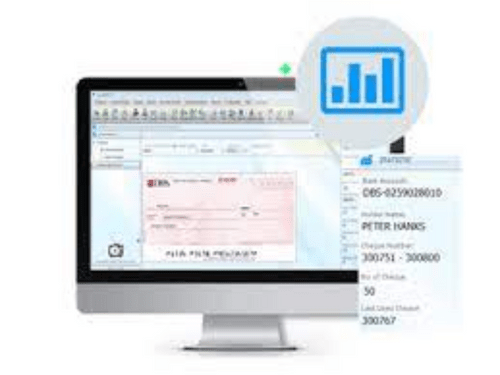
A simple and smart cheque writing and printing software designed to save time, avoid errors, and speed up payments.
See MoreHave you used ChequePRO before?
Share your insights for better experience
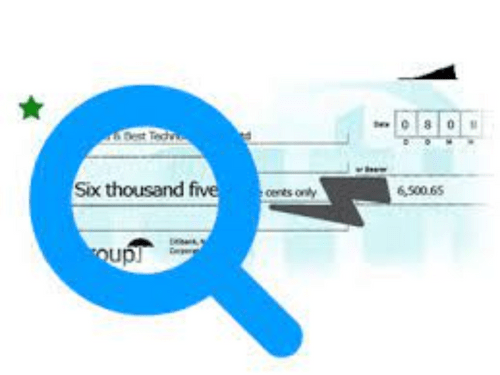
 Bulk Printing Reconciliation Database Management Customer Database Supports Most Printers WYSIWYG Alignment Engine Cheque Printing Tamper Proof Templates Reporting Batch Printing Maker & Checker Digital Signage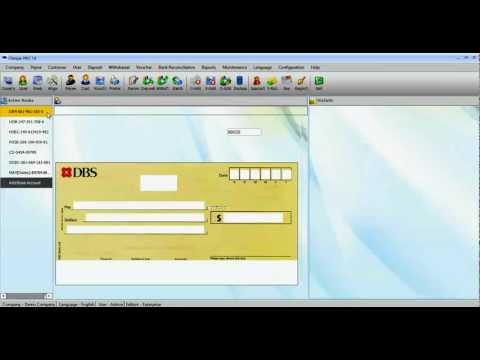

Watch the demo video to explore key features, real workflows, and how the software fits your business needs.
 Windows
  MacOS
MacOS  Linux
Linux  Desktop
  Cloud-Based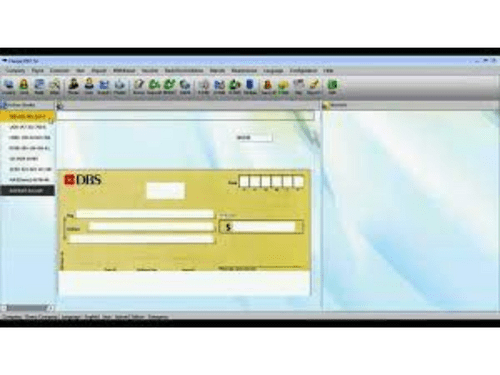
Small Business
Designed for startups and growing businesses
Medium Business
Built for business growth and flexibility
Enterprises
Designed for complex and large-scale business needs
4.3
Out of 5

Overall Rating
Based on
11 Verified Reviews
Rating Breakdown
87% Recommend this Product
Add ReviewUsers generally appreciate ChequePRO for its efficient cheque printing capabilities, particularly the print preview feature that minimizes errors and the ability to handle multiple currencies. Many find the backup and restore functions helpful, along with the tamper-resistant cheque design, which enhances security. However, several users note limitations, such as the lack of automatic cloud sync, the high costs associated with advanced features, and the need for manual adjustments in some areas, which can complicate workflows. Overall, the sentiment is positive, with users valuing the product's functionality despite some drawbacks.
Pros
"Print preview shows exactly how the cheque, voucher, and signature align"
"Batch cheque printing from Excel, reconciliation, multi-company"
"Offers free Lite version with unlimited cheques, multi-bank support"
Cons
"Advanced features like batch printing and signatures are pricey"
"Seamless international cheque printing, typo-free, strong alignment engine"

Jun 2, 2025
Techjockey Verified
“Print Preview = Fewer Errors”
Before printing, I always use the preview to ensure correct alignment. That’s saved me from numerous misprints. However, I wish the preview displayed post-dated cheques with future dates—I still have to open them individually to confirm.
Pros
Print preview shows exactly how the cheque, voucher, and signature align
Cons
Doesn’t preview post-dated cheque scheduling
Reason to switch
I moved to ChequePRO for a reliable print preview that actually reflects the final result.
Mar 12, 2025
Techjockey Verified
“Simple Backup and Restore Saves Me”
Before major system updates, I export the entire cheque and bank data. If something goes wrong, a quick import restores everything. I just wish there was automatic cloud sync—it’s manual but better than starting from scratch.
Pros
Easy backup/restore of customer/bank databases
Cons
No built-in cloud sync—manual file transfer is needed
Reason to switch
Chose ChequePRO for dependable local backup plus manual restores without vendor reliance.
May 29, 2025
Techjockey Verified
“Maker & Checker Adds Control—Ultimate Tier Needed”
In my finance team, it's essential that one person creates a cheque and another approves. ChequePRO’s checker feature provides exactly that. We also added digital signatures, which reduces risk. Unfortunately, this came with a steep upgrade cost to Ultimate.
Pros
Maker/Checker workflow in Ultimate tier, digital signing
Cons
Only available in $499/month Ultimate plan
Reason to switch
We shifted to ChequePRO to gain internal approval controls without investing in custom systems.

ChequePRO
Price On Request
Desktop
Mobile
Web based
On Premises
Windows
Mac OS

Aadhar Card Printing Software
₹ 5000
Desktop
Mobile
Web based
On Premises
Windows
Mac OS

PVC Pan Card Printing Software
Price On Request
Desktop
Mobile
Web based
On Premises
Windows
Mac OS
BarPrint PVC Software
Price On Request
Desktop
Mobile
Web based
On Premises
Windows
Mac OS

Uniqode
Price On Request
Desktop
Mobile
Web based
On Premises
Windows
Mac OS

NUGN Giftcard Print Software
₹ 3000
Desktop
Mobile
Web based
On Premises
Windows
Mac OS

Mybizz World
Price On Request
Desktop
Mobile
Web based
On Premises
Windows
Mac OS

CB PVC Card Printing Software
₹ 1694
Desktop
Mobile
Web based
On Premises
Windows
Mac OS

Vbizcard
₹ 299
Desktop
Mobile
Web based
On Premises
Windows
Mac OS

Digital Business Card Aarvi Technology
₹ 700
Desktop
Mobile
Web based
On Premises
Windows
Mac OS

Compu-Tech Find Pan Service
Price On Request
Desktop
Mobile
Web based
On Premises
Windows
Mac OS
(0) Product(s) selected
Available
Price on Request
Starting Price:
$5 /User/Month
Starting Price:
₹299 /OneTime
Available
Price on Request

Available
Price on Request

Starting Price:
₹2,500

Starting Price:
₹8,850 /Lifetime

Starting Price:
₹3,850

Available
Price on Request
You enter the cheque details, choose a template, align your printer, and print as it is simple and fast.
The price of ChequePRO starts at $49 at Techjockey.com.
It’s used by small businesses, accountants, banks, NGOs, and even embassies worldwide.
Yes, you can try out all key features for free before deciding to purchase.
Yes! It works with most laser, inkjet, and multifunction office printers.
A cheque system helps people and businesses make secure payments without using cash by writing the amount on a cheque.
A cheque is valid for 3 months from the issue date. After that, it cannot be used or cashed.
20,000+ Software Listed
Best Price Guranteed
Free Expert Consultation
2M+ Happy Customers
Terms and Condtions

Users with registered businesses can purchase goods from merchants on the platform to satisfy their business needs. Users are not permitted to utilize any products acquired through the platform for resale, advertising, business, or further distribution.
For each purchase made, users will receive a Tax Invoice (or 'GST invoice') that includes specific details such as:
the GSTIN of the user associated with their registered business, and
the specified Entity Name for their business.
It should be noted that not all products are eligible for GST Invoice. Only the products displayed by participating sellers with the 'GST-based Invoice Available' callout on the product description page would qualify.
Certain goods and services are not eligible to get a GST Invoice, including items with VAS, i.e., Value Added Services (e.g., Total Mobile Protection/Assured Buyback) and those involving an exchange offer at the time of purchase.
Users must ensure the accuracy of the GSTIN, and business entity name provided for the GST Invoice. Requests for corrections into GST Invoice would not be accommodated by Techjockey.com or any Seller, and any issues arising from user-provided information are the sole responsibility of users.
Techjockey.com is not liable for the GST Invoice or any associated input tax credit. To efficiently claim an input tax credit, users should select the registered place of business address as per the GST authority's data and follow the provisions of the GST Act and rules.
To claim an input tax credit, the delivery and billing addresses must match. Furthermore, input tax credits will not be granted if the delivery address and GSTIN on the invoice are from different states. In case of incorrect GST details provided during the order placement, the order will be canceled automatically.