linkedin
Altium CircuitMaker logo
Altium CircuitMaker fusion 360
Altium CircuitMaker home
Altium CircuitMaker file

Altium CircuitMaker

Brand: Altium Limited

  • 4.2

  • 5 Ratings

A software for PCB design that allows engineers to create, share, and collaborate on projects using a community-driven library of components.

See More

Have you used Altium CircuitMaker before?

Share your insights for better experience

Add a Review

Free Forever

Get started immediately at no cost. Upgrade anytime if your business demand more.

100% Genuine
Products
Best Price
Guaranteed
Safe & Secure
Payment
  • Description

  • Pricing

  • Features

  • Specification

  • Review

  • Compare

  • Alternatives

  • FAQ

Altium CircuitMaker Software Overview

What is Altium CircuitMaker?

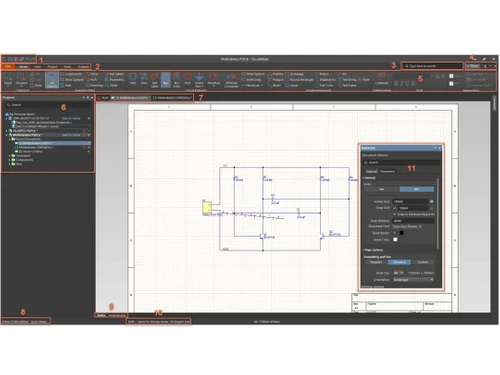
Altium CircuitMaker is a free electronic design automation (EDA) software specifically tailored for hobbyists, makers, and engineers to create printed circuit board (PCB) designs. It provides a user-friendly interface that allows users to perform schematic capture and PCB layout without the restrictions commonly found in other free tools. CircuitMaker supports up to 16 signal layers and 16 plane layers, enabling complex designs without limitations on PCB dimensions.

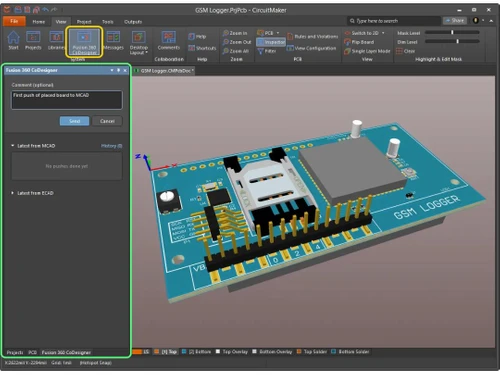
The software is built on a community-driven library that integrates with the Octopart database, giving users access to hundreds of thousands of components for easy placement in their designs. It features advanced capabilities such as interactive routing, design rule checking, and real-time collaboration with other users. Additionally, CircuitMaker includes native 3D visualization technology, allowing designers to view their layouts in three dimensions for better accuracy. Users can also generate industry-standard CAM outputs for manufacturing their designs.

Why Choose Altium CircuitMaker Software?

  • Free Access: It is completely free to use, making it an excellent choice for hobbyists, students, and makers who want powerful PCB design tools without financial commitment.
  • Community-Driven Library: Users have access to a vast library of components backed by the Octopart database, allowing for easy component placement and management.
  • Advanced PCB Design Features: It supports up to 16 signal layers and 16 plane layers, enabling users to create complex designs without restrictions on PCB dimensions.
  • Real-Time Collaboration: The software facilitates collaboration among users, allowing multiple designers to work on the same project simultaneously and share feedback directly within the platform.
  • Intuitive User Interface: It features a user-friendly interface that simplifies the design process, making it accessible even for those new to PCB design.
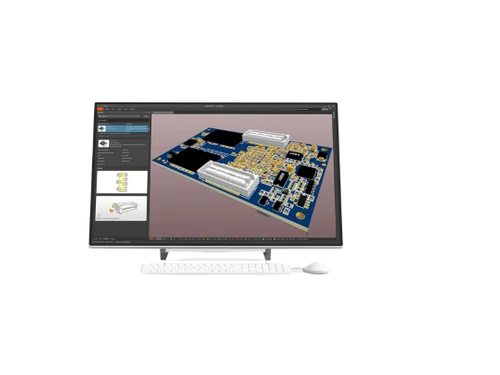
  • Integrated 3D Visualization: Users can view their PCB layouts in 3D, helping them identify potential clearance issues and ensuring accurate designs before fabrication.
  • Project Sharing Options: Users can choose to share their projects with specific individuals or the entire community, fostering collaboration and knowledge sharing.
  • No Commercial Restrictions: Unlike many free tools, it allows users to monetize their designs without any non-commercial clauses, providing opportunities for entrepreneurs.
  • Hierarchical Design Support: The software allows for complex multi-sheet designs and hierarchical blocks, making it easier to manage larger projects effectively.
  • Continuous Updates and Improvements: As part of the Altium ecosystem, CircuitMaker receives regular updates that enhance its features and capabilities based on user feedback and technological advancements.

Benefits of Altium CircuitMaker Software

  • Multi-Sheet Design Capability: It allows users to create complex designs using multiple sheets, making it easier to manage large projects and organize schematic layouts effectively.
  • Topological Autorouter: The software features a sophisticated autorouting tool that optimizes routing based on design rules, significantly speeding up the layout process.
  • Interactive Routing Modes: It offers various interactive routing options, such as obstacle avoidance and differential pair routing, which enhance design flexibility and efficiency.
  • SmartPDF Generation: Users can generate SmartPDF outputs from their projects, providing a comprehensive view of designs that includes interactive features for better documentation.
  • Custom Component Creation: Users can create custom components with unique schematic symbols and footprints, allowing for greater design specificity and customization.
  • Integration with Third-Party Tools: It supports importing design projects from other EDA tools like KiCAD and P-CAD, making it easier for users to transition between platforms.
  • Community Feedback Mechanism: The platform allows users to release their designs to the community for feedback, fostering collaboration and improvement based on collective insights.
  • IPC Test Point Reports: It can generate IPC test point reports, ensuring that designs meet industry standards for manufacturing and testing.
  • Direct Manufacturing Integration: Users can easily generate CAM outputs needed for professional manufacturing, streamlining the process from design to production.
  • User-Centric Personal Space: Each user has a dedicated Personal Space within Altium 365 where they can manage their projects privately or share them selectively with collaborators for enhanced control over their work.

Pricing of Altium CircuitMaker

Altium CircuitMaker price is available for FREE at techjockey.com.

The pricing model is based on different parameters, including extra features, deployment type, and the total number of users. For further queries related to the product, you can contact our product team and learn more about the pricing and offers.

Read more

Altium CircuitMaker Pricing & Plans

This Product is Available Free Forever.

Start instantly with no fees, no subscriptions, and no commitments.

  • Full access to basic version available
  • No credit card or sign-up required

Free Forever Plan

Get started immediately at no cost. Upgrade anytime if your business demand more.

Free Forever

Altium CircuitMaker Features

  • icon_check Capable & Free
    Access professional-grade PCB design tools at no cost.
  • icon_check Share & Collaborate
    Work seamlessly with team members and share projects easily.
  • icon_check Native 3D
    Visualize and analyze your designs in a fully integrated 3D environment.
  • icon_check Push-N-Shove Routing
    Optimize PCB routing with advanced push-and-shove technology.
  • icon_check Multi-Sheet Schematic Editor
    Manage complex designs with support for multi-sheet schematics.
  • icon_check Topological Autorouter
    Utilize powerful autorouting for efficient and accurate PCB layouts.
  • icon_check DRC/DFM Validated Outputs
    Ensure manufacturability and adherence to design rules with validated outputs.

Altium CircuitMaker Specifications

Supported Platforms
Windows Windows MacOS MacOS
Devices
Desktop Desktop
Deployment
Cloud-Based Cloud-Based
Suitable For
Designers
Business Specific
All Businesses
Business Size
Startups Medium Business SMBs SMEs MSMBs
Language
English

Altium CircuitMaker Review

4.2

Out of 5

img

Overall Rating

Based on
5 Verified Ratings

Rating Breakdown

  • Features 3.9
  • Value for Money 4.5
  • Ease of Use 4.4
  • Customer Support 4.3

88% Recommend this Product

Add Review

Be the First to Review

This product has no reviews yet. Be the first to leave your feedback.

Add Review

Compare Altium CircuitMaker With other ECAD Software

Products
Ratings
Pricing
Device Supported
Deployment
Supported Platforms
  • img

    Altium CircuitMaker

  • 4.2

  • FREE

  • Desktop

    Mobile

  • Web based

    On Premises

  • Windows

    Mac OS

  • img

    Capital Electra X

  • 4.6

  • Price On Request

  • Desktop

    Mobile

  • Web based

    On Premises

  • Windows

    Mac OS

  • img

    EPLAN Electric P8

  • 4.5

  • Price On Request

  • Desktop

    Mobile

  • Web based

    On Premises

  • Windows

    Mac OS

  • img

    Allegro ECAD

  • 4.2

  • Price On Request

  • Desktop

    Mobile

  • Web based

    On Premises

  • Windows

    Mac OS

  • img

    See Electrical

  • 4.3

  • Price On Request

  • Desktop

    Mobile

  • Web based

    On Premises

  • Windows

    Mac OS

  • img

    KiCad EDA

  • 4.0

  • Price On Request

  • Desktop

    Mobile

  • Web based

    On Premises

  • Windows

    Mac OS

(0) Product(s) selected

Altium CircuitMaker Alternatives

See All Altium CircuitMaker Alternatives

Available

Price on Request

Articles for Altium CircuitMaker

See All Related Articles

How much does Altium CircuitMaker Software Cost?

Altium CircuitMaker price in India is available for FREE at techjockey.com.

Is there any Altium CircuitMaker Software App?

No, Altium CircuitMaker does not have an app available for Android and iOS.

Which operating system does Altium CircuitMaker Software Support?

Altium CircuitMaker supports Windows and MacOS operating systems.

Does Altium CircuitMaker offer a free trial?

Altium CircuitMaker does not offer a free trial because it is completely free to use without any trial limitations.

How does Altium CircuitMaker Software Work?

Altium CircuitMaker works by allowing users to create PCB designs through a cloud-based platform, enabling schematic capture and layout with access to a community-driven library of components.

Who are the potential users of Altium CircuitMaker Software?

Potential users of Altium CircuitMaker include hobbyists, makers, students, and anyone interested in designing PCBs without the cost of professional software.

Is there any free demo for Altium CircuitMaker Software?

Altium CircuitMaker is completely available for free..

Is Altium CircuitMaker Software Free?

Yes, Altium CircuitMaker is free to use, providing powerful PCB design tools without any commercial restrictions.

20,000+ Software Listed

Best Price Guranteed

Free Expert Consultation

2M+ Happy Customers

Terms and Condtions

close

Users with registered businesses can purchase goods from merchants on the platform to satisfy their business needs. Users are not permitted to utilize any products acquired through the platform for resale, advertising, business, or further distribution.

For each purchase made, users will receive a Tax Invoice (or 'GST invoice') that includes specific details such as:

  • the GSTIN of the user associated with their registered business, and

  • the specified Entity Name for their business.

It should be noted that not all products are eligible for GST Invoice. Only the products displayed by participating sellers with the 'GST-based Invoice Available' callout on the product description page would qualify.

Certain goods and services are not eligible to get a GST Invoice, including items with VAS, i.e., Value Added Services (e.g., Total Mobile Protection/Assured Buyback) and those involving an exchange offer at the time of purchase.

Users must ensure the accuracy of the GSTIN, and business entity name provided for the GST Invoice. Requests for corrections into GST Invoice would not be accommodated by Techjockey.com or any Seller, and any issues arising from user-provided information are the sole responsibility of users.

Techjockey.com is not liable for the GST Invoice or any associated input tax credit. To efficiently claim an input tax credit, users should select the registered place of business address as per the GST authority's data and follow the provisions of the GST Act and rules.

To claim an input tax credit, the delivery and billing addresses must match. Furthermore, input tax credits will not be granted if the delivery address and GSTIN on the invoice are from different states. In case of incorrect GST details provided during the order placement, the order will be canceled automatically.