linkedin
Capital Electra X logo
play Capital Electra X - Fully Cloud Native Electrical CAD Software
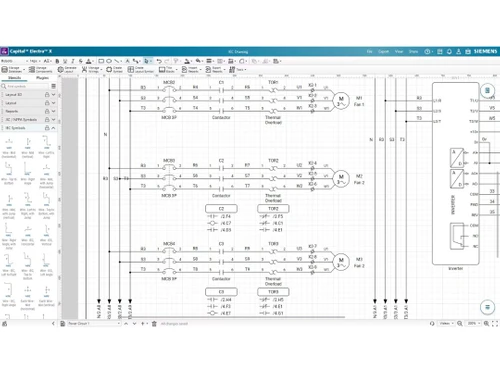
capital electra x stencils
capital electra x symbols

Capital Electra X

Brand: Siemens Digital Industries Software

  • 4.6

  • 3 Ratings

Capital Electra X is a cloud-based ECAD software for electrical schematic design, offering real-time collaboration and automation features. It simplifies circuit design with an intuitive interface and extensive component libraries.

See More

Have you used Capital Electra X before?

Share your insights for better experience

Add a Review
Starting Price
₹9945

View plans

100% Genuine
Products
Best Price
Guaranteed
Safe & Secure
Payment
  • Description

  • Pricing

  • Features

  • Specification

  • Review

  • Compare

  • Alternatives

  • FAQ

Starting at ₹9,945

Capital Electra X Software Overview

What is Capital Electra X?

Capital Electra X is a cloud-based ECAD software designed for efficient electrical schematic design. It features an intuitive interface that simplifies circuit creation while enhancing productivity. With real-time collaboration, teams can work seamlessly from different locations, improving workflow efficiency.

The software includes an extensive component library, making it easier to design complex circuits. Additionally, automation features help reduce design errors and streamline the process. Ideal for engineers and designers, Capital Electra X provides a modern and user-friendly solution for electrical design needs.

Why Choose Capital Electra X Software?

  • User-Friendly Interface : Intuitive design tools make electrical schematic creation easy and efficient.
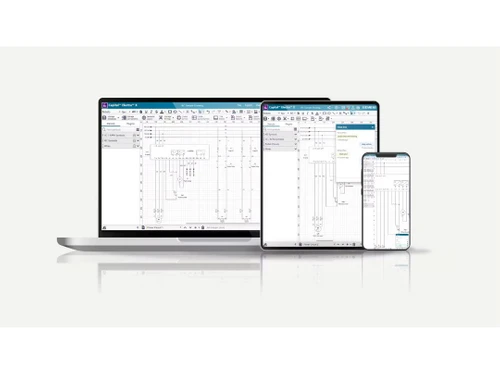
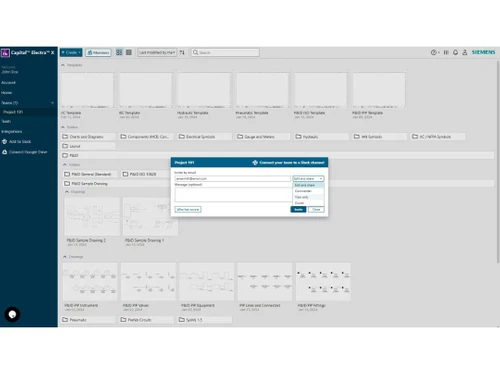
  • Cloud-Based Collaboration : Teams can work together in real time from different locations without complex installations.
  • Extensive Component Library : Pre-built components simplify circuit design, saving time and effort.
  • Powerful Automation : Reduces design errors and enhances workflow efficiency.
  • Fast and Responsive : Optimized for smooth performance, ensuring quick design iterations.
  • Ideal for Professionals & Students : Suitable for engineers, designers, and learners looking for a modern ECAD solution.

Benefits of Capital Electra X Software

  • Auto-Numbering & Cross-Referencing : Automatically assigns numbers and references to components, reducing manual effort.
  • Cloud Storage & Backup : Ensures data safety with automatic cloud backups, preventing data loss.
  • Multi-Platform Accessibility : Works on Windows, macOS, and Linux without requiring additional installations.
  • Customizable Templates : Allows users to create and reuse templates, improving design consistency.
  • Easy Integration : Compatible with other CAD tools, enabling seamless workflow integration.
  • Affordable & Scalable : Cost-effective pricing with flexible plans for individuals and businesses.

Pricing of Capital Electra X

Capital Electra X price in India starts at INR 9,945 at techjockey.com.

The pricing model is based on different parameters, including extra features, deployment type, and the total number of users. For further queries related to the product, you can contact our product team and learn more about the pricing and offers.

Read more

Siemens Digital Industries Software Company Details

Founded Year:  1922

Siemens is an engineering and electronics company that specializes in the fields of industry, energy, transportation, and healthcare.

Director/Founders Johann Halske, Sebastian Greiss, Werner Siemens
Company Size 1000+ Employees

Capital Electra X Pricing & Plans

Capital Electra X Standard
Key Features
  • Full featured
  • Cloud-native collaboration
  • Storage limit- 1GB
  • Technical support- Standard support
Starting at ₹9945
    • Users

      Users
      Users
    • Monthly

      Monthly
      Monthly

Key Features

  • Full featured

  • Cloud-native collaboration

  • Storage limit- 1GB

  • Technical support- Standard support

Capital Electra X Features

  • icon_check Cloud-Native Design
    Create and edit complex electrical schematics directly in your web browser with no software installation required today.
  • icon_check Real-Time Collaboration
    Enable multiple engineers to work on the same circuit design simultaneously from any global location with live updates now.
  • icon_check Intelligent Tagging
    Automatically number symbols and wires based on your custom naming conventions to ensure total accuracy across projects.
  • icon_check Real-Time Cross-Ref Log
    Track parent and child contacts instantly across multiple pages with automated cross-referencing that updates as you design.
  • icon_check Auto Panel Layout
    Automatically generate 2D panel layouts based on your schematic components with real-world dimensions and spacing today.
  • icon_check Drag & Drop
    Easily place components and symbols into the schematic with a simple drag-and-drop function.
  • icon_check Automatically Generate Panel Layout
    Quickly create panel layouts based on the circuit design, saving time and effort.
  • icon_check Smart Wires
    Auto-routing wires that adjust intelligently to maintain a clean and organized schematic.
  • icon_check Import/Export Multiple Formats
    Supports various file formats for seamless data exchange with other CAD tools.
  • icon_check Modern JavaScript Based Plugins
    Extend functionality with custom plugins built using modern JavaScript.
  • icon_check Circuit Design & Re-Use
    Save and reuse existing circuits to streamline future projects.
  • icon_check Report Generation
    Automatically generate detailed reports, including bill of materials and wire lists.
  • icon_check Symbol Inheritance
    Create hierarchical symbols that inherit attributes, simplifying complex designs.
  • icon_check Integration
    Easily connects with other design and engineering software for enhanced workflow.
  • icon_check Notification
    Get real-time updates and alerts for design changes or collaboration activities.
Capital Electra X Demo Video play icon

Get Capital Electra X Demo

Watch the demo video to explore key features, real workflows, and how the software fits your business needs.

Understand
Key Features
Personal
Demo Insights
Interactive
Demo Support

Capital Electra X Specifications

Supported Platforms
Ubuntu Ubuntu Windows Windows MacOS MacOS Linux Linux
Devices
Desktop Desktop
Deployment
Cloud-Based Cloud-Based
Suitable For
All Industries
Business Specific
All Businesses
Business Size
Small Business Startups Medium Business Enterprises
Customer Support
Email Communities
Language
English
Training Resources
Documentation Videos

Capital Electra X Review

4.6

Out of 5

img

Overall Rating

Based on
3 Verified Ratings

Rating Breakdown

  • Features 4.6
  • Value for Money 4.5
  • Ease of Use 4.8
  • Customer Support 4.6

90% Recommend this Product

Add Review

Be the First to Review

This product has no reviews yet. Be the first to leave your feedback.

Add Review

Compare Capital Electra X With other ECAD Software

Products
Ratings
Pricing
Device Supported
Deployment
Supported Platforms
  • img

    Capital Electra X

  • 4.6

  • Price On Request

  • Desktop

    Mobile

  • Web based

    On Premises

  • Windows

    Mac OS

  • img

    Allegro ECAD

  • 4.2

  • Price On Request

  • Desktop

    Mobile

  • Web based

    On Premises

  • Windows

    Mac OS

  • img

    EPLAN Electric P8

  • 4.5

  • Price On Request

  • Desktop

    Mobile

  • Web based

    On Premises

  • Windows

    Mac OS

  • img

    See Electrical

  • 4.3

  • Price On Request

  • Desktop

    Mobile

  • Web based

    On Premises

  • Windows

    Mac OS

  • img

    KiCad EDA

  • 4.0

  • Price On Request

  • Desktop

    Mobile

  • Web based

    On Premises

  • Windows

    Mac OS

(0) Product(s) selected

Capital Electra X Alternatives

See All Capital Electra X Alternatives

Available

Price on Request

Articles for Capital Electra X

See All Related Articles

How much does Capital Electra X Software cost?

The starting cost of Capital Electra X in India is INR 9,945 on TechJockey.com.

Is there a mobile app available for Capital Electra X Software?

No, Capital Electra X is a cloud-based software and does not have a dedicated mobile app.

Which operating systems are compatible with Capital Electra X Software?

Capital Electra X supports Ubuntu, Windows, macOS, and Linux since it runs on a web browser.

Does Capital Electra X Software provide a free trial?

Yes, Capital Electra X free trial is available for users to explore its features before purchasing.

What is the working mechanism of Capital Electra X Software?

Capital Electra X is a cloud-based ECAD software that allows users to design, edit, and collaborate on electrical schematics.

Who can use Capital Electra X Software?

Engineers, designers, students, and professionals involved in electrical schematic design are potential users of Capital Electra X.

Is there a free demo available for Capital Electra X Software?

Yes, Capital Electra X software offers a free demo to help users understand its features and usability.

Can Capital Electra X Software be used for free?

No, Capital Electra X is a paid software, but users can access a free trial before purchasing.

Is Capital Electra X Software cloud-based or offline?

Capital Electra X is a fully cloud-based ECAD software that requires an internet connection to use.

Can I import designs from other ECAD software into Capital Electra X?

Yes, Capital Electra X supports import/export in multiple file formats for compatibility with other CAD tools.

20,000+ Software Listed

Best Price Guranteed

Free Expert Consultation

2M+ Happy Customers

Terms and Condtions

close

Users with registered businesses can purchase goods from merchants on the platform to satisfy their business needs. Users are not permitted to utilize any products acquired through the platform for resale, advertising, business, or further distribution.

For each purchase made, users will receive a Tax Invoice (or 'GST invoice') that includes specific details such as:

  • the GSTIN of the user associated with their registered business, and

  • the specified Entity Name for their business.

It should be noted that not all products are eligible for GST Invoice. Only the products displayed by participating sellers with the 'GST-based Invoice Available' callout on the product description page would qualify.

Certain goods and services are not eligible to get a GST Invoice, including items with VAS, i.e., Value Added Services (e.g., Total Mobile Protection/Assured Buyback) and those involving an exchange offer at the time of purchase.

Users must ensure the accuracy of the GSTIN, and business entity name provided for the GST Invoice. Requests for corrections into GST Invoice would not be accommodated by Techjockey.com or any Seller, and any issues arising from user-provided information are the sole responsibility of users.

Techjockey.com is not liable for the GST Invoice or any associated input tax credit. To efficiently claim an input tax credit, users should select the registered place of business address as per the GST authority's data and follow the provisions of the GST Act and rules.

To claim an input tax credit, the delivery and billing addresses must match. Furthermore, input tax credits will not be granted if the delivery address and GSTIN on the invoice are from different states. In case of incorrect GST details provided during the order placement, the order will be canceled automatically.