linkedin
ClassDojo logo
play Directory Management: Families
classdojo-messages
classdojo-email

ClassDojo

Brand: ClassDojo

  • No Ratings & Reviews

An educational software that connects teachers, students, and parents to share updates, track behavior, and support learning.

See More

Have you used ClassDojo before?

Share your insights for better experience

Add a Review

Price Available on Request

Questions about pricing or customization? We’re here to help, just a click away.

100% Genuine
Products
Best Price
Guaranteed
Safe & Secure
Payment
  • Description

  • Pricing

  • Features

  • Specification

  • Review

  • FAQ

ClassDojo Software Overview

What is ClassDojo?

ClassDojo is an online educational software that helps teachers, students, and parents stay connected. It is mainly used in schools to manage classrooms and improve communication.

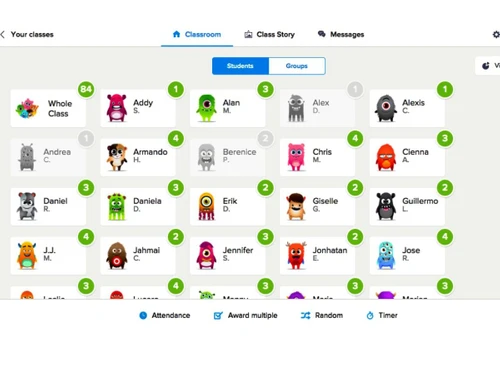
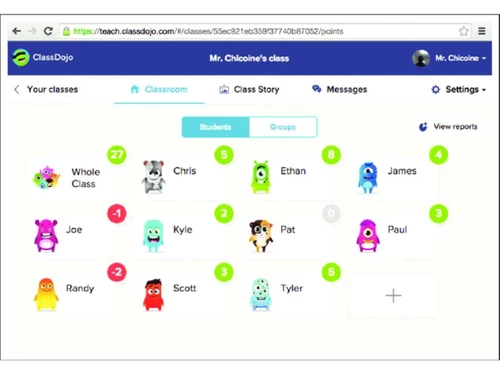
Teachers can share photos, videos, and updates about daily class activities with parents. It also allows teachers to give feedback on student behavior and skills. Students can create digital portfolios to show their work and progress.

Parents can easily see what their child is doing in school and communicate with teachers. The platform supports messaging in many languages, making communication easier.

It also helps build a positive classroom environment through rewards and feedback. ClassDojo works on mobile phones, tablets, and computers. It is simple to use and widely used in schools around the world.

Why Choose ClassDojo Software?

  • Free for Schools: Core features are completely free for teachers and schools.
  • Easy Communication: Connects teachers, parents, and students instantly.
  • Real-Time Updates: Share photos, videos, and class activities instantly.
  • Behavior Tracking: Helps monitor and improve student behavior.
  • Student Portfolios: Students can showcase their work digitally.
  • Parent Engagement: Keeps parents involved in their child's learning.
  • Multi-Language Support: Supports communication in 35plus languages.
  • Positive Classroom Culture: Encourages good behavior with rewards.
  • Simple Interface: Easy to use for teachers, students, and parents.
  • Mobile Friendly: Works on phones, tablets, and computers.
  • Class Story Feature: Share daily classroom moments with families.
  • Secure Messaging: Private communication between teachers and parents.
  • No Ads Policy: Does not show ads or sell user data.
  • Privacy Focused: Strong data protection and security practices.
  • Quick Setup: Easy to set up and start using in minutes.

Benefits of ClassDojo Software

  • Classroom Management Tools: Helps organize and manage classroom activities.
  • Attendance Reports: Track student performance and behavior reports.
  • Custom Avatars: Fun avatars keep students engaged.
  • Instant Notifications: Alerts for messages and updates.
  • Encourages Student Motivation: Reward system boosts participation.
  • Works Globally: Used by schools in many countries.
  • Teacher-Friendly Tools: Designed specifically for classroom needs.
  • Parent-Teacher Collaboration: Builds stronger relationships.
  • Flexible Use: Suitable for in-class and remote learning.
  • Centralized Platform: All communication and data in one place.
  • Event Sharing: Share school events and announcements easily.
  • Optional Premium Features: Extra tools available with ClassDojo Plus.
  • Encourages Habit Building: Helps students develop good habits.
  • Time-Saving Tool: Reduces manual communication efforts.

ClassDojo Pricing

ClassDojo price is available upon request, as listed on Techjockey. The pricing model is based on different parameters, including extra features, deployment type, and the total number of users. For further queries about the product, you can contact our product team to learn more about pricing and offers.

Read more

ClassDojo Company Details

Founded Year:  2011

ClassDojo's mission is to give every child on Earth an education they love. We started by building a network that connects teachers, children, and families.

Director/Founders Liam Don, Sam Chaudhary
Company Size 101-500 Employees

ClassDojo Pricing & Plans

Looking for The Right Pricing?

Share your requirements and get a plan built around your business.

  • Define your business needs
  • Get customised pricing
  • Choose features that fit your workflow

Price Available on Request

Get personalised ClassDojo pricing that fits your needs. Our team will connect with you.

ClassDojo Features

  • icon_check Communication Management
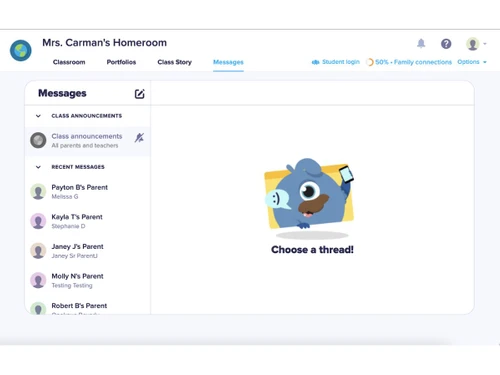
    Enables teachers to communicate with parents and students through messages, announcements, and shared classroom updates.
  • icon_check Behavior Tracking
    Allows teachers to track student behavior, participation, and classroom activities using customizable behavior points system.
  • icon_check Portfolio Management
    Lets students share classwork, photos, videos, and assignments in a digital portfolio accessible by teachers and parents.
  • icon_check Class Story Sharing
    Allows teachers to post classroom updates, photos, videos, and announcements to keep parents informed about class activities.
  • icon_check Attendance Tracking
    Enables teachers to record and manage student attendance digitally within the classroom management platform.
  • icon_check Classroom Management
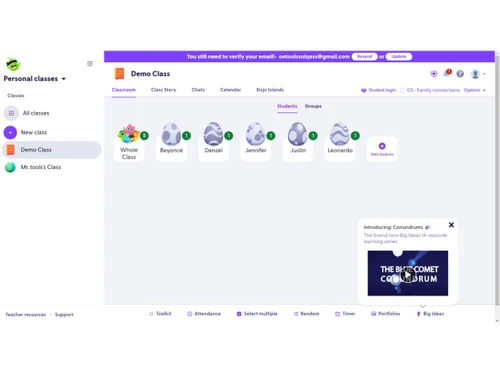
    Provides tools for managing classroom activities, student behavior, communication, and classroom engagement in one platform.
  • icon_check Group Messaging
    Allows teachers to send messages to groups of parents or students for announcements, reminders, or classroom updates.
  • icon_check Digital Classroom Portfolio
    Stores student work and learning progress digitally, allowing teachers and parents to monitor academic development over time.
  • icon_check Feedback Management
    Allows teachers to provide instant feedback and behavior points to students to encourage participation and engagement.
  • icon_check Multi Language Support
    Supports automatic translation of messages so teachers and parents can communicate across different languages.
  • icon_check Classroom Announcements
    Enables teachers to share classroom announcements and updates with students and parents in real time.
  • icon_check Teacher Parent Communication Log
    Stores communication history between teachers and parents for tracking discussions, updates, and student progress communication.
  • icon_check Student Engagement Tracking
    Tracks student participation, behavior points, and engagement to help teachers monitor classroom involvement and performance.
ClassDojo Demo Video play icon

Get ClassDojo Demo

Watch the demo video to explore key features, real workflows, and how the software fits your business needs.

Understand
Key Features
Personal
Demo Insights
Interactive
Demo Support

ClassDojo Specifications

Supported Platforms
Windows Windows iOS iOS Android Android MacOS MacOS
Devices
Desktop Desktop Mobile Mobile Tablet Tablet iPad iPad
Deployment
Cloud-Based Cloud-Based
Suitable For
Education K-12
Business Specific
School/Colleges
Business Size
Individual Small Business Medium Business
Customer Support
Email Communities
Language
English
Training Resources
Videos

ClassDojo Review

Techjockey Trusted Reviews from Verified Users

No reviews are currently available for ClassDojo. Discover similar Educational Software reviews

  • Megam Education

    4.6

    Whats great - The user interface is simple and contemporary, and device checkout is simple and convenient. These are perhaps its best quali... read more

  • School Console

    4.6

    Whats great - The overall experience is great, and the team support is also excellent. read more

  • EDUPI

    4.7

    Whats great - I could contact with my kids' instructors and gather information about them, and it was simple to use. working well read more

Articles for ClassDojo

See All Related Articles

How much does ClassDojo cost?

ClassDojo price is available upon request, as listed on techjockey.com.

Is there a mobile app available for ClassDojo Software?

No, the ClassDojo mobile app is available on iOS and Android.

Which operating systems are compatible with ClassDojo Software?

ClassDojo is compatible with Windows and MacOS operating systems.

Does ClassDojo Software offer a free trial?

No, ClassDojo does not offer a free trial.

How does ClassDojo Software function?

ClassDojo works by letting teachers share updates, track student behavior, and communicate with parents through messaging, class stories, and digital portfolios.

Who uses ClassDojo Software?

ClassDojo is used by teachers, students, parents, and schools to manage classrooms and improve communication.

Is a free demo available for ClassDojo Software?

Yes, ClassDojo free demo is available.

Is ClassDojo Software available for free?

Yes, the core ClassDojo platform is completely free for teachers, students, and parents, with optional paid features.

20,000+ Software Listed

Best Price Guranteed

Free Expert Consultation

2M+ Happy Customers

Terms and Condtions

close

Users with registered businesses can purchase goods from merchants on the platform to satisfy their business needs. Users are not permitted to utilize any products acquired through the platform for resale, advertising, business, or further distribution.

For each purchase made, users will receive a Tax Invoice (or 'GST invoice') that includes specific details such as:

  • the GSTIN of the user associated with their registered business, and

  • the specified Entity Name for their business.

It should be noted that not all products are eligible for GST Invoice. Only the products displayed by participating sellers with the 'GST-based Invoice Available' callout on the product description page would qualify.

Certain goods and services are not eligible to get a GST Invoice, including items with VAS, i.e., Value Added Services (e.g., Total Mobile Protection/Assured Buyback) and those involving an exchange offer at the time of purchase.

Users must ensure the accuracy of the GSTIN, and business entity name provided for the GST Invoice. Requests for corrections into GST Invoice would not be accommodated by Techjockey.com or any Seller, and any issues arising from user-provided information are the sole responsibility of users.

Techjockey.com is not liable for the GST Invoice or any associated input tax credit. To efficiently claim an input tax credit, users should select the registered place of business address as per the GST authority's data and follow the provisions of the GST Act and rules.

To claim an input tax credit, the delivery and billing addresses must match. Furthermore, input tax credits will not be granted if the delivery address and GSTIN on the invoice are from different states. In case of incorrect GST details provided during the order placement, the order will be canceled automatically.