linkedin
Classe365 logo
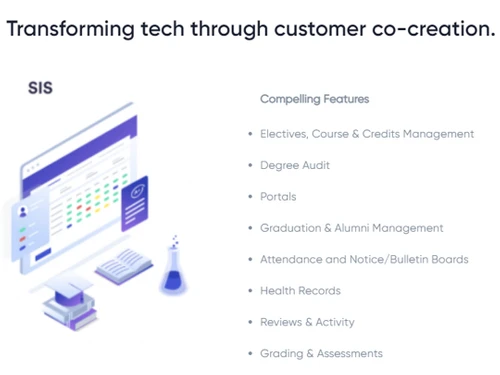
play Degree Audit
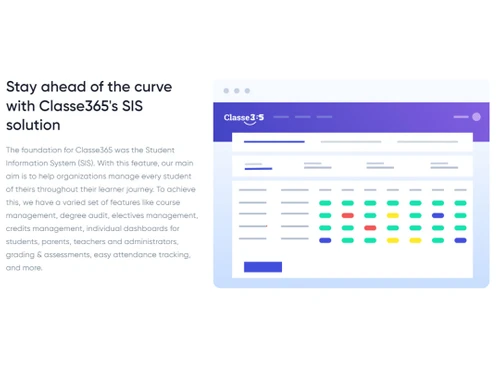
classe365 sis software
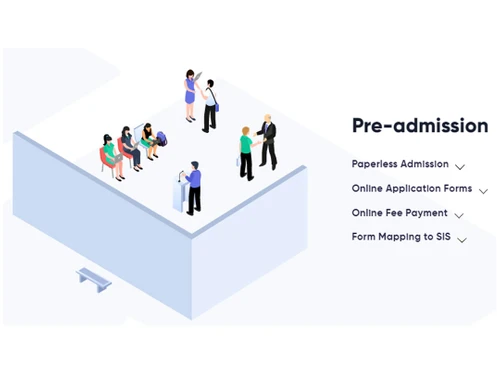
classe365 sis software pre admission

Classe365

Brand: Classe365

  • 4.5

  • 4 Ratings

Classe365 is a cloud-based student information system (SIS) and learning management system (LMS) that helps educational institutions manage their academic and administrative operations. It is designed to streamline various processes, including student enrolment, attendance, grading, course management, and communication between teachers, students, and parents. The tool provides a centralized platf...

See More

Have you used Classe365 before?

Share your insights for better experience

Add a Review

Price Available on Request

Questions about pricing or customization? We’re here to help, just a click away.

100% Genuine
Products
Best Price
Guaranteed
Safe & Secure
Payment
  • Description

  • Pricing

  • Features

  • Specification

  • Review

  • Compare

  • Alternatives

  • FAQ

Classe365 Software Overview

What is Classe365?

Classe365 is a cloud-based student information system (SIS) and learning management system (LMS) that helps educational institutions manage their academic and administrative operations. It is designed to streamline various processes, including student enrolment, attendance, grading, course management, and communication between teachers, students, and parents.

The tool provides a centralized platform for educational institutions to manage their data, track student progress, and communicate with stakeholders effectively. The software allows for easy customization of features to meet the unique needs of each institution.

The system also offers a comprehensive LMS that allows educators to create, share, and track learning content, assignments, and assessments.

Key Functionalities of Classe365

  • Student Management: Classe365 allows educational institutions to manage student data, including personal information, enrolment details, attendance, grades, and academic progress.
  • Course Management: The platform provides tools for managing course schedules, creating course content, and organizing course materials, assignments, and assessments.
  • Assessment: It enables educators to create and manage assessments, including quizzes, exams, and assignments, and track student progress and performance.
  • Attendance Management: The software allows educational institutions to track and manage student attendance and generate reports on attendance patterns and trends.
  • Finance and Accounts Management: It provides tools to manage fee collections, payments, and financial reporting, enabling institutions to track and manage their finances more effectively.
  • Learning Management System: The software offers a comprehensive learning management system (LMS) that enables educators to create, share, and track learning content, assignments, and assessments.
  • Reporting and Analytics: The platform provides a range of reporting and institutional analytics, enabling institutions to generate reports on various metrics.

Benefits of using Classe365

  • The software helps educational institutions streamline operations and enhance student learning outcomes. The comprehensive platform can manage academic and administrative tasks.
  • By automating administrative tasks, Classe365 can help institutions save time and resources, allowing them to focus on providing quality education to their students.
  • The platform offers communication and collaboration features that enable teachers, students, and parents to stay connected and engaged, improving transparency and accountability.
  • With the ability to handle large volumes of student data and support multiple campuses, Classe365 is an ideal solution for educational institutions of all sizes.

Classe365 Pricing

Classe365 price details are available on request at techjockey.com. Please request a call back for subscription-related details and to avail offers on premium packages.

Read more

Classe365 Company Details

Founded Year:  2013

Unified Student Information and Learning Management System

Director/Founders Nandan Keerthi, Vanishree Ranganath
Company Size 1-100 Employees

Classe365 Pricing & Plans

Looking for The Right Pricing?

Share your requirements and get a plan built around your business.

  • Define your business needs
  • Get customised pricing
  • Choose features that fit your workflow

Price Available on Request

Get personalised Classe365 pricing that fits your needs. Our team will connect with you.

Classe365 Features

  • icon_check Degree Audit
    Allow students to self enrol themselves to a degree or course or program and track their progress.
  • icon_check Portals
    Sign up on the portal and get access to all information required to manage your complete student learner journey.
  • icon_check Alumni Management
    Enable easy communication, stay connected online & update alumni students with ongoing school activities using alumni module.
  • icon_check Health Records
    Allow both students and teachers to maintain and update their health records on a regular basis on the portal.
  • icon_check Assessment Management
    Add assessment and grading category upon which you can view the report cards, assessments, grade setup etc.
  • icon_check Dashboards
    Using the interactive dashboard, manage ongoing learning programs, track students’ progress and more.
  • icon_check Admission Management
    Streamline admissions with online application forms, applicant tracking, and efficient enrollment workflows for institutions.
  • icon_check Enrollment Management
    Manage student registrations, course enrollments, enrollment statuses, and academic participation across programs.
  • icon_check Course Management
    Organize courses, subjects, academic programs, and course structures to simplify educational administration.
  • icon_check Attendance Management
    Track student attendance, monitor absences, and manage leave requests through centralized attendance records.
  • icon_check Gradebook Management
    Record student grades, manage assessments, and monitor academic performance through an integrated gradebook.
  • icon_check Library Management
    Organize library resources, manage book records, and provide students with access to educational reading materials.
Classe365 Demo Video play icon

Get Classe365 Demo

Watch the demo video to explore key features, real workflows, and how the software fits your business needs.

Understand
Key Features
Personal
Demo Insights
Interactive
Demo Support

Classe365 Specifications

Supported Platforms
Windows Windows iOS iOS Android Android
Devices
Desktop Desktop Mobile Mobile
Deployment
Cloud-Based Cloud-Based
Suitable For
Schools & Institutes
Business Specific
School/Colleges/Coaching
Business Size
Small Business Startups Medium Business SMBs SMEs
Language
English

Explore the Best Alternative Solutions Similar to Your Business Size and Needs

Classe365 Review

4.5

Out of 5

img

Overall Rating

Based on
4 Verified Ratings

Rating Breakdown

  • Features 4.6
  • Value for Money 4.1
  • Ease of Use 5
  • Customer Support 4.5

85% Recommend this Product

Add Review

Be the First to Review

This product has no reviews yet. Be the first to leave your feedback.

Add Review

Compare Classe365 With other Student Information System

Products
Ratings
Pricing
Device Supported
Deployment
Supported Platforms
  • img

    Classe365

  • 4.5

  • Price On Request

  • Desktop

    Mobile

  • Web based

    On Premises

  • Windows

    Mac OS

  • img

    Workday SIS

  • 4.1

  • Price On Request

  • Desktop

    Mobile

  • Web based

    On Premises

  • Windows

    Mac OS

  • img

    Powerschool

  • 4.2

  • Price On Request

  • Desktop

    Mobile

  • Web based

    On Premises

  • Windows

    Mac OS

  • img

    Tuio

  • 4.4

  • Price On Request

  • Desktop

    Mobile

  • Web based

    On Premises

  • Windows

    Mac OS

  • img

    Facts SIS

  • 4.1

  • Price On Request

  • Desktop

    Mobile

  • Web based

    On Premises

  • Windows

    Mac OS

  • img

    Aeries SIS

  • 4.5

  • Price On Request

  • Desktop

    Mobile

  • Web based

    On Premises

  • Windows

    Mac OS

  • img

    Wisenet

  • 4.0

  • Price On Request

  • Desktop

    Mobile

  • Web based

    On Premises

  • Windows

    Mac OS

  • img

    Maestro SIS

  • 4.3

  • Price On Request

  • Desktop

    Mobile

  • Web based

    On Premises

  • Windows

    Mac OS

  • img

    Focus K-12 SIS

  • 4.3

  • Price On Request

  • Desktop

    Mobile

  • Web based

    On Premises

  • Windows

    Mac OS

  • img

    ParentLocker

  • 4.1

  • Price On Request

  • Desktop

    Mobile

  • Web based

    On Premises

  • Windows

    Mac OS

  • img

    Alma SIS

  • 4.3

  • Price On Request

  • Desktop

    Mobile

  • Web based

    On Premises

  • Windows

    Mac OS

(0) Product(s) selected

Classe365 Alternatives

See All Classe365 Alternatives

Available

Price on Request

Articles for Classe365

See All Related Articles

Which operating system does Classe365 support?

Classe365 is compatible with Windows, Android, iOS and Mac operating systems.

Is there any Classe365 app?

Classe365 app is available for Android and iOS devices.

What is the deployment type of Classe365?

Classe365 supports cloud-based deployment type.

How much does Classe365 cost?

Classe365 pricing is available on request at techjockey.com.

Who are the potential users of Classe365?

Classe365 is typically used in the education sector to aid students to register in the course, track student attendance, generate reports and more.

Is there any free trial or demo for Classe365?

Classe365 demo is available for free with techjockey.com.

Is Classe365 free?

Classe365 offers a free trial. However, the premium plan with advanced features is available at techjockey.com with exciting deals.

How can you download Classe365?

Classe365 installation is not required, as it is cloud-based. Just open the Setup Wizard to get started.

20,000+ Software Listed

Best Price Guranteed

Free Expert Consultation

2M+ Happy Customers

Terms and Condtions

close

Users with registered businesses can purchase goods from merchants on the platform to satisfy their business needs. Users are not permitted to utilize any products acquired through the platform for resale, advertising, business, or further distribution.

For each purchase made, users will receive a Tax Invoice (or 'GST invoice') that includes specific details such as:

  • the GSTIN of the user associated with their registered business, and

  • the specified Entity Name for their business.

It should be noted that not all products are eligible for GST Invoice. Only the products displayed by participating sellers with the 'GST-based Invoice Available' callout on the product description page would qualify.

Certain goods and services are not eligible to get a GST Invoice, including items with VAS, i.e., Value Added Services (e.g., Total Mobile Protection/Assured Buyback) and those involving an exchange offer at the time of purchase.

Users must ensure the accuracy of the GSTIN, and business entity name provided for the GST Invoice. Requests for corrections into GST Invoice would not be accommodated by Techjockey.com or any Seller, and any issues arising from user-provided information are the sole responsibility of users.

Techjockey.com is not liable for the GST Invoice or any associated input tax credit. To efficiently claim an input tax credit, users should select the registered place of business address as per the GST authority's data and follow the provisions of the GST Act and rules.

To claim an input tax credit, the delivery and billing addresses must match. Furthermore, input tax credits will not be granted if the delivery address and GSTIN on the invoice are from different states. In case of incorrect GST details provided during the order placement, the order will be canceled automatically.