linkedin
Cokpit logo
Cokpit cloud
Cokpit features
Cokpit context

Cokpit

Brand: Zelar Soft

  • No Ratings & Reviews

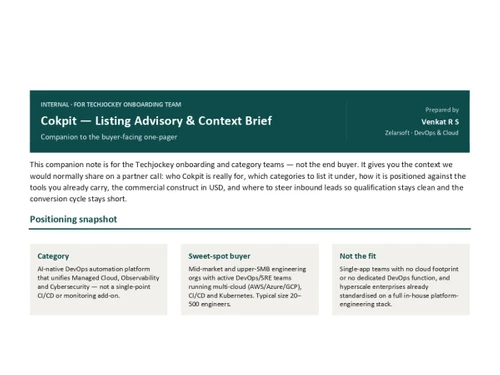
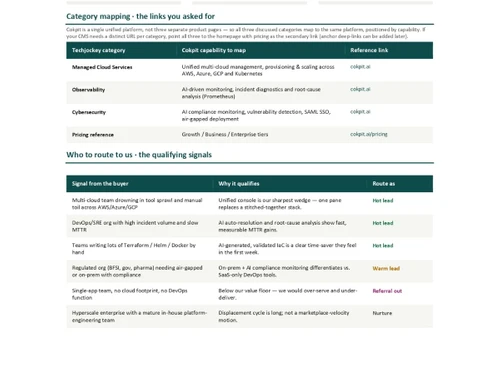
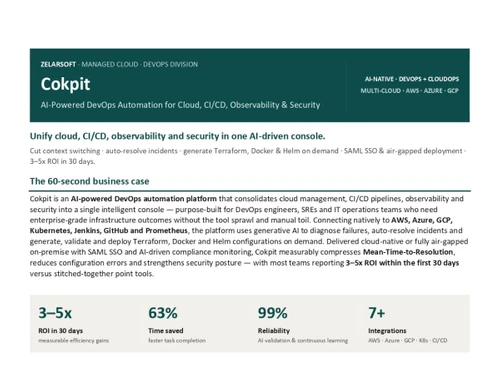
Cokpit is an agentic AI tool for DevOps that automates infrastructure provisioning, CI/CD pipelines, incident resolution, and compliance across your cloud toolchain.

See More

Have you used Cokpit before?

Share your insights for better experience

Add a Review

Price Available on Request

Questions about pricing or customization? We’re here to help, just a click away.

100% Genuine
Products
Best Price
Guaranteed
Safe & Secure
Payment
  • Description

  • Pricing

  • Features

  • Specification

  • Review

  • FAQ

Cokpit Software Overview

What is Cokpit Software?

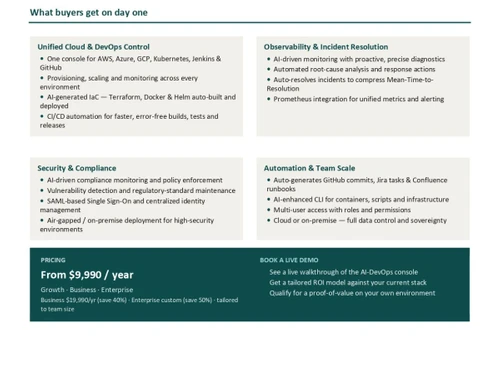
Cokpit is an agentic AI tool built for engineering and SRE teams who want to eliminate repetitive operational work. Instead of relying on predefined scripts, Cokpit deploys autonomous AI agents that provision infrastructure, generate and validate Terraform, Helm, and Docker configurations. It also diagnoses incidents and documents every action end-to-end.

The platform connects natively with tools like AWS, Azure, GCP, Kubernetes, Jenkins, GitHub, and GitLab, so teams can plug it into their existing stack without a rip-and-replace migration. Cokpit's agents continuously learn from past incidents and infrastructure patterns, improving root cause analysis and reducing Mean Time to Resolution over time.

Built-in compliance guardrails, audit trails, and role-based access make it suitable for regulated and enterprise environments, with support for both cloud and on-premise, air-gapped deployments. By offloading routine identity, access, and operational tasks to AI agents, Cokpit reduces context switching for DevOps engineers and frees teams to focus on strategic engineering work.

Benefits of Cokpit Agentic AI Software

  • Faster Incident Resolution: AI agents diagnose root causes and execute fixes automatically, cutting incident resolution time by up to 40%.
  • Automated Infrastructure Provisioning: Agents generate and enforce Terraform, Helm, and Docker templates consistently.
  • Reduced Context Switching: One console unifies AWS, Azure, GCP, and Kubernetes workflows, reducing context switching by up to 50%.
  • Continuous Compliance: Security policies are monitored and enforced automatically with full audit trails.
  • Faster Delivery Cycles: Pipelines run end-to-end with fewer manual bottlenecks, delivering up to 2x faster release cycles.
  • Instant Documentation: Every agent action is logged automatically to GitHub, Jira, or Confluence, cutting documentation effort by up to 70%.
  • Self-Improving Operations: Agents learn from incidents to continuously refine workflows.
  • Higher ROI: Teams typically see 3–5x ROI within the first 30 days of deployment.

Why Use Agentic AI Software?

  • No Rip-and-Replace: Integrates directly with your existing DevOps toolchain.
  • Cross-Tool Agent Orchestration: Executes tasks across AWS, Azure, GCP, Jenkins, and Kubernetes without manual hand-offs.
  • Enterprise-Grade Security: Built-in guardrails ensure every agent action stays compliant, with up to 99.9% reliability.
  • On-Prem Cloud Flexibility: Supports air-gapped, on-premise deployments for regulated industries.
  • Built for Teams: Role-based access and permissions support collaborative SRE and IT ops workflows.
  • Award-Recognised Platform: Named Best Agentic AI Platform for DevOps at the DevOps Conclave Awards 2026.
  • Proactive Troubleshooting: AI surfaces and resolves issues before they impact users.

Cokpit Pricing

Cokpit price is available on request at Techjockey. The pricing model is based on different parameters, including extra features, deployment type, and the total number of users. For further queries related to the product, you can contact our product expert and learn more about the pricing and offers.

Read more

Zelar Soft Company Details

Founded Year:  2018

Zelar is a company that partners with rapidly expanding technology companies to enhance their DevOps culture, accelerate code releases, and improve end-user experiences.

Director/Founders Vasu Maganti
Company Size 101-500 Employees

Cokpit Pricing & Plans

Looking for The Right Pricing?

Share your requirements and get a plan built around your business.

  • Define your business needs
  • Get customised pricing
  • Choose features that fit your workflow

Price Available on Request

Get personalised Cokpit pricing that fits your needs. Our team will connect with you.

Cokpit Features

  • icon_check DevOps Task Automation
    Automates routine DevOps tasks to reduce manual effort and improve operational efficiency.
  • icon_check Transfer Automations
    Generates, validates, and deploys Terraform configurations using generative AI.
  • icon_check Docker Automation
    Generates and manages Docker configurations to simplify container deployment workflows.
  • icon_check SRE Automation
    Uses GenAI to assist with containers, scripts, infrastructure, and site reliability tasks.
  • icon_check Helm Configuration
    Generates and validates Helm configurations for consistent Kubernetes deployments.
  • icon_check CI/CD Automation
    Automates build, testing, and release workflows with AI-assisted pipeline management.
  • icon_check Pipeline Optimization
    Provides AI insights to optimize pipeline performance and help prevent deployment errors.
  • icon_check Cloud Management
    Manages cloud-native resources across AWS, Azure, and GCP from one intelligent console.
  • icon_check Incident Resolution
    Uses AI to analyze incidents, recommend fixes, and automate resolution workflows.
  • icon_check Root Cause Analysis
    Analyzes incidents and infrastructure patterns to identify potential root causes.
  • icon_check Workflow Automation
    Automates multi-step DevOps workflows using AI-driven actions and decision-making.
  • icon_check Compliance Monitoring
    Continuously monitors security policies and compliance requirements across infrastructure.
  • icon_check Security Policy Enforcement
    Helps detect vulnerabilities and enforce security policies through AI-driven monitoring.
  • icon_check Audit Trails
    Records operational actions and changes to support visibility, accountability, and compliance.
  • icon_check Role-Based Access Control (RBAC)
    Assigns user roles and permissions for secure collaboration across DevOps teams.
  • icon_check Integrations
    Connects AWS, Azure, GCP, Jenkins, GitHub, Kubernetes, and other DevOps tools.

Cokpit Specifications

Supported Platforms
Windows Windows MacOS MacOS
Devices
Desktop Desktop
Deployment
Cloud-Based Cloud-Based Perpetual Perpetual
Suitable For
All Industries
Business Specific
All Businesses
Business Size
Small Business Medium Business Enterprises SMBs SMEs
Customer Support
Email Forums
Language
English
Integration
API Integration
Training Resources
Live Online Documentation
AI Features
AI Integrated

Cokpit Review

Be the First to Review

This product has no reviews yet. Be the first to leave your feedback.

Add Review

Articles for Cokpit

See All Related Articles

How much does Cokpit software cost?

Cokpit software pricing is available upon request at Techjockey.

Which operating systems are supported by Cokpit Software?

Cokpit is a cloud-based platform accessible via web browser, with support for both cloud and on-premise, air-gapped deployments for regulated environments.

Does Cokpit software offer a free trial?

No, Cokpit does not currently offer a free trial.

How does Cokpit software work?

Cokpit deploys autonomous AI agents that provision infrastructure, build CI/CD pipelines, resolve incidents, and generate Terraform, Docker, and Helm configurations across your DevOps toolchain.

Who uses Cokpit software?

Cokpit is built for DevOps engineers, SREs, and IT operations teams at organisations ranging from startups to global enterprises.

Is a free demo available for Cokpit software?

Yes, a free Cokpit demo is available via Techjockey.

Is Cokpit software available for free?

No, Cokpit does not offer a free version.

20,000+ Software Listed

Best Price Guranteed

Free Expert Consultation

2M+ Happy Customers

Terms and Condtions

close

Users with registered businesses can purchase goods from merchants on the platform to satisfy their business needs. Users are not permitted to utilize any products acquired through the platform for resale, advertising, business, or further distribution.

For each purchase made, users will receive a Tax Invoice (or 'GST invoice') that includes specific details such as:

  • the GSTIN of the user associated with their registered business, and

  • the specified Entity Name for their business.

It should be noted that not all products are eligible for GST Invoice. Only the products displayed by participating sellers with the 'GST-based Invoice Available' callout on the product description page would qualify.

Certain goods and services are not eligible to get a GST Invoice, including items with VAS, i.e., Value Added Services (e.g., Total Mobile Protection/Assured Buyback) and those involving an exchange offer at the time of purchase.

Users must ensure the accuracy of the GSTIN, and business entity name provided for the GST Invoice. Requests for corrections into GST Invoice would not be accommodated by Techjockey.com or any Seller, and any issues arising from user-provided information are the sole responsibility of users.

Techjockey.com is not liable for the GST Invoice or any associated input tax credit. To efficiently claim an input tax credit, users should select the registered place of business address as per the GST authority's data and follow the provisions of the GST Act and rules.

To claim an input tax credit, the delivery and billing addresses must match. Furthermore, input tax credits will not be granted if the delivery address and GSTIN on the invoice are from different states. In case of incorrect GST details provided during the order placement, the order will be canceled automatically.