linkedin
Collections MAX logo
play Dashboards in Collections MAX Administrator V4
collection-max-administration
collection-max-configure-emails

Collections MAX

Brand: Decca Software

  • 4.5

  • 4 Ratings

Collections MAX delivers complete debt collection automation, secure payment processing, in-depth reporting, and robust account management for peak efficiency.

See More

Have you used Collections MAX before?

Share your insights for better experience

Add a Review

Price Available on Request

Questions about pricing or customization? We’re here to help, just a click away.

100% Genuine
Products
Best Price
Guaranteed
Safe & Secure
Payment
  • Description

  • Pricing

  • Features

  • Specification

  • Review

  • Compare

  • Alternatives

  • FAQ

Collections MAX Software Overview

What is Collections MAX?

Collections MAX is a comprehensive debt collection software available both as a Windows-based desktop program (.exe) and as web-based, cloud-hosted software. It provides collection agencies, managers, and administrators with the tools needed to manage the entire debt recovery lifecycle. The Windows software runs on a wide range of versions, including Windows 7, 8.1, 10, 11, and Windows Server editions from 2008 R2 to 2025, while web-based options like Remote Collector and Payment Portal offer browser-based access.

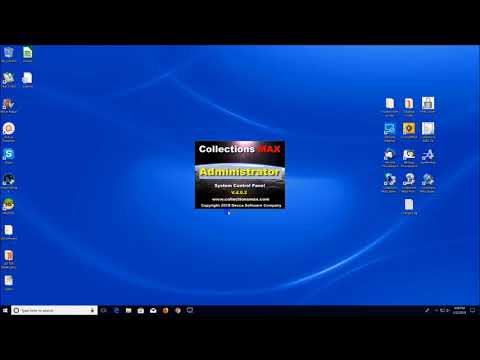
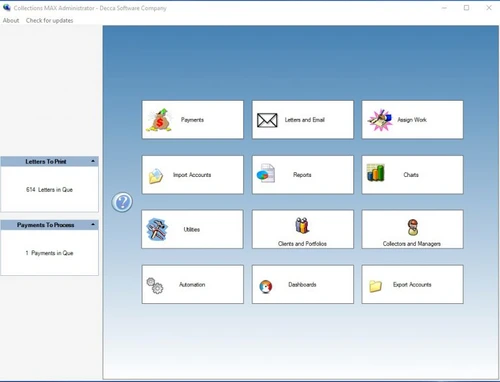
The core of the system is the Collections MAX Administrator, which serves as the central control panel for managing debtor accounts, processing payments, automating workflows, and generating detailed reports. It is engineered to streamline operations, enhance security with military-grade encryption, and improve overall collection efficiency through robust data management and communication features.

Why Choose Collections MAX?

  • Advanced Automation: The software features a status-based automation system that significantly reduces manual effort. You can create rules to automatically change an account's status, schedule demand letters, reassign accounts to different collectors, or adjust interest rates based on predefined time-based triggers.
  • Robust Security: Security is paramount in debt collection. Collections MAX protects sensitive data with military-grade AES encryption both at rest and in transit. For payment processing, it utilizes TLS 1.2 encryption, ensuring all financial transactions are secure.
  • In-Depth Reporting and Analytics: Gain critical insights into your operations with over 35 standard reports, 60+ metric reports for portfolios and collectors, and a custom Ad-hoc reporting system. Reports can be exported to multiple formats (PDF, Excel, PNG) and even batch-emailed directly to clients.
  • Cost-Effective Core: The central control panel of the system, Collections MAX Administrator, is offered completely free of charge, providing an exceptional entry point with powerful management capabilities without an initial software cost.
  • Efficient Data Handling: The software is designed for high-volume data management, featuring a Quick Import utility that can process up to 50,000 accounts at once from CSV files. It also includes intelligent systems like a dupes scanner and a "Match and Tie" feature to link accounts from the same debtor automatically.

Advanced Features of Collections MAX

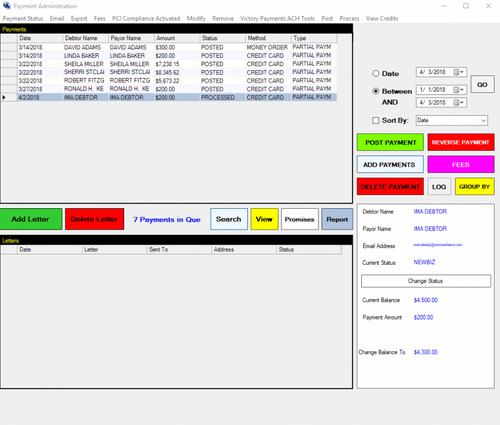
  • Integrated Payment Processing: Seamlessly process credit cards and eChecks through a compatible partner merchant account. The system includes an auto-post feature to update debtor balances automatically, an option to export payment data for batch processing, and the ability to mark payments as Hold, Pending, or Declined.
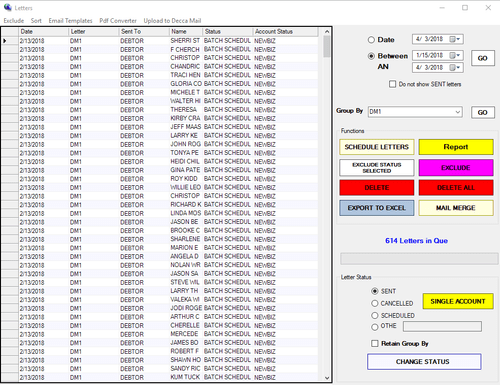
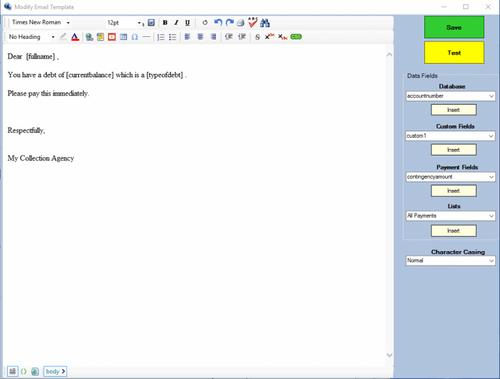
  • Compliance and Communication Tools: The software is Metro 2 capable for credit reporting (requires a subscription) and supports National Change of Address (NCOA) checks. It includes a built-in mail merge system for letter templates, email template creation, and a DOCX-to-PDF converter, eliminating the need for Microsoft Word on every machine.
  • Granular User Permissions: Maintain tight control over user access with a detailed permissions system. For managers, you can restrict access to specific functions within the Administrator panel. For collectors, you can control their ability to take or view payments, access email, and limit account searches to only their assigned portfolio.
  • Intelligent Account Management: The system automatically calculates accrued interest from the charge-off date during import and can continue to calculate interest daily, weekly, or monthly. The "Assign Work" screen allows managers to efficiently distribute accounts among collectors.
  • Dialer and System Integrations: Collections MAX integrates with Tmax and TCN dialers to streamline outbound calling campaigns. It also offers export capabilities to popular check printing software like EZ Check Printing and Versa Check Platinum.

Modules of Collections MAX

  • Collections MAX Administrator: This is the nerve center of the software. It is used by administrators and managers to configure the system, manage user permissions, import and assign accounts, set up automation rules, and generate comprehensive reports.
  • Collections MAX Collector/Professional: Collector is a limited demo version for collectors to work assigned accounts. Professional is the upgraded version that removes Collector's limitations, adding full functionality for processing payments, scheduled letters and emails, and account status updates.
  • Collections MAX Scheduler: Enables status-based automation, allowing the software to perform actions automatically, such as reassigning an account or scheduling a letter after it has been in a specific status for a set number of days.
  • Collections MAX Payment Runner: An automated credit card processor integrating with USA ePay, Authorize.Net, and NMI payment gateways.
  • Collections MAX Update Utility: An administrator tool that expands system capabilities, including batch-updating account information via file.
  • Collections MAX Remote Collector (Web-Based): A browser-based version of Professional with additional features, for teams that need remote access.
  • Collections MAX Payment Portal (Web-Based): An online portal where debtors can make payments directly.
  • Skip Tracing/Database Hosting (Services): Optional add-on services for integrated skip tracing and server hosting for agencies with remote collectors.

How to Use Collections MAX?

  1. Installation and Setup: Begin by installing the Windows-based program. Use the Collections MAX Administrator panel to configure system-wide settings, create user roles, and define permissions for managers and collectors.
  2. Import Debtor Accounts: Load debtor data into the system. You can perform a batch import of thousands of accounts using a CSV file or use the manual entry screen for individual accounts. The software's "Match and Tie" system will automatically link related accounts.
  3. Assign and Automate: Managers use the 'Assign Work' screen to distribute portfolios to individual collectors. Concurrently, set up automation rules to handle routine tasks, such as moving accounts to a new status or scheduling follow-ups.
  4. Execute Collection Activities: Collectors log in to their interface to work their assigned queues. They can process payments, use email and letter templates for communication, and update account information in real-time.
  5. Monitor and Report: Utilize the extensive reporting suite to track key performance indicators. Generate reports on collector productivity, portfolio performance, and payment histories to make data-driven decisions and provide updates to clients.

Collections MAX Pricing

Collections MAX pricing details are available on request on techjockey.com.

The pricing model is based on different parameters, including extra features, deployment type, and the total number of users. For further queries related to the product, you can contact our product team and learn more about the pricing and offers.

Read more

Collections MAX Pricing & Plans

Looking for The Right Pricing?

Share your requirements and get a plan built around your business.

  • Define your business needs
  • Get customised pricing
  • Choose features that fit your workflow

Price Available on Request

Get personalised Collections MAX pricing that fits your needs. Our team will connect with you.

Collections MAX Features

  • icon_check Import & Export
  • icon_check Reports
  • icon_check Client Management
  • icon_check Collection Management
  • icon_check Notice & Circular
  • icon_check Contact Management
  • icon_check Transaction Management
  • icon_check Callback Scheduling
  • icon_check Agency Management
Collections MAX Demo Video play icon

Get Collections MAX Demo

Watch the demo video to explore key features, real workflows, and how the software fits your business needs.

Understand
Key Features
Personal
Demo Insights
Interactive
Demo Support

Collections MAX Specifications

Supported Platforms
Ubuntu Ubuntu Windows Windows MacOS MacOS Linux Linux
Devices
Desktop Desktop
Deployment
Cloud-Based Cloud-Based
Suitable For
All Industries
Business Specific
All Businesses
Business Size
Small Business Startups Medium Business SMBs SMEs
Customer Support
Email
Language
English

Explore the Best Alternative Solutions Similar to Your Business Size and Needs

Collections MAX Review

4.5

Out of 5

img

Overall Rating

Based on
4 Verified Ratings

Rating Breakdown

  • Features 4.6
  • Value for Money 4.7
  • Ease of Use 4.3
  • Customer Support 4.3

90% Recommend this Product

Add Review

Techjockey Trusted Reviews from Verified Users

No reviews are currently available for Collections MAX. Discover similar Debt Collection Software reviews

  • CredFlow

    4.2

    Whats great - In demo they show everything but nothing works. Dont BUY. read more

  • OkCredit

    4.4

    Whats great - Completely free and very easy to use. read more

  • Highradius

    4.2

    Whats great - The layout's simplicity. The computer also performs the majority of the work required to identify any differences or conflict... read more

Compare Collections MAX With other Debt Collection Software

Products
Ratings
Pricing
Device Supported
Deployment
Supported Platforms
  • img

    Collections MAX

  • 4.5

  • Price On Request

  • Desktop

    Mobile

  • Web based

    On Premises

  • Windows

    Mac OS

  • img

    CredFlow

  • 4.1

  • ₹ 4999

  • Desktop

    Mobile

  • Web based

    On Premises

  • Windows

    Mac OS

  • img

    Swordfish

  • 4.3

  • Price On Request

  • Desktop

    Mobile

  • Web based

    On Premises

  • Windows

    Mac OS

  • img

    Bankruptcy Control

  • 4.2

  • Price On Request

  • Desktop

    Mobile

  • Web based

    On Premises

  • Windows

    Mac OS

  • img

    CogendaWorks

  • 4.4

  • Price On Request

  • Desktop

    Mobile

  • Web based

    On Premises

  • Windows

    Mac OS

  • img

    Finledgers

  • 4.4

  • Price On Request

  • Desktop

    Mobile

  • Web based

    On Premises

  • Windows

    Mac OS

  • img

    Gaviti

  • 4.3

  • Price On Request

  • Desktop

    Mobile

  • Web based

    On Premises

  • Windows

    Mac OS

  • img

    Capone

  • 4.3

  • Price On Request

  • Desktop

    Mobile

  • Web based

    On Premises

  • Windows

    Mac OS

  • img

    CashOnTime

  • 4.2

  • Price On Request

  • Desktop

    Mobile

  • Web based

    On Premises

  • Windows

    Mac OS

(0) Product(s) selected

Collections MAX Alternatives

See All Collections MAX Alternatives
SAVE UPTO 8%

Available

Price on Request

Which operating system does Collection MAX support?

Collection MAX is compatible with Windows operating systems.

Is there any Collection MAX app?

Collection MAX app is not available.

What is deployment type of Collection MAX?

Collection MAX supports Web-Based.

Who are the potential users of Collection MAX?

Collection MAX is typically used in All Industries.

Is there any Collection MAX demo or free trial?

The Collection MAX demo is available for free at Techjockey.com.

Is Collection MAX free?

Collection MAX Debt Collection Software offers a free trial. However, the premium plan with advanced features available at Techjockey.com.

How can you download Collection MAX?

For Collection MAX installation, insert the given CD/USB flash storage in your system and open the Setup Wizard to get started. The web-based version can be accessed directly through the Collection MAX portal.

How does Collection MAX work?

Collection MAX helps with Import & Export,Reports,Client Management and Collection management. It's a complete solution for Notice & Circular,Contact Management,Transaction Management and Callback Scheduling.

Are there any hidden charges for Collection MAX updates?

Collection MAX regular updates are available free of cost. There are no hidden software update charges.

What is Collection MAX used for?

Collection MAX used for Import & Export,Reports,Client Management and Collection management.

How do I contact Collection MAX support?

You can directly visit Collection MAX portal and get in touch with Collection MAX customer support for any software-related query.

How to get Collection MAX lifetime deal?

Please contact our product experts to get Collection MAX lifetime deal with exclusive offers.

What does Collections MAX do?

Collections MAX is a comprehensive debt collection software designed for administrators and managers to manage the entire collection process, from account import and payment processing to automated correspondence and detailed reporting.

How much does Collections MAX cost?

Collections MAX pricing details are available on request on techjockey.com.

What are the main features of Collections MAX?

Collections MAX offers robust features including integrated payment processing for credit cards and eChecks, automated account management and letter scheduling, Metro 2 credit reporting capabilities, extensive reporting and analytics, and a powerful automation system for account statuses.

Is there a free trial for Collections MAX?

The Collections MAX Administrator software itself is available for free, meaning users can access its core functionalities without needing a trial period.

Who can use Collections MAX?

Collections MAX is primarily designed for administrators, managers, and collectors within debt collection agencies, providing distinct permission systems tailored to each role's responsibilities.

What operating systems are compatible with Collections MAX?

Collections MAX is a Windows-based software compatible with Windows 7, 8.1, 10, 11, and Windows Server versions from 2008 R2 through 2025.

How does Collections MAX ensure data security for payments?

Collections MAX employs military-grade AES encryption to protect sensitive payment data at rest and in transit, and uses TLS 1.2 encryption for processing credit card transactions.

Can Collections MAX help with account automation and workflow?

Yes, Collections MAX features an automation system that allows users to create rules for accounts based on days and status, enabling automatic actions like status changes, letter scheduling, or account reassignment.

What kind of reporting and analytics does Collections MAX provide?

Collections MAX offers over 35 standard reports, more than 60 metric reports for portfolios and collectors, and an Ad-hoc report system for custom reports, all exportable to various formats including PDF and Excel, along with 7 built-in charts and graphs.

20,000+ Software Listed

Best Price Guranteed

Free Expert Consultation

2M+ Happy Customers

Terms and Condtions

close

Users with registered businesses can purchase goods from merchants on the platform to satisfy their business needs. Users are not permitted to utilize any products acquired through the platform for resale, advertising, business, or further distribution.

For each purchase made, users will receive a Tax Invoice (or 'GST invoice') that includes specific details such as:

  • the GSTIN of the user associated with their registered business, and

  • the specified Entity Name for their business.

It should be noted that not all products are eligible for GST Invoice. Only the products displayed by participating sellers with the 'GST-based Invoice Available' callout on the product description page would qualify.

Certain goods and services are not eligible to get a GST Invoice, including items with VAS, i.e., Value Added Services (e.g., Total Mobile Protection/Assured Buyback) and those involving an exchange offer at the time of purchase.

Users must ensure the accuracy of the GSTIN, and business entity name provided for the GST Invoice. Requests for corrections into GST Invoice would not be accommodated by Techjockey.com or any Seller, and any issues arising from user-provided information are the sole responsibility of users.

Techjockey.com is not liable for the GST Invoice or any associated input tax credit. To efficiently claim an input tax credit, users should select the registered place of business address as per the GST authority's data and follow the provisions of the GST Act and rules.

To claim an input tax credit, the delivery and billing addresses must match. Furthermore, input tax credits will not be granted if the delivery address and GSTIN on the invoice are from different states. In case of incorrect GST details provided during the order placement, the order will be canceled automatically.