 USA
USA UAE
UAESmall Business
Designed for startups and growing businesses
See More





Brand: OkCredit Psi Phi Global Solutions
Designed for small businesses to manage their financial transactions, track payments, and simplify reconciliation processes.
See MoreHave you used OkCredit before?
Share your insights for better experience
Brand: OkCredit Psi Phi Global Solutions
Founded Year: 2017
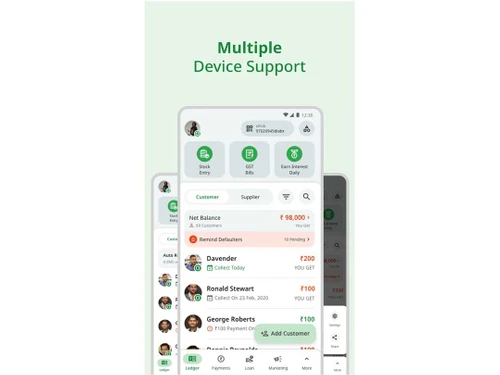
OkCredit is a mobile application that helps micro businesses collect their receivables faster and pay their payables on time. We have more than 30 Lakh (3 Million) MSMEs who use our products actively across India.
Looking for The Right Pricing?
Share your requirements and get a plan built around your business.
Price Available on Request
Get personalised OkCredit pricing that fits your needs. Our team will connect with you.
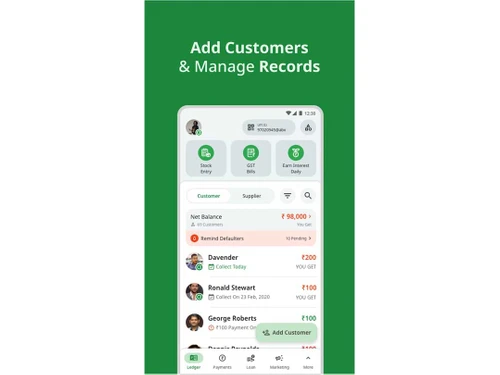
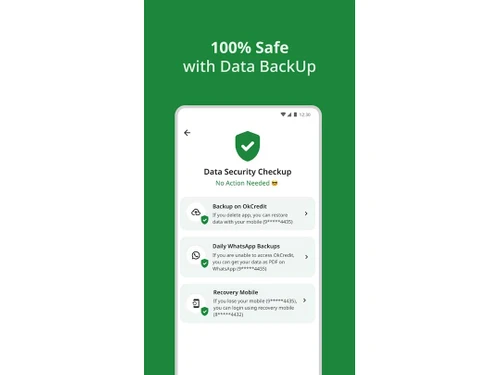
 Collection Reminders Multi Language Support Reports Customer Management Transaction Management Data Backup at Cloud Billing & Invoicing Receipt Entry Account Statements

Watch the demo video to explore key features, real workflows, and how the software fits your business needs.
 Android
  Mobile
  Cloud-Based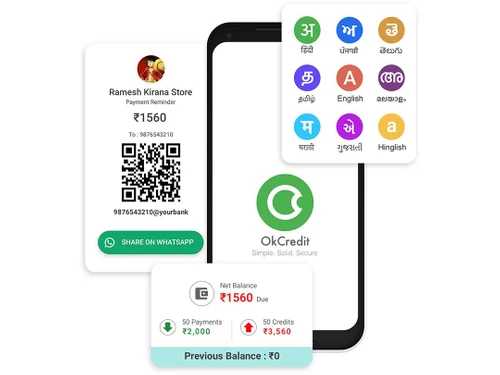
4.3
Out of 5

Overall Rating
Based on
10 Verified Reviews
Rating Breakdown
87% Recommend this Product
Add ReviewUsers generally appreciate OkCredit for its ease of use and effectiveness in managing customer dues, with many noting it has significantly reduced errors and improved transparency in transactions. The app's automated reminders and real-time updates are frequently highlighted as major benefits. However, several users express concerns about the lack of offline support and integration options, as well as occasional issues with customer support response times and unexpected logouts. Overall, OkCredit is well-received among small business owners looking for a reliable digital ledger solution.
Pros
"Very quick to record entries and share updates with customers."
"Very simple interface, even for someone like me who isn’t tech-savvy."
"OkCredit makes managing credit and payments really easy. It saves me a lot of time compared to manual books."
Cons
"It requires internet to update the records, which is difficult when the network is weak."

Feb 19, 2025
Techjockey Verified
“Great App for Small Businesses Like Mine”
I own a small tailoring shop, and this app has made my life so much easier. No more confusion about dues or who paid what. Everything is digital and safe.
Pros
Completely free and very easy to use.
Cons
No export-to-Excel feature yet.
Reason to switch
AutoRek was too focused on payments, and I needed something simple for managing credits, which OkCredit does really well.
Jun 28, 2025
Techjockey Verified
“Digital Ledger that Just Works!”
My father and I both use OkCredit for our shop. It reduced mistakes and made our work easy. Everything is transparent with the customers now, which builds trust.
Pros
Clean design and supports Hindi and other languages.
Cons
Needs integration with UPI for faster payments.
Reason to switch
OkCredit was faster to set up and had fewer ads than Gresham, which I found very annoying.
Aug 12, 2025
Techjockey Verified
“Makes Collections Hassle-Free”
I was tired of calling people to remind them of dues. OkCredit’s automated reminders did that for me. Collections improved, and I get paid on time now.
Pros
Payment reminders save me time and effort.
Cons
Needs better customer support response time.
Reason to switch
Numeric was more accounting-oriented. I needed something simple for credit and collections, and OkCredit is exactly that.

OkCredit
Price On Request
Desktop
Mobile
Web based
On Premises
Windows
Mac OS

ReconArt
Price On Request
Desktop
Mobile
Web based
On Premises
Windows
Mac OS

FloQast
Price On Request
Desktop
Mobile
Web based
On Premises
Windows
Mac OS

Adra Suite
Price On Request
Desktop
Mobile
Web based
On Premises
Windows
Mac OS

Kani
Price On Request
Desktop
Mobile
Web based
On Premises
Windows
Mac OS

Duco
Price On Request
Desktop
Mobile
Web based
On Premises
Windows
Mac OS

Gresham
Price On Request
Desktop
Mobile
Web based
On Premises
Windows
Mac OS

AutoRek
Price On Request
Desktop
Mobile
Web based
On Premises
Windows
Mac OS

Numeric
Price On Request
Desktop
Mobile
Web based
On Premises
Windows
Mac OS

enReconcile
Price On Request
Desktop
Mobile
Web based
On Premises
Windows
Mac OS

ReconNet
Price On Request
Desktop
Mobile
Web based
On Premises
Windows
Mac OS
(0) Product(s) selected
Available
Price on Request
Available
Price on Request
Available
Price on Request

Available
Price on Request

Available
Price on Request
Pricing details for OkCredit are available upon request at techjockey.com.
Yes, OkCredit offers mobile applications for both Android devices.
OkCredit is compatible with mobile operating systems like Android.
There is no free trial needed, as OkCredit is free to use with basic features.
OkCredit Software operates by allowing small business owners to record credit transactions digitally, send payment reminders, and manage customer accounts through a user-friendly app, enhancing transparency and efficiency in financial management.
Small business owners, merchants, and freelancers looking for efficient financial management can benefit from OkCredit.
OkCredit does not offer a formal demo since it is free to use; users can explore all features.
Yes, OkCredit Software is available at no cost for basic functionality, with optional paid features.
No, OkCredit Software requires an internet connection for full functionality, as it is cloud-based.
Yes, OkCredit offers customer support through various channels, including in-app support and help centers.
Yes, users can customize invoice templates to match their business branding and requirements using OkCredit.
20,000+ Software Listed
Best Price Guranteed
Free Expert Consultation
2M+ Happy Customers
Terms and Condtions

Users with registered businesses can purchase goods from merchants on the platform to satisfy their business needs. Users are not permitted to utilize any products acquired through the platform for resale, advertising, business, or further distribution.
For each purchase made, users will receive a Tax Invoice (or 'GST invoice') that includes specific details such as:
the GSTIN of the user associated with their registered business, and
the specified Entity Name for their business.
It should be noted that not all products are eligible for GST Invoice. Only the products displayed by participating sellers with the 'GST-based Invoice Available' callout on the product description page would qualify.
Certain goods and services are not eligible to get a GST Invoice, including items with VAS, i.e., Value Added Services (e.g., Total Mobile Protection/Assured Buyback) and those involving an exchange offer at the time of purchase.
Users must ensure the accuracy of the GSTIN, and business entity name provided for the GST Invoice. Requests for corrections into GST Invoice would not be accommodated by Techjockey.com or any Seller, and any issues arising from user-provided information are the sole responsibility of users.
Techjockey.com is not liable for the GST Invoice or any associated input tax credit. To efficiently claim an input tax credit, users should select the registered place of business address as per the GST authority's data and follow the provisions of the GST Act and rules.
To claim an input tax credit, the delivery and billing addresses must match. Furthermore, input tax credits will not be granted if the delivery address and GSTIN on the invoice are from different states. In case of incorrect GST details provided during the order placement, the order will be canceled automatically.



