linkedin
Bank Rec logo
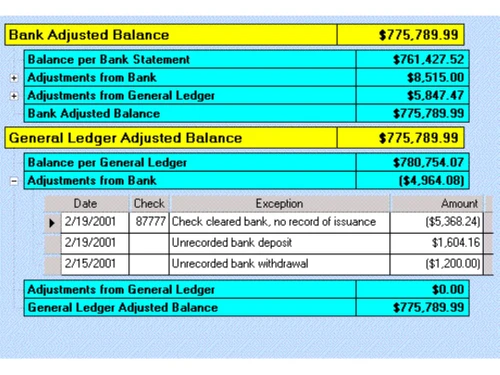
play Bank Reconciliation Software - Reconciliation Report
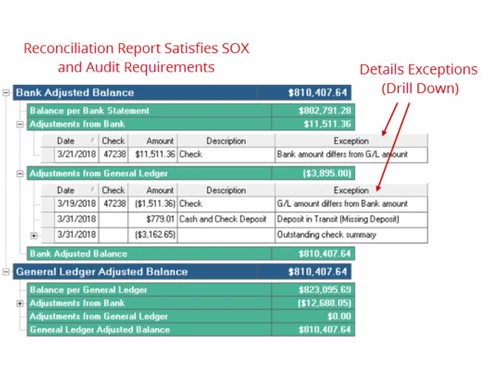
Bank Rec Reports
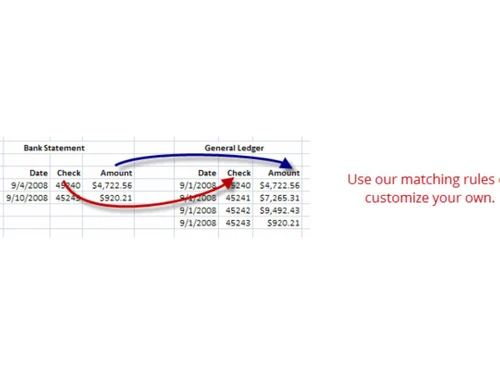
Bank Rec Customize

Bank Rec

Brand: Treasury Software

  • 4.2

  • 5 Ratings

Bank Rec is a reconciliation software designed to simplify and automate the bank reconciliation process for businesses of all sizes.

See More

Have you used Bank Rec before?

Share your insights for better experience

Add a Review

Price Available on Request

Questions about pricing or customization? We’re here to help, just a click away.

100% Genuine
Products
Best Price
Guaranteed
Safe & Secure
Payment
  • Description

  • Pricing

  • Features

  • Specification

  • Review

  • Compare

  • Alternatives

  • FAQ

Bank Rec Software Overview

What is Bank Rec?

Bank Rec is the unsung hero of the financial world, tackling the tedious task of bank reconciliation with gusto. This software turns the mind-numbing process of matching transactions and identifying discrepancies into a breeze, saving accountants from death by a thousand spreadsheet cells.

Think of Bank Rec as a financial detective, tirelessly combing through bank statements and ledgers to ensure every penny is accounted for. It's like having a team of eagle-eyed accountants working around the clock, but without the need for coffee breaks or overtime pay. Bank Rec doesn't just match transactions; it learns from patterns, flags anomalies, and even suggests solutions to discrepancies.

For businesses drowning in financial data, Bank Rec throws a lifeline of efficiency and accuracy. Its user-friendly interface means you don't need to be a tech wizard to navigate it. Whether you're reconciling a single account or managing a complex multi-entity structure, Bank Rec adapts to your needs. It's not just about balancing the books; it's about giving finance professionals the tools to make informed decisions and sleep better at night.

Why Choose Bank Rec?

  • Unparalleled Accuracy and Reliability: Its automated processes and exception management capabilities help businesses identify and resolve issues quickly, leading to reliable and trustworthy financial records.
  • Tailored to Specific Business Needs: Users can set custom rules, configure account mappings, and define reconciliation criteria, ensuring that the reconciliation process aligns precisely with their business needs, regardless of industry or complexity.
  • Seamless Integration and Automation: Bank Rec's automated data import and exception management capabilities further streamline the reconciliation process, minimising manual effort and improving efficiency.
  • Ease of Use and Accessibility: Its intuitive design and clear navigation allow users to quickly learn and navigate the software, even without prior experience in reconciliation tasks.
  • Dedicated Customer Support: This personalised support ensures that businesses can resolve queries quickly and efficiently, minimising disruptions to their reconciliation workflow.
  • Cloud-Based Accessibility: Bank Rec is a cloud-based solution, providing businesses with anytime, anywhere access to their reconciliation data.

Benefits of Bank Rec Reconciliation Software

  • Automated Data Import and Exception Management: Bank Rec automates the import of bank statements and detects exceptions, significantly reducing manual effort and the risk of errors. This streamlined process allows businesses to focus on analysing and resolving exceptions, improving reconciliation efficiency.
  • Multi-Currency Support: For businesses operating in global markets, Bank Rec provides multi-currency support, enabling them to reconcile transactions in different currencies and gain a consolidated view of their financial position.
  • Customizable Features: Users can set custom rules, configure account mappings, and define reconciliation criteria, ensuring that the reconciliation process aligns precisely with their business needs.
  • Real-Time Reporting and Analytics: Bank Rec provides real-time reporting and analytics, giving businesses instant access to financial data.
  • Improved Collaboration and Communication: Users can share notes, assign tasks, and track the progress of reconciliation tasks, ensuring transparency and accountability.
  • Reduced Risk of Fraud and Errors: Bank Rec's automated reconciliation process and exception management capabilities help businesses identify and address discrepancies quickly, reducing the risk of fraud and errors.

Pricing Of Bank Rec

Bank Rec pricing is available upon request at techjockey.com. The pricing model is based on different parameters, including the amount of bandwidth you need, the number of servers you need, and the features you need. For further queries related to the product, you can contact our product team and learn more about the pricing and offers.

Read more

Treasury Software Company Details

Founded Year:  1999

Treasury Software is actively involved in the banking and ACH community.

Director/Founders Glenn Fromer
Company Size 1-100 Employees

Bank Rec Pricing & Plans

Looking for The Right Pricing?

Share your requirements and get a plan built around your business.

  • Define your business needs
  • Get customised pricing
  • Choose features that fit your workflow

Price Available on Request

Get personalised Bank Rec pricing that fits your needs. Our team will connect with you.

Bank Rec Features

  • icon_check Data Import
    Seamlessly import data from various sources and formats.
  • icon_check Exception Management
    Identify and resolve data discrepancies and errors.
  • icon_check Bank Reconciliation
    Reconcile bank statements with accounting records for accuracy.
  • icon_check Data Validation
    Ensure data integrity and accuracy through automated validation rules.
  • icon_check Multi-Currency Support
    Manage transactions in multiple currencies with ease.
  • icon_check Cash Flow Forecasting
    Predict future cash flow patterns for informed decision-making.
  • icon_check Reporting & Analytics
    Generate customizable reports and analyse data for insights.
  • icon_check Audit Trail
    Maintain a complete history of all transactions for transparency and accountability.
  • icon_check Data Security
    Protect sensitive financial data with robust security measures.
Bank Rec Demo Video play icon

Get Bank Rec Demo

Watch the demo video to explore key features, real workflows, and how the software fits your business needs.

Understand
Key Features
Personal
Demo Insights
Interactive
Demo Support

Bank Rec Specification

Supported Platforms
Ubuntu Ubuntu Windows Windows MacOS MacOS Linux Linux
Devices
Desktop Desktop
Deployment
Web-Based Web-Based
Suitable For
All Industries
Business Specific
All Businesses
Business Size
Small Business Medium Business Enterprises
Customer Support
Email Communities
Language
English
Training Resources
Videos

Explore the Best Alternative Solutions Similar to Your Business Size and Needs

Bank Rec Review

4.2

Out of 5

img

Overall Rating

Based on
5 Verified Ratings

Rating Breakdown

  • Features 4.4
  • Value for Money 4.3
  • Ease of Use 4.2
  • Customer Support 4.2

92% Recommend this Product

Add Review

Techjockey Trusted Reviews from Verified Users

No reviews are currently available for Bank Rec. Discover similar Reconciliation Software reviews

  • OkCredit

    4.4

    Whats great - Completely free and very easy to use. read more

  • Sage Accounting

    4.3

    Whats great - User-Friendly Interface: Clean and intuitive dashboard, easy for beginners and non-accountants. Sage Accounting has been a ga... read more

  • Zoho Books

    4.5

    Whats great - Can be integrated with your online shoping websites like shopify, woocommerce and many more. read more

Compare Bank Rec With other Reconciliation Software

Products
Ratings
Pricing
Device Supported
Deployment
Supported Platforms
  • img

    Bank Rec

  • 4.2

  • Price On Request

  • Desktop

    Mobile

  • Web based

    On Premises

  • Windows

    Mac OS

  • img

    OkCredit

  • 4.3

  • Price On Request

  • Desktop

    Mobile

  • Web based

    On Premises

  • Windows

    Mac OS

  • img

    Adra Suite

  • 4.6

  • Price On Request

  • Desktop

    Mobile

  • Web based

    On Premises

  • Windows

    Mac OS

  • img

    Kani

  • 4.3

  • Price On Request

  • Desktop

    Mobile

  • Web based

    On Premises

  • Windows

    Mac OS

  • img

    ReconArt

  • 4.3

  • Price On Request

  • Desktop

    Mobile

  • Web based

    On Premises

  • Windows

    Mac OS

  • img

    FloQast

  • 4.2

  • Price On Request

  • Desktop

    Mobile

  • Web based

    On Premises

  • Windows

    Mac OS

  • img

    Gresham

  • 4.2

  • Price On Request

  • Desktop

    Mobile

  • Web based

    On Premises

  • Windows

    Mac OS

  • img

    Numeric

  • 4.3

  • Price On Request

  • Desktop

    Mobile

  • Web based

    On Premises

  • Windows

    Mac OS

  • img

    Duco

  • 4.2

  • Price On Request

  • Desktop

    Mobile

  • Web based

    On Premises

  • Windows

    Mac OS

  • img

    enReconcile

  • 4.5

  • Price On Request

  • Desktop

    Mobile

  • Web based

    On Premises

  • Windows

    Mac OS

  • img

    AutoRek

  • 4.3

  • Price On Request

  • Desktop

    Mobile

  • Web based

    On Premises

  • Windows

    Mac OS

(0) Product(s) selected

Bank Rec Alternatives

See All Bank Rec Alternatives

Available

Price on Request

Kani

4.3

Available

Price on Request

Available

Price on Request

Available

Price on Request

Available

Price on Request

How does Bank Rec work?

Bank Rec automates the bank reconciliation process. It matches transactions, identifies discrepancies, and generates reports to streamline financial reconciliation tasks.

Who are the potential users of Bank Rec?

Bank Rec is ideal for accountants, bookkeepers, and finance teams in businesses of all sizes. It helps professionals save time and reduce errors in bank reconciliation.

Which operating systems does Bank Rec support?

Bank Rec is likely a cloud-based platform accessible through web browsers. It should work on Windows, Mac, Linux, and other major operating systems.

Is there a Bank Rec mobile app?

No, there is no mobile app for Bank Rec. It is probably web-based, so you can access it through your smartphone's browser.

How much does Bank Rec cost?

Bank Rec's pricing is likely available upon request. You can contact techjockey.com for further information about pricing plans.

Does Bank Rec offer a free trial?

Bank Rec offers a free trial. You can contact techjockey to inquire about pricing plans.

How does Bank Rec improve financial accuracy?

Bank Rec automates the reconciliation process, reducing human error and providing a clear audit trail. This helps improve overall financial accuracy and compliance.

20,000+ Software Listed

Best Price Guranteed

Free Expert Consultation

2M+ Happy Customers

Terms and Condtions

close

Users with registered businesses can purchase goods from merchants on the platform to satisfy their business needs. Users are not permitted to utilize any products acquired through the platform for resale, advertising, business, or further distribution.

For each purchase made, users will receive a Tax Invoice (or 'GST invoice') that includes specific details such as:

  • the GSTIN of the user associated with their registered business, and

  • the specified Entity Name for their business.

It should be noted that not all products are eligible for GST Invoice. Only the products displayed by participating sellers with the 'GST-based Invoice Available' callout on the product description page would qualify.

Certain goods and services are not eligible to get a GST Invoice, including items with VAS, i.e., Value Added Services (e.g., Total Mobile Protection/Assured Buyback) and those involving an exchange offer at the time of purchase.

Users must ensure the accuracy of the GSTIN, and business entity name provided for the GST Invoice. Requests for corrections into GST Invoice would not be accommodated by Techjockey.com or any Seller, and any issues arising from user-provided information are the sole responsibility of users.

Techjockey.com is not liable for the GST Invoice or any associated input tax credit. To efficiently claim an input tax credit, users should select the registered place of business address as per the GST authority's data and follow the provisions of the GST Act and rules.

To claim an input tax credit, the delivery and billing addresses must match. Furthermore, input tax credits will not be granted if the delivery address and GSTIN on the invoice are from different states. In case of incorrect GST details provided during the order placement, the order will be canceled automatically.