 USA
USA UAE
UAESmall Business
Designed for startups and growing businesses


See More




Brand: Zoho Corporation
Zoho Books is the ultimate accounting software for small businesses, helping you track finances, automate invoices, and stay tax ready.
See MoreHave you used Zoho Books before?
Share your insights for better experience
View plans
 Save upto 18%, Get GST Invoice on your business purchase T&C Buy Now & Pay Later, Check offer on payment page.
 Brand: Zoho Corporation
Founded Year: 1996
Zoho Corporation is an Indian multinational company that specialises in software development, cloud computing, and web-based business tools. It is best known for Zoho Office suite and its enterprise IT management division, ManageEngine
Core Functionalities
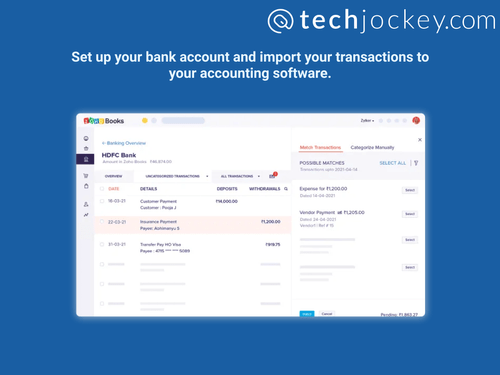
 Payroll Management Accounts Payable Accounts Receivable General Ledger Quotation & Estimates Alerts & Notifications Collection Management Credit / Debit Note Multi Currency Support Transaction Management Time & Expenses Management Statutory Compliances Bank Reconciliation Batch Management Gst Report Preparations Return Filings GST Input Reconciliations Document Management Tax Management Branch Management Receipt Management Bookkeeping Capabilities Bank Settlement Tds Report Generations Asset Management Fund Accounting Cost Centres Fixed Asset Register (FAR) Management Trial Balance Preparation Variant Analysis Broker Management Claims Management Sales Management
 Billing & Invoicing
Payment Processing Payment Tracking Invoice Processing Automatic Payment Reminders E-Way Bill Generation Bill Of Materials (BOM) Retail and Point of Sale
Point of Sale (POS) Retail Management Project and Workflow Management
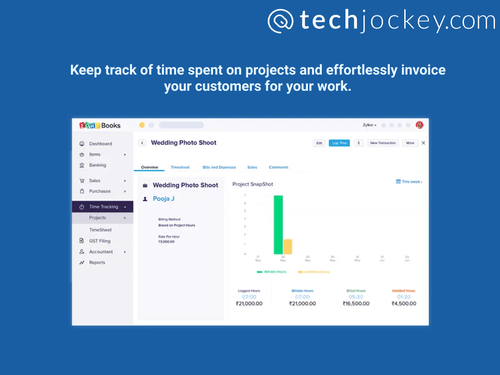
Transaction Management Time & Expenses Management Project Accounting Workflow Management Facility Management Production Management Inventory and Supply Chain Management
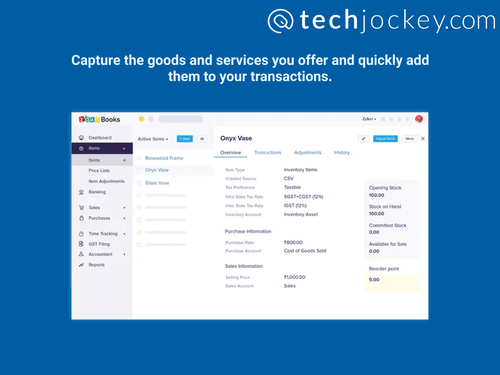
Vendor & Supplier Management Inventory Management Stock Management Item Master Warehouse Management Delivery Management Inventory Reconciliation Barcode Scanning Distribution Management Product Management Store Management Supply Chain Management Sales and CRM
Customer Management Order Management Quotation & Estimates CRM Capabilities Loyalty Program Sales Management Financial Management
Cash Flow Management Cash and Bank Management Budgeting & Forecasting Revenue Management Fund Accounting Fund Planning Net Worth Management Financial Planning & Analysis Integrations Supported
Import / Export Management Analytics and Reporting
Financial Statement Generation & Analysis Audit Management Financial Accounting and Reporting Profit & Loss Gross Profit Ratio Analysis Net Profit Management Profit Centers Administrative Features
Self Service Portal Admin Controls User Access Management Backup & Restore Ledger Scrutiny Facility Management Others
Digital Signature Reccuring Payments Auto Scan and Extract Transaction locking Multi Language Support PCI-DSS Certified Base currency adjustments 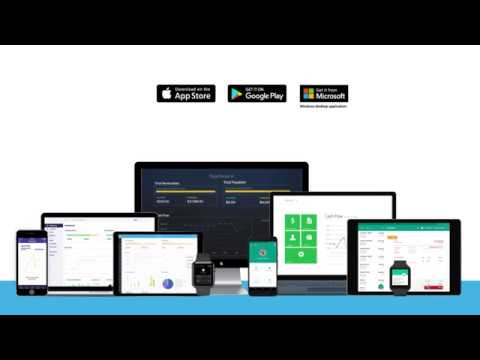

Watch the demo video to explore key features, real workflows, and how the software fits your business needs.
 Ubuntu
  Windows
  iOS
iOS  Android MacOS
  Linux
Linux  Desktop
  Mobile
  Tablet
  iPad
iPad  Cloud-Based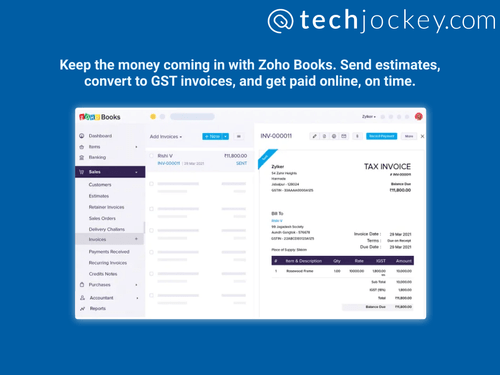
Small Business
Designed for startups and growing businesses
Medium Business
Built for business growth and flexibility
Enterprises
Designed for complex and large-scale business needs
4.5
Out of 5

Overall Rating
Based on
58 Verified Reviews
Rating Breakdown
92% Recommend this Product
Add ReviewOverall, users express strong satisfaction with Zoho Books, appreciating its user-friendly interface, seamless integration with other Zoho products, and time-saving automation features. Many find it particularly beneficial for managing invoicing and accounting tasks efficiently. However, some users have noted limitations, such as the need for improved customer support, challenges with data extraction and reporting capabilities, and the absence of certain advanced features like payroll services. Despite these concerns, the software is generally seen as a cost-effective solution for small to medium-sized businesses.
Pros
"The simplicity and seamless and offers perfect integration capabilities which makes it my go to choice"
"Zoho Books saves me time and energy by automating report generation and operational decisions."
"I liked that Zoho Books connected to my accounts and was included in my Zoho One subscription until it stopped working."
Cons
"There's nothing I dislike. It works well and is good value for money"
"The support team needs improvement and should include more professionals."
"Handling business expense reports can be time-consuming, especially with multiple entities. The data extraction and report formats need improvement."



Aug 16, 2018
Techjockey Verified
“Very Impressive features”
Pros
Can be integrated with your online shoping websites like shopify, woocommerce and many more.
Cons
Zoho attracts consumer by quoting very less fees for 1st year but from next years there is steep increase in charges.
Feb 10, 2019
Techjockey Verified
“Booking Made Simple”
Pros
It is very easy to use and Zoho books made bookkeeping very simple. Individuals and SMBs can easily adopt.
Cons
There is no way to scale up complete process automate...we need to import over and over again which is hectic
Reason to switch
To automate our expenses, track payment, and generate invoices.
Mar 23, 2024
Techjockey Verified
“Streamlining Accounting Processes with Zoho Books”
Great features include automatic adjustment of banking modules, cloud storage, easy remote access, analytics and advanced intelligence with Zoho Analytics and Zoho Books, and integration with amazing payment strategies like PayPal and Stripe, you can process many payments and track them through robot updates.
Pros
Zoho Books makes it easy to monitor invoices, sort them by various criteria, and integrate with services such as Paypal, Payflow Pro, and Square. Its standout features include automated reconciliation in the banking module, GST compliance, and integration with Zoho analytics for insightful dashboards. Additionally, it can easily integrate with other Zoho suite products like Zoho CRM.
Cons
Generating businesses expenditure reports can be time-consuming, especially for multiple business entities. Navigating between different company views can lead to errors in data entry. Zoho Books could improve data extraction, as the excel output often has formatting issues. Additionally, the online display of reports like the Balance Sheet and P&L could be more user-friendly.
Reason to switch
Zoho Books is a comprehensive accounting solution that organizes receivables, payables, invoices, and estimates in one place. Its seamless integration with other Zoho apps like CRM streamlines tasks such as customer creation and linking quotes and invoices to CRM activities. With its rich features and integration with other Zoho applications, Zoho Books helps tackle complex business challenges effectively.

Zoho Books
₹ 899.00 excl. GST
Desktop
Mobile
Web based
On Premises
Windows
Mac OS
Busy Accounting Software
Price On Request
Desktop
Mobile
Web based
On Premises
Windows
Mac OS
iAccounting
Price On Request
Desktop
Mobile
Web based
On Premises
Windows
Mac OS

TallyPrime
Price On Request
Desktop
Mobile
Web based
On Premises
Windows
Mac OS
LedgerX
Price On Request
Desktop
Mobile
Web based
On Premises
Windows
Mac OS

LedgerFlo
₹ 2999
Desktop
Mobile
Web based
On Premises
Windows
Mac OS
DualEntry
Price On Request
Desktop
Mobile
Web based
On Premises
Windows
Mac OS

Marg ERP 9+
Price On Request
Desktop
Mobile
Web based
On Premises
Windows
Mac OS
GBooks
Price On Request
Desktop
Mobile
Web based
On Premises
Windows
Mac OS

Stock And Account Book
₹ 7999
Desktop
Mobile
Web based
On Premises
Windows
Mac OS

Sage Intacct
Price On Request
Desktop
Mobile
Web based
On Premises
Windows
Mac OS
(0) Product(s) selected
Available
Price on Request
Starting Price:
₹750 /Month
Available
Price on Request
Starting Price:
₹2,999 /Year
Available
Price on Request
Available
Price on Request
Starting Price:
₹7,999 /Year
Available
Price on Request

Starting Price:
₹699
Available
Price on Request

Available
Price on Request


Well, you can make use of Zoho Books on a trial-based model. That is, when you sign up for Zoho Books, you'll get a free trial period of 14 days. So, you can easily explore the key features and functionalities during the 14-day trial. If you find 2 weeks less to evaluate the accounting solution's overall effectiveness, you can extend the trial period by 14 days.
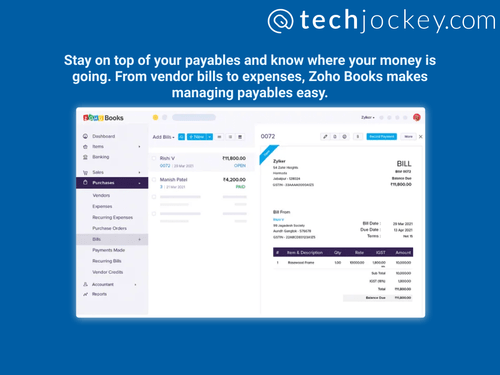
Zoho Books is a comprehensive accounting platform that is your one-stop destination for seamlessly managing your accounting tasks and organising all your financial transactions.
Yes, Zoho Books is an easy-to-use accounting solution with a clean UI and a simple dashboard for the users to easily manage and monitor all their financial transactions.
Under a standard plan, you can have 3 users to use the platform; however, if you opt for a professional plan, you can have unlimited users.
You can easily attach up to 10 files of 5 MB each to the invoices you create in Zoho Books.
You can easily add unlimited bank accounts in Zoho Books.
Yes, Zoho Books is available on Android and iOS devices.
Zoho Books supports web-based deployment.
Yes, you can get a free trial for using Zoho Books for 14-days.
Zoho Books standard pricing plan starts from INR 899. It is a basic and affordable plan that allows 3 users to use the platform along with email support.
Zoho Books works well with Windows, macOS, Android, and iOS operating systems.
You can get a free demo of Zoho Books at techjockey.com. To know more about the details, you can also contact their product experts, who will explain how to use a free demo.
To record GST on Zoho Books, follow the steps given below:
0 0
A journal entry in Zoho Books is a record of a business transaction that can be made manually or automatically. To make a Journal entry in Zoho Books, follow the steps given below:
0 0
Zoho Books is a good choice for small and medium-sized enterprises in a variety of industries that require reliable accounting solutions, as it provides its users with features like project management, expense tracking, invoicing, and tax compliance. It's incredibly flexible for independent contractors, new companies, and well-established enterprises.
0 0
Zoho's certified consultants and resellers, who are trained in customizing and configuring Zoho Books for business requirements, are the best partners for Zoho Books implementation.
0 0
Yes, Zoho Books is a good choice for small businesses because of its cost-effectiveness, ease of use, and wide range of features, which includes tax administration, expense monitoring, and invoicing.
0 0
20,000+ Software Listed
Best Price Guranteed
Free Expert Consultation
2M+ Happy Customers
Terms and Condtions

Users with registered businesses can purchase goods from merchants on the platform to satisfy their business needs. Users are not permitted to utilize any products acquired through the platform for resale, advertising, business, or further distribution.
For each purchase made, users will receive a Tax Invoice (or 'GST invoice') that includes specific details such as:
the GSTIN of the user associated with their registered business, and
the specified Entity Name for their business.
It should be noted that not all products are eligible for GST Invoice. Only the products displayed by participating sellers with the 'GST-based Invoice Available' callout on the product description page would qualify.
Certain goods and services are not eligible to get a GST Invoice, including items with VAS, i.e., Value Added Services (e.g., Total Mobile Protection/Assured Buyback) and those involving an exchange offer at the time of purchase.
Users must ensure the accuracy of the GSTIN, and business entity name provided for the GST Invoice. Requests for corrections into GST Invoice would not be accommodated by Techjockey.com or any Seller, and any issues arising from user-provided information are the sole responsibility of users.
Techjockey.com is not liable for the GST Invoice or any associated input tax credit. To efficiently claim an input tax credit, users should select the registered place of business address as per the GST authority's data and follow the provisions of the GST Act and rules.
To claim an input tax credit, the delivery and billing addresses must match. Furthermore, input tax credits will not be granted if the delivery address and GSTIN on the invoice are from different states. In case of incorrect GST details provided during the order placement, the order will be canceled automatically.



