 USA
USA UAE
UAESmall Business
Designed for startups and growing businesses

See More





Brand: CompuTax
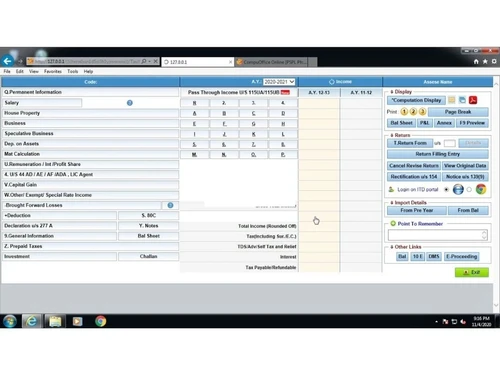
CompuTax is one of the best income tax management and TDS software in India which streamlines daily operations with much-needed ease and simplicity. This income tax software provides direct access to the GST portal for filing taxes and digitalizes all the workflows for quicker operability.
See MoreHave you used CompuTax before?
Share your insights for better experience
Brand: CompuTax
Founded Year: 1989
Largest Taxation Software company in India, Approved as GST Suvidha Provider(GSP) with Goods and Services Tax Network(GSTN), Highest no. of Income Tax returns filed through CompuTax in India among private software providers,
Looking for The Right Pricing?
Share your requirements and get a plan built around your business.
Price Available on Request
Get personalised CompuTax pricing that fits your needs. Our team will connect with you.
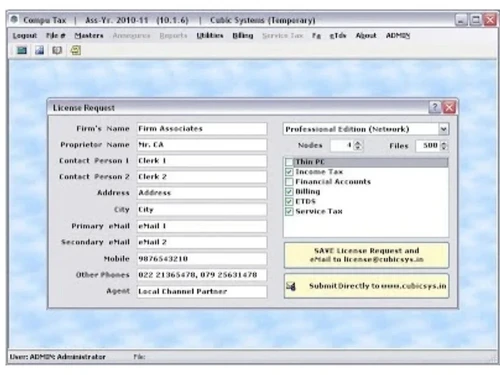
 PAN Verification File e-TDS Generate Form-16s Import Data ITR Preparation File Transfer Interest Calculation Income Tax Filing Link Aadhar with PAN & Generate EVC ITR Filing Tax Calculation File TDS

Watch the demo video to explore key features, real workflows, and how the software fits your business needs.


 Windows
  Android
  Desktop
  Mobile
  Perpetual
Small Business
Designed for startups and growing businesses
Medium Business
Built for business growth and flexibility
Enterprises
Designed for complex and large-scale business needs
3.7
Out of 5

Overall Rating
Based on
21 Verified Reviews
Rating Breakdown
60% Recommend this Product
Add ReviewCustomer sentiment towards CompuTax is largely negative, with many users expressing frustration over poor customer support and service reliability, especially during critical filing periods. While some users appreciate the software's functionality and ease of use, others report significant delays in receiving assistance and unresolved issues. Complaints about unresponsive support and software crashes are common, leading to recommendations against the product from several reviewers. A few positive experiences do exist, but they are overshadowed by the predominant dissatisfaction regarding support and service reliability.
Pros
"Product is good, but there is no customer support. Not satisfied with the service."
"I don't Like the product which does not give result when I need."
"Computax is a good product. For 10 year i have used the product but I have faced no problem."
Cons
"Very big list. But only one advise. Don't buy this product. I have all the proof and going to sue in customer court."
"Everything. Some times It Is So Slow That it Works Worse Than Govt. Utility."
"Currently it is not compatible with Google Chrome as a result the software misses out on such functionalities as automatic back-ups and regular automatic updates."

Nov 25, 2019
Techjockey Verified
“Data analysis and reporting made easier”
Pros
Data analysing and reports preparing is quite easy with CompuTax GST. It provides various types of reports, which help in preparing reconciliation.
Cons
It doesn't update the data filed and populated on GST portal by itself. We have to update and refresh the software every time we login the software. Filing of GSTR-1 is also complicated with CompuTax.
Reason to switch
The software gives simplified GST functions
May 20, 2020
Techjockey Verified
“I am satisfied with the software as it consumes less time, is easy to use and ensures smooth functioning.”
Pros
Besides being easy to use, the software has a smooth operating process.
Cons
Currently it is not compatible with Google Chrome as a result the software misses out on such functionalities as automatic back-ups and regular automatic updates.
Reason to switch
Attractive Prices
Apr 17, 2019
Techjockey Verified
“Best GST software for tax professionals and tax consultants. I would recommend this software to all tax professionals.”
Pros
GST2A matching concept is amazing and so is GST2A reporting. I think this is the best software, which provides so many types of reports. GSTR3B offset summary and GSTR 1 reporting is also very good.
Cons
This software needs to run on Google Chrome, software speed is slow, Currently, no web version is available, GSTR1 amendment reporting is not working properly
Reason to switch
Reporting feature

CompuTax
Price On Request
Desktop
Mobile
Web based
On Premises
Windows
Mac OS

EasyOFFICE
₹ 3900
Desktop
Mobile
Web based
On Premises
Windows
Mac OS

GEN Income Tax
₹ 7000
Desktop
Mobile
Web based
On Premises
Windows
Mac OS

TdsPac
Price On Request
Desktop
Mobile
Web based
On Premises
Windows
Mac OS

FreeTaxUSA
Price On Request
Desktop
Mobile
Web based
On Premises
Windows
Mac OS

TaxCloud
Price On Request
Desktop
Mobile
Web based
On Premises
Windows
Mac OS

GEN Genius
₹ 7000
Desktop
Mobile
Web based
On Premises
Windows
Mac OS

DAVO
Price On Request
Desktop
Mobile
Web based
On Premises
Windows
Mac OS

ClearTax Income Tax
Price On Request
Desktop
Mobile
Web based
On Premises
Windows
Mac OS

Saral IncomeTax
₹ 5500
Desktop
Mobile
Web based
On Premises
Windows
Mac OS

Eztax It Filing
₹ 990
Desktop
Mobile
Web based
On Premises
Windows
Mac OS
(2) Product(s) selected
Available
Price on Request
Available
Price on Request
Starting Price:
₹2,999 /quantity
Starting Price:
$58 /Month
Available
Price on Request

Starting Price:
$25

Starting Price:
₹899 /User/Year

Starting Price:
₹6,000

Available
Price on Request

Available
Price on Request


CompuTax Income Tax Software is the easiest way to e-File your Income Tax Return in India. computax system requirements remakes e-Filing incredibly simple with great software and design.
Yes, CompuTax is GST compliant. You can also accommodate CompuTax with the changes made in GST rates by the government.
CompuTax lets you file your income tax with a single click. You don’t even need to visit the income tax website for it.
CompuTax is required by Chartered Accountants, Tax Practitioners, Corporates for Income Tax, TDS, Service Tax, VAT, etc
CompuTax does not have a mobile app. However, CompuTax is fully operational on browsers, you can access CompuTax from your smartphone browsers.
Computax price starts from Rs. 4008.5/- per annum and comes in 9 different plans.
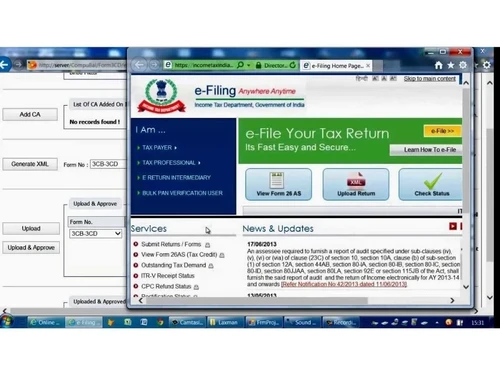
To file ITR in computax software, first come to PSPL server> Upload the ITR on department server > Once uploaded, the server processing may take 10 minutes to 24 hours. After processing, you will receive a token number and it’s done.
First click on TDS> select client> select year> click “ok”. click on TDS entry> select your entry (insurance, rent, contract, commission etc.)> Select deductee’s entry> click ok.> Now enter date> click on “add more” to add new entry, > select a new entry> and click on save and exit. Find your TDS at the bottom of the page.
Click on E-TDS return> Enter Captcha> Download the CSI file> Now browse the CSI file>click “Open”> You will see PRN of last file original statement will show> Click on “Continue”> Add/correct your PAN card details. > Now click on “Verify” and enter the details. > Once verified, it will notify you. After that check your PAN no., pincode and other details. And click “continue” and “continue” again. The file will be generated and will be ready for you to download.
Once you delete a client in computax, it gets deleted permanently. Hence, you should be very careful with it.> First you click on “Utilities”,> click on “Delete parties”. > You will see a list of clients and companies.> Select an entry you want to delete and click “Ok”. > It will ask for your reconfirmation if you want to delete it. > Click on “Ok” and it will get deleted.
20,000+ Software Listed
Best Price Guranteed
Free Expert Consultation
2M+ Happy Customers
Terms and Condtions

Users with registered businesses can purchase goods from merchants on the platform to satisfy their business needs. Users are not permitted to utilize any products acquired through the platform for resale, advertising, business, or further distribution.
For each purchase made, users will receive a Tax Invoice (or 'GST invoice') that includes specific details such as:
the GSTIN of the user associated with their registered business, and
the specified Entity Name for their business.
It should be noted that not all products are eligible for GST Invoice. Only the products displayed by participating sellers with the 'GST-based Invoice Available' callout on the product description page would qualify.
Certain goods and services are not eligible to get a GST Invoice, including items with VAS, i.e., Value Added Services (e.g., Total Mobile Protection/Assured Buyback) and those involving an exchange offer at the time of purchase.
Users must ensure the accuracy of the GSTIN, and business entity name provided for the GST Invoice. Requests for corrections into GST Invoice would not be accommodated by Techjockey.com or any Seller, and any issues arising from user-provided information are the sole responsibility of users.
Techjockey.com is not liable for the GST Invoice or any associated input tax credit. To efficiently claim an input tax credit, users should select the registered place of business address as per the GST authority's data and follow the provisions of the GST Act and rules.
To claim an input tax credit, the delivery and billing addresses must match. Furthermore, input tax credits will not be granted if the delivery address and GSTIN on the invoice are from different states. In case of incorrect GST details provided during the order placement, the order will be canceled automatically.




