linkedin
Copy Ai logo
play How to Generate Blog Posts From Briefs Using Copy.ai
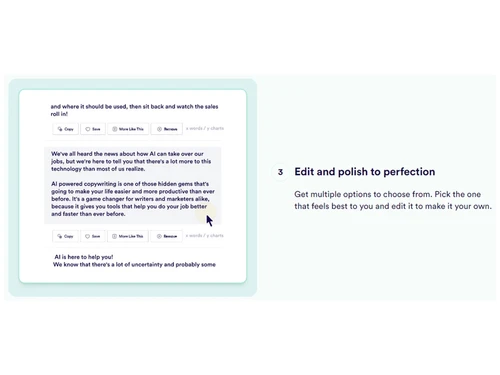
copy.ai editing
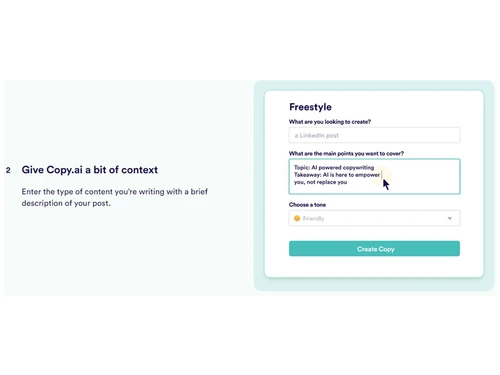
copy.ai frestryle

Copy Ai

Brand: copy.ai

  • 4.1

  • 3 Ratings & 3 Reviews

Copy.ai is an AI copywriting assistance tool that helps you create compelling content quickly and easily.

See More

Have you used Copy Ai before?

Share your insights for better experience

Add a Review
Starting Price
$49

View plans

100% Genuine
Products
Best Price
Guaranteed
Safe & Secure
Payment
  • Description

  • Pricing

  • Features

  • Specification

  • Review

  • Compare

  • Alternatives

  • FAQ

Starting at $49

Copy Ai Software Overview

What is Copy.ai?

Copy.ai is an AI writing tool that uses natural language processing (NLP) and machine learning (ML) to generate high-quality content for various purposes. The tool is designed to help content creators, copywriters, and marketers automate their writing process to save time and increase productivity.

Copy.ai is designed to save time and effort for content creators, copywriters, and marketers to automate their writing process to save time and increase productivity. It can help users come up with new ideas, overcome writer's block, and improve the overall quality of their writing.

With Copy.ai, you can create marketing copy, blog posts, social media posts, product descriptions and more with just a few clicks.

How Does Copy AI Work?

Copy.ai uses natural language processing (NLP) and machine learning (ML) to understand the context, analyse existing text patterns, and generate new text that follows those patterns. Users can input a few keywords or prompts related to the type of text they want to create, and Copy.ai will generate multiple options for them to choose from.

The tool has access to a large database of writing samples, which it uses to learn and improve over time. Copy.ai also offers several AI models, such as long-form assistants, short-form assistants, and blog ideas, which are tailored to specific content types.

The tool also has various settings and customisation options, allowing users to adjust the generated text's tone, style, and format to fit their needs better.

What Are The Key Features of Copy.ai?

Some of the top features of Copy.ai include:

  • AI-powered content generation: Copy.ai is powered by advanced artificial intelligence (AI) technology that can generate high-quality content for various use cases.
  • Customisable writing models: Copy.ai offers a wide range of writing models, each designed to match specific content types and styles.
  • SEO-friendly content generation: Copy.ai can help you generate SEO-friendly content by providing relevant keywords and phrases to include in your content.
  • Collaboration tools for teams: With the platform's Team feature, you can invite team members to collaborate on content projects, assign tasks, and track progress.
  • Integration with popular platforms: It can be integrated with many popular platforms, including WordPress, Shopify, and Zapier. This allows you to incorporate the content you generate with Copy.ai seamlessly.
  • Multi-language support: It supports multiple languages, making it a versatile tool for global brands and businesses. Currently, the platform supports English, French, German, Italian, Portuguese, Spanish, and Dutch.
  • Dedicated customer support: The platform's support team is available via email, chat, or phone and can assist with everything from technical issues to content creation advice.
  • Time saving and Productivity boosting: By automating the content creation process, Copy.ai frees up time for content creators, copywriters, and marketers to focus on other tasks. This can lead to increased efficiency and productivity,

What Are The Benefits of Using Copy.ai?

Some benefits of using Copy.ai include:

  • Saves time and increases productivity
  • It helps you write high-quality content faster
  • Provides content ideas and suggestions
  • Generates SEO-friendly content
  • It helps you beat writer's block
  • It can be used for a wide range of content types
  • Works with multiple languages
  • Offers a collaborative writing feature for teams

How to Write with Copy.ai?

To start writing with Copy.ai, follow these steps:

  1. Choose a plan that suits your needs. Purchase a license from Techjockey.com.
  2. Sign up for a Copy.ai account and login with the credentials.
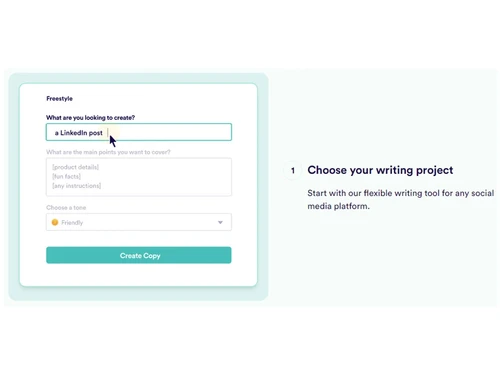
  3. Choose the type of content you want to create, such as blog posts or social media captions.
  4. Input a brief description or prompt for the content you want to create.
  5. Choose a writing model that matches the content type and tone you want to achieve.
  6. Review and edit the generated content, making any necessary changes to ensure it matches your brand's voice and style.
  7. Use the generated content in your marketing campaigns or website.

How Much Do Copy.ai Costs?

Copy.ai offers two plans along with a free trial: Pro and Enterprise.

The pro plan costs $36 per month, and Custom plans are also available for larger teams or enterprises on request at Techjockey.com.

All plans offer access to all writing models, multi-language support, and integration with popular platforms.

Read more

copy.ai Company Details

Founded Year:  2020

CopyAI is a startup building AI-powered copywriting tools for business customers.

Director/Founders Chris Lu, Paul Yacoubian
Company Size 1-100 Employees

Copy Ai Pricing & Plans

Starter
Starting at $49
    • Licenses

      Licenses
      Licenses
    • Monthly

      Monthly
      Monthly

Key Features

  • 1 Seat

  • Unlimited Words in Chat

  • Unlimited Chat Projects

  • Access to all latest LLMs

  • Private Community Access

Advanced
Starting at $249
    • Licenses

      Licenses
      Licenses
    • Monthly

      Monthly
      Monthly

Key Features

  • Up to 5 Seats

  • 2k Workflow Credits / Mo.

  • 15+ Marketing Workflows

  • 15+ Sales Workflows

  • Workflow Builder Access

Copy Ai Features

Core Writing & Editing Tools

  • icon_check Paraphrasing
    Rewrites content dynamically for clarity, tone, or style changes.
  • icon_check Content Formatting
    Structures content for platforms like ads, blogs, and social media.
  • icon_check Tone & Style Customization
    Adjusts content to match desired tone and audience preferences.
  • icon_check Grammar & Punctuation
    Detects and corrects grammar and punctuation errors in real time.
  • icon_check Content Scoring
    Rates content quality for engagement, SEO, and readability.
  • icon_check Audience Targeting
    Customizes content for specific demographics and personas.

Content Generation

  • icon_check SEO-Optimized Content
    Suggests and integrates keywords for better search engine rankings.
  • icon_check Video Script Generation
    Creates professional scripts for promotional and explainer videos.
  • icon_check Email Drip Campaigns
    Automates email sequences to nurture leads and boost engagement.
  • icon_check Ad Copy Creation
    Generates compelling ad content tailored for platforms like Google and Facebook.
  • icon_check Landing Page Copy
    Writes persuasive content to maximize conversions on landing pages.
  • icon_check Upselling & Cross-Selling Copy
    Suggests effective copy for bundling and complementary sales.
  • icon_check Product Descriptions
    Writes concise, persuasive descriptions for e-commerce listings.
  • icon_check Headlines & CTAs
    Creates engaging headlines and actionable CTAs to boost conversions.
  • icon_check Retargeting Ads
    Crafts personalized ads to re-engage potential customers.

Collaboration & Workflow

  • icon_check Team Collaboration
    Supports multi-user editing and real-time collaboration features.
  • icon_check Approval Workflows
    Assigns roles for drafting, reviewing, and approving content.
  • icon_check Version Control
    Tracks and restores changes to maintain editing transparency.
  • icon_check Export & Sharing Options
    Allows content downloads in various formats or direct publishing.

Integrations

  • icon_check API Integration
    Connects with external platforms to enhance functionality and streamline workflows.
  • icon_check CRM Integration
    Syncs with Salesforce, HubSpot, and other CRM tools for data-driven content.
  • icon_check CMS Integration
    Direct publishing to CMS platforms like WordPress and Shopify.
  • icon_check Email Marketing Tools
    Integrates with platforms like Mailchimp and ActiveCampaign.
  • icon_check Ad Platform Integration
    Connects with Google Ads, Facebook Ads, and LinkedIn Ads.
  • icon_check Third Party Integrations
    Extends compatibility with analytics and marketing tools.

Analytics & Reporting

  • icon_check Performance Analytics
    Provides real-time data on content reach, CTR, and engagement.
  • icon_check Predictive Analysis
    Forecasts content success based on historical performance.
  • icon_check A/B Testing
    Automatically generates and tracks variations for performance comparison.
  • icon_check Behavioral Insights
    Analyzes user behavior to optimize content engagement.
  • icon_check Content ROI Analysis
    Tracks how content impacts sales and lead generation.

AI Capabilities

  • icon_check Plagiarism Detection
    Ensures content originality with AI-driven checks.
  • icon_check Summarisation
    Condenses long-form content into concise, impactful summaries.
  • icon_check Content Optimization Suggestions
    Recommends improvements for tone, SEO, and readability.
  • icon_check Custom Prompts
    Allows user-defined instructions for unique content generation.
  • icon_check AI Content Variation
    Generates multiple content variations for testing or personalization.
  • icon_check Multi-Model Support
    Utilizes various AI models for better content adaptability.

Security and Compliance

  • icon_check Data Encryption
    Secures sensitive data with encryption at rest and in transit.
  • icon_check GDPR Compliant
    Adheres to EU data privacy and user rights regulations.
  • icon_check SOC 2 Compliance
    Ensures secure handling of customer data per industry standards.
  • icon_check AI Act Compliance
    Complies with European AI ethical and risk-based standards.
  • icon_check Ad Compliance Checks
    Validates content against advertising platform policies.
  • icon_check Regulatory Compliance
    Meets industry-specific legal requirements like HIPAA or CCPA.
  • icon_check Bias Mitigation
    Identifies and reduces biases in AI-generated content.
  • icon_check Audit Logs
    Tracks user activity and system changes for accountability.

Administrative Features

  • icon_check API Access
    Provides programmatic access to tool features for custom integrations and automation.
  • icon_check User Access Management
    Controls user permissions and monitors access levels across the platform.
  • icon_check Role-Based Access Control (RBAC)
    Assigns permissions based on user roles to enhance security and manage access.
  • icon_check Team Management
    Organizes users into teams with specific roles for streamlined collaboration and accountability.
  • icon_check Data Loss Prevention
    Protects against accidental or malicious data breaches, ensuring secure handling of information.
Copy Ai Demo Video play icon

Get Copy Ai Demo

Watch the demo video to explore key features, real workflows, and how the software fits your business needs.

Understand
Key Features
Personal
Demo Insights
Interactive
Demo Support

Copy Ai Specifications

Supported Platforms
Ubuntu Ubuntu Windows Windows MacOS MacOS Linux Linux
Devices
Desktop Desktop Mobile Mobile Tablet Tablet iPad iPad
Deployment
Cloud-Based Cloud-Based
Suitable For
All Industries
Business Specific
All Businesses
Business Size
Small Business Startups Medium Business Enterprises SMBs SMEs MSMBs MSMEs
Customer Support
Email Communities
Language
English
Integration
API Integration
Training Resources
Videos
AI Features
AI Integrated

Explore the Best Alternative Solutions Similar to Your Business Size and Needs

Copy Ai Reviews

4.1

Out of 5

img

Overall Rating

Based on
3 Verified Reviews

Rating Breakdown

  • Features 4.3
  • Value for Money 4
  • Ease of Use 4.3
  • Customer Support 4

90% Recommend this Product

Add Review

Copy Ai Video Review

youtubeVideoId

4.3

“Copy AI Review & Demo Copy AI Creates Full Length Blog Posts”

Review by: VIDSociety

Shubham linkedin_verify

Editor

Industry: IT

4.2

Reviewed on: Feb 12, 2025

Techjockey Verified

“Copy AI is the Best Copywriting Tool—No Doubt!”

Copy AI is hands down the best AI copywriting software out there! The pre-made templates make content creation super easy, with tons of options to choose from. Whether you need social media posts, product descriptions, company bios, or even full blog drafts, Copy AI has you covered. As a blogger, I’m especially amazed by its blog content generator—it delivers impressive first drafts every time!

Pros

Diverse Content Templates: Copy.ai provides over 90+ templates for different content types, including social media captions, product descriptions, blog intros, and email copy. Fast Blog Draft Generation: The blog content first draft generator helps bloggers quickly create structured drafts, making it easier to start writing and refine the content.

Cons

Lacks Depth in Long Form Content. While Copy.ai generates blog drafts quickly, the content often feels repetitive or generic.

Switched from Writerly AI

Reason to switch

Needed a better tool that can handle all my copywriting needs.

Opuere Odu

Freelancer

Industry: Writing and Editing User since: 1-2 years

4

Reviewed on: Jun 7, 2023

Techjockey Verified

“Copy AI is better than most AI writing softwares.”

Pros

Copy AI generates the best quality output. Its chat feature can be trained on user input, and the tool is very helpful for writing blogs and video scripts.

Cons

The original writing style of Copy AI's chatbot is too robotic, and it italicizes and bolds text unnecessarily.

Switched from Anyword

Compare Copy Ai With other Copywriting Tools

Products
Ratings
Pricing
Device Supported
Deployment
Supported Platforms
  • img

    Copy Ai

  • 4.1

  • Price On Request

  • Desktop

    Mobile

  • Web based

    On Premises

  • Windows

    Mac OS

  • img

    Copymatic

  • 4.4

  • Price On Request

  • Desktop

    Mobile

  • Web based

    On Premises

  • Windows

    Mac OS

  • img

    Botowski

  • 4.6

  • Price On Request

  • Desktop

    Mobile

  • Web based

    On Premises

  • Windows

    Mac OS

  • img

    Writerly AI

  • 4.5

  • Price On Request

  • Desktop

    Mobile

  • Web based

    On Premises

  • Windows

    Mac OS

  • img

    ClosersCopy

  • 4.2

  • Price On Request

  • Desktop

    Mobile

  • Web based

    On Premises

  • Windows

    Mac OS

  • img

    Copysmith

  • 4.2

  • Price On Request

  • Desktop

    Mobile

  • Web based

    On Premises

  • Windows

    Mac OS

  • img

    Gerwin

  • 4.3

  • Price On Request

  • Desktop

    Mobile

  • Web based

    On Premises

  • Windows

    Mac OS

  • img

    CopyKatAI

  • 4.3

  • Price On Request

  • Desktop

    Mobile

  • Web based

    On Premises

  • Windows

    Mac OS

  • img

    Craftly AI

  • Price On Request

  • Desktop

    Mobile

  • Web based

    On Premises

  • Windows

    Mac OS

  • img

    GoCopy

  • 4.2

  • Price On Request

  • Desktop

    Mobile

  • Web based

    On Premises

  • Windows

    Mac OS

  • img

    Localio

  • 4.4

  • Price On Request

  • Desktop

    Mobile

  • Web based

    On Premises

  • Windows

    Mac OS

(0) Product(s) selected

Copy Ai Alternatives

See All Copy Ai Alternatives

Articles for Copy Ai

See All Related Articles

Which operating system does Copy.ai support?

Copy.ai AI Writing Assistants is compatible with Windows operating systems.

Is there any Copy.ai app?

Copy.ai AI Writing Assistants app is not available.

What is deployment type of Copy.ai?

Copy.ai AI Writing Assistants supports Web-Based.

Who are the potential users of Copy.ai?

Copy.ai AI Writing Assistants is typically used in All Industries.

Is there any Copy.ai demo or free trial?

Copy.ai demo is available for free with Techjockey.com. Please request a call back.

Is Copy.ai free?

Copy.ai AI Writing Assistants offers a free trial. However, the premium plan with advanced features available at Techjockey.com.

How can you download Copy.ai?

For Copy.ai installation, insert the given CD/USB flash storage in your system and open the Setup Wizard to get started. The web-based version can be accessed directly through Copy.ai portal.

How does Copy.ai work?

Copy.ai AI Writing Assistants helps with Better Lead Control,Social Media Content Moderation,Website Content Management and eCommerce. It's a complete solution for Blog and Sales Conversion.

Are there any hidden charges for Copy.ai updates?

Copy.ai regular updates are available free of cost. There are no hidden software update charges.

What is Copy.ai used for?

Copy.ai AI Writing Assistants used for Better Lead Control,Social Media Content Moderation,Website Content Management and eCommerce.

How do I contact Copy.ai support?

You can directly visit Copy.ai portal and get in touch with Copy.ai customer support for any software-related query.

How to get Copy.ai lifetime deal?

Please contact our product experts to get Copy.ai lifetime deal with exclusive offers.

20,000+ Software Listed

Best Price Guranteed

Free Expert Consultation

2M+ Happy Customers

Terms and Condtions

close

Users with registered businesses can purchase goods from merchants on the platform to satisfy their business needs. Users are not permitted to utilize any products acquired through the platform for resale, advertising, business, or further distribution.

For each purchase made, users will receive a Tax Invoice (or 'GST invoice') that includes specific details such as:

  • the GSTIN of the user associated with their registered business, and

  • the specified Entity Name for their business.

It should be noted that not all products are eligible for GST Invoice. Only the products displayed by participating sellers with the 'GST-based Invoice Available' callout on the product description page would qualify.

Certain goods and services are not eligible to get a GST Invoice, including items with VAS, i.e., Value Added Services (e.g., Total Mobile Protection/Assured Buyback) and those involving an exchange offer at the time of purchase.

Users must ensure the accuracy of the GSTIN, and business entity name provided for the GST Invoice. Requests for corrections into GST Invoice would not be accommodated by Techjockey.com or any Seller, and any issues arising from user-provided information are the sole responsibility of users.

Techjockey.com is not liable for the GST Invoice or any associated input tax credit. To efficiently claim an input tax credit, users should select the registered place of business address as per the GST authority's data and follow the provisions of the GST Act and rules.

To claim an input tax credit, the delivery and billing addresses must match. Furthermore, input tax credits will not be granted if the delivery address and GSTIN on the invoice are from different states. In case of incorrect GST details provided during the order placement, the order will be canceled automatically.