USA
USA UAE
UAESmall Business
Designed for startups and growing businesses


See More




Brand: COUPA
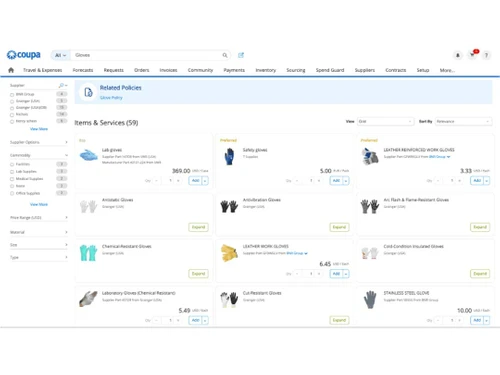
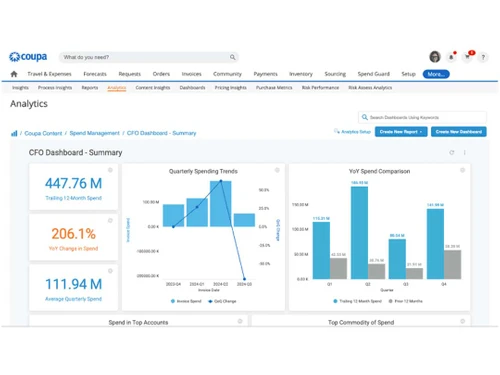
Coupa is a cloud-based procurement software that automates purchasing, invoicing, and spending management for businesses.
See MoreHave you used Coupa Procurement Software before?
Share your insights for better experience
Looking for The Right Pricing?
Share your requirements and get a plan built around your business.
Price Available on Request
Get personalised Coupa Procurement Software pricing that fits your needs. Our team will connect with you.
 User Delight Contract Management Supplier and Purchase Order Management Track Spends against Budget Accelerate Approvals Leverage Flexible Forms Manage Complex Services Spend Amazon Business Resource Planning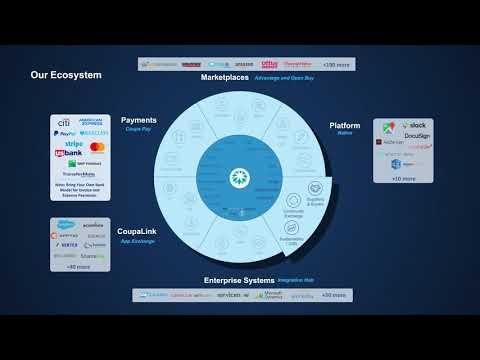

Watch the demo video to explore key features, real workflows, and how the software fits your business needs.
 Windows
  Desktop
  Cloud-Based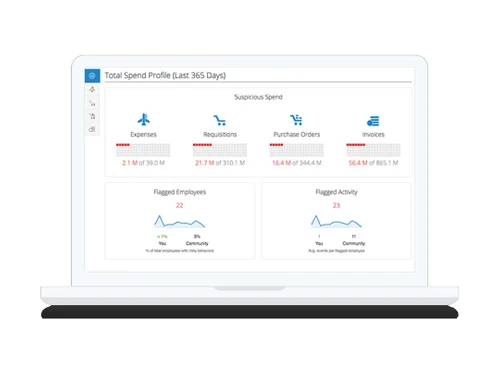
Small Business
Designed for startups and growing businesses
Medium Business
Built for business growth and flexibility
Enterprises
Designed for complex and large-scale business needs
3.8
Out of 5

Overall Rating
Based on
3 Verified Reviews
Rating Breakdown
90% Recommend this Product
Add ReviewUsers generally appreciate Coupa Procurement Software for its speed, reliability, and ease of use, particularly highlighting the convenience of punchouts for direct ordering. The software is praised for its integration capabilities with various ERP systems. However, some users have expressed frustration with the search functionality, making it difficult to find approved items. Additionally, the lack of built-in procurement analytics and the need for separate accounting tools have been noted as limitations. Overall, the sentiment is positive, with users recommending the software for its efficiency despite some drawbacks.

Sep 25, 2017
Techjockey Verified
“will recommend it”
Pros
Extremely fast and reliable service. The products worked perfectly and exactly as promised.
Cons
N/A
Jun 17, 2018
Techjockey Verified
“Does what it needs to”
Pros
That i can use the punchouts to directly order rom stores that link to it. It makes it way easier and takes away other steps for me
Cons
It's hard to search, right now i can't search to find items i have approved other than the administrator.
Mar 29, 2018
Techjockey Verified
“Fantastic Procurement Solution”
Pros
Coupa is the next generation state of the art procurement software. Coupa can be easily integrated with most Enterprise Resource Planning packages available in the market. Coupa provides ready to use Application Program Interfaces (API) to integrate with various ERP packages.
Cons
Coupa procurement does not include Procurement Analytics. You need an additional license for the Coupa procurement analytics. Coupa cannot handle accounting part, hence you must integrate with other Accounting tools or ERP.

Coupa Procurement Software
Price On Request
Desktop
Mobile
Web based
On Premises
Windows
Mac OS

ezAtlas S2P
Price On Request
Desktop
Mobile
Web based
On Premises
Windows
Mac OS

TYASuite Procurement to Pay
₹ 1250
Desktop
Mobile
Web based
On Premises
Windows
Mac OS

TenderWizard
Price On Request
Desktop
Mobile
Web based
On Premises
Windows
Mac OS

Procol Bid
Price On Request
Desktop
Mobile
Web based
On Premises
Windows
Mac OS

Zycus Procurement Software Suite
Price On Request
Desktop
Mobile
Web based
On Premises
Windows
Mac OS

Mapol Vendor Management Software
Price On Request
Desktop
Mobile
Web based
On Premises
Windows
Mac OS

Onex Spend Management
Price On Request
Desktop
Mobile
Web based
On Premises
Windows
Mac OS

e-Procurement suite
Price On Request
Desktop
Mobile
Web based
On Premises
Windows
Mac OS

Scoutbee
Price On Request
Desktop
Mobile
Web based
On Premises
Windows
Mac OS

Eyvo eProcurement Solutions
₹ 500
Desktop
Mobile
Web based
On Premises
Windows
Mac OS
(0) Product(s) selected
Available
Price on Request
Available
Price on Request
Available
Price on Request
Available
Price on Request
Available
Price on Request
Starting Price:
₹500

Available
Price on Request
Available
Price on Request

Available
Price on Request

Starting Price:
€2,000 /Month
Available
Price on Request
The pricing of Coupa Procurement Software is on request at Techjockey. For more information, you can reach out to us.
No, Coupa does not offer a mobile app for both iOS and Android devices.
Coupa is a cloud-based solution compatible with Windows operating systems via web browsers.
Coupa does not offer a free trial; availability depends on direct vendor engagement.
Coupa automates procurement processes like requisitions, approvals, and supplier management through a centralized platform.
Ideal users include mid-to-large enterprises looking to streamline and control their procurement operations.
Yes, Coupa offers free demos upon request through its official website.
No, Coupa is a paid enterprise solution and is not available for free.
Yes, Coupa integrates with popular ERP systems such as SAP, Oracle, and Microsoft Dynamics.
While primarily designed for medium to large enterprises, Coupa can be tailored for small businesses as well, depending on their needs.
20,000+ Software Listed
Best Price Guranteed
Free Expert Consultation
2M+ Happy Customers
Terms and Condtions

Users with registered businesses can purchase goods from merchants on the platform to satisfy their business needs. Users are not permitted to utilize any products acquired through the platform for resale, advertising, business, or further distribution.
For each purchase made, users will receive a Tax Invoice (or 'GST invoice') that includes specific details such as:
the GSTIN of the user associated with their registered business, and
the specified Entity Name for their business.
It should be noted that not all products are eligible for GST Invoice. Only the products displayed by participating sellers with the 'GST-based Invoice Available' callout on the product description page would qualify.
Certain goods and services are not eligible to get a GST Invoice, including items with VAS, i.e., Value Added Services (e.g., Total Mobile Protection/Assured Buyback) and those involving an exchange offer at the time of purchase.
Users must ensure the accuracy of the GSTIN, and business entity name provided for the GST Invoice. Requests for corrections into GST Invoice would not be accommodated by Techjockey.com or any Seller, and any issues arising from user-provided information are the sole responsibility of users.
Techjockey.com is not liable for the GST Invoice or any associated input tax credit. To efficiently claim an input tax credit, users should select the registered place of business address as per the GST authority's data and follow the provisions of the GST Act and rules.
To claim an input tax credit, the delivery and billing addresses must match. Furthermore, input tax credits will not be granted if the delivery address and GSTIN on the invoice are from different states. In case of incorrect GST details provided during the order placement, the order will be canceled automatically.