linkedin
Cway logo
play How to upload new artwork
cway-image1
cway-image2

Cway

Brand: Cway

  • 4.1

  • 4 Ratings

You don't have to struggle with messy brand content anymore. Cway sets up a perfect structure that makes your creative work much smoother than ever.

See More

Have you used Cway before?

Share your insights for better experience

Add a Review
Starting Price
€1473

View plans

100% Genuine
Products
Best Price
Guaranteed
Safe & Secure
Payment
  • Description

  • Pricing

  • Features

  • Specification

  • Review

  • Compare

  • Alternatives

  • FAQ

Starting at €1,473

Cway Software Overview

What is Cway Software?

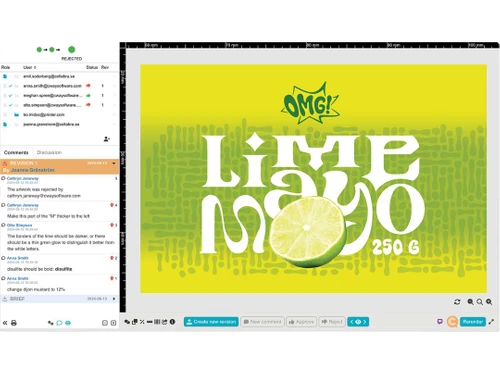
Cway is an easy-to-use digital asset management tool that makes design and packaging work seamless for teams. The solution keeps all brand files, updates, and tasks stored in one organized, easy-to-access place. You can save images, videos, and documents without worrying about losing any versions or formats.

The software facilitates super smooth collaboration among teams without tedious email threads or jumbled feedback. Approvals become quicker, and changes are tracked easily at each step. With less error and delay, projects are completed on time and with fewer headaches. It makes creative work easier and more manageable.

Why Choose Cway Software?

  • Everything Stays in One Place: Your valuable files (and artwork) stay neat in one simple, shared spot.
  • All Changes Tracked with Transparency: Every edit, update, or version is stored. You can see them anytime.
  • Faster Work With No Confusion: Work gets done in full swing with less to-and-fro and no lost approvals.
  • Substantial Time Savings: Steps that are repeated are taken care of automatically. This lets teams focus on actual work.
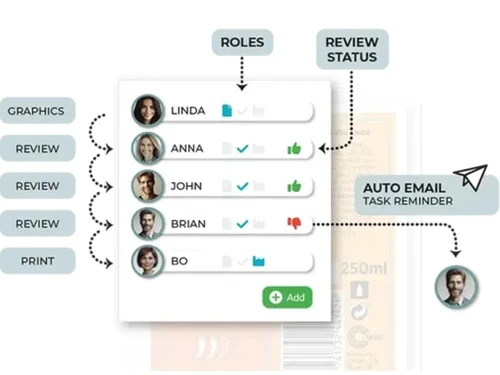
  • Smooth and Stress-Free Teamwork: All members are in sync with clear roles and updates in real-time along the way.
  • Secure Files and Access Control: Only the right people (or team members) get to see or edit what they must.

Benefits of Cway Software

  • Quick Setup Without Technical Hassles: Getting started with Cway is like falling off a log. It doesn't need any complicated training or IT support at all.
  • Handles Various File Types Seamlessly: You can upload and manage videos, images, PDFs, and other files without any conversion problems.
  • Clear Alerts for Timely Action: Cway sends helpful reminders, so nothing gets missed or delayed during busy projects.
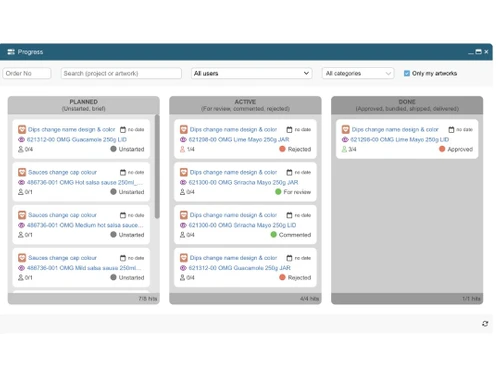
  • Easy to Plan Upcoming Tasks Visually: Visual tools make it simple to map updates and keep the team aligned.
  • Reliable Record for Audit Needs: Every action is saved clearly. This precision helps meet compliance rules and track responsibility.
  • Works Well Across Devices and Systems: Whether on Windows or Mac, the experience stays consistent and smooth for one and all.

Cway Pricing

Cway price in the US starts at 1473 Euros per month at techjockey.com. The pricing model is based on different parameters, including extra features, deployment type, and the total number of users. For further queries related to the product, you can contact our product team and learn more about the pricing and offers.

Read more

Cway Pricing & Plans

Basic
Key Features
  • Monthly artworks-25
  • Pro users-25
  • Support users-50
  • Storage-250 GB
  • Projects-unlimited
  • Media folders-Unlimited
  • Media shares-Unlimited
Starting at €1473
    • Licenses

      Licenses
      Licenses
    • Monthly

      Monthly
      Monthly

Key Features

  • Monthly artworks-25

  • Pro users-25

  • Support users-50

  • Storage-250 GB

  • Projects-unlimited

  • Media folders-Unlimited

  • Media shares-Unlimited

Cway Features

  • icon_check Centralized Asset Storage
    Keep all your creative files in one spot so your team can easily find and use them.
  • icon_check Visual Planning
    Use simple visual tools to map updates clearly and help your team stay in sync.
  • icon_check Multi Format Support
    Upload and manage all file types easily without worrying about compatibility problems.
  • icon_check Version Control
    Always work with the latest file while older versions stay saved for reference.
  • icon_check Task Automation
    Let the system handle repeat tasks to help your team focus on important work.
  • icon_check Role-Based Access Control (RBAC)
    Control who can see or edit files by assigning roles with specific access rights.
  • icon_check Alerts & Notifications
    Stay on track with smart reminders that keep your team updated without delays.
  • icon_check Document Management
    Organize, store, and retrieve documents quickly with simple tools built for daily use.
  • icon_check Audit Trail
    Every step and action is logged clearly so you always know who did what.
Cway Demo Video play icon

Get Cway Demo

Watch the demo video to explore key features, real workflows, and how the software fits your business needs.

Understand
Key Features
Personal
Demo Insights
Interactive
Demo Support

Cway Specifications

Supported Platforms
Ubuntu Ubuntu Windows Windows MacOS MacOS Linux Linux
Devices
Desktop Desktop
Deployment
Cloud-Based Cloud-Based
Suitable For
All Industries
Business Specific
All Businesses
Business Size
Small Business Startups Medium Business Enterprises SMBs SMEs MSMBs MSMEs Freelancers
Customer Support
Email Communities
Language
English
Training Resources
Videos

Explore the Best Alternative Solutions Similar to Your Business Size and Needs

Cway Review

4.1

Out of 5

img

Overall Rating

Based on
4 Verified Ratings

Rating Breakdown

  • Features 4
  • Value for Money 4.6
  • Ease of Use 4
  • Customer Support 4

85% Recommend this Product

Add Review

Be the First to Review

This product has no reviews yet. Be the first to leave your feedback.

Add Review

Compare Cway With other Digital Asset Management Software

Products
Ratings
Pricing
Device Supported
Deployment
Supported Platforms
  • img

    Cway

  • 4.1

  • Price On Request

  • Desktop

    Mobile

  • Web based

    On Premises

  • Windows

    Mac OS

  • img

    Pickit

  • 4.6

  • Price On Request

  • Desktop

    Mobile

  • Web based

    On Premises

  • Windows

    Mac OS

  • img

    4AllPortal DAM

  • 4.5

  • Price On Request

  • Desktop

    Mobile

  • Web based

    On Premises

  • Windows

    Mac OS

  • img

    Crest Finder

  • 4.0

  • Price On Request

  • Desktop

    Mobile

  • Web based

    On Premises

  • Windows

    Mac OS

  • img

    SmugMug

  • 4.0

  • Price On Request

  • Desktop

    Mobile

  • Web based

    On Premises

  • Windows

    Mac OS

  • img

    Vermillio

  • 4.0

  • Price On Request

  • Desktop

    Mobile

  • Web based

    On Premises

  • Windows

    Mac OS

  • img

    Pics DAM

  • 4.6

  • Price On Request

  • Desktop

    Mobile

  • Web based

    On Premises

  • Windows

    Mac OS

  • img

    Adobe Bridge

  • 4.2

  • Price On Request

  • Desktop

    Mobile

  • Web based

    On Premises

  • Windows

    Mac OS

  • img

    ioMoVo

  • 4.2

  • Price On Request

  • Desktop

    Mobile

  • Web based

    On Premises

  • Windows

    Mac OS

  • img

    Desygner the hub

  • 4.1

  • Price On Request

  • Desktop

    Mobile

  • Web based

    On Premises

  • Windows

    Mac OS

(2) Product(s) selected

Cway Alternatives

See All Cway Alternatives

Starting Price:

$30 /Month

Available

Price on Request

Available

Price on Request

Available

Price on Request
Articles for Cway

See All Related Articles

How much does Cway cost?

Cway is usually priced at Euro1473 per month. However, the final cost may differ depending on features and specific user needs.

Is there a mobile app available for Cway Software?

Unfortunately, no mobile app is available; Cway runs purely as a web-based desktop platform.

Which operating systems are compatible with Cway Software?

The Cway digital asset management software supports Windows, MacOS, Ubuntu, and other Linux-based operating systems.

Does Cway Software offer a free trial?

Yes, Cway offers a free trial so users can explore its features before subscribing.

How does Cway Software function?

Cway helps teams manage design, packaging, and approvals through automation and centralized collaboration.

Who Uses Cway Software?

Designers, marketers, and creative teams use Cway to manage brand files, collaborate smoothly, and speed up project approvals.

20,000+ Software Listed

Best Price Guranteed

Free Expert Consultation

2M+ Happy Customers

Terms and Condtions

close

Users with registered businesses can purchase goods from merchants on the platform to satisfy their business needs. Users are not permitted to utilize any products acquired through the platform for resale, advertising, business, or further distribution.

For each purchase made, users will receive a Tax Invoice (or 'GST invoice') that includes specific details such as:

  • the GSTIN of the user associated with their registered business, and

  • the specified Entity Name for their business.

It should be noted that not all products are eligible for GST Invoice. Only the products displayed by participating sellers with the 'GST-based Invoice Available' callout on the product description page would qualify.

Certain goods and services are not eligible to get a GST Invoice, including items with VAS, i.e., Value Added Services (e.g., Total Mobile Protection/Assured Buyback) and those involving an exchange offer at the time of purchase.

Users must ensure the accuracy of the GSTIN, and business entity name provided for the GST Invoice. Requests for corrections into GST Invoice would not be accommodated by Techjockey.com or any Seller, and any issues arising from user-provided information are the sole responsibility of users.

Techjockey.com is not liable for the GST Invoice or any associated input tax credit. To efficiently claim an input tax credit, users should select the registered place of business address as per the GST authority's data and follow the provisions of the GST Act and rules.

To claim an input tax credit, the delivery and billing addresses must match. Furthermore, input tax credits will not be granted if the delivery address and GSTIN on the invoice are from different states. In case of incorrect GST details provided during the order placement, the order will be canceled automatically.