linkedin
Dancing Numbers logo
play Dancing Numbers: Delete, Export & Import Transactions into QuickBooks
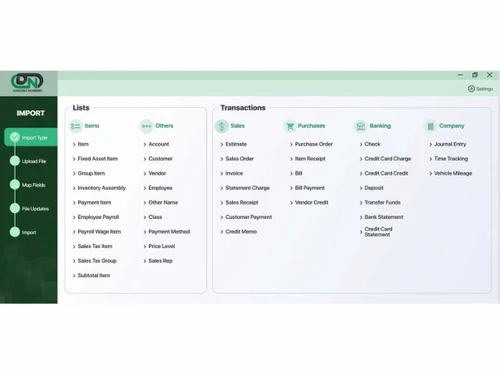
Dancing-Numbers-Import
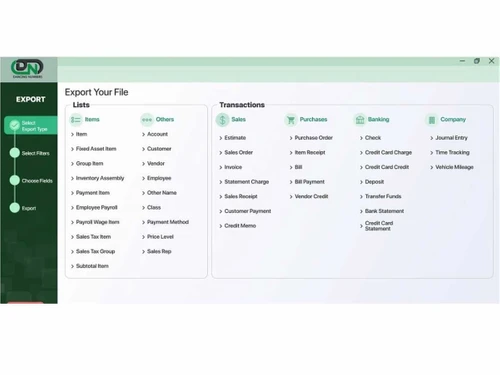
Dancing-Numbers-Exports

Dancing Numbers

Brand: Dancing Numbers

  • 4.4

  • 5 Ratings

Dancing Numbers Accounting Software streamlines financial processes by migrating, mapping, and importing data between various platforms.

See More

Have you used Dancing Numbers before?

Share your insights for better experience

Add a Review
Starting Price
$199

View plans

100% Genuine
Products
Best Price
Guaranteed
Safe & Secure
Payment
  • Description

  • Pricing

  • Features

  • Specification

  • Review

  • Compare

  • Alternatives

  • FAQ

Starting at $199

Dancing Numbers Software Overview

What is Dancing Numbers Software?

The Dancing Number Accounting Software is an online application that migrates data between different financial software, especially between QuickBooks Desktop and QuickBooks Online. This application allows data transfer, export, and migration through automation. Due to automation, human errors, duplicate records, and data loss risks are minimized. It thus enhances the data accuracy and makes the financial records authentic.

The Dancing Number application facilitates data transfer between QuickBooks Desktop and QuickBooks Online. It reads the data from the sources, transfers it into the desired format, and makes it compatible with QuickBooks Online. It thus can apply the process of reformatting data, mapping data files, and adjusting to make the data compatible. It then performs the validation check process to ensure the data is transferred without errors. It then imports the data into QuickBooks Online. It rechecks to ensure that the data is correctly imported.

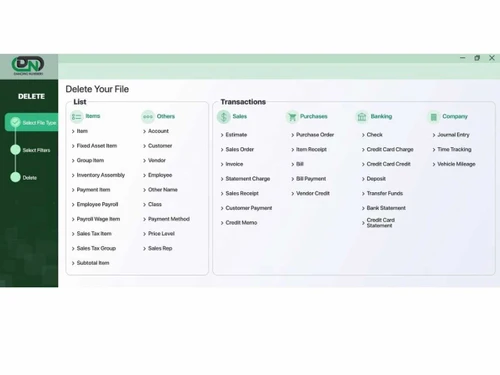
The Dancing Number can delete data that is not relevant. It allows integration with QuickBooks and updates financial reports on need. The reports generated are up-to-date and provide financial information for decision-making. It also keeps track of logs, detailed reports of the migration process, and the errors faced during migration.

Why Choose Dancing Numbers?

It is an extremely important application providing smooth and error-free data transfer and migration between software or devices like QuickBooks Desktop and QuickBooks Online. The manual migration is prone to errors, can have duplicate records, and is time-consuming. Thus, this online tool makes this migration smooth, error-free, and quick. It also generates logs and reports that display the entire process and provides ready to use database for exporting and processing financial information.

This platform performs the data compatibility check and transformation task and deletes unrelated data from the database. It easily imports, exports, and deletes data while adhering to the platform's structure. It reduces the need for extensive manual work and accelerates migration, allowing businesses to adapt swiftly to evolving needs. It also helps generate reports that can be used for financial information processing. Its user-friendly interface empowers users to manage their financial data across different QuickBooks environments effortlessly.

Benefits of Dancing Numbers Accounting Software

  • Accuracy: It ensures that the data transferred is accurate and maintains financial data integrity.
  • Automates: Automates tasks, thus saving time and effort in data migration.
  • Integration: It integrates with QuickBooks for generating updated financial reports.
  • Flexibility: It supports data conversion to various platforms, supporting adaptability.
  • User-Friendly: It provides an intuitive interface for an easy way of carrying out operations.
  • Data Security: It prioritizes data protection with encryption and ensures the safety of sensitive financial information.

Dancing Pricing

Dancing pricing starts from $199 at techjockey.com.

The pricing model is based on different parameters, including extra features, deployment type, and total users. For further queries related to the product, you can contact our product team and learn more about the pricing and offers.

Read more

Dancing Numbers Company Details

Founded Year:  2020

Dancing Numbers is a platform where you can importing, exporting, and deleting the data in your QuickBooks account easily.

Director/Founders Punit Jindal
Company Size 1-100 Employees

Dancing Numbers Pricing & Plans

Importer, Exporter & Deleter
Key Features
  • Unlimited Import
  • Unlimited Export
  • Unlimited Delete
Starting at $199
    • Quantity

      Quantity
      Quantity
    • Yearly

      Yearly
      Yearly

Key Features

  • Unlimited Import

  • Unlimited Export

  • Unlimited Delete

Dancing Numbers Features

  • icon_check Multi-Source Data Aggregation
    Centralize data from ERP, POS, eCommerce, Excel, and banking systems.
  • icon_check Expense Management
    Auto-classify expenses and vendor payments for accurate reporting.
  • icon_check E-Invoicing
    Generate GST-compliant e-Invoices and track IRN/ACK statuses.
  • icon_check Audit Logs
    Track every transaction and change with full audit history.
  • icon_check Custom Reports
    Create P&L, balance sheet, AR/AP aging, and other financial reports.
  • icon_check Role-Based Access Control (RBAC)
    Manage secure access and permissions for finance, management, and auditors.
  • icon_check Multi-Company Support
    Handle multiple entities, books, and ledgers from one dashboard.
  • icon_check Alerts & Notifications
    Receive alerts for exceptions, compliance deadlines, and reconciliation issues.
  • icon_check Multi Currency
    Handle transactions and reports in multiple currencies.
  • icon_check Data Security
    Ensure secure storage with encryption, backups, and safe access control.
  • icon_check Third Party Integrations
    Connect with banks, ERPs, CRM, and other business systems via APIs.
  • icon_check Automated Data Sync
    Automatically import and sync financial data from ERP, accounting, and business systems.
  • icon_check Accounting Automation
    Eliminate manual entries with auto book-keeping, journal entries, and ledger updates.
  • icon_check Bank Reconciliation
    Automatically match bank statements with ledger entries for fast reconciliation.
  • icon_check GST & Tax Compliance
    Prepare GST returns (GSTR-1/3B), generate tax liabilities, and ensure compliance.
  • icon_check Tally Integration
    Seamlessly connect with Tally to sync masters, transactions, and reports.
  • icon_check Dashboards
    Real-time visualization of revenue, expenses, cash flow, inventory, and receivables.
  • icon_check Cash Flow Forecasting
    Project future cash positions based on current data and trends.
Dancing Numbers Demo Video play icon

Get Dancing Numbers Demo

Watch the demo video to explore key features, real workflows, and how the software fits your business needs.

Understand
Key Features
Personal
Demo Insights
Interactive
Demo Support

Dancing Numbers Specifications

Supported Platforms
Ubuntu Ubuntu Windows Windows MacOS MacOS Linux Linux
Devices
Desktop Desktop Mobile Mobile Tablet Tablet iPad iPad
Deployment
Cloud-Based Cloud-Based Perpetual Perpetual
Suitable For
All Industries
Business Specific
All Businesses
Business Size
Small Business Startups Medium Business Enterprises SMBs SMEs MSMBs MSMEs
Customer Support
Phone Email Live Chat Communities
Language
English
Integration
API Integration
Training Resources
Documentation Videos

Explore the Best Alternative Solutions Similar to Your Business Size and Needs

Dancing Numbers Review

4.4

Out of 5

img

Overall Rating

Based on
5 Verified Ratings

Rating Breakdown

  • Features 4.2
  • Value for Money 4.3
  • Ease of Use 4.7
  • Customer Support 4.6

98% Recommend this Product

Add Review

Techjockey Trusted Reviews from Verified Users

No reviews are currently available for Dancing Numbers. Discover similar Data Management Software reviews

  • MagicBot

    4.5

    Whats great - “I’m no accounting expert and yet l I’ve had no problems to feel comfortable using SlickPie” read more

  • Mink InfoTech Data Extraction System

    4.9

    Whats great - Good software to use saved my time by extracting data in a pattern, and saving in a file. The software requires no technical ... read more

  • WeighMAST

    4.8

    Whats great - The system integrates seamlessly with your organization. Its key strength is the ability to be customized with features and w... read more

Compare Dancing Numbers With other Data Management Software

Products
Ratings
Pricing
Device Supported
Deployment
Supported Platforms
  • img

    Dancing Numbers

  • 4.4

  • Price On Request

  • Desktop

    Mobile

  • Web based

    On Premises

  • Windows

    Mac OS

  • img

    Zoho DataPrep

  • 4.3

  • ₹ 28800

  • Desktop

    Mobile

  • Web based

    On Premises

  • Windows

    Mac OS

  • img

    OpenRefine

  • 4.4

  • Price On Request

  • Desktop

    Mobile

  • Web based

    On Premises

  • Windows

    Mac OS

  • img

    Zapper Edge

  • 4.1

  • Price On Request

  • Desktop

    Mobile

  • Web based

    On Premises

  • Windows

    Mac OS

  • img

    Squeezely

  • 4.4

  • Price On Request

  • Desktop

    Mobile

  • Web based

    On Premises

  • Windows

    Mac OS

  • img

    Teamscope

  • 4.4

  • Price On Request

  • Desktop

    Mobile

  • Web based

    On Premises

  • Windows

    Mac OS

  • img

    Tibco Rendezvous

  • 4.2

  • Price On Request

  • Desktop

    Mobile

  • Web based

    On Premises

  • Windows

    Mac OS

  • img

    TreeSize

  • Price On Request

  • Desktop

    Mobile

  • Web based

    On Premises

  • Windows

    Mac OS

  • img

    Harmonize

  • 4.1

  • Price On Request

  • Desktop

    Mobile

  • Web based

    On Premises

  • Windows

    Mac OS

  • img

    Anomalo

  • 4.1

  • Price On Request

  • Desktop

    Mobile

  • Web based

    On Premises

  • Windows

    Mac OS

(0) Product(s) selected

Dancing Numbers Alternatives

See All Dancing Numbers Alternatives

Available

Price on Request

Available

Price on Request

Starting Price:

€399 /year

Available

Price on Request

Available

Price on Request

Starting Price:

$300 Monthly/

Articles for Dancing Numbers

See All Related Articles

Which operating system does Dancing Numbers Software Support?

Dancing Numbers software is compatible with Windows and macOS operating systems.

Is there any Dancing Numbers App?

Dancing Numbers app is only available for Android devices.

What is the deployment type of the Dancing Numbers Software?

Dancing Numbers Software supports cloud-based deployment.

How much does Dancing Numbers Cost?

Dancing Numbers pricing starts from $199 at techjockey.com.

Who are the potential users of the Dancing Numbers?

Dancing Numbers can be used by entrepreneurs, freelancers, and accountants who require efficient bookkeeping, invoicing, and financial reporting features.

Is there any free trial or demo for Dancing Numbers?

Dancing Numbers demo is available for free with techjockey.com.

Is Dancing Numbers free?

Dancing Numbers offers a free trial. Please request a call back for subscription-related details and to avail offers on premium packages.

How can you download Dancing Numbers?

Dancing Numbers is a cloud-based platform. So, you need not download any software or app to use it.

How does Dancing Numbers work?

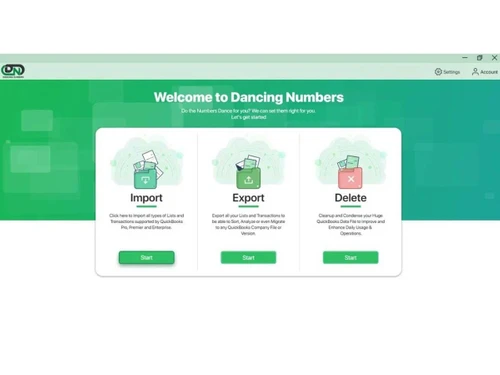
Dancing Numbers simplifies accounting by swiftly importing, exporting, and deleting data in QuickBooks, ensuring real-time updates. This user-friendly tool saves valuable time and resources, enhancing efficiency and accuracy in financial management.

20,000+ Software Listed

Best Price Guranteed

Free Expert Consultation

2M+ Happy Customers

Terms and Condtions

close

Users with registered businesses can purchase goods from merchants on the platform to satisfy their business needs. Users are not permitted to utilize any products acquired through the platform for resale, advertising, business, or further distribution.

For each purchase made, users will receive a Tax Invoice (or 'GST invoice') that includes specific details such as:

  • the GSTIN of the user associated with their registered business, and

  • the specified Entity Name for their business.

It should be noted that not all products are eligible for GST Invoice. Only the products displayed by participating sellers with the 'GST-based Invoice Available' callout on the product description page would qualify.

Certain goods and services are not eligible to get a GST Invoice, including items with VAS, i.e., Value Added Services (e.g., Total Mobile Protection/Assured Buyback) and those involving an exchange offer at the time of purchase.

Users must ensure the accuracy of the GSTIN, and business entity name provided for the GST Invoice. Requests for corrections into GST Invoice would not be accommodated by Techjockey.com or any Seller, and any issues arising from user-provided information are the sole responsibility of users.

Techjockey.com is not liable for the GST Invoice or any associated input tax credit. To efficiently claim an input tax credit, users should select the registered place of business address as per the GST authority's data and follow the provisions of the GST Act and rules.

To claim an input tax credit, the delivery and billing addresses must match. Furthermore, input tax credits will not be granted if the delivery address and GSTIN on the invoice are from different states. In case of incorrect GST details provided during the order placement, the order will be canceled automatically.