USA
USA UAE
UAESmall Business
Designed for startups and growing businesses
See More


Brand: iMyFone Technology
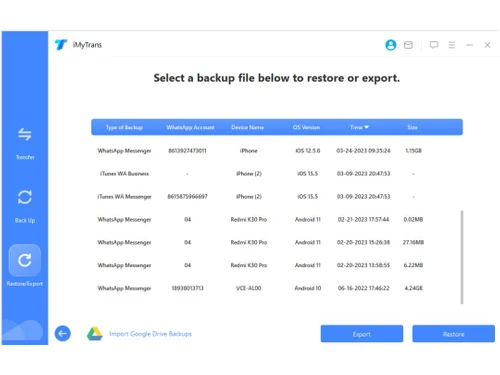
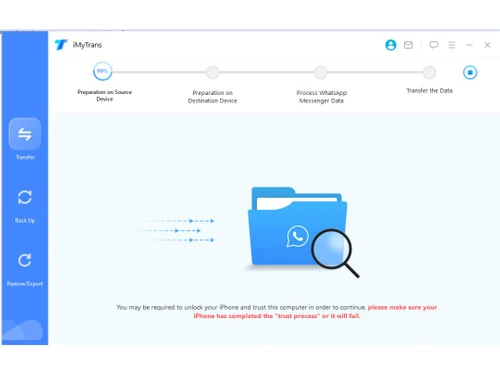
iTransor for WhatsApp is one of the best WhatsApp data transfer tools for business and domestic usage. The software allows users to transfer data from one device to another without any inconvenience. The utility software also creates a backup for WhatsApp data. It is a quintessential tool for people who are changing devices and have to shift the current WhatsApp data to their new mobile phone. Th...
See MoreHave you used iTransor for Whatsapp before?
Share your insights for better experience
Brand: iMyFone Technology
Founded Year: 2015
Established in 2015, iMyFone is devoted to providing the best solution for iPhone/iPad/iPod touch users. With a team of exceptionally dedicated individuals, we are always passionate to solve the complicated mobile problems that people encounter in daily life.
 Highest Success Rate Easy & Fast Implementation / Easy to Operate Direct Transfer Chats & Attachments Backup & Restore Contacts Cross-Platform Move Google Drive Restore Local Backup Engine Individual Chat View Media Attachment Hub Export to HTML/CSV WhatsApp Business Incremental Backups Historical Log Vault

Watch the demo video to explore key features, real workflows, and how the software fits your business needs.
 Windows
  iOS
iOS  Android MacOS
  Desktop
  Mobile
  Tablet
  iPad
iPad  Cloud-Based
  Perpetual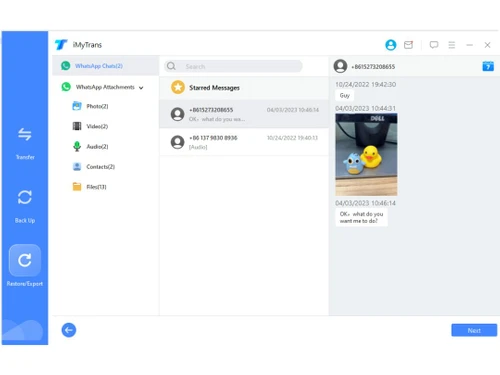
Small Business
Designed for startups and growing businesses
Medium Business
Built for business growth and flexibility
Enterprises
Designed for complex and large-scale business needs
4.5
Out of 5

Overall Rating
Based on
5 Verified Ratings
Rating Breakdown
88% Recommend this Product
Add ReviewTechjockey Trusted Reviews from Verified Users
No reviews are currently available for iTransor for Whatsapp. Discover similar Data Management Software reviews

MagicBot
Whats great - “I’m no accounting expert and yet l I’ve had no problems to feel comfortable using SlickPie” read more

Mink InfoTech Data Extraction System
Whats great - Good software to use saved my time by extracting data in a pattern, and saving in a file. The software requires no technical ... read more

WeighMAST
Whats great - The system integrates seamlessly with your organization. Its key strength is the ability to be customized with features and w... read more

iTransor for Whatsapp
₹ 4162.91 excl. GST
Desktop
Mobile
Web based
On Premises
Windows
Mac OS

Dancing Numbers
Price On Request
Desktop
Mobile
Web based
On Premises
Windows
Mac OS

Zoho DataPrep
₹ 28800
Desktop
Mobile
Web based
On Premises
Windows
Mac OS

OpenRefine
Price On Request
Desktop
Mobile
Web based
On Premises
Windows
Mac OS

MagicBot
Price On Request
Desktop
Mobile
Web based
On Premises
Windows
Mac OS

Tibco Rendezvous
Price On Request
Desktop
Mobile
Web based
On Premises
Windows
Mac OS

Squeezely
Price On Request
Desktop
Mobile
Web based
On Premises
Windows
Mac OS

Teamscope
Price On Request
Desktop
Mobile
Web based
On Premises
Windows
Mac OS

Zapper Edge
Price On Request
Desktop
Mobile
Web based
On Premises
Windows
Mac OS

Mysql
Price On Request
Desktop
Mobile
Web based
On Premises
Windows
Mac OS

Rubrik Cloud Cluster
Price On Request
Desktop
Mobile
Web based
On Premises
Windows
Mac OS
(0) Product(s) selected
Available
Price on Request
Available
Price on Request
Available
Price on Request
Starting Price:
€399 /year

Available
Price on Request

Available
Price on Request

Starting Price:
€20

Available
Price on Request

Available
Price on Request

Available
Price on Request
Available
Price on Request
Yes, iTransor for WhatsApp allows users to transfer data from both regular and business WhatsApp.
iTransor for WhatsApp complies with GDPR and various data processing guidelines to ensure the user’s data safety.
The time taken by iTransor for WhatsApp to transfer the data strictly depends on the file size. Large-sized data can take longer time.
No, iTransor for WhatsApp will not influence, corrupt or affect other data on your phone.
For Android, iTransor for WhatsApp supports Version 2.0 and higher. While for iOS devices, it starts from iOS 9.0 and later.
20,000+ Software Listed
Best Price Guranteed
Free Expert Consultation
2M+ Happy Customers
Terms and Condtions

Users with registered businesses can purchase goods from merchants on the platform to satisfy their business needs. Users are not permitted to utilize any products acquired through the platform for resale, advertising, business, or further distribution.
For each purchase made, users will receive a Tax Invoice (or 'GST invoice') that includes specific details such as:
the GSTIN of the user associated with their registered business, and
the specified Entity Name for their business.
It should be noted that not all products are eligible for GST Invoice. Only the products displayed by participating sellers with the 'GST-based Invoice Available' callout on the product description page would qualify.
Certain goods and services are not eligible to get a GST Invoice, including items with VAS, i.e., Value Added Services (e.g., Total Mobile Protection/Assured Buyback) and those involving an exchange offer at the time of purchase.
Users must ensure the accuracy of the GSTIN, and business entity name provided for the GST Invoice. Requests for corrections into GST Invoice would not be accommodated by Techjockey.com or any Seller, and any issues arising from user-provided information are the sole responsibility of users.
Techjockey.com is not liable for the GST Invoice or any associated input tax credit. To efficiently claim an input tax credit, users should select the registered place of business address as per the GST authority's data and follow the provisions of the GST Act and rules.
To claim an input tax credit, the delivery and billing addresses must match. Furthermore, input tax credits will not be granted if the delivery address and GSTIN on the invoice are from different states. In case of incorrect GST details provided during the order placement, the order will be canceled automatically.