linkedin
LockWiper logo
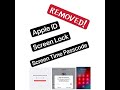
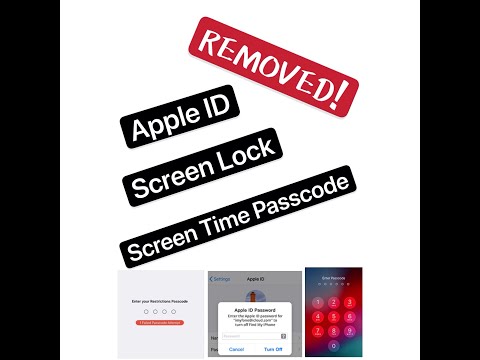
play LockWiper 5.0 - Unlock Apple ID, Screen Lock & Screen Time Passcode
lockwiper feature
lockwiper passward

LockWiper

Brand: iMyFone Technology

  • 4.5

  • 1 Rating & 1 Review

LockWiper is utility software provided by iMyFone to bypass the phone locks. The software can instantly remove different kinds of locks from iOS and Android devices, without using the password. In the case of Android, the software assists users to unlock FRP (Factory reset Protection) and remove Google account verification without the password. It also removes different types of screen locks, suc...

See More

Have you used LockWiper before?

Share your insights for better experience

Add a Review
Starting Price 40% OFF
₹2,469 excl.GST  ₹4,116
₹ 2,914 incl. GST

View plans

100% Genuine
Products
Best Price
Guaranteed
Safe & Secure
Payment
  • Description

  • Pricing

  • Features

  • Specification

  • Review

  • Compare

  • Alternatives

  • FAQ

Starting at ₹2,469

LockWiper Software Overview

What is LockWiper?

LockWiper is utility software provided by iMyFone to bypass the phone locks. The software can instantly remove different kinds of locks from iOS and Android devices, without using the password. In the case of Android, the software assists users to unlock FRP (Factory reset Protection) and remove Google account verification without the password. It also removes different types of screen locks, such as pattern, PIN, fingerprint, password, and face lock.

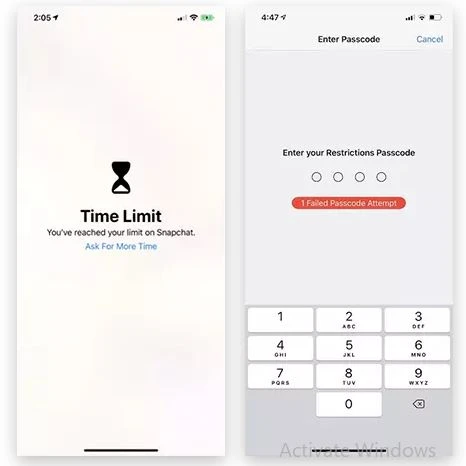
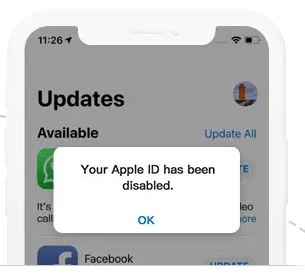
For iOS devices, the software can unlock Apple ID without the password. It can remove iPhone passcode from a locked, disabled or broken screen. The software also helps users bypass screen time, restrictive passcodes, and MDM (Mobile Device Management) activation screen.

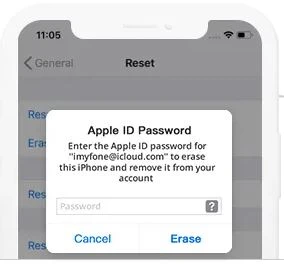
iMyFone LockWiper even helps Apple users who have forgotten their Apple ID. It completely removes your Apple ID from the device without the requirement of the password. One of the best aspects of using LockWiper is it removes the password from the device without causing any data loss.

How to use iMyFone LockWiper to recover a password from an iOS device?

Here is a step by step guide as to how to recover data from iOS devices:

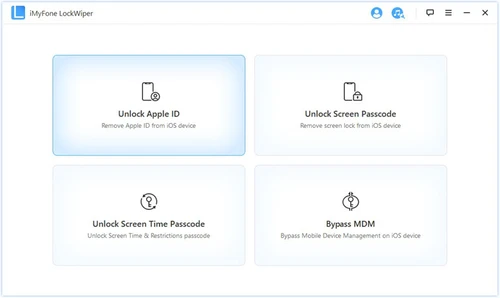
  1. Install and run LockWiper on the PC and select any of the four unlocking modes as per the requirements. These modes are:

    - Unlock apple ID

    - unlock Screen Passcode

    - Unlock Screen Time Passcode

    - Bypass MDM

  2. Connect the device after selecting the mode.
  3. The software will show the message “Unlock is Complete.” Please check whether the device is starting or not. If the device is not starting, press “Try Again.”

How to use iMyFone LockWiper to remove a password from an Android device?

Here is a step by step guide to removing the password from an Android device:

  1. Launch LockWiper and choose one of the two unlocking modes, i.e.,


    -Remove google Lock (FRP)

    -Remove Screen Lock

  2. Connect your phone through a USB cable to the PC.
  3. The system will initiate the password removal process and show the message “Unlocked successfully” once completed.

What is the price or LockWiper download?

LockWiper is available in two different plans, these are:

  1. For 1-Month Plan-  INR 4116.16 per month.
  2.  For 1-Year Plan- INR 7495.36 per month.
Read more

iMyFone Technology Company Details

Founded Year:  2015

Established in 2015, iMyFone is devoted to providing the best solution for iPhone/iPad/iPod touch users. With a team of exceptionally dedicated individuals, we are always passionate to solve the complicated mobile problems that people encounter in daily life.

Director/Founders Dean Huang
Company Size 101-500 Employees

LockWiper Pricing & Plans

1-Month Plan

Calculated Price

₹ 2469 ₹4116
SAVE UPTO 40%
Exclusive of all taxes
    • Device (iOS Devices)

      Device (iOS Devices)
      Device (iOS Devices)
    • Monthly

      Monthly
      Monthly

Key Features

  • Unlock Apple ID

  • Remove Iphone Password

  • Forgot Password

  • Data Loss Prevention

  • Remove Screen Time

  • Bypass MDM Screen

1-Year Plan

Calculated Price

₹ 4164 ₹7495
SAVE UPTO 44%
Exclusive of all taxes
    • Device (iOS Devices)

      Device (iOS Devices)
      Device (iOS Devices)
    • Yearly

      Yearly
      Yearly

Key Features

  • Unlock Apple ID

  • Remove Iphone Password

  • Forgot Password

  • Data Loss Prevention

  • Remove Screen Time

  • Bypass MDM Screen

LockWiper Features

  • icon_check Unlock Apple ID
    The software allows users to unlock the phone even if they do not remember their Apple ID.
  • icon_check Remove Iphone Password
    Users can remove the iPhone password with the help of LockWiper instantly.
  • icon_check Forgot Password
    This utility software helps users recover their device without any data loss even in the case of forgotten password.
  • icon_check Data Loss Prevention
    LockWiper ensures that there is a zero data loss during the password removal/device recovery process.
  • icon_check Remove Screen Time
    The software helps users bypass screen time restrictions in both Apple and Android devices.
  • icon_check Bypass MDM Screen
    iMyFone LockWiper can bypass the MDM activation screen for the users.
  • icon_check Face ID
    Face ID screen locks for both iOS and Android devices can be removed with the help of this software.
  • icon_check Technical Support
    You will get technical support on time to use this software efficiently.
  • icon_check Touch ID Removal Support
    Bypass fingerprint security locks on older iPhone models when your Touch ID fails to work or your sensor is physically damaged.
  • icon_check Screen Time Passcode Reset
    Recover or reset your forgotten Screen Time passcode without losing any of your important personal data or device photos.
  • icon_check Parental Control Bypass
    Remove restrictions set through parental controls or Family Sharing quickly without needing to perform a full factory reset.
  • icon_check Second-Hand Device Reset
    Completely wipe a used iPhone you purchased to remove the previous owner's lock screen and Apple ID account settings.
  • icon_check Broken Screen Unlocking
    Access your data and reset your device even if the screen is cracked and unresponsive to your physical touch or gestures.
LockWiper Demo Video play icon

Get LockWiper Demo

Watch the demo video to explore key features, real workflows, and how the software fits your business needs.

Understand
Key Features
Personal
Demo Insights
Interactive
Demo Support

LockWiper Specifications

Supported Platforms
Windows Windows iOS iOS MacOS MacOS
Devices
Desktop Desktop Mobile Mobile Tablet Tablet iPad iPad
Deployment
Perpetual Perpetual
Suitable For
All Industries
Business Specific
All Businesses
Business Size
Individual Small Business Enterprises SMBs Freelancers
Customer Support
Email
Language
English
Training Resources
Documentation Videos
Technology
Next Generation

LockWiper Review

4.5

Out of 5

img

Overall Rating

Based on
1 Verified Review

Rating Breakdown

  • Features 4.5
  • Value for Money 4.5
  • Ease of Use 4.5
  • Customer Support 4.5

90% Recommend this Product

Add Review

Suraj Guptam

User

4.5

Reviewed on: Aug 29, 2020

Techjockey Verified

“best lock bypass software”

Pros

Easy to handle application

Cons

NO CONS

Compare LockWiper With other Mobile Data Backup Software

Products
Ratings
Pricing
Device Supported
Deployment
Supported Platforms
  • img

    LockWiper

  • 4.5

  • ₹ 2469.36 excl. GST

  • Desktop

    Mobile

  • Web based

    On Premises

  • Windows

    Mac OS

  • img

    Tenorshare UltData

  • 4.1

  • Price On Request

  • Desktop

    Mobile

  • Web based

    On Premises

  • Windows

    Mac OS

  • img

    IOS Transfer

  • 4.4

  • Price On Request

  • Desktop

    Mobile

  • Web based

    On Premises

  • Windows

    Mac OS

  • img

    dr.fone - Switch

  • 4.7

  • ₹ 3630

  • Desktop

    Mobile

  • Web based

    On Premises

  • Windows

    Mac OS

  • img

    dr.fone - Repair

  • 4.6

  • ₹ 4197

  • Desktop

    Mobile

  • Web based

    On Premises

  • Windows

    Mac OS

(0) Product(s) selected

LockWiper Alternatives

See All LockWiper Alternatives

Can I use the same license of LockWiper for both Android and iOS devices?

No, there is a different license for password recovery from Android and iOS devices. You will have to purchase them separately.

What are the system requirements for LockWiper?

Here are the system requirements for LockWiper: 1. Operating system: Window 7, 8, 10, (for both iOS and Android devices), Mac 10.9 to 10.15 (only for iOS devices) 2. Processor: 1 GHz (32 and 64 bit) 3. RAM: 256 MB or higher (for Windows); 512 MB or higher (for Mac) 4. Hard Disk Space: 200 MB

Which iOS devices does LockWiper support?

LockWiper supports all iPhones from iPhone 3G and beyond, all models of iPad, iPad mini, iPad Pro, iPad Air, and all the models of iPod touch.

Which versions of Android does LockWiper support?

This utility software supports all the versions of Android from version 2.3 and beyond.

Can I get a demo for LockWiper?

Yes, interested buyers can get a demo of the software by requesting a call back from our product experts.

How much does LockWiper cost?

The pricing of LockWiper is available at INR 4116.16 per month at techjockey.com.

20,000+ Software Listed

Best Price Guranteed

Free Expert Consultation

2M+ Happy Customers

Terms and Condtions

close

Users with registered businesses can purchase goods from merchants on the platform to satisfy their business needs. Users are not permitted to utilize any products acquired through the platform for resale, advertising, business, or further distribution.

For each purchase made, users will receive a Tax Invoice (or 'GST invoice') that includes specific details such as:

  • the GSTIN of the user associated with their registered business, and

  • the specified Entity Name for their business.

It should be noted that not all products are eligible for GST Invoice. Only the products displayed by participating sellers with the 'GST-based Invoice Available' callout on the product description page would qualify.

Certain goods and services are not eligible to get a GST Invoice, including items with VAS, i.e., Value Added Services (e.g., Total Mobile Protection/Assured Buyback) and those involving an exchange offer at the time of purchase.

Users must ensure the accuracy of the GSTIN, and business entity name provided for the GST Invoice. Requests for corrections into GST Invoice would not be accommodated by Techjockey.com or any Seller, and any issues arising from user-provided information are the sole responsibility of users.

Techjockey.com is not liable for the GST Invoice or any associated input tax credit. To efficiently claim an input tax credit, users should select the registered place of business address as per the GST authority's data and follow the provisions of the GST Act and rules.

To claim an input tax credit, the delivery and billing addresses must match. Furthermore, input tax credits will not be granted if the delivery address and GSTIN on the invoice are from different states. In case of incorrect GST details provided during the order placement, the order will be canceled automatically.