linkedin
DashThis logo
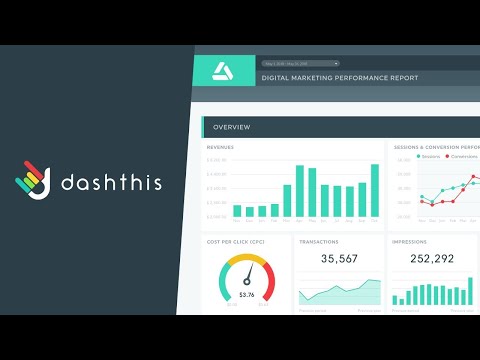
play DashThis Tutorial & Demo
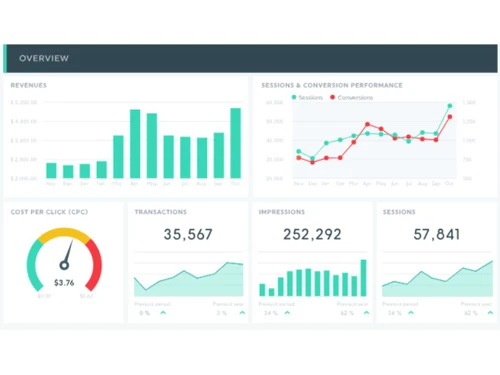
DashThis Overview
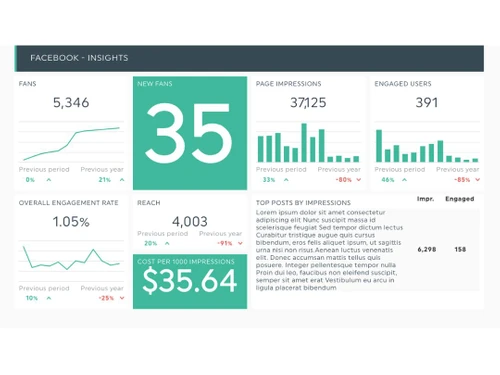
DashThis Social Insights

DashThis

Brand: Moment Zero

  • 4.6

  • 4 Ratings

DashThis Dashboard Software will streamline data visualization and reporting with user-friendly dashboards that drive informed decisions.

See More

Have you used DashThis before?

Share your insights for better experience

Add a Review
Starting Price
$45

View plans

100% Genuine
Products
Best Price
Guaranteed
Safe & Secure
Payment
  • Description

  • Pricing

  • Features

  • Specification

  • Review

  • Compare

  • Alternatives

  • FAQ

Starting at $45

DashThis Software Overview

What is DashThis Software?

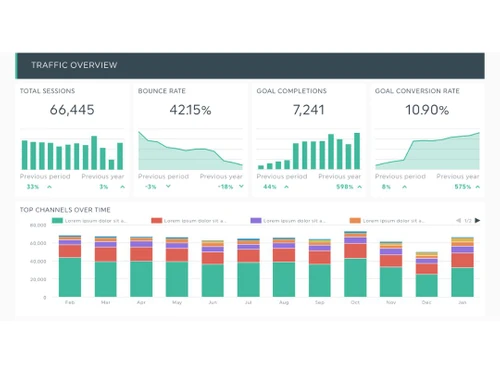
DashThis is a powerful cloud-based marketing reporting dashboard software tailored to meet the needs of businesses and agencies. This platform simplifies the process of creating informative and visually appealing reports. It allows users to combine data from various marketing sources into a comprehensive view.

The ability to integrate data from SEO, SEM, social media, analytics, and display advertising reporting sources makes the platform a versatile tool for marketers. Users can effortlessly merge multiple data sources to optimize the reporting process. The automated updating feature ensures that your reports stay current without manual intervention.

A wide array of pre-built dashboard templates and preset widgets offers users a head start in showcasing their key performance indicators (KPIs). Its custom widget editor empowers users to fine-tune data representation. This feature controls metrics, dimensions, segments, filters, and chart types for tailored, data-driven narratives in each report. In addition to integrating various data sources, the software allows for CSV file imports, enabling users to add their data effortlessly.

Why Choose DashThis System?

DashThis includes search and filtering capabilities to easily find and organize data within the platform. It allows users to track the performance of specific keywords in their SEO and SEM campaigns. Users can define and track their Key Performance Indicators (KPIs) to focus on the metrics that matter most to their business. The dashboard software allows users to track the geographical performance of their marketing campaigns.

The software allows users to segment their audience data to gain insights into customer groups. Users can set up alerts and notifications to stay informed about significant changes or events in their data. It includes features for e-commerce reporting to help businesses track and optimize their online sales performance.

Benefits of DashThis Dashboard Software

  • The dashboard software provides in-depth analytics for marketing campaigns to evaluate campaign performance effectively.
  • It allows integration with various data connectors to collect data from multiple marketing channels.
  • The platform automatically synchronizes data to ensure that reports reflect real-time information.
  • Users can track and measure audience engagement across different marketing channels.
  • It allows users to schedule and automate the generation and distribution of reports at specified intervals.

Pricing of DashThis Dashboard Solution

DashThis dashboard solution pricing starts from $45 at techjockey.com.

The pricing model is based on different parameters, including extra features, deployment type, and total users. For further queries related to the product, you can contact our product team and learn more about the pricing and offers.

Read more

Moment Zero Company Details

Founded Year:  2011

DashThis helps digital agencies creating marketing reports and dashboards for their clients. Simplicity and customer experience sum it all

Director/Founders Stéphane Guérin
Company Size 1-100 Employees

DashThis Pricing & Plans

INDIVIDUAL
Key Features
  • Data source aggregation
  • Preset templates
  • Custom Logos
  • Preset colour themes
  • Email support
  • Drag and drop editor
  • Multi-integration dashboards
Starting at $45
    • Quantity

      Quantity
      Quantity
    • Monthly

      Monthly
      Monthly

Key Features

  • Data source aggregation

  • Preset templates

  • Custom Logos

  • Preset colour themes

  • Email support

  • Drag and drop editor

  • Multi-integration dashboards

DashThis Features

  • icon_check Dashboard
    Compiles data from multiple marketing sources into a cohesive view.
  • icon_check Ad Hoc Reports
    Users can generate on-demand reports for quick data analysis.
  • icon_check Performance Metrics
    Enables tracking and visualizing key performance metrics to gauge marketing effectiveness.
  • icon_check Integrations
    Supports integration with various marketing data sources for streamlining data collection.
  • icon_check Business Intelligence
    Users can gain valuable insights from their data for making informed marketing decisions.
  • icon_check Templates
    Provides pre-built report templates as starting points for creating comprehensive reports.
  • icon_check Annotations
    Users can add notes and comments within their reports to provide context and insights.
  • icon_check Drag & Drop
    Simplifies report creation through a drag-and-drop interface for effortless widget placement and arrangement.
  • icon_check Data Visualizations
    Offers various visualization options to ensure data is presented clearly and clearly.
DashThis Demo Video play icon

Get DashThis Demo

Watch the demo video to explore key features, real workflows, and how the software fits your business needs.

Understand
Key Features
Personal
Demo Insights
Interactive
Demo Support

DashThis Specifications

Supported Platforms
Ubuntu Ubuntu Windows Windows MacOS MacOS Linux Linux
Devices
Desktop Desktop Mobile Mobile Tablet Tablet iPad iPad
Deployment
Cloud-Based Cloud-Based
Suitable For
All Industries
Business Specific
All Businesses
Business Size
Small Business Startups Medium Business Enterprises SMBs SMEs MSMBs MSMEs
Customer Support
Email Live Chat Communities
Language
English
Training Resources
Documentation Videos

Explore the Best Alternative Solutions Similar to Your Business Size and Needs

DashThis Review

4.6

Out of 5

img

Overall Rating

Based on
4 Verified Ratings

Rating Breakdown

  • Features 5
  • Value for Money 4.7
  • Ease of Use 4.5
  • Customer Support 4.2

90% Recommend this Product

Add Review

Be the First to Review

This product has no reviews yet. Be the first to leave your feedback.

Add Review

Compare DashThis With other Dashboard Software

Products
Ratings
Pricing
Device Supported
Deployment
Supported Platforms
  • img

    DashThis

  • 4.6

  • Price On Request

  • Desktop

    Mobile

  • Web based

    On Premises

  • Windows

    Mac OS

  • img

    Shyplite

  • 4.3

  • Price On Request

  • Desktop

    Mobile

  • Web based

    On Premises

  • Windows

    Mac OS

  • img

    Databox

  • 4.3

  • Price On Request

  • Desktop

    Mobile

  • Web based

    On Premises

  • Windows

    Mac OS

  • img

    Metabase

  • 4.3

  • Price On Request

  • Desktop

    Mobile

  • Web based

    On Premises

  • Windows

    Mac OS

  • img

    Style Scope

  • 4.5

  • Price On Request

  • Desktop

    Mobile

  • Web based

    On Premises

  • Windows

    Mac OS

  • img

    DashboardFox

  • 4.4

  • Price On Request

  • Desktop

    Mobile

  • Web based

    On Premises

  • Windows

    Mac OS

  • img

    iDashboards

  • 4.4

  • Price On Request

  • Desktop

    Mobile

  • Web based

    On Premises

  • Windows

    Mac OS

  • img

    Klipfolio

  • 4.5

  • Price On Request

  • Desktop

    Mobile

  • Web based

    On Premises

  • Windows

    Mac OS

  • img

    Geckoboard

  • 4.3

  • Price On Request

  • Desktop

    Mobile

  • Web based

    On Premises

  • Windows

    Mac OS

  • img

    Vizzlo

  • 4.4

  • Price On Request

  • Desktop

    Mobile

  • Web based

    On Premises

  • Windows

    Mac OS

(0) Product(s) selected

DashThis Alternatives

See All DashThis Alternatives

Starting Price:

$14

Which operating system does the DashThis Dashboard Software support?

DashThis Dashboard Software is compatible with Windows and macOS device systems.

Is there any DashThis app?

DashThis app is not available on Android and iOS devices.

What is the deployment type of the DashThis Dashboard Software?

DashThis Dashboard Software supports web-based deployment.

How much does the DashThis Dashboard Software cost?

DashThis software pricing starts from $45 at techjockey.com.

Who are the potential users of the DashThis Dashboard Software?

Marketing professionals, digital marketers, SEO specialists, and anyone involved in data analytics can benefit from DashThis. It simplifies report creation and analysis, making it ideal for individuals and teams in these fields.

Is there any free trial or demo for DashThis Dashboard Software?

DashThis Dashboard Software’s demo is available for free with techjockey.com.

Is the DashThis Dashboard Software free?

DashThis Dashboard Software System does not offer a free trial.

How can you download DashThis Dashboard Software?

DashThis Dashboard Software's installation is not required, as it is web-based. Just open the Setup Wizard to get started.

How does DashThis Dashboard Software work?

DashThis is an intuitive dashboard software designed for automating marketing reports. It streamlines the process of generating visually appealing reports for marketing, analytics, SEM, and SEO data, saving time and effort. With DashThis, users can create comprehensive reports in seconds, making it a valuable tool for marketing professionals.

20,000+ Software Listed

Best Price Guranteed

Free Expert Consultation

2M+ Happy Customers

Terms and Condtions

close

Users with registered businesses can purchase goods from merchants on the platform to satisfy their business needs. Users are not permitted to utilize any products acquired through the platform for resale, advertising, business, or further distribution.

For each purchase made, users will receive a Tax Invoice (or 'GST invoice') that includes specific details such as:

  • the GSTIN of the user associated with their registered business, and

  • the specified Entity Name for their business.

It should be noted that not all products are eligible for GST Invoice. Only the products displayed by participating sellers with the 'GST-based Invoice Available' callout on the product description page would qualify.

Certain goods and services are not eligible to get a GST Invoice, including items with VAS, i.e., Value Added Services (e.g., Total Mobile Protection/Assured Buyback) and those involving an exchange offer at the time of purchase.

Users must ensure the accuracy of the GSTIN, and business entity name provided for the GST Invoice. Requests for corrections into GST Invoice would not be accommodated by Techjockey.com or any Seller, and any issues arising from user-provided information are the sole responsibility of users.

Techjockey.com is not liable for the GST Invoice or any associated input tax credit. To efficiently claim an input tax credit, users should select the registered place of business address as per the GST authority's data and follow the provisions of the GST Act and rules.

To claim an input tax credit, the delivery and billing addresses must match. Furthermore, input tax credits will not be granted if the delivery address and GSTIN on the invoice are from different states. In case of incorrect GST details provided during the order placement, the order will be canceled automatically.