linkedin
DoNotPay logo
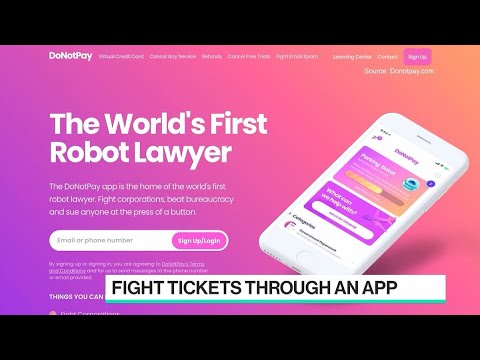
play DoNotPay.com CEO Browder on World’s First Robot Lawyer
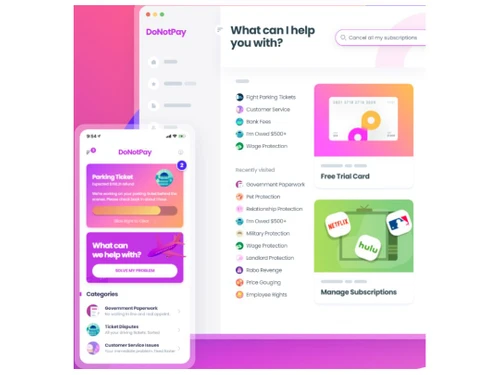
DoNotPay Dashboard
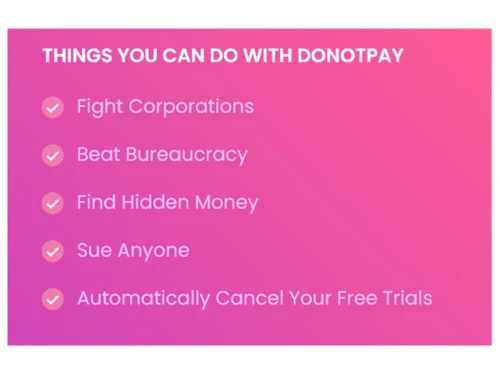
DoNotPay Things one can do with Donotpay

DoNotPay

Brand: DoNotPay

  • 4.2

  • 5 Ratings

DoNotPay law firm software revolutionizes legal services with AI-powered automation, enabling law firms to streamline processes, increase efficiency, and deliver cost-effective solutions to clients.

See More

Have you used DoNotPay before?

Share your insights for better experience

Add a Review

Price Available on Request

Questions about pricing or customization? We’re here to help, just a click away.

100% Genuine
Products
Best Price
Guaranteed
Safe & Secure
Payment
  • Description

  • Pricing

  • Features

  • Specification

  • Review

  • Compare

  • Alternatives

  • FAQ

DoNotPay Software Overview

What is DoNotPay Software?

DoNotPay is a comprehensive law firm software that uses artificial intelligence to provide users with legal information and fight against legal issues. A robotic lawyer helps solve your problems by providing legal information and self-help. Through this application, you can solve issues like parking ticket problems, bank fees, fighting corporations, beating bureaucracy, suing anyone etc.

DoNotPay uses natural language processing to understand user queries. Based on the query interpretation, it provides legal advice. It uses learning algorithms to enhance its response based on user interaction. It is like a robotic chatbot lawyer. It asks specific questions about the case and gives you the right advice, information, and help. You can use this information to decide on further action.

One of the key strengths of DoNotPay is its ability to save time and money. Automating repetitive tasks and providing accurate legal information reduces the need for costly consultations and streamlines the legal process. Its success is evident from the millions of users who have benefited from its services.

Moreover, DoNotPay prioritizes user privacy and security. It employs robust encryption and data protection measures to keep sensitive information confidential. This commitment to privacy instils trust in users, making it a reliable choice for legal assistance.

Overall, DoNotPay has democratized access to justice by providing an affordable and user-friendly alternative to traditional law firms. It empowers individuals to navigate the legal system confidently, enabling them to assert their rights effectively and efficiently.

Why Choose DoNotPay?

  • The robotic lawyeruses artificial intelligence, machine learning and natural language processing technology to interpret user questions and suggest legal advice and information. This information can be used to make other legal decisions.
  • Accurate information:This application provides legal advice on different situations accurately. It uses a machine learning algorithm to improve its response. Like an honest lawyer, you get advice from this application instantly.
  • Legal advice:Makes legal information accessible to everyone. With this application, you can solve companies related legal issues, bureaucrat-related issues, parking ticket issues and more.

Benefits of DoNotPay Law Firm Software

  • Empower consumers: It helps the consumers to get the right legal advice and therefore allows them to overcome hindrances caused due to fraud or complaints.
  • Safety: It ensures the information is safe and protected from sharing applications.
  • Accessibility:The application is easily accessible, and the information is readily available.
  • Easy to use:The application is straightforward to use. The user enters queries, gives responses to questions, and the application prepares legal advice.
  • Diversified advice:It guides many issues like warranty cases, consumer complaints, company-related issues, parking issues, trademark issues, suing and many such complaints.

Pricing of DoNotPay Software

DoNotPay law firm software solution pricing is available on request at techjockey.com.

The overall pricing model is based on different factors such as personalization, extra features required, total users, and the deployment type. Please feel free to request a call from our product experts if you want to learn more about our subscription plans or premium package deals.

Read more

DoNotPay Company Details

Founded Year:  2016

The world’s first robot lawyer. Helping millions of consumers resolve their issues.

Director/Founders Joshua Browder
Company Size 101-500 Employees

DoNotPay Pricing & Plans

Looking for The Right Pricing?

Share your requirements and get a plan built around your business.

  • Define your business needs
  • Get customised pricing
  • Choose features that fit your workflow

Price Available on Request

Get personalised DoNotPay pricing that fits your needs. Our team will connect with you.

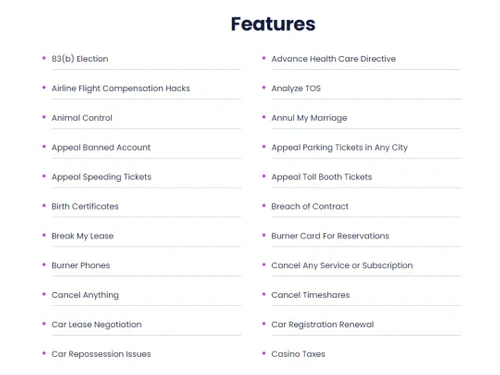
DoNotPay Features

  • icon_check AI Based Robot Lawyer
    It uses AI technology to provide legal advice and help with user-based queries.
  • icon_check Analyze TOS
    It helps you to understand and analyze the terms of services for various applications like YouTube, Discord etc.
  • icon_check Appeal Banned Account
    It helps you by guiding you in case applications like Facebook, WhatsApp etc., ban your account.
  • icon_check Birth Certificates
    It gives all advice on how to apply for birth certificates, where to get them, etc.
  • icon_check Breach of Contract
    It helps you to handle unreliable clients during a breach of contract and advises you on legal steps.
  • icon_check Break My Lease
    It gives legal advice on lease agreements, the situation when you can break, the legal consequences etc.
  • icon_check Concert Ticket Scams
    It gives legal advice on fighting against counterfeited scams related to tickets.
  • icon_check Change Mailing Address
    It gives legal help with changing a mailing address, and the necessary documents to be furnished.
  • icon_check Close Bank Accounts
    It gives legal advice on how to close bank accounts and ensure safety in case of a negative balance.
  • icon_check Sue Anyone
    It gives legal help in suing anyone who has caused harm, defamation, fraud etc.
  • icon_check Fight Corporations
    It provides all the necessary support and guidelines to help you understand the situation and fight with corporations.
  • icon_check Beat Bureaucracy
    It allows you to get all the support that helps you take legal action to beat bureaucracy-related issues.
DoNotPay Demo Video play icon

Get DoNotPay Demo

Watch the demo video to explore key features, real workflows, and how the software fits your business needs.

Understand
Key Features
Personal
Demo Insights
Interactive
Demo Support

DoNotPay Specifications

Supported Platforms
Ubuntu Ubuntu Windows Windows iOS iOS Android Android MacOS MacOS Windows(Phone) Windows(Phone) Linux Linux
Devices
Desktop Desktop Mobile Mobile Tablet Tablet iPad iPad
Deployment
Cloud-Based Cloud-Based
Suitable For
All Industries
Business Specific
All Businesses
Business Size
Small Business Startups Medium Business Enterprises SMBs SMEs MSMBs MSMEs
Customer Support
Email Communities
Language
English
Training Resources
Documentation Videos
AI Features
AI Integrated

Explore the Best Alternative Solutions Similar to Your Business Size and Needs

DoNotPay Review

4.2

Out of 5

img

Overall Rating

Based on
5 Verified Ratings

Rating Breakdown

  • Features 3.6
  • Value for Money 4.5
  • Ease of Use 4.4
  • Customer Support 4.3

90% Recommend this Product

Add Review

Techjockey Trusted Reviews from Verified Users

No reviews are currently available for DoNotPay . Discover similar Law Firm Software reviews

  • Lexzur (App4Legal)

    4.4

    Whats great - Affordable, feature-packed, and easy to use. read more

  • MyKase

    4.3

    Whats great - Affordable, feature-packed, and user-friendly. read more

  • Manage My Lawsuits

    4.6

    Whats great - Manage My Law Suits is Smart and efficient solution for legal services read more

Compare DoNotPay With other Law Firm Software

Products
Ratings
Pricing
Device Supported
Deployment
Supported Platforms
  • img

    DoNotPay

  • 4.2

  • Price On Request

  • Desktop

    Mobile

  • Web based

    On Premises

  • Windows

    Mac OS

  • img

    Lexzur (App4Legal)

  • 4.4

  • Price On Request

  • Desktop

    Mobile

  • Web based

    On Premises

  • Windows

    Mac OS

  • img

    CASEpeer

  • 4.6

  • Price On Request

  • Desktop

    Mobile

  • Web based

    On Premises

  • Windows

    Mac OS

  • img

    AI Lawyer

  • 4.5

  • Price On Request

  • Desktop

    Mobile

  • Web based

    On Premises

  • Windows

    Mac OS

  • img

    Legal XGen

  • 4.4

  • ₹ 2000

  • Desktop

    Mobile

  • Web based

    On Premises

  • Windows

    Mac OS

  • img

    Legal Robot

  • 4.1

  • Price On Request

  • Desktop

    Mobile

  • Web based

    On Premises

  • Windows

    Mac OS

  • img

    MyKase

  • 4.3

  • Price On Request

  • Desktop

    Mobile

  • Web based

    On Premises

  • Windows

    Mac OS

(2) Product(s) selected

DoNotPay Alternatives

See All DoNotPay Alternatives

Starting Price:

$69 /month

Starting Price:

$10 /month

Available

Price on Request

Available

Price on Request

Available

Price on Request

Available

Price on Request

Which operating system does the DoNotPay Software support?

DoNotPay software is compatible with Windows and macOS operating systems.

Is there any DoNotPay app?

DoNotPay app is available on Android and iOS devices.

What is the deployment type of the DoNotPay Law Firm Software platform?

DoNotPay Law Firm Software supports web-based deployment.

How much does the DoNotPay Law Firm Software cost?

DoNotPay Law Firm Software pricing is available on request at techjockey.com.

Who are the potential users of DoNotPay?

The Law Firm Software can be used by individuals seeking legal guidance and support. Its potential users range from individuals dealing with parking tickets and landlord disputes to those seeking assistance with consumer rights and small claims cases.

Is there any free trial or demo for DoNotPay Law Firm Software?

DoNotPay law firm system demo is available for free with techjockey.com.

Is the DoNotPay Law Firm Software System free?

DoNotPay Law Firm Software System does not offer a free trial.

How can you download the DoNotPay Law Firm software?

DoNotPay is a web-based platform. So, you don't have to download any software to use it on your PC. However, you can download the app from the app store if you use mobile devices.

How does DoNotPay work?

DoNotPay is an innovative legal robot that helps individuals easily navigate legal challenges. It helps users to fight against corporations, tackle bureaucratic hurdles, and initiate lawsuits effortlessly, empowering them to assert their legal rights effectively.

20,000+ Software Listed

Best Price Guranteed

Free Expert Consultation

2M+ Happy Customers

Terms and Condtions

close

Users with registered businesses can purchase goods from merchants on the platform to satisfy their business needs. Users are not permitted to utilize any products acquired through the platform for resale, advertising, business, or further distribution.

For each purchase made, users will receive a Tax Invoice (or 'GST invoice') that includes specific details such as:

  • the GSTIN of the user associated with their registered business, and

  • the specified Entity Name for their business.

It should be noted that not all products are eligible for GST Invoice. Only the products displayed by participating sellers with the 'GST-based Invoice Available' callout on the product description page would qualify.

Certain goods and services are not eligible to get a GST Invoice, including items with VAS, i.e., Value Added Services (e.g., Total Mobile Protection/Assured Buyback) and those involving an exchange offer at the time of purchase.

Users must ensure the accuracy of the GSTIN, and business entity name provided for the GST Invoice. Requests for corrections into GST Invoice would not be accommodated by Techjockey.com or any Seller, and any issues arising from user-provided information are the sole responsibility of users.

Techjockey.com is not liable for the GST Invoice or any associated input tax credit. To efficiently claim an input tax credit, users should select the registered place of business address as per the GST authority's data and follow the provisions of the GST Act and rules.

To claim an input tax credit, the delivery and billing addresses must match. Furthermore, input tax credits will not be granted if the delivery address and GSTIN on the invoice are from different states. In case of incorrect GST details provided during the order placement, the order will be canceled automatically.