 USA
USA UAE
UAESmall Business
Designed for startups and growing businesses

See More





Brand: Apport Software Solutions
Boost your marketing efforts with DoubleTick, a powerful tool that enables personalized and automated WhatsApp messaging, allowing you to reach a wider audience.
See MoreHave you used DoubleTick before?
Share your insights for better experience
View plans
 Save upto 18%, Get GST Invoice on your business purchase T&C Buy Now & Pay Later, Check offer on payment page.
 Brand: Apport Software Solutions
Founded Year: 2017
We help businesses accelerate their sales process by enabling them to communicate their product offerings via an intelligent catalogue with inbuilt real-time customer insights and quick order booking
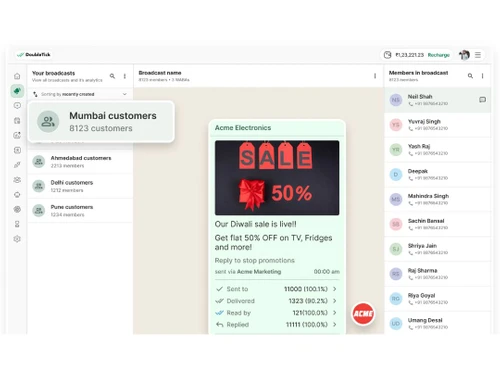
Bulk Messaging & Broadcasting
 Bulk Messaging Customizable Templates Auto Replies Rich Media Support Scheduled Messaging Message Templates Broadcast Lists Preview Mode
 Contact Management & Segmentation
Sync Contacts Import/Export Contacts Contact Tagging & Segmentation Deduplication Blacklist/Unsubscribe Chatbot & Automation
Workflow Automation Auto Replies Recurring Messaging Drip Campaigns Canned Responses Automated Follow-Ups Automatic Retry Campaign Scheduling Hybrid Mode AI Features
AI Chatbots Lead Qualification Auto-Responders AI Sentiment Analysis Predictive Analytics Multi-Agent & Team Collaboration
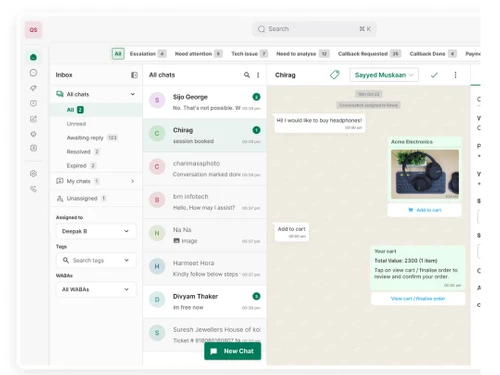
Shared Inbox Alerts & Notifications Internal Notes Live Agent Support Unlimited Agents Chat Transfer Integrations
WhatsApp Business API CRM Integration Third Party Integrations E-Commerce Platforms Webhooks Integration TallyPrime Integration API Integration Chatbot Integration OpenAI Integration ERP Integration Payment Gateway Integration E-Signatures Analytics & Reporting
Campaign Performance Delivery & Read Reports Engagement Metrics Agent Performance Metrics Conversion Tracking Real Time Dashboards Security & Compliance
Role-Based Access Control (RBAC) Data Encryption Data Retention Opt-In/Opt-Out Management GDPR & CCPA Compliance API Rate Limiting Anti Spam Filtering Audit Logs Audit Trail IP Whitelisting Others
Multi-Language Support Polls & Surveys 

Watch the demo video to explore key features, real workflows, and how the software fits your business needs.
 Ubuntu
  Windows
  iOS
iOS  Android MacOS
  Linux
Linux  Desktop
  Mobile
  Cloud-Based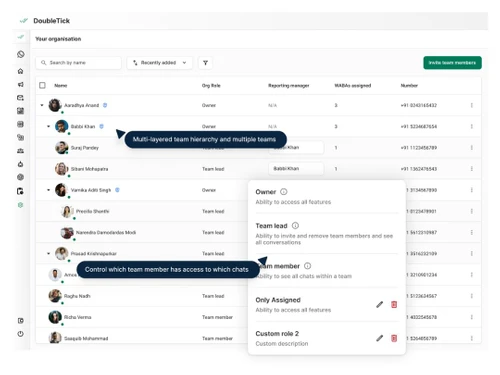
Small Business
Designed for startups and growing businesses
Medium Business
Built for business growth and flexibility
Enterprises
Designed for complex and large-scale business needs
4.3
Out of 5

Overall Rating
Based on
1 Verified Review
Rating Breakdown
86% Recommend this Product
Add Review

DoubleTick
₹ 30000.00 excl. GST
Desktop
Mobile
Web based
On Premises
Windows
Mac OS

RichAutomate
Price On Request
Desktop
Mobile
Web based
On Premises
Windows
Mac OS

Whatso
Price On Request
Desktop
Mobile
Web based
On Premises
Windows
Mac OS
Flowcart
₹ 1900
Desktop
Mobile
Web based
On Premises
Windows
Mac OS
Chati
₹ 999
Desktop
Mobile
Web based
On Premises
Windows
Mac OS

WappBlaster
₹ 1549
Desktop
Mobile
Web based
On Premises
Windows
Mac OS

Gallabox
₹ 43188
Desktop
Mobile
Web based
On Premises
Windows
Mac OS

Foxglove
₹ 10000
Desktop
Mobile
Web based
On Premises
Windows
Mac OS
ChatMitra
₹ 980
Desktop
Mobile
Web based
On Premises
Windows
Mac OS

WAPlus
₹ 9999
Desktop
Mobile
Web based
On Premises
Windows
Mac OS

WhatSender Pro
₹ 1000
Desktop
Mobile
Web based
On Premises
Windows
Mac OS
(0) Product(s) selected
Available
Price on Request
Starting Price:
₹999 /Month
Starting Price:
₹10,000 /OneTime

Starting Price:
$25 /Month

Starting Price:
₹24,999 /Year

Starting Price:
₹1,999

Available
Price on Request

Starting Price:
₹9,999 /Month




DoubleTick software is compatible with Windows and macOS operating systems.
Yes, DoubleTick offers a mobile app for controlling WhatsApp communication and automation.
DoubleTick system supports cloud-based deployment.
DoubleTick WhatsApp marketing system pricing starts from INR 30000 per year at techjockey.com.
DoubleTick is also used by various-sized organizations, e-commerce firms, customer service teams, and marketing companies to communicate on WhatsApp.
Yes, there is a free demo available in DoubleTick.
No, DoubleTick is not available for free.
DoubleTick is a cloud-based software. So, download the installation file on your system and open the Setup Wizard to get started.
To resolve the Please fill all fields error when using templates in DoubleTick, ypou must make sure that all required fields in the template are filled correctly before sending the message.
0 0
To resolve conflicting bot keywords in DoubleTick, follow the steps given below:
0 0
To Set Up Your WABA Profile on DoubleTick , follow the steps given below:
0 0
To import your customer data to create Multiple Broadcast channels in DoubleTick via Excel upload, follow the steps given below:
0 0
DoubleTick provides ready-made tools called APIs, helpful guides, and add-ons for services like Shopify, Salesforce, and Zapier, making it simple to connect and use them together quickly.
0 0
20,000+ Software Listed
Best Price Guranteed
Free Expert Consultation
2M+ Happy Customers
Terms and Condtions

Users with registered businesses can purchase goods from merchants on the platform to satisfy their business needs. Users are not permitted to utilize any products acquired through the platform for resale, advertising, business, or further distribution.
For each purchase made, users will receive a Tax Invoice (or 'GST invoice') that includes specific details such as:
the GSTIN of the user associated with their registered business, and
the specified Entity Name for their business.
It should be noted that not all products are eligible for GST Invoice. Only the products displayed by participating sellers with the 'GST-based Invoice Available' callout on the product description page would qualify.
Certain goods and services are not eligible to get a GST Invoice, including items with VAS, i.e., Value Added Services (e.g., Total Mobile Protection/Assured Buyback) and those involving an exchange offer at the time of purchase.
Users must ensure the accuracy of the GSTIN, and business entity name provided for the GST Invoice. Requests for corrections into GST Invoice would not be accommodated by Techjockey.com or any Seller, and any issues arising from user-provided information are the sole responsibility of users.
Techjockey.com is not liable for the GST Invoice or any associated input tax credit. To efficiently claim an input tax credit, users should select the registered place of business address as per the GST authority's data and follow the provisions of the GST Act and rules.
To claim an input tax credit, the delivery and billing addresses must match. Furthermore, input tax credits will not be granted if the delivery address and GSTIN on the invoice are from different states. In case of incorrect GST details provided during the order placement, the order will be canceled automatically.



