USA
USA UAE
UAESmall Business
Designed for startups and growing businesses

See More





Brand: Drip
Drip allows you to segregate your emails to respective campaigns with the help of powerful tools and highly adaptable functionality.
See MoreHave you used Drip Marketing Automation Software before?
Share your insights for better experience
Brand: Drip
Founded Year: 2012
Email and SMS marketing for growing ecommerce brands.
Core Functionalities
 Behaviour Management Templates Landing Page / Web Forms SMS Marketing Automated Workflow Optimization A/B Testing Dynamic Content Behavioral Targeting Custom Workflows Customer Journey Mapping Cart Recovery Automation Content Marketing Automation Progressive Profiling Social Media Automation Compliance Management Contact Management Loyalty Management Through Channel Marketing Automation (TCMA) User Access Management Visual Editor
 Campaign Management
Channel Management Campaign Optimization Omnichannel Performance Analytics Conversion Rate Optimization (CRO) Multichannel Channel Optimization Data Driven Optimization Landing Page Optimization Advertising Management Lead Management
Lead Generation Lead Nurturing Lead Qualification Segmentation Lead Scoring Leads Conversion List Management Email Marketing
Auto - Responders Drip Campaigns Behavioral Targeting Cart Recovery Automation Email Optimization WhatsApp Marketing
Auto - Responders Drip Campaigns Behavioral Targeting Cart Recovery Automation Segmentation Bulk Messaging Integrations Supported
CRM Integration Third Party Integration API Integration Barcode Integration Event Marketing Influencer Marketing Project Management Webhooks Analytics and Reporting
Predictive Analytics Visitor Tracking Real-Time & Actionable Insights Heatmaps Live View PDF Report Session Recording Web Form Tracking Dashboards Alerts & Notifications
SMS Notification Email Notifications Push Notifications In-App Notifications Desktop Notification Real-Time Alerts AI Capabilities
Predictive Analytics Customer Journey Mapping Generative AI Smart Recommendations Subject Line Helper 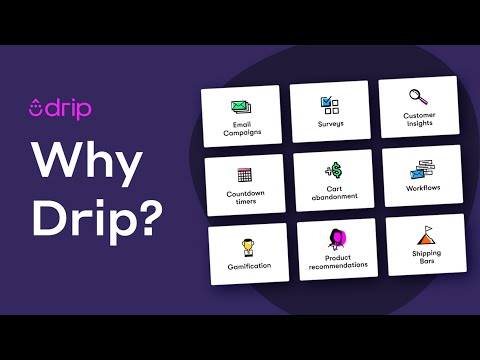

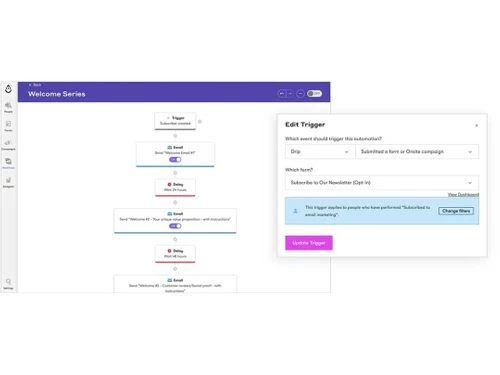
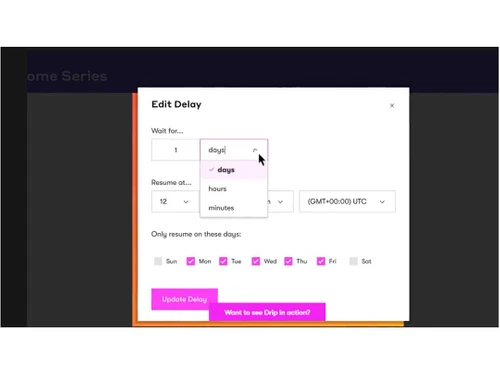
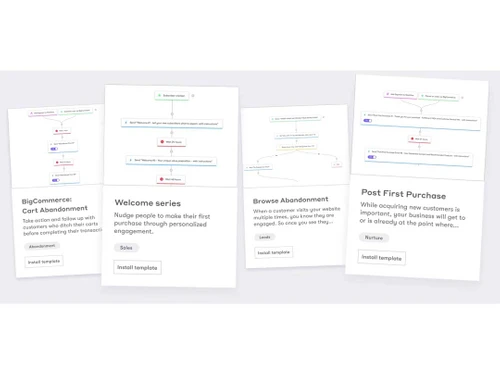
Watch the demo video to explore key features, real workflows, and how the software fits your business needs.
 Ubuntu
  Windows
  MacOS
MacOS  Linux
Linux  Desktop
  Mobile
  Tablet
  iPad
iPad  Cloud-Based
Small Business
Designed for startups and growing businesses
Medium Business
Built for business growth and flexibility
Enterprises
Designed for complex and large-scale business needs
4.1
Out of 5

Overall Rating
Based on
11 Verified Reviews
Rating Breakdown
86% Recommend this Product
Add ReviewOverall, users appreciate Drip Marketing Automation Software for its user-friendly interface, effective email segmentation, and automation capabilities, which streamline campaign management and enhance audience engagement. Many find the variety of templates and AI tools beneficial for simplifying their email marketing processes. However, common complaints include slow customer support, limited reporting features, and issues with the text editor and signup process. While most users recommend Drip, concerns about pricing and occasional system performance issues are noted.
Pros
"Drip integrates easily with my video hosting platform, making my workflow much smoother."
"Drip's dashboard is super easy to navigate. As someone who uses email campaigns regularly, I find it easy and user-friendly."
"Drip has been a very reliable choice for my needs. They assured me everything would work out, and it did."
Cons
"Support can get backed up, and there’s no phone support option. Sometimes the system can be slow, especially when loading lists or prior broadcasts."
"I had some trouble with the signup process, it felt a bit buggy and didn’t send me a confirmation email, which was quite annoying."
"The text editor for newsletters can be quirky, with fonts changing randomly despite setting a default font."

Jul 9, 2024
Techjockey Verified
“Drip Helped Me Reach My Audience More Effectively, But There's Room for Improvement”
Drip has been my go-to email marketing tool for about a year now. It offers a user-friendly interface that makes it easy to create email campaigns and segment audiences based on their behavior.
Pros
One thing I appreciate about Drip is its ability to make my email campaigns more targeted. It allows me to send messages to specific groups of people, which has really improved the way I communicate with my audience. The email editor is simple, and I don't have to struggle with design, which saves me a lot of time. The integration with my online store has been smooth, and tracking customer behavior has helped me boost engagement.
Cons
While Drip has been great for email marketing, I feel it could use more detailed reporting. Sometimes, I need more insights about how my emails are performing beyond just open rates and clicks.
Reason to switch
I switched to Drip because I wanted more automation options and better ways to target specific groups of customers. Mailchimp was great for starting out, but Drip provided the next level of customization I needed for my growing business.
Aug 6, 2024
Techjockey Verified
“Best ESP I’ve Ever Used, totally value for money”
Having used many ESPs over the years, Drip is by far the best. While support can be slow and there’s no phone option, the staff is knowledgeable. Sometimes, the system slows down, but these issues are minor compared to the overall benefits.
Pros
Drip stands out among the many ESPs I’ve used over the years, including GetResponse, Mailchimp, and AWeber. Its flexibility and depth of integration in automation, the software makes it easy to reach the right person with the right message at the right time.
Cons
Support can get backed up, and there’s no phone support option. Sometimes the system can be slow, especially when loading lists or prior broadcasts.
Reason to switch
I needed a more flexible platform with better integration capabilities.
Aug 5, 2024
Techjockey Verified
“Drip Has Simplified My Email Marketing processes”
Drip has greatly simplified my email marketing, especially with its integration with UScreen. The only issue is the text editor, which can be a bit unpredictable with fonts.
Pros
Drip integrates easily with my video hosting platform, making my workflow much smoother.
Cons
The text editor for newsletters can be quirky, with fonts changing randomly despite setting a default font.
Reason to switch
I needed a platform that integrated well with UScreen and offered customizable workflows, which Drip did perfectly.

Drip Marketing Automation Software
Price On Request
Desktop
Mobile
Web based
On Premises
Windows
Mac OS

Retner
₹ 999
Desktop
Mobile
Web based
On Premises
Windows
Mac OS

Cronberry
₹ 2000
Desktop
Mobile
Web based
On Premises
Windows
Mac OS

ActiveCampaign
Price On Request
Desktop
Mobile
Web based
On Premises
Windows
Mac OS

Brevo
₹ 625
Desktop
Mobile
Web based
On Premises
Windows
Mac OS
Zoho Marketing Automation
₹ 1140
Desktop
Mobile
Web based
On Premises
Windows
Mac OS

Zepic
Price On Request
Desktop
Mobile
Web based
On Premises
Windows
Mac OS

InSider
Price On Request
Desktop
Mobile
Web based
On Premises
Windows
Mac OS

Dotdigital
Price On Request
Desktop
Mobile
Web based
On Premises
Windows
Mac OS

Freshmarketer
₹ 1499
Desktop
Mobile
Web based
On Premises
Windows
Mac OS

Adobe Marketo Engage
Price On Request
Desktop
Mobile
Web based
On Premises
Windows
Mac OS
(0) Product(s) selected
Available
Price on Request
Available
Price on Request
Available
Price on Request

Starting Price:
$20 /month

Starting Price:
₹770 /Month

Starting Price:
$1,250 /Month
Available
Price on Request

Starting Price:
$24 /Month

Available
Price on Request

Available
Price on Request









Drip Marketing Automation Software Marketing Automation Software is compatible with Windows operating systems.
Drip Marketing Automation Software is compatible with Ubuntu, Windows, MacOS, and Linux device systems.
No, it is not available on Android and iOS devices.
Drip Marketing Automation Software supports web-based deployment.
The pricing of Drip Marketing Automation Software starts at $ 39 on techjockey.com.
Drip marketing automation software can benefit businesses of all sizes, including startups, SMBs, SMEs, and agencies, by streamlining their marketing efforts and driving growth.
Drip Marketing Automation Software platform demo is available with techjockey.com.
No, Drip Marketing Automation Software is not available for free. You can get in touch with our experts to know more about the pricing plans.
No, Drip Marketing Automation Software does not offer a free trial.
Software installation is not needed since it supports web-based deployment. So, just open the setup wizard and get started.
Drip Marketing Automation Software simplifies marketing processes by offering features such as email marketing, workflow automation, segmentation, and reporting. It helps businesses optimize campaigns and achieve their marketing goals.
To cancel my Drip Subscription, follow the steps given below:
0 0
To create a webhook in Drip, follow the steps given below:
0 0
The events that automatically increase or decrease a person lead score, are as follows:
0 0
To apply a lead score to a Drip form, follow the steps given below:
0 0
To enable lead scoring in your account in Drip, follow the steps given below:
0 0
20,000+ Software Listed
Best Price Guranteed
Free Expert Consultation
2M+ Happy Customers
Terms and Condtions

Users with registered businesses can purchase goods from merchants on the platform to satisfy their business needs. Users are not permitted to utilize any products acquired through the platform for resale, advertising, business, or further distribution.
For each purchase made, users will receive a Tax Invoice (or 'GST invoice') that includes specific details such as:
the GSTIN of the user associated with their registered business, and
the specified Entity Name for their business.
It should be noted that not all products are eligible for GST Invoice. Only the products displayed by participating sellers with the 'GST-based Invoice Available' callout on the product description page would qualify.
Certain goods and services are not eligible to get a GST Invoice, including items with VAS, i.e., Value Added Services (e.g., Total Mobile Protection/Assured Buyback) and those involving an exchange offer at the time of purchase.
Users must ensure the accuracy of the GSTIN, and business entity name provided for the GST Invoice. Requests for corrections into GST Invoice would not be accommodated by Techjockey.com or any Seller, and any issues arising from user-provided information are the sole responsibility of users.
Techjockey.com is not liable for the GST Invoice or any associated input tax credit. To efficiently claim an input tax credit, users should select the registered place of business address as per the GST authority's data and follow the provisions of the GST Act and rules.
To claim an input tax credit, the delivery and billing addresses must match. Furthermore, input tax credits will not be granted if the delivery address and GSTIN on the invoice are from different states. In case of incorrect GST details provided during the order placement, the order will be canceled automatically.