USA
USA UAE
UAESmall Business
Designed for startups and growing businesses
See More





Brand: Orchid Technical Consultancy
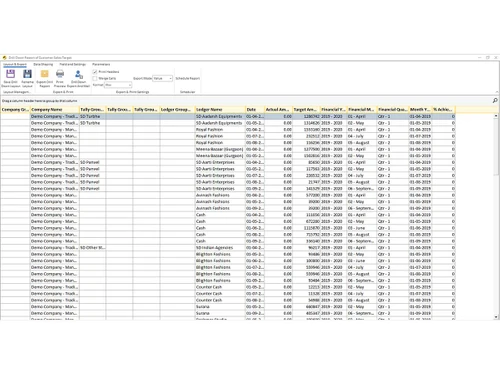
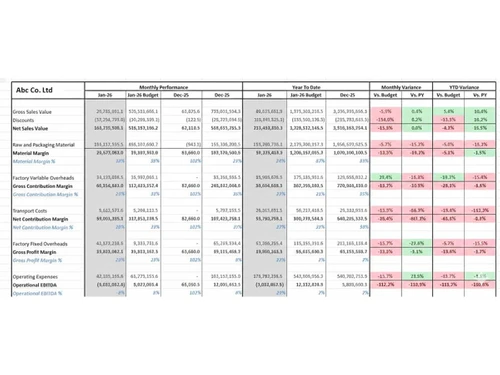
EasyReports is a zero-code reporting automation platform designed to streamline reporting and MIS functions across departments. It enables businesses to build dashboards, financial statements, and analytical reports by integrating ERP and non-ERP data sources into a single reporting environment.
See MoreHave you used EasyReports before?
Share your insights for better experience
Looking for The Right Pricing?
Share your requirements and get a plan built around your business.
Price Available on Request
Get personalised EasyReports pricing that fits your needs. Our team will connect with you.
 Dashboards ERP Integration Automated Report Distribution Financial Reporting Role-Based Access Control (RBAC) Customizable Templates Financial Statements Sales Analysis Multi Company Performance Tracking MIS Reporting Data Integrations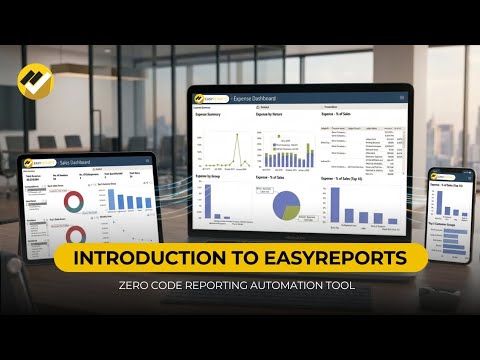

Watch the demo video to explore key features, real workflows, and how the software fits your business needs.
 Windows
  Desktop
  Mobile
  Cloud-Based
  Perpetual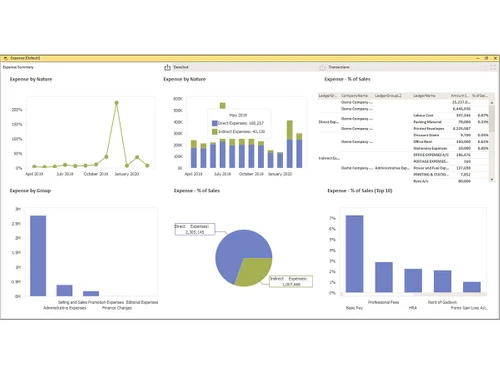
Small Business
Designed for startups and growing businesses
Medium Business
Built for business growth and flexibility
Enterprises
Designed for complex and large-scale business needs
4.3
Out of 5

Overall Rating
Based on
4 Verified Reviews
Rating Breakdown
85% Recommend this Product
Add ReviewOverall, users appreciate EasyReports for its user-friendly interface and ability to simplify reporting tasks, making it accessible even for non-technical users. Many find it particularly useful for data consolidation and generating reports efficiently. However, some users have reported challenges with integration and syncing issues, especially when dealing with larger datasets. Additionally, while the support system is generally viewed positively, there are calls for improvements in responsiveness and customization options.

Feb 27, 2026
Techjockey Verified
“Product with latest Technology”
Product is very usefull for any segment. Easy for freshers and non technical person . You can create your own report with out help of any technical person . In a one word self reporting system
Pros
Easy to install and use
Cons
Need to improve support system
Reason to switch
Reliability and price
Feb 24, 2026
Techjockey Verified
“A practical review of EasyReports BI as a user-friendly business intelligence tool for everyday reporting needs”
EasyReports BI is a business intelligence and reporting platform designed to help organizations convert raw data into meaningful insights.
Pros
One of the strongest advantages of EasyReports BI is its focus on simplicity and usability. The platform is easy to navigate, even for users who do not come from a strong technical or analytics background.
Cons
Predictive analytics or users who prefer highly customized dashboards may feel restricted.
Reason to switch
Reporting
Feb 23, 2026
Techjockey Verified
“Useful for summarizing the data”
When there is more than 10 companies, there is complex process for consolidate the data in one format, this report is helpful for this, however there is challenges also face for integration when we want to use, there is some problem come like inventory not sync, report is not open, more time take for sync the data etc.,
Pros
Complex process of consolidation will become easy,
Cons
Challenges face the integration of system data with Easy Report. When we want to use it, there is some problems that come up, like inventory not sync, report is not open, more time taken to sync the data, etc.
Reason to switch
-

EasyReports
Price On Request
Desktop
Mobile
Web based
On Premises
Windows
Mac OS

Zelenka Reporting Solution
₹ 12000
Desktop
Mobile
Web based
On Premises
Windows
Mac OS

Revealbot
Price On Request
Desktop
Mobile
Web based
On Premises
Windows
Mac OS

OZ REPORT
Price On Request
Desktop
Mobile
Web based
On Premises
Windows
Mac OS

KarbunWise
Price On Request
Desktop
Mobile
Web based
On Premises
Windows
Mac OS

FFReporting
Price On Request
Desktop
Mobile
Web based
On Premises
Windows
Mac OS

CxReports
Price On Request
Desktop
Mobile
Web based
On Premises
Windows
Mac OS

Hubble
Price On Request
Desktop
Mobile
Web based
On Premises
Windows
Mac OS

FTT MIS
Price On Request
Desktop
Mobile
Web based
On Premises
Windows
Mac OS

Agency Dashboard
Price On Request
Desktop
Mobile
Web based
On Premises
Windows
Mac OS

Two Minute Reports
₹ 1259
Desktop
Mobile
Web based
On Premises
Windows
Mac OS
(0) Product(s) selected
Available
Price on Request
EasyReports price is available on request at techjockey.com.
EasyReports is a MIS Reporting Automation software that connects to your ERP and other data sources and delivers automated reports and dashboards instantly.
EasyReports integrates with Tally, SAP B1, Microsoft NAV, Business Central, D365, MySQL, Oracle, SQL Server and more.
Yes, EasyReports is specifically built for SMBs, offering affordable pricing, quick implementation and zero coding requirements.
No, it's a fully zero-code, drag-and-drop platform that any business user can operate without IT support.
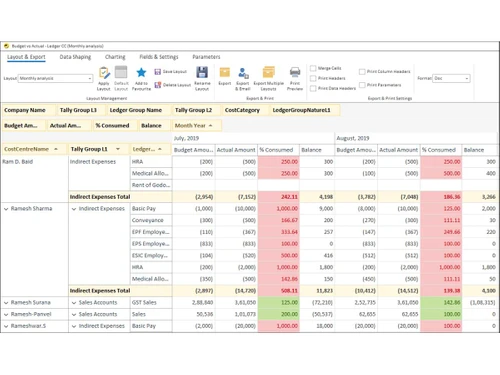
EasyReports supports Pivot Reports, Grid Reports, Spreadsheet Reports and Formatted PDF-style Reports for every business need.
EasyReports offers Financial, Sales, Debtor, Production, Expense and many more with drill-down, filters and real-time interactivity.
EasyReports is deployed On-Premise, your data never leaves your own infrastructure.
Yes, EasyReports seamlessly combines ERP, CRM, Accounting software's and other data sources.
Yes, the built-in Report Scheduler automatically generates and delivers reports via email.
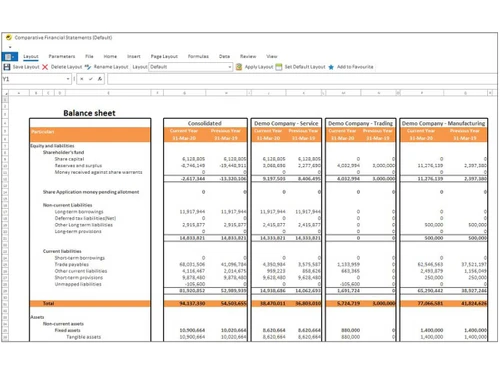
Yes, EasyReports supports consolidated reporting across multiple companies.
EasyReports provides On-Premise deployment, Role-Based Security and Data-Level field filters for complete, enterprise-grade data protection.
Yes, EasyReports auto-generates Balance Sheets, P&L, and Cash Flow statements in your own preferred format with multi-currency support.
Yes, EasyReports offers a free, no-obligation trial and a live demo.
EasyReports serves the Trading, Manufacturing, Financial Services, IT/ITES, BPO, Professional Services, Media & Entertainment, and Retail sectors.
EasyReports has been trusted by businesses since 2009, with 15+ years of experience, 1,000+ users and 5,000+ reports deployed.
20,000+ Software Listed
Best Price Guranteed
Free Expert Consultation
2M+ Happy Customers
Terms and Condtions

Users with registered businesses can purchase goods from merchants on the platform to satisfy their business needs. Users are not permitted to utilize any products acquired through the platform for resale, advertising, business, or further distribution.
For each purchase made, users will receive a Tax Invoice (or 'GST invoice') that includes specific details such as:
the GSTIN of the user associated with their registered business, and
the specified Entity Name for their business.
It should be noted that not all products are eligible for GST Invoice. Only the products displayed by participating sellers with the 'GST-based Invoice Available' callout on the product description page would qualify.
Certain goods and services are not eligible to get a GST Invoice, including items with VAS, i.e., Value Added Services (e.g., Total Mobile Protection/Assured Buyback) and those involving an exchange offer at the time of purchase.
Users must ensure the accuracy of the GSTIN, and business entity name provided for the GST Invoice. Requests for corrections into GST Invoice would not be accommodated by Techjockey.com or any Seller, and any issues arising from user-provided information are the sole responsibility of users.
Techjockey.com is not liable for the GST Invoice or any associated input tax credit. To efficiently claim an input tax credit, users should select the registered place of business address as per the GST authority's data and follow the provisions of the GST Act and rules.
To claim an input tax credit, the delivery and billing addresses must match. Furthermore, input tax credits will not be granted if the delivery address and GSTIN on the invoice are from different states. In case of incorrect GST details provided during the order placement, the order will be canceled automatically.