linkedin
CxReports logo
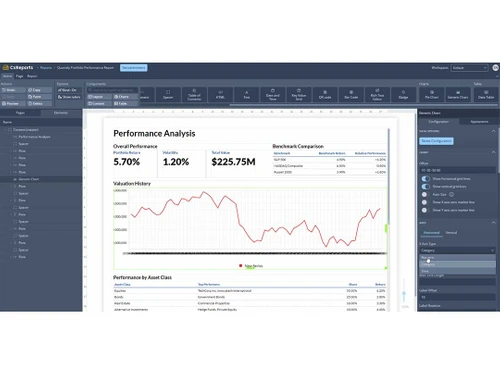
CxReports performance
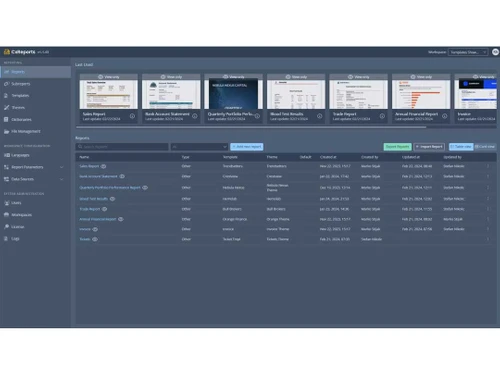
CxReports reports
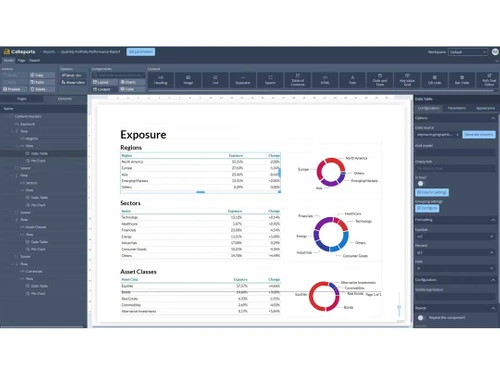
CxReports exposure

CxReports

Brand: Codaxy

  • 4.2

  • 4 Ratings

CxReports is a reporting tool designed to collect, process, and present data in a structured format. It enables users to generate and analyze various types of reports.

See More

Have you used CxReports before?

Share your insights for better experience

Add a Review

Price Available on Request

Questions about pricing or customization? We’re here to help, just a click away.

100% Genuine
Products
Best Price
Guaranteed
Safe & Secure
Payment
  • Description

  • Pricing

  • Features

  • Specification

  • Review

  • Compare

  • FAQ

CxReports Software Overview

What is CxReports?

CxReports is a PDF report generator designed to simplify the creation of professional reports from complex data sets. It features an intuitive drag-and-drop editor that allows users to customize reports without coding skills. The software supports automated report delivery via email at scheduled intervals, ensuring timely updates for stakeholders.

Users can also integrate various data sources, enhancing the accuracy of reports. Customizable templates enable branding alignment with corporate guidelines. Security is prioritized through on-premise hosting and advanced features to protect sensitive data. CxReports is suitable for businesses of all sizes across various industries, streamlining reporting processes effectively.

Why Choose CxReports Software?

  • Automation and Efficiency: It automated report generation, saving time and allowing teams to focus on strategy.
  • Real-Time Data Access: It integrates real-time data for up-to-date and relevant reports, aiding quick decision-making.
  • Customizable Reporting: Users can create tailored reports using various templates and design features for effective data visualization.
  • Error Reduction: Automation reduces human errors, improving the accuracy of reports for stakeholders.
  • Improved Decision-Making: Detailed reports provide insights that help organizations identify trends and make informed decisions.

Benefits of CxReports Software

  • Intuitive Report Design: The WYSIWYG editor allows easy report creation with drag-and-drop functionality, supporting tables, charts, images, and rich text, all without needing advanced coding skills.
  • Automated Report Generation: The software enables automated PDF report creation for various business needs, with scheduled delivery via email at set intervals, such as daily, weekly, or monthly.
  • Dynamic Reporting Features: Reports can be parameterized for dynamic content based on specific criteria, and multilingual reports are supported, catering to a global audience.
  • Integrated Data Sources: It fetches data from multiple sources, including APIs and SQL databases, ensuring accurate data visibility during the report design phase.
  • Customizable Templates and Branding: Reports can be tailored to match corporate branding by customizing fonts, colors, and layouts, maintaining a consistent professional appearance.
  • Streamlined Page Management: Page layout is automated, including page breaking, numbering, and dynamic table of contents, with customizable templates for headers and footers.
  • Security and Accessibility: Advanced security features like role-based access control and on-premises hosting protect data, with single sign-on (SSO) support for enhanced authentication.
  • Support for Collaboration: Features like workspaces for departmental separation and secure testing environments facilitate teamwork, which is essential for larger teams working on complex tasks.
  • Deployment Options: Available for on-premises deployment and Docker setup, offering enhanced security and accessibility, with a free version available for smaller-scale needs.

Pricing of CxReports

CxReports price details are available on request at techjockey.com.

The pricing model is based on different parameters, including extra features, deployment type, and the total number of users. If you have further queries related to the product, you can contact our product team to learn more about the pricing and offers.

Read more

Codaxy Company Details

Founded Year:  2010

Codaxy is a software development company based in Banja Luka, founded in 2010 with the goal of providing a safe haven for creative thinkers and curious minds; a place where innovation helps clients gain an advantage over their competitors while offering employees room to grow

Director/Founders Codaxy
Company Size 101-500 Employees

CxReports Pricing & Plans

Starter

Calculated Price

$ 1000 Exclusive of all taxes
    • Quantity

      Quantity
      Quantity
    • Yearly

      Yearly
      Yearly

Key Features

  • Users -3

  • Workspaces -2

  • Reports -50

  • PDFs/year -5000

Pro

Calculated Price

$ 3000 Exclusive of all taxes
    • Quantity

      Quantity
      Quantity
    • Yearly

      Yearly
      Yearly

Key Features

  • Users -15

  • Workspaces -2

  • Reports -500

  • PDFs/year -20000

Server

Calculated Price

$ 6000 Exclusive of all taxes
    • Quantity

      Quantity
      Quantity
    • Yearly

      Yearly
      Yearly

Key Features

  • Unlimited Users

  • Workspaces Unlimited

  • Reports Unlimited

  • PDFs/year -Unlimited

CxReports Features

  • icon_check Automated Scheduling
    Automatically generates and delivers reports at preset times, reducing manual effort.
  • icon_check Sales Reports
    Provides detailed insights into sales performance and metrics.
  • icon_check Multilingual Support
    Offers report generation and user interface in multiple languages for global accessibility.
  • icon_check Templates
    Includes customizable templates for consistent and professional report formatting.
  • icon_check Performance Reports
    Tracks and analyzes key performance indicators to gauge business performance.
  • icon_check Bank Account Statement
    Generates and integrates statements for financial tracking and reconciliation.
  • icon_check Ticket
    Allows users to create and manage support tickets for issue resolution and assistance.

CxReports Specifications

Supported Platforms
Ubuntu Ubuntu Windows Windows Linux Linux
Devices
Desktop Desktop
Deployment
Perpetual Perpetual
Suitable For
All Industries
Business Specific
All Businesses
Business Size
Small Business Startups Medium Business Enterprises SMBs SMEs MSMBs MSMEs
Customer Support
Phone Email
Language
English
Training Resources
In Person Documentation

Explore the Best Alternative Solutions Similar to Your Business Size and Needs

CxReports Review

4.2

Out of 5

img

Overall Rating

Based on
4 Verified Ratings

Rating Breakdown

  • Features 4.1
  • Value for Money 4.3
  • Ease of Use 4
  • Customer Support 4.3

95% Recommend this Product

Add Review

Techjockey Trusted Reviews from Verified Users

No reviews are currently available for CxReports. Discover similar Reporting Tools reviews

  • EasyReports

    4.0

    Whats great - Easy to install and use read more

  • Counts Tally on Mobile

    5.0

    Whats great - Real time Data, enhanced client transparency & trust, effortless data accessibility, easy to navigate. read more

  • Uvdesk

    4.4

    Whats great - Stable performance, consistent updates, marketplace extensions, and responsive support team. read more

Compare CxReports With other Reporting Tools

Products
Ratings
Pricing
Device Supported
Deployment
Supported Platforms
  • img

    CxReports

  • 4.2

  • Price On Request

  • Desktop

    Mobile

  • Web based

    On Premises

  • Windows

    Mac OS

  • img

    EasyReports

  • 4.3

  • Price On Request

  • Desktop

    Mobile

  • Web based

    On Premises

  • Windows

    Mac OS

  • img

    Revealbot

  • 4.5

  • Price On Request

  • Desktop

    Mobile

  • Web based

    On Premises

  • Windows

    Mac OS

  • img

    FTT MIS

  • 4.4

  • Price On Request

  • Desktop

    Mobile

  • Web based

    On Premises

  • Windows

    Mac OS

  • img

    OZ REPORT

  • 4.4

  • Price On Request

  • Desktop

    Mobile

  • Web based

    On Premises

  • Windows

    Mac OS

  • img

    Hubble

  • 4.5

  • Price On Request

  • Desktop

    Mobile

  • Web based

    On Premises

  • Windows

    Mac OS

  • img

    Agency Dashboard

  • 4.3

  • Price On Request

  • Desktop

    Mobile

  • Web based

    On Premises

  • Windows

    Mac OS

  • img

    FFReporting

  • 4.2

  • Price On Request

  • Desktop

    Mobile

  • Web based

    On Premises

  • Windows

    Mac OS

(0) Product(s) selected

How much does CxReports Software cost?

Price details for CxReports can be obtained upon request at techjockey.com.

Is there any CxReports Software app?

CxReports software app is not available.

Which operating system does CxReports Software support?

CxReports supports major operating systems, including Ubuntu, Windows, and Linux, via a web browser.

Does CxReports offer a free trial?

Yes, CxReports offers a free version with limitations on the number of users and reports.

How does CxReports Software work?

CxReports Software works by allowing users to create customizable PDF reports from complex data sets using an intuitive visual editor, integrating various data sources, and automating report delivery via email at scheduled intervals.

Who are the potential users of CxReports Software?

Potential users of CxReports Software include small to medium businesses, large enterprises, finance and sales departments, IT professionals, and software developers seeking efficient reporting solutions across various industries.

Is there any free demo for CxReports Software?

Yes, CxReports free demo is available upon request on techjockey.com.

Is CxReports Software free?

No, CxReports is not free.

What types of reports can be generated from CxReports?

Users can create various reports, including financial statements, sales reports, and invoices from CxReports.

What is the typical implementation time for CxReports Software?

The implementation time of CxReports varies based on the complexity of the requirements but typically ranges from a few weeks to a couple of months.

20,000+ Software Listed

Best Price Guranteed

Free Expert Consultation

2M+ Happy Customers

Terms and Condtions

close

Users with registered businesses can purchase goods from merchants on the platform to satisfy their business needs. Users are not permitted to utilize any products acquired through the platform for resale, advertising, business, or further distribution.

For each purchase made, users will receive a Tax Invoice (or 'GST invoice') that includes specific details such as:

  • the GSTIN of the user associated with their registered business, and

  • the specified Entity Name for their business.

It should be noted that not all products are eligible for GST Invoice. Only the products displayed by participating sellers with the 'GST-based Invoice Available' callout on the product description page would qualify.

Certain goods and services are not eligible to get a GST Invoice, including items with VAS, i.e., Value Added Services (e.g., Total Mobile Protection/Assured Buyback) and those involving an exchange offer at the time of purchase.

Users must ensure the accuracy of the GSTIN, and business entity name provided for the GST Invoice. Requests for corrections into GST Invoice would not be accommodated by Techjockey.com or any Seller, and any issues arising from user-provided information are the sole responsibility of users.

Techjockey.com is not liable for the GST Invoice or any associated input tax credit. To efficiently claim an input tax credit, users should select the registered place of business address as per the GST authority's data and follow the provisions of the GST Act and rules.

To claim an input tax credit, the delivery and billing addresses must match. Furthermore, input tax credits will not be granted if the delivery address and GSTIN on the invoice are from different states. In case of incorrect GST details provided during the order placement, the order will be canceled automatically.