linkedin
JustBilling logo
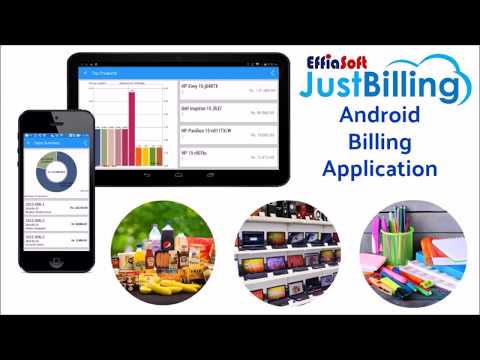
play Just Billing Retail POS App Demo
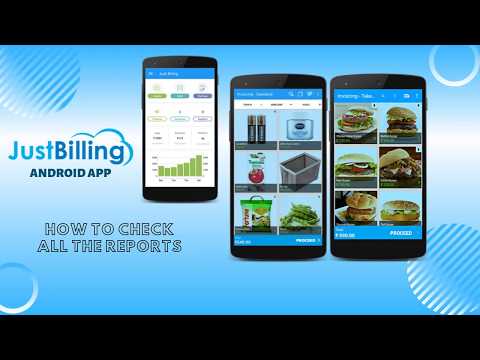
play Just Billing Android App- How to check all reports in the Just Billing app?
EffiaSoft Just Billing

JustBilling

Brand: EffiaSoft

  • 4.5

  • 10 Ratings & 8 Reviews

JustBilling helps businesses manage billing, inventory, GST, and customers with all-in-one retail billing software and real-time reports across mobile and PC.

See More

Have you used JustBilling before?

Share your insights for better experience

Add a Review
Starting Price 16% OFF
₹1,179 excl.GST  ₹1,402
₹ 1,391 incl. GST

View plans

offer Save upto 18%, Get GST Invoice on your business purchase T&C
offer Buy Now & Pay Later, Check offer on payment page.
Buy Now
100% Genuine
Products
Best Price
Guaranteed
Safe & Secure
Payment
  • Description

  • Pricing

  • Features

  • Specification

  • Review

  • Compare

  • Alternatives

  • FAQ

Starting at ₹1,179
Buy Now

JustBilling Software Overview

What is JustBilling?

JustBilling is a comprehensive and intuitive Point of Sale (POS) and billing software designed to streamline and automate business operations for the retail, restaurant, and service industries. Available on Windows, Android, and iOS platforms, it provides a unified solution for managing sales, inventory, customers, and GST compliance from a single dashboard. Whether on a mobile device or a desktop PC, JustBilling empowers businesses to bill faster, track inventory smarter, and access real-time business insights from anywhere, at any time. It is engineered to be user-friendly, requiring no advanced technical knowledge, allowing business owners to focus on growth and customer service rather than complex software management.

Why Choose JustBilling?

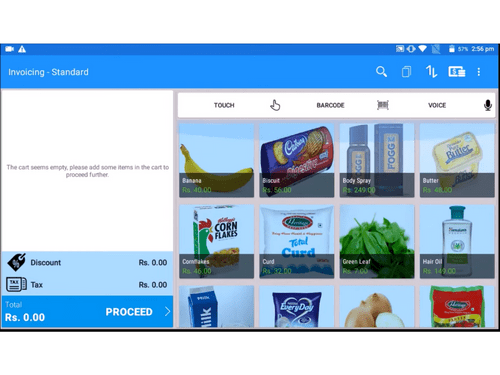
  • Easy & Fast Billing: Process sales transactions instantly using touch, barcode scanning, or even voice commands, significantly reducing customer wait times.
  • 100% GST Compliant: Generate accurate, GST-compliant invoices in seconds, simplifying tax management and ensuring regulatory adherence.
  • Multi-Store Support: Seamlessly manage operations, inventory, and sales data across multiple store locations from a centralized system.
  • Secure Cloud Backup: Protect your valuable business data with automatic and secure cloud backups, ensuring business continuity and peace of mind.
  • Advanced Inventory Management: Keep a precise track of stock levels, manage product details, and receive alerts for low inventory to prevent stockouts.
  • Effective Customer Management: Build and maintain a customer database to track purchase history, preferences, and contact information, enabling personalized marketing and service.
  • Real-Time Sales Reports: Access dynamic dashboards and detailed sales reports on the go, providing actionable insights to make informed business decisions.
  • Online & Offline Functionality: Continue business operations without interruption, even with an unstable internet connection. The software syncs data automatically once connectivity is restored.

Advanced Features of JustBilling

  • Comprehensive Point of Sale (POS): An intuitive interface that supports various payment methods, split billing, and quick product lookups for a smooth checkout experience.
  • Digital Invoicing: Go paperless by sending digital bills to customers via SMS, Email, or WhatsApp, enhancing customer convenience and reducing environmental impact.
  • Offers & Schemes Management: Easily create and manage special deals, discounts, coupons, and gift vouchers to attract new customers and increase sales from existing ones.
  • Integrated Payment Processing: Accept a wide range of payment types, including credit/debit cards, mobile wallets, and UPI, directly through the POS system.
  • Data & Analytics: Leverage powerful reporting tools to analyze sales trends, top-selling products, and customer behavior, helping you optimize your business strategy.
  • Barcode Scanning Integration: Expedite the billing and inventory management process by using integrated barcode scanning for quick and accurate product identification.

Modules of JustBilling

  • Retail Management: Specifically designed for businesses like supermarkets, grocery stores, electronics shops, and gift stores. It includes robust inventory tracking, supplier management, and barcode generation to handle a large volume of products efficiently.
  • Restaurant & QSR Management: Ideal for take-away counters, self-service restaurants, coffee shops, and bakeries. Features include kitchen order ticket (KOT) management, table management, and recipe costing to streamline food service operations.
  • Service Business Management: A perfect fit for professionals like accountants, lawyers, consultants, and photographers. It simplifies appointment scheduling, client management, and service-based invoicing.
  • Distribution & Warehouse Management: For businesses with distribution networks, it offers tools for stock management across multiple warehouses, order processing, and logistics coordination to ensure a smooth supply chain.

How to Use JustBilling?

  1. Install JustBilling: Download and install the application on your preferred device, Windows PC, Android tablet/phone, or iOS device. The setup process is quick and easy.
  2. Add Your Products & GST Details: Easily import your existing product catalog or add items manually. Configure your GST details to ensure all invoices are compliant from the start.
  3. Start Billing Instantly: Once your products are in the system, you can begin processing sales immediately. The user-friendly interface makes billing a seamless task for your staff.
  4. Monitor Sales & Reports Anytime: Log in to your dashboard from any device to access real-time sales data, monitor inventory levels, and generate insightful reports to track your business performance.

JustBilling Pricing

JustBilling price starts at INR 1,179/year at techjockey.com.

The pricing model is based on different parameters, including extra features, deployment type, and the total number of users. For further queries related to the product, you can contact our product team and learn more about the pricing and offers.

Read more

EffiaSoft Company Details

Founded Year:  2012

EffiaSoft

Director/Founders Koushik Shee
Company Size 1-100

JustBilling Pricing & Plans

Pro (Windows)

Calculated Price

1179 ₹1402
SAVE UPTO 16%
Exclusive of all taxes
    • Quantity

      Quantity
      Quantity
    • Yearly

      Yearly
      Yearly

Key Features

  • Weighing Scale Integration

  • Create & Manage Tables

  • Table-Wise Order Management

  • Inventory Up-To-Date

  • Optimize Expense

  • Analytics & Reporting

  • Real Time Aggregation

  • Data Management

  • Stock Management

  • Waiter Access Role

  • Customer Management

  • Accounting & Taxation

  • Distribution Management

  • Warehouse Management

  • Table Occupancy Timer

Max Plan (Windows)

Calculated Price

7079 ₹8482
SAVE UPTO 17%
Exclusive of all taxes
    • Quantity

      Quantity
      Quantity
    • Yearly

      Yearly
      Yearly

Key Features

  • Includes everything in Pro +

  • Sales / Delivery Agent Role

  • App-Level User Permissions

  • Auto GRN

  • Auto Purchase Order

JustBilling Features

  • icon_check Point of Sale (POS)
    Comprehensive Point of Sale.
  • icon_check GST Compliance
    Create a GST invoice accurately in a fraction of a second using touch, barcode, or voice command.
  • icon_check Offers & Schemes
    Know your customers’ preferences to offer them special deals, coupons or gift vouchers to increase sales and customer footfall.
  • icon_check Digital Bills
    SMS, Email, WhatsApp or Print Invoice, Order and Estimates based on pre-configured professional looking templates.
  • icon_check Digital Payments
    Let it be customer’s choice to pay by cash, card, coupon, multiple digital wallets or a combination of these.
  • icon_check Inventory Up-To-Date
    Know your stock in hand at any time. Reduce the bad debts like wastage, overstocking, pilferage or misuse.
  • icon_check Optimize Expense
    Maintaining records of all business expenses with a few touches would help you to evaluate where to spend and where not to.
  • icon_check Analytics & Reporting
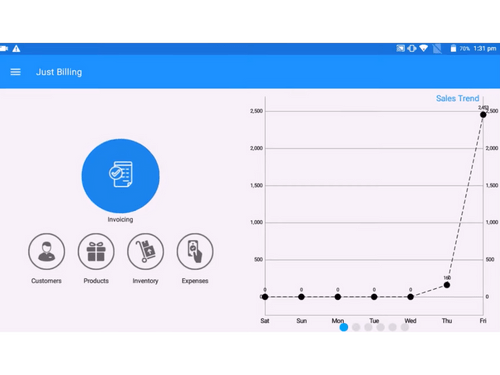
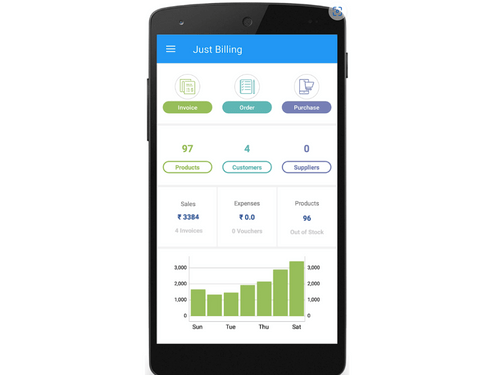
    Get the accurate report on your daily sales, customers, expenses, and many more to know your growth curve is at fingertips.
  • icon_check Real Time Aggregation
    Head office can view consolidated sales, customers, inventory, payments, and expenses across all locations in real time.
  • icon_check Data Management
    Save time and bring consistency by eliminating stores efforts from creating masters such as menu, recipe, pricing, and offers.
  • icon_check Stock Management
    Automatically generate purchase orders and transfer orders based on inventory levels.
  • icon_check Customer Management
    Centralize CRM and Promotions.
  • icon_check Accounting & Taxation
    Accounting Management. Optimized Cost and Cash Flow.
  • icon_check Distribution Management
    Automatically generate purchase orders and transfer orders based on inventory levels. Order Management. 
  • icon_check Warehouse Management
    Transfer stock between stores or your warehouse, and easily check inventory across all sales channels.
JustBilling Demo Video play icon

Get JustBilling Demo

Watch the demo video to explore key features, real workflows, and how the software fits your business needs.

Understand
Key Features
Personal
Demo Insights
Interactive
Demo Support

JustBilling Specifications

Supported Platforms
Ubuntu Ubuntu Windows Windows iOS iOS Android Android MacOS MacOS Linux Linux
Devices
Desktop Desktop Mobile Mobile Tablet Tablet iPad iPad
Deployment
Cloud-Based Cloud-Based
Suitable For
Retail
Business Specific
e-retailers
Business Size
Small Business Startups Medium Business Enterprises SMBs SMEs MSMBs MSMEs
Customer Support
Phone Email Forums
Language
English
Training Resources
Videos

Explore the Best Alternative Solutions Similar to Your Business Size and Needs

JustBilling Reviews

4.5

Out of 5

img

Overall Rating

Based on
8 Verified Reviews

Rating Breakdown

  • Features 4.1
  • Value for Money 4.1
  • Ease of Use 4.4
  • Customer Support 4.0

93% Recommend this Product

Add Review

Monika Arora linkedin_verify

Digital Marketer

Industry: Consumer Electronics User since: < 6 months

4.2

Reviewed on: Feb 13, 2023

Techjockey Verified

“Efficient software”

Pros

EffiaSoft Just Billing is the most user-friendly software to use, we can operate the billing system easily.

Cons

need more features

Switched from Trigent Wholesale Business Software

Reason to switch

Need more features

sujata muduli

Administrator

User since: 1-2 years

5

Reviewed on: Apr 9, 2020

Techjockey Verified

“Most recommended POS software! ”

Pros

User friendly, cloud back office and real time data monitoring.

Cons

NO CONS

RS

Administrator

4.7

Reviewed on: Apr 9, 2020

Techjockey Verified

“JUst Billing CLOUD is Time & Money saver”

Pros

Any number of stores manage from Home or Any where. Control on every option available at store operations

Cons

Few most used functionality needs enhancements

See All JustBilling Reviews

Compare JustBilling With other Retail Billing Software

Products
Ratings
Pricing
Device Supported
Deployment
Supported Platforms
  • img

    JustBilling

  • 4.5

  • ₹ 1179.00 excl. GST

  • Desktop

    Mobile

  • Web based

    On Premises

  • Windows

    Mac OS

  • img

    bMate-i

  • 4.5

  • ₹ 5000

  • Desktop

    Mobile

  • Web based

    On Premises

  • Windows

    Mac OS

  • img

    Unisolve Software

  • 4.7

  • ₹ 20000

  • Desktop

    Mobile

  • Web based

    On Premises

  • Windows

    Mac OS

  • img

    Znex POS

  • 4.3

  • ₹ 15000

  • Desktop

    Mobile

  • Web based

    On Premises

  • Windows

    Mac OS

  • img

    Kuberha AI

  • 4.3

  • ₹ 5000

  • Desktop

    Mobile

  • Web based

    On Premises

  • Windows

    Mac OS

  • img

    Elixr Finsys

  • 5

  • Price On Request

  • Desktop

    Mobile

  • Web based

    On Premises

  • Windows

    Mac OS

  • img

    Profit Hands

  • 4.7

  • ₹ 11999

  • Desktop

    Mobile

  • Web based

    On Premises

  • Windows

    Mac OS

(0) Product(s) selected

JustBilling Alternatives

See All JustBilling Alternatives

Starting Price:

₹15,000 /Year

Starting Price:

₹2,499 /Year

Available

Price on Request

Starting Price:

$59 /User

Can I create estimation for different sales order type?

Yes, you can create estimations for all available sales order types.

What is the purpose of recall option in estimation history?

In Justbilling Android application, Recall option in Estimation history is to allow user to edit the existing estimation record.

Is it possible to enter a amount and the application will calculate the quantity?

No, JustBilling does not support this option. User has to enter amount & quantity separately.

Can I clear all the KOT at once ?

Yes, JustBilling has been given the provision to User to clear all the KOT by one click. In the Kitchen Order screen, by the Clear All button you can clear all the KOTs instantly.

What is an Invoice?

An invoice is a bill that lists the details of goods sold to the customer. It involves the details of the products, quantity, Cost, customer details, payment status. This is a financial document which helps user in accounting and keeping track of money flow.

What is JustBilling?

JustBilling is a GST-compliant Point of Sale (POS) and billing software designed for retail shops, restaurants, and service businesses in India, available on Android, iOS, and Windows platforms.

Is JustBilling free?

JustBilling offers a free POS software version for download on Android, iOS, and Windows.

How much does JustBilling cost?

JustBilling price starts at INR 1,179/year at techjockey.com.

What does JustBilling do?

JustBilling helps businesses manage their daily operations by providing tools for fast billing, inventory management, GST compliance, customer management, and real-time sales reporting.

What devices and operating systems does JustBilling support?

JustBilling is a versatile software that works on mobile devices running Android and iOS, as well as on PCs with the Windows operating system.

Can I use JustBilling without an internet connection?

Yes, JustBilling is designed to work both online and offline, ensuring your business operations can continue without interruption even if the internet is down.

Can I manage multiple store locations with JustBilling?

JustBilling supports multi-store management, enabling you to monitor sales, inventory, and reports across all your business locations from a single platform.

Does JustBilling offer data backup for my business?

Yes, the software includes a secure cloud backup feature to protect your sales, inventory, and customer data, which you can access anytime.

Who can use JustBilling?

JustBilling is ideal for supermarkets, retail stores, QSRs, cafes, bakeries, service providers, and multi-location businesses that need billing, inventory, GST, and customer management.

20,000+ Software Listed

Best Price Guranteed

Free Expert Consultation

2M+ Happy Customers

Terms and Condtions

close

Users with registered businesses can purchase goods from merchants on the platform to satisfy their business needs. Users are not permitted to utilize any products acquired through the platform for resale, advertising, business, or further distribution.

For each purchase made, users will receive a Tax Invoice (or 'GST invoice') that includes specific details such as:

  • the GSTIN of the user associated with their registered business, and

  • the specified Entity Name for their business.

It should be noted that not all products are eligible for GST Invoice. Only the products displayed by participating sellers with the 'GST-based Invoice Available' callout on the product description page would qualify.

Certain goods and services are not eligible to get a GST Invoice, including items with VAS, i.e., Value Added Services (e.g., Total Mobile Protection/Assured Buyback) and those involving an exchange offer at the time of purchase.

Users must ensure the accuracy of the GSTIN, and business entity name provided for the GST Invoice. Requests for corrections into GST Invoice would not be accommodated by Techjockey.com or any Seller, and any issues arising from user-provided information are the sole responsibility of users.

Techjockey.com is not liable for the GST Invoice or any associated input tax credit. To efficiently claim an input tax credit, users should select the registered place of business address as per the GST authority's data and follow the provisions of the GST Act and rules.

To claim an input tax credit, the delivery and billing addresses must match. Furthermore, input tax credits will not be granted if the delivery address and GSTIN on the invoice are from different states. In case of incorrect GST details provided during the order placement, the order will be canceled automatically.