linkedin
Elementor logo
play Elementor Hosting: Why It’s the Best WP Hosting for Elementor Websites!
Elementor Dashboard
Elementor Website Builder

Elementor

Brand: Elementor

  • 4.5

  • 4 Ratings & 1 Review

Elementor is a user-friendly website builder for WordPress that allows you to create web pages with a drag-and-drop interface.

See More

Have you used Elementor before?

Share your insights for better experience

Add a Review
Starting Price
$10

View plans

100% Genuine
Products
Best Price
Guaranteed
Safe & Secure
Payment
  • Description

  • Pricing

  • Features

  • Specification

  • Review

  • Compare

  • Alternatives

  • FAQ

Starting at $10

Elementor Software Overview

What is Elementor?

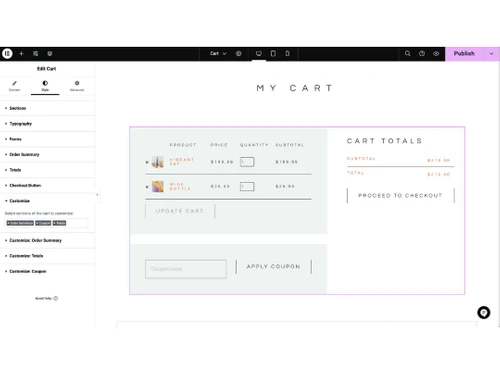
Elementor is a powerful website builder for WordPress that allows users to create stunning websites without needing any coding skills. It features a drag-and-drop interface, enabling you to design your web pages visually and see changes in real time. Instead of using the basic WordPress editor, Elementor provides a live frontend editor that makes it easy to customize layouts and add various design elements like text, images, buttons, and forms.

With Elementor, you can choose from numerous pre-designed templates and widgets to jumpstart your website creation process. The platform is designed for both beginners and experienced users, offering flexibility to create unique designs tailored to individual needs. Additionally, Elementor ensures that your designs are responsive, meaning they will look great on all devices, including desktops, tablets, and smartphones.

Why Choose Elementor Website Builder?

  • Drag-and-Drop Interface: Elementor's intuitive drag-and-drop builder allows you to create and customize websites visually, without needing to write code.
  • Real-Time Editing: See changes instantly as you design, making the website-building process faster and more efficient.
  • Responsive Design: Create websites that look great on all devices, with tools to adjust designs for desktop, tablet, and mobile views.
  • Extensive Template Library: Access a wide range of pre-designed templates and blocks to kickstart your website design.
  • Customizable Widgets: Use a variety of widgets to add features like buttons, images, galleries, forms, and more, all customizable to fit your design needs.
  • Theme Builder: Design every part of your website, including headers, footers, single post templates, and archive pages, without being limited by your theme.
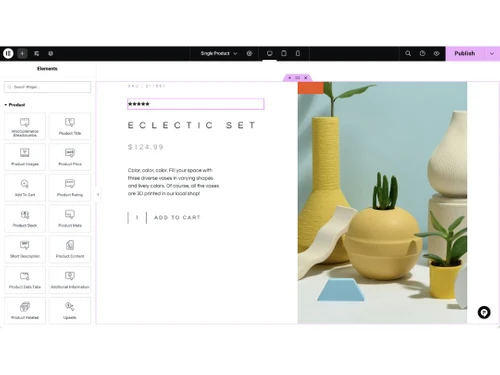
  • WooCommerce Integration: Build and customize online stores with ease using Elementor's seamless integration with WooCommerce.
  • Pop-Up Builder: Create and manage pop-ups with advanced targeting and triggering options to enhance user engagement.
  • Global Widgets and Styles: Save time by creating reusable widgets and global styles that can be applied across your website.
  • Developer-Friendly: For those with coding knowledge, Elementor offers custom CSS, HTML, and JavaScript integration, along with hooks and APIs for advanced customization.
  • Regular Updates and New Features: Elementor is continuously updated with new features, improvements, and security enhancements.
  • Large Community and Support: Benefit from a large, active community, extensive documentation, tutorials, and professional support.
  • Third-Party Integrations: Integrate with popular marketing tools, analytics, and other third-party services to extend your website's functionality.
  • Performance Optimization: Built with performance in mind, Elementor helps ensure your website loads quickly and runs smoothly.
  • Affordable Pricing: Elementor offers a free version with robust features, and its premium plans are competitively priced, providing excellent value for money.

Benefits of Elementor Website Builder

  • Dynamic Content Integration: Easily integrate dynamic content from custom fields, ACF (Advanced Custom Fields), and other sources to create personalized user experiences.
  • Role-Based Access Control: Assign different editing permissions to team members based on their roles, ensuring secure and collaborative workflows.
  • Revision History: Track and revert to previous versions of your designs with the built-in revision history feature.
  • Custom Breakpoints: Define custom breakpoints for responsive design, giving you full control over how your site looks on different screen sizes.
  • Motion Effects and Animations: Add advanced motion effects, scroll animations, and hover effects to make your website more interactive and engaging.
  • Form Builder: Create custom forms with advanced styling options, conditional logic, and integrations with popular email marketing services.
  • Custom Fonts and Icons: Upload and use custom fonts and icons to maintain brand consistency and enhance design flexibility.
  • Maintenance Mode: Set up a maintenance or coming soon page with ease, allowing you to work on your site without it being publicly accessible.
  • White Labeling: Customize the Elementor interface with your own branding for client projects, making it look like your own proprietary tool.
  • Multilingual Support: Build multilingual websites with compatibility for popular translation plugins like WPML and Polylang.
  • Accessibility Features: Design with accessibility in mind, ensuring your website is usable by people with disabilities.
  • SEO-Friendly Markup: Elementor generates clean, semantic code that is optimized for search engines, helping improve your site's SEO.
  • Custom CSS for Individual Elements: Apply custom CSS to individual elements without affecting the rest of your design, allowing for precise styling.
  • Background Slideshow and Video: Add background slideshows and videos to sections and columns for a more dynamic and visually appealing design.
  • Sticky Elements: Create sticky headers, menus, or any other element that stays fixed while scrolling, improving navigation and user experience.
  • Integration with Popular Page Builders: Compatible with other popular WordPress page builders, allowing for seamless transitions and integrations.
  • Custom Attributes: Add custom HTML attributes to elements for advanced functionality and integrations.
  • Inline Text Editing: Edit text directly on the page without needing to open a separate editor, speeding up the design process.
  • Global Colors and Fonts: Define global color palettes and font settings that can be easily applied and updated across your entire site.
  • Export/Import Templates: Save and export your designs as templates, and import them into other projects for consistent and efficient design workflows.

Elementor Pricing

Elementor price in India starts at $10 at techjockey.com.

The pricing model is based on different parameters, including extra features, deployment type, and the total number of users. For further queries related to the product, you can contact our product team and learn more about the pricing and offers.

Read more

Elementor Company Details

Founded Year:  2015

Elementor is an open-source website builder platform for professionals on Wordpress; Offered as a free and a premium edition.

Director/Founders Ariel Klikstein, Yakir Sitbon, Yoni Luksenberg
Company Size 1-100 Employees

Elementor Pricing & Plans

BASIC
Key Features
  • SSL & CDN from Cloudflare
  • Premium Support - 1 Member
  • Integrated Caching Tool
  • SFTP Access
  • DB Access
Starting at $10
    • Quantity

      Quantity
      Quantity
    • Monthly

      Monthly
      Monthly

Key Features

  • SSL & CDN from Cloudflare

  • Premium Support - 1 Member

  • Integrated Caching Tool

  • SFTP Access

  • DB Access

Elementor Features

  • icon_check Website Builder
    Create and design websites easily with a visual editor.
  • icon_check Content Import/ Export
    Transfer website content effortlessly between platforms.
  • icon_check Pre-built Templates
    Access ready-made website designs for quick setup.
  • icon_check Real Time Editing
    See live changes as you edit your website.
  • icon_check Drag & Drop
    Customize layouts easily without coding.
  • icon_check Content Management
    Organize and update website content efficiently.
  • icon_check Lead Generation
    Capture visitor information with built-in marketing tools.
  • icon_check Landing Pages
    Design high-converting landing pages for campaigns.
Elementor Demo Video play icon

Get Elementor Demo

Watch the demo video to explore key features, real workflows, and how the software fits your business needs.

Understand
Key Features
Personal
Demo Insights
Interactive
Demo Support

Elementor Specification

Supported Platforms
Ubuntu Ubuntu Windows Windows MacOS MacOS Linux Linux
Devices
Desktop Desktop Mobile Mobile Tablet Tablet iPad iPad
Deployment
Web-Based Web-Based
Suitable For
All Industries
Business Specific
All Businesses
Business Size
Small Business Medium Business Enterprises
Customer Support
Email Communities
Language
English
Training Resources
Webinars Documentation Videos

Explore the Best Alternative Solutions Similar to Your Business Size and Needs

Elementor Review

4.5

Out of 5

img

Overall Rating

Based on
1 Verified Review

Rating Breakdown

  • Features 4.5
  • Value for Money 4.2
  • Ease of Use 4.8
  • Customer Support 4.7

95% Recommend this Product

Add Review

Elementor Video Review

youtubeVideoId

4.3

“ELEMENTOR PRO REVIEW 2024 Is Elementor Pro Worth It”

Review by: pinky1472

Compare Elementor With other Website Builder

Products
Ratings
Pricing
Device Supported
Deployment
Supported Platforms
  • img

    Elementor

  • 4.5

  • Price On Request

  • Desktop

    Mobile

  • Web based

    On Premises

  • Windows

    Mac OS

  • img

    Framer

  • 4.4

  • ₹ 4332

  • Desktop

    Mobile

  • Web based

    On Premises

  • Windows

    Mac OS

  • img

    Zoho Sites

  • 4.5

  • ₹ 280

  • Desktop

    Mobile

  • Web based

    On Premises

  • Windows

    Mac OS

  • img

    Readdy AI

  • 4.5

  • Price On Request

  • Desktop

    Mobile

  • Web based

    On Premises

  • Windows

    Mac OS

  • img

    Boost 360

  • 4.5

  • Price On Request

  • Desktop

    Mobile

  • Web based

    On Premises

  • Windows

    Mac OS

  • img

    Durable

  • 4.7

  • Price On Request

  • Desktop

    Mobile

  • Web based

    On Premises

  • Windows

    Mac OS

  • img

    Webneed

  • 4.3

  • Price On Request

  • Desktop

    Mobile

  • Web based

    On Premises

  • Windows

    Mac OS

  • img

    Wegic AI

  • 4.2

  • Price On Request

  • Desktop

    Mobile

  • Web based

    On Premises

  • Windows

    Mac OS

  • img

    beehiiv

  • 4.2

  • Price On Request

  • Desktop

    Mobile

  • Web based

    On Premises

  • Windows

    Mac OS

(0) Product(s) selected

Elementor Alternatives

See All Elementor Alternatives

Starting Price:

$25 /Month

Starting Price:

$15

Starting Price:

$24 /Month $40

SAVE UPTO 40%

Starting Price:

$49 /Month

Mixo

4.3

Starting Price:

$10

Starting Price:

$5 /Month

Starting Price:

$14

Starting Price:

$7 /Month

Articles for Elementor

See All Related Articles

How much does Elementor cost?

Elementor's pricing in India starts at $10 on Techjockey.com.

Does Elementor Software have a mobile app?

No, Elementor does not have a mobile app.

Which operating systems support Elementor Website Builder?

Elementor is compatible with Ubuntu, Linux, Windows, macOS.

Is there a free trial available for Elementor Website Builder?

Elementor does not offer a free trial, but it provides a 30-day money-back guarantee on its paid plans, allowing users to try the Pro version risk-free.

How does Elementor Software work?

Elementor Website Builder works by providing a drag-and-drop interface that allows users to design and customize their WordPress websites visually without needing coding skills.

Who uses Elementor Software?

Elementor is used by web designers, developers, marketers, and business owners who want to create and manage their websites easily.

Can I request a free demo of Elementor Software?

Yes, Elementor Website Builder offers a free demo upon request.

Is Elementor Website Builder available for free?

Yes, Elementor offers a free version that includes basic features for building websites, while more advanced features are available in the paid Pro version.

Does Elementor work with all themes?

Yes, Elementor is compatible with most WordPress themes, allowing users to build and design their sites without restrictions.

What is Elementor Pro?

Elementor Pro is the premium version of the plugin that offers advanced features, additional widgets, and enhanced design capabilities compared to the free version.

20,000+ Software Listed

Best Price Guranteed

Free Expert Consultation

2M+ Happy Customers

Terms and Condtions

close

Users with registered businesses can purchase goods from merchants on the platform to satisfy their business needs. Users are not permitted to utilize any products acquired through the platform for resale, advertising, business, or further distribution.

For each purchase made, users will receive a Tax Invoice (or 'GST invoice') that includes specific details such as:

  • the GSTIN of the user associated with their registered business, and

  • the specified Entity Name for their business.

It should be noted that not all products are eligible for GST Invoice. Only the products displayed by participating sellers with the 'GST-based Invoice Available' callout on the product description page would qualify.

Certain goods and services are not eligible to get a GST Invoice, including items with VAS, i.e., Value Added Services (e.g., Total Mobile Protection/Assured Buyback) and those involving an exchange offer at the time of purchase.

Users must ensure the accuracy of the GSTIN, and business entity name provided for the GST Invoice. Requests for corrections into GST Invoice would not be accommodated by Techjockey.com or any Seller, and any issues arising from user-provided information are the sole responsibility of users.

Techjockey.com is not liable for the GST Invoice or any associated input tax credit. To efficiently claim an input tax credit, users should select the registered place of business address as per the GST authority's data and follow the provisions of the GST Act and rules.

To claim an input tax credit, the delivery and billing addresses must match. Furthermore, input tax credits will not be granted if the delivery address and GSTIN on the invoice are from different states. In case of incorrect GST details provided during the order placement, the order will be canceled automatically.