USA
USA UAE
UAESmall Business
Designed for startups and growing businesses


See More





Brand: Nicepage
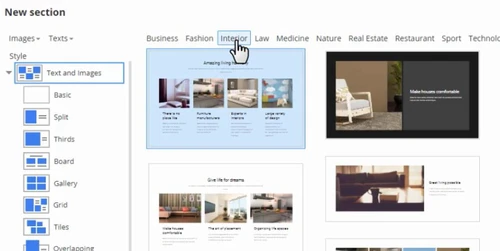
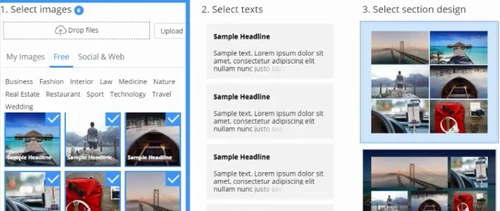
Nicepage is a website designing software that does not require any coding. Its simple freehand designing and drag n’ drop feature make it widely accessible. The website builder also offers a wide variety of templates to pick up from. Nicepage web designing software facilitates free positioning of texts, images videos, etc. Nicepage web designing software offers a wide range of features to wor...
See MoreHave you used Nicepage before?
Share your insights for better experience
Looking for The Right Pricing?
Share your requirements and get a plan built around your business.
Price Available on Request
Get personalised Nicepage pricing that fits your needs. Our team will connect with you.
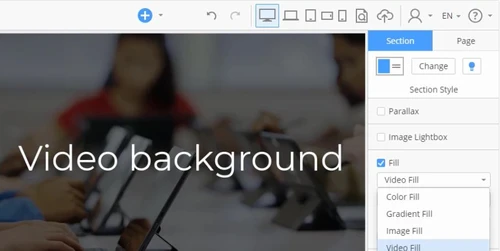
 Theme Customization True Mobile-Friendly Animation & Motions Video Background SEO Management Landing Pages Surveys Auto Update Drag & Drop Content Import/ Export Templates

Watch the demo video to explore key features, real workflows, and how the software fits your business needs.
 Windows
  Desktop
  Cloud-Based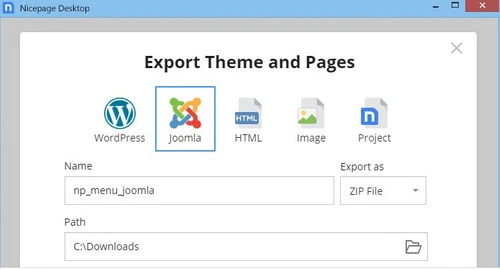

Small Business
Designed for startups and growing businesses
Medium Business
Built for business growth and flexibility
Enterprises
Designed for complex and large-scale business needs
3.9
Out of 5

Overall Rating
Based on
11 Verified Reviews
Rating Breakdown
74% Recommend this Product
Add ReviewCustomer sentiment towards Nicepage is mixed, with many praising its ease of use, intuitive design, and responsive support. Users appreciate the frequent updates that enhance functionality and address bugs. However, there are significant complaints regarding billing issues, lack of domain transfer services, and limitations in customization, particularly concerning font usage. Some users have expressed frustration with the software's stability and the quality of the code it outputs, suggesting that these drawbacks may overshadow its benefits for certain users.
Pros
"I have been with Nicepage since day one when it was released. Previously I was with Artisteer. I find the software easy to use. I find the support and the forum also useful. "
"The concept of or the idea behind the software is nice. Although NicePage does not output good code, nor is it a stable product. So overall, the CONs outweigh the PROs."
"Easy to use, and quite intuitive, convenient to have presets already made but at the same time a disadvantage"
Cons
"Billing Issues and No Domain Transfer or Domain Hosting Service."
"Though some new features may be buggy, it is usually solved with the next update."
"Earlier make improves only in UI. But now every update it is only new features and bugfixes."

Jan 19, 2025
Techjockey Verified
“No Domain Transfer Service, Poor Customer Service & No Refund if you pay by accident”
Poor Customer Service & billing issues. Once you pay them they won't refund your money & making it very difficult. NicePage do not provide any domain transfer service. If you have an existing website then their service wont work for you but they do not mention about this on their website. They want you to transfer your domain to another Hosting Company but pay them for their website software.
Pros
Templates
Cons
Billing Issues and No Domain Transfer or Domain Hosting Service.
Sep 29, 2024
Techjockey Verified
“A good tool for a good job!”
I have known the software for a long time, it has improved a lot, it makes web work a lot easier, I recommend it to everyone! Worth buying!
Pros
It is easy to use and has quick support and good services.
Cons
No cons
Reason to switch
It saves a lot of time
Sep 13, 2021
Techjockey Verified
“Nicepage is great!”
Pros
As for me this is best web builder I have ever seen. You can use already existing blocks or create new and save it in your library. It works very good, but at first time you need some practice with it. Web design is complicated thing, but Nicepage make it simplier.
Cons
Only thing I dont like is I can't load my own fonts. Why this simple function is so special and can't be avalible in paid version? Even for 70$? There are a lot of different fonts in paid version, much more than in free. But sometimes I need to use my own. On my oppinion it is not fair and strange.
Reason to switch
Nicepage gives more potentions and its much better.

Nicepage
Price On Request
Desktop
Mobile
Web based
On Premises
Windows
Mac OS

Framer
₹ 4332
Desktop
Mobile
Web based
On Premises
Windows
Mac OS

Odoo Website Builder
₹ 760
Desktop
Mobile
Web based
On Premises
Windows
Mac OS
Creative AI
Price On Request
Desktop
Mobile
Web based
On Premises
Windows
Mac OS

GoDaddy Website Builder
₹ 249
Desktop
Mobile
Web based
On Premises
Windows
Mac OS

Zoho Sites
₹ 280
Desktop
Mobile
Web based
On Premises
Windows
Mac OS

Readdy AI
Price On Request
Desktop
Mobile
Web based
On Premises
Windows
Mac OS

Boost 360
Price On Request
Desktop
Mobile
Web based
On Premises
Windows
Mac OS

Durable
Price On Request
Desktop
Mobile
Web based
On Premises
Windows
Mac OS

Wegic AI
Price On Request
Desktop
Mobile
Web based
On Premises
Windows
Mac OS

Webneed
Price On Request
Desktop
Mobile
Web based
On Premises
Windows
Mac OS
(0) Product(s) selected
Starting Price:
₹249 /Month
Starting Price:
$25 /Month
Starting Price:
$15
Starting Price:
$24 /Month $40

Starting Price:
$49 /Month

Starting Price:
$5 /Month

Starting Price:
$10

Starting Price:
$10

Starting Price:
$14

Starting Price:
$7 /Month


![11 Best eCommerce Website Builders for Small Businesses [Free & Paid]](https://cdn.techjockey.com/blog/wp-content/uploads/2020/06/telemed_banner.jpg?d=265x163 "Blog - 11 Best eCommerce Website Builders for Small Businesses [Free & Paid]")

Nicepage edition for WordPress and Joomla plugin require online authorization for protection purposes. While Nicepage for Windows and Mac OS can be used offline only if you were already signed in. During the offline mode, templates are not accessible.
Yes, the Nicepage offers access to the BillionPhotos.com plugin. It does not cost extra and is included with your subscription.
Here are the mandatory system requirements for Nicepage web designing software •For Windows: Windows 7 or later •For Mac OS: macOS 10.10 (Yosemite) on 64-bit
Nicepage automatically builds a mobile friendly version of your website and also facilitates separate editing of the mobile version.
Nicepage web designing software supports HTML, Joomla, and WordPress as of now.
20,000+ Software Listed
Best Price Guranteed
Free Expert Consultation
2M+ Happy Customers
Terms and Condtions

Users with registered businesses can purchase goods from merchants on the platform to satisfy their business needs. Users are not permitted to utilize any products acquired through the platform for resale, advertising, business, or further distribution.
For each purchase made, users will receive a Tax Invoice (or 'GST invoice') that includes specific details such as:
the GSTIN of the user associated with their registered business, and
the specified Entity Name for their business.
It should be noted that not all products are eligible for GST Invoice. Only the products displayed by participating sellers with the 'GST-based Invoice Available' callout on the product description page would qualify.
Certain goods and services are not eligible to get a GST Invoice, including items with VAS, i.e., Value Added Services (e.g., Total Mobile Protection/Assured Buyback) and those involving an exchange offer at the time of purchase.
Users must ensure the accuracy of the GSTIN, and business entity name provided for the GST Invoice. Requests for corrections into GST Invoice would not be accommodated by Techjockey.com or any Seller, and any issues arising from user-provided information are the sole responsibility of users.
Techjockey.com is not liable for the GST Invoice or any associated input tax credit. To efficiently claim an input tax credit, users should select the registered place of business address as per the GST authority's data and follow the provisions of the GST Act and rules.
To claim an input tax credit, the delivery and billing addresses must match. Furthermore, input tax credits will not be granted if the delivery address and GSTIN on the invoice are from different states. In case of incorrect GST details provided during the order placement, the order will be canceled automatically.