linkedin
Eraser logo
Eraser-AI diagram
Eraser-maps
Eraser-diagramming API

Eraser

Brand: Eraser Labs

  • No Ratings & Reviews

Have you used Eraser before?

Share your insights for better experience

Add a Review
Starting Price
$60

View plans

100% Genuine
Products
Best Price
Guaranteed
Safe & Secure
Payment
  • Description

  • Pricing

  • Features

  • Specification

  • Review

Starting at $60

Eraser Software Overview

Eraser Labs Company Details

Founded Year:  2020

Eraser is a collaboration whiteboard tool for engineering and technical teams.

Director/Founders Shin Kim
Company Size 1-100 Employees

Eraser Pricing & Plans

Business
Starting at $60
    • Seat

      Seat
      Seat
    • Monthly

      Monthly
      Monthly

Key Features

  • 100 AI credits / mo

  • Unlimited files

  • 1 Git repo + 1 data source

  • Models up to 1,000 rows

  • Unlimited version history

  • Private files

  • 100 custom icons

Business Plus
Starting at $420
    • Seat

      Seat
      Seat
    • Monthly

      Monthly
      Monthly

Key Features

  • 250 AI credits / mo

  • 3 Git repos + 3 data sources

  • Tenant-level data sources

  • Models up to 5,000 rows

  • SAML SSO

  • Unlimited custom icons

Eraser Features

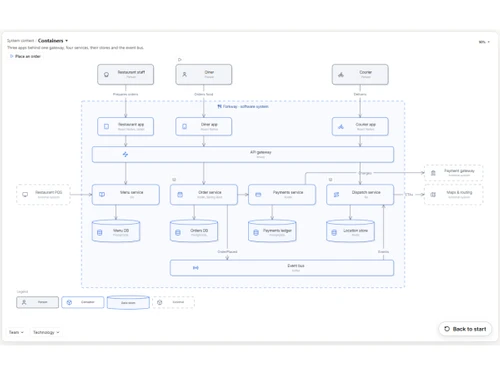
  • icon_check Flowchart Creation
    Create and edit flowcharts to represent processes, workflows, decision paths and relationships between system components.
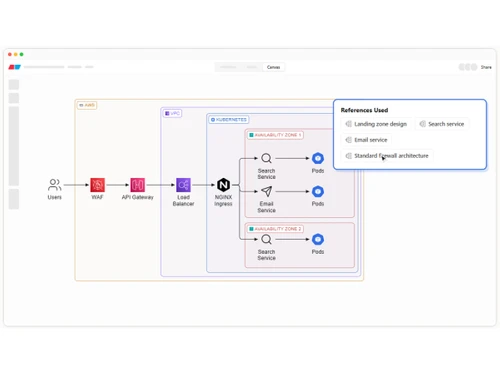
  • icon_check Diagramming
    Design technical diagrams to visualize application structures, infrastructure, processes and system dependencies.
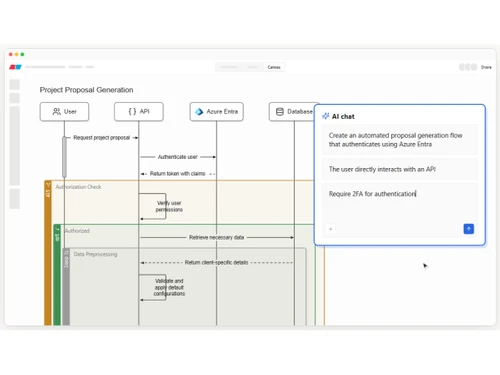
  • icon_check AI Diagram Generation
    Generate editable diagrams using natural language prompts, source code, images and uploaded technical files.
  • icon_check Sequence Diagram
    Visualize interactions and message exchanges between different applications, services and system components.
  • icon_check Real-Time Collaboration
    Collaborate with team members on shared diagrams and documents using real-time editing capabilities.
  • icon_check Version History
    Review previous diagram versions and track changes made to technical documentation over time.
  • icon_check Templates
    Use predefined templates and reference diagrams to maintain consistent layouts and technical documentation standards.
  • icon_check Customization
    Apply custom styles, colors, icons, layouts and team-specific rules to maintain consistent diagram designs.
  • icon_check File Import
    Import images, PDFs, Word, Excel, PowerPoint, Visio and Draw.io files as references for diagram creation.
  • icon_check File Export
    Export diagrams into formats such as PNG, JPEG, SVG, PDF, Visio and PowerPoint, depending on plan.
  • icon_check API Integration
    Generate, search, update and export diagrams programmatically through supported REST API capabilities.
  • icon_check Git Integration
    Connect Git repositories to generate architecture diagrams from codebases and keep technical documentation updated.
  • icon_check Cloud Integration
    Connect AWS, Azure and Google Cloud data sources to visualize infrastructure and cloud architecture.
  • icon_check Documentation Management
    Maintain technical documents and Markdown notes alongside diagrams in a centralized workspace.
  • icon_check Access Control
    Manage team membership, private files and sharing permissions to control access to technical resources.

Eraser Specifications

Supported Platforms
Ubuntu Ubuntu Windows Windows MacOS MacOS Linux Linux
Devices
Desktop Desktop
Deployment
Cloud-Based Cloud-Based Web-Based Web-Based
Suitable For
Education ITES Offices Techno Hubs Corporations
Business Specific
Businessman
Business Size
Individual Small Business Startups Medium Business Enterprises Freelancers
Customer Support
Email Communities
Language
English
Integration
API Integration
Training Resources
Webinars Documentation Videos
AI Features
AI Integrated
Technology
Next Generation

Eraser Review

Techjockey Trusted Reviews from Verified Users

No reviews are currently available for Eraser. Discover similar Flowchart Software reviews

  • SmartDraw

    4.4

    Whats great - Excellent service and aftercare with helping with questions relating to installation. Also a price that is amazing.? read more
  • Creately

    4.5

    Whats great - Visual collaboration features are ideal for brainstorming plans and processes. Highly suited for teams as in-built video conf... read more

  • ConceptDraw MINDMAP

    4.5

    Whats great - Project planning and management software with built-in themes. Allows you to customize themes accordingly. read more

Articles for Eraser

See All Related Articles

21,000+ Software Listed

Best Price Guranteed

Free Expert Consultation

5M+ Happy Customers

Terms and Condtions

close

Users with registered businesses can purchase goods from merchants on the platform to satisfy their business needs. Users are not permitted to utilize any products acquired through the platform for resale, advertising, business, or further distribution.

For each purchase made, users will receive a Tax Invoice (or 'GST invoice') that includes specific details such as:

  • the GSTIN of the user associated with their registered business, and

  • the specified Entity Name for their business.

It should be noted that not all products are eligible for GST Invoice. Only the products displayed by participating sellers with the 'GST-based Invoice Available' callout on the product description page would qualify.

Certain goods and services are not eligible to get a GST Invoice, including items with VAS, i.e., Value Added Services (e.g., Total Mobile Protection/Assured Buyback) and those involving an exchange offer at the time of purchase.

Users must ensure the accuracy of the GSTIN, and business entity name provided for the GST Invoice. Requests for corrections into GST Invoice would not be accommodated by Techjockey.com or any Seller, and any issues arising from user-provided information are the sole responsibility of users.

Techjockey.com is not liable for the GST Invoice or any associated input tax credit. To efficiently claim an input tax credit, users should select the registered place of business address as per the GST authority's data and follow the provisions of the GST Act and rules.

To claim an input tax credit, the delivery and billing addresses must match. Furthermore, input tax credits will not be granted if the delivery address and GSTIN on the invoice are from different states. In case of incorrect GST details provided during the order placement, the order will be canceled automatically.