linkedin
FaceUp logo
play FaceUp Whistleblowing System – Product go through
faceup-features
faceup-reports

FaceUp

Brand: FaceUp Technology

  • 4.2

  • 4 Ratings

FaceUp is a secure whistleblowing platform that helps organizations collect reports, identify risks, manage cases, and support compliance.

See More

Have you used FaceUp before?

Share your insights for better experience

Add a Review

Price Available on Request

Questions about pricing or customization? We’re here to help, just a click away.

100% Genuine
Products
Best Price
Guaranteed
Safe & Secure
Payment
  • Description

  • Pricing

  • Features

  • Specification

  • Review

  • Compare

  • Alternatives

  • FAQ

FaceUp Software Overview

What is FaceUp?

FaceUp is a comprehensive whistleblowing software designed to serve as a centralized hub for ethics and compliance management. It provides organizations with the tools for secure whistleblowing, systematic case management, and structured investigations. The platform is engineered to help compliance, legal, and HR teams detect potential risks early, respond to incidents with consistency, and maintain defensible oversight over all reported issues.

Trusted by over 3,600 organizations across more than 70 countries, FaceUp empowers employees to speak up safely and anonymously. Its user-friendly interface is built for diverse work environments, including frontline workers, global offices, and remote teams, ensuring that everyone has a secure channel to voice concerns, report misconduct, or share feedback. The system is proven to increase the volume of internal reports, significantly improving an organization's ability to detect and address misconduct and fraud at an early stage.

Why Choose FaceUp?

  • Enhanced Risk Detection: By facilitating internal reporting, FaceUp helps organizations identify and address potential misconduct and compliance risks earlier.
  • Increased Employee Engagement: The platform's simple and anonymous reporting experience encourages employees and other stakeholders to speak up through secure reporting channels.
  • Tailored for Key Departments: FaceUp is designed to meet the specific needs of different teams:
    • Legal & Compliance: Reduces financial, legal, and reputational exposure by ensuring regulatory standards are met and providing tools for confident issue resolution.
    • HR & People Teams: Supports a positive workplace culture by addressing employee issues early and resolving complex cases fairly and consistently.
    • Executives & Finance: Offers clear visibility into emerging risks, enabling better strategic decisions and ensuring high-risk issues are resolved with accountability.
  • Global Security & Compliance: The platform is built on a foundation of security, with ISO 27001 certification, GDPR compliance, and data hosted on SOC 2-certified AWS infrastructure. It offers end-to-end encryption and local data storage options to meet international data privacy requirements.
  • Seamless Integration: FaceUp can integrate with over 8,000 applications, allowing it to fit smoothly into your existing technology ecosystem and workflows.

Advanced Features of FaceUp

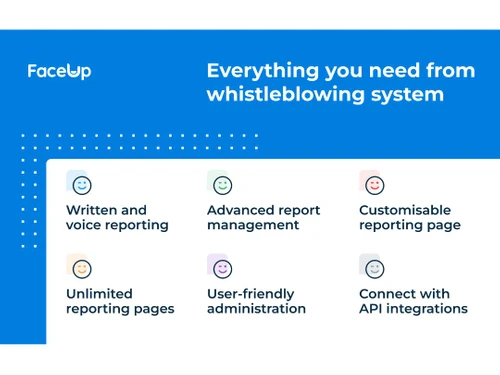
  • Multi-Channel Anonymous Reporting: Employees can submit reports through customized online forms, dedicated iOS and Android mobile apps, or unique QR codes. The system supports attachments and even anonymized voice messages to protect reporter identity.
  • Encrypted Two-Way Communication: Administrators can communicate securely and anonymously with whistleblowers to ask follow-up questions or provide updates. The platform includes built-in translation to overcome language barriers in global organizations.
  • Comprehensive Language Support: With support for over 113 languages, the platform is globally accessible, ensuring no employee is excluded due to language differences.
  • Advanced Hotline Options: Organizations can enhance their reporting channels with powerful add-ons, including a 24/7 automated phone hotline, a live hotline staffed by experienced agents, or a next-generation AI-powered hotline that guides reporters through a structured submission process.
  • Customization and Branding: The platform can be fully customized with your organization's logo and color scheme to align with your brand identity, fostering trust and familiarity among users.
  • Secure Administrator Controls: Features like the anonymous assignee option allow investigators to communicate without revealing their name, while robust notification systems keep the case management team informed of all activity.

Key Capabilities of FaceUp

  • Report Intake & Submission: The platform offers multiple, easy-to-access channels for submitting reports. Users can report via custom URLs, QR codes, or embeddable website widgets. The system ensures complete anonymity while allowing for the secure upload of evidence and ongoing, encrypted dialogue.
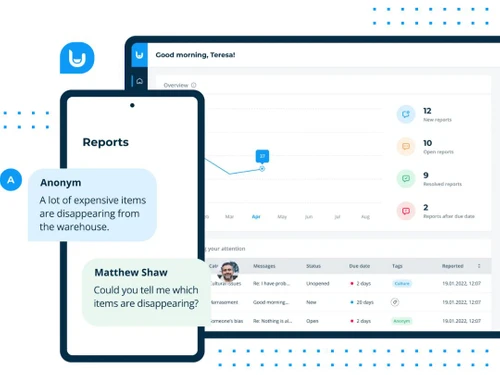
  • Centralized Case Management: All incoming reports are organized in a secure, centralized case database. Administrators have an intuitive overview of all cases, with tools to assign investigators, track progress with a clear audit trail, and manage workflows across different departments or use cases.
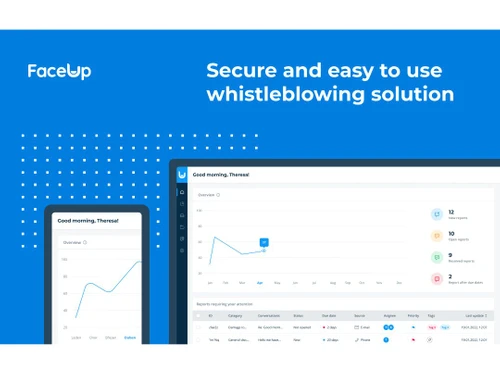
  • Analytics and Reporting: FaceUp provides advanced analytics and a reporting dashboard that helps leadership identify patterns and track trends across the organization. This data-driven oversight enables teams to address root causes of issues rather than just individual complaints, leading to more effective, long-term solutions.
  • Security and Compliance Infrastructure: The platform is built with enterprise-grade security at its core. It is GDPR compliant and ISO 27001 certified, with data hosted on SOC 2-certified AWS infrastructure. Features like end-to-end encryption, penetration testing, and controlled administrator permissions help protect sensitive data.

How to Use FaceUp?

  1. Setup and Customization: Your organization customizes the reporting forms, branding, and communication channels to fit your specific needs and compliance requirements.
  2. Report Submission: An employee or stakeholder uses a secure channel (web, mobile app, QR code) to submit a report. They can choose to remain anonymous, provide their identity, attach evidence, and even leave an anonymized voice message.
  3. Triage and Assignment: Designated administrators are immediately notified of the new report. They review the submission in the centralized dashboard and assign it to the appropriate investigator or department for handling.
  4. Investigation and Communication: The assigned case manager uses the platform's encrypted two-way messaging to communicate with the reporter, ask for more details, and provide status updates, all while protecting the reporter's anonymity.
  5. Resolution and Analysis: Once the investigation is complete, the case is formally resolved within the system. The data contributes to the platform's analytics, helping the organization gain insights into its ethical health and identify areas for improvement.

FaceUp Pricing

FaceUp pricing details are available on request on techjockey.com.

The pricing model is based on different parameters, including extra features, deployment type, and the total number of users. For further queries related to the product, you can contact our product team and learn more about the pricing and offers.

Read more

FaceUp Technology Company Details

Founded Year:  2017

FaceUp is a anonymous reporting platform, ethics hotline and HR tool. It is a secure, intuitive and easy to use solution, which allows employees and pupils to report instances of wrongdoing.

Director/Founders FaceUp Technology
Company Size 1-100 Employees

FaceUp Pricing & Plans

Looking for The Right Pricing?

Share your requirements and get a plan built around your business.

  • Define your business needs
  • Get customised pricing
  • Choose features that fit your workflow

Price Available on Request

Get personalised FaceUp pricing that fits your needs. Our team will connect with you.

FaceUp Features

Case Management

  • icon_check Incident/Case Tracking
    Monitor incidents and cases from reporting to resolution in a unified system.
  • icon_check Unique Case ID Generation
    Automatically assign a unique identifier to each case for easy tracking.
  • icon_check Automated Case Assignment
    Route cases to the right personnel based on predefined criteria.
  • icon_check Manual Case Reassignment
    Reassign cases to other team members or departments as needed.
  • icon_check Centralized Case Dashboard
    View and manage all cases in a single, intuitive interface.
  • icon_check Document Management
    Store, retrieve, and manage case-related documents securely.
  • icon_check Cross-Department Collaboration
    Facilitate seamless collaboration between teams on cases.
  • icon_check Data Integrity Checks
    Ensure data accuracy and prevent unauthorized modifications.
  • icon_check Escalation Management
    Automatically escalate unresolved cases based on defined rules.
  • icon_check Evidence Management
    Handle evidence securely for thorough investigations.
  • icon_check Case Prioritization
    Rank cases by urgency and severity for efficient resolution.
  • icon_check Duplicate Report Detection
    Identify and merge duplicate reports to avoid redundancy.
  • icon_check Customizable Workflows
    Tailor workflows to match your organizational processes.

Reporting Channels

  • icon_check Anonymous Reporting
    Enable reporters to share concerns without revealing their identity.
  • icon_check Multilingual Reporting
    Provide reporting options in multiple languages for global reach.
  • icon_check Multi-Channel Reporting
    Allow reporting via web, hotline, email, and more.
  • icon_check Offline Reporting
    Support reporting even without an internet connection.
  • icon_check Voice-to-Text Reporting
    Convert spoken reports into text for easier documentation.

Security and Data Protection

  • icon_check Two-Factor Authentication (2FA)
    Add an extra layer of security for user authentication.
  • icon_check End-to-End Data Encryption
    Encrypt data during transmission and storage for security.
  • icon_check GDPR-Compliant Data Storage
    Ensure compliance with GDPR regulations for data privacy.
  • icon_check ISO 27001-Certified Infrastructure
    Maintain robust security with ISO-certified systems.
  • icon_check Secure Messaging Channels
    Use encrypted communication for confidential discussions.
  • icon_check Role-Based Access Control (RBAC)
    Assign access based on user roles to protect sensitive data.
  • icon_check IP Masking
    Hide IP addresses to ensure reporter anonymity.
  • icon_check Automated Data Backup
    Schedule regular backups to prevent data loss.
  • icon_check Metadata Removal
    Remove metadata from files to protect sensitive information.
  • icon_check Secure File-Sharing Support
    Share files safely with end-to-end encryption.
  • icon_check Zero-Trust Security Architecture
    Adopt strict access control for enhanced security.

Compliance and Legal Standards

  • icon_check Compliance Management
    Manage and monitor adherence to legal and organizational policies.
  • icon_check EU Whistleblowing Directive Alignment
    Align with EU whistleblower protection standards.
  • icon_check WCAG-Compliant Accessibility
    Ensure platform usability for people with disabilities.
  • icon_check Global Compliance Updates
    Stay updated on evolving compliance requirements.
  • icon_check Audit Trail
    Track changes and updates within the system for enhanced security and transparency.
  • icon_check GDPR and SOX Support
    Ensure compliance with global data and financial regulations.
  • icon_check Policy Integration Framework
    Integrate organizational policies with reporting workflows.
  • icon_check Third-Party Audit Readiness
    Prepare systems for external compliance audits.

Reporting and Analytics

  • icon_check Customizable Analytics Dashboard
    Visualize and track data with tailored dashboards.
  • icon_check Real-Time Analytics
    Access live data for immediate insights and decisions.
  • icon_check KPI Tracking and Monitoring
    Measure performance using key metrics.
  • icon_check Predictive Analytics
    Forecast trends and outcomes based on historical data.
  • icon_check Trend Analysis
    Identify patterns and trends from reported data.
  • icon_check Sentiment Analysis
    Gauge emotional tone from reports to assess urgency.
  • icon_check Export Reports
    Generate and share reports in various formats.
  • icon_check Automated Report Scheduling
    Schedule recurring report generation automatically.
  • icon_check Root Cause Analysis
    Identify the underlying cause of reported incidents.
  • icon_check Anomaly Detection
    Spot unusual patterns in reporting data.

Integrations

  • icon_check API Access
    Enable seamless integration with custom systems.
  • icon_check Third Party Integration
    Connect with external platforms like HR or compliance tools.
  • icon_check HR Platform Integration
    Sync whistleblowing data with HR platforms for better tracking.
  • icon_check Tor Network Integration
    Support anonymous reporting via the Tor network.
  • icon_check Email and Hotline Integration
    Integrate email and hotline channels into the platform.
  • icon_check Feedback Survey Integration
    Gather feedback for continuous improvement.
  • icon_check Forensic Tool Integration
    Connect with forensic tools for advanced investigation.
  • icon_check Workflow Automation
    Automate tasks for improved operational efficiency.

Whistleblowing Program Tools

  • icon_check Risk Assessment
    Analyze potential risks and their impact on the organization.
  • icon_check Evidence Management
    Handle evidence securely for thorough investigations.
  • icon_check Whistleblower Protection
    Safeguard whistleblowers from retaliation.
  • icon_check Policy Acknowledgment Tracker
    Track employee acknowledgment of policies.
  • icon_check Risk Scoring Models
    Assess and rank risks using scoring systems.

Alerts & Notifications

  • icon_check Real-Time Notifications
    Notify stakeholders instantly of new reports or updates.
  • icon_check SLA-Based Reminders
    Send reminders based on service level agreements.
  • icon_check Automated Follow-Up Reminders
    Ensure timely follow-ups with automated alerts.
  • icon_check High-Severity Case Alerts
    Prioritize alerts for critical cases requiring immediate attention.
FaceUp Demo Video play icon

Get FaceUp Demo

Watch the demo video to explore key features, real workflows, and how the software fits your business needs.

Understand
Key Features
Personal
Demo Insights
Interactive
Demo Support

FaceUp Specifications

Supported Platforms
Ubuntu Ubuntu Windows Windows iOS iOS Android Android MacOS MacOS Linux Linux
Devices
Desktop Desktop Mobile Mobile
Deployment
Cloud-Based Cloud-Based
Suitable For
All Industries
Business Specific
All Businesses
Business Size
Small Business Startups Medium Business Enterprises
Customer Support
Email Communities
Language
English
Integration
API Integration
Training Resources
Videos
Compliance Regulation
GDPR SOC 2

Explore the Best Alternative Solutions Similar to Your Business Size and Needs

Medium Business

Built for business growth and flexibility

Trusty

4.2

Gendas

4

Kenjo

4.1

See More

FaceUp Review

4.2

Out of 5

img

Overall Rating

Based on
4 Verified Ratings

Rating Breakdown

  • Features 4
  • Value for Money 4.3
  • Ease of Use 4.2
  • Customer Support 4.2

87% Recommend this Product

Add Review

Be the First to Review

This product has no reviews yet. Be the first to leave your feedback.

Add Review

Compare FaceUp With other Whistleblowing Software

Products
Ratings
Pricing
Device Supported
Deployment
Supported Platforms
  • img

    FaceUp

  • 4.2

  • Price On Request

  • Desktop

    Mobile

  • Web based

    On Premises

  • Windows

    Mac OS

  • img

    Trusty

  • 4.2

  • Price On Request

  • Desktop

    Mobile

  • Web based

    On Premises

  • Windows

    Mac OS

  • img

    AllVoices

  • 4.3

  • Price On Request

  • Desktop

    Mobile

  • Web based

    On Premises

  • Windows

    Mac OS

  • img

    NotMe

  • 4.5

  • Price On Request

  • Desktop

    Mobile

  • Web based

    On Premises

  • Windows

    Mac OS

  • img

    tell it

  • 4.5

  • Price On Request

  • Desktop

    Mobile

  • Web based

    On Premises

  • Windows

    Mac OS

  • img

    Grapevine

  • 4.1

  • Price On Request

  • Desktop

    Mobile

  • Web based

    On Premises

  • Windows

    Mac OS

  • img

    SpeakUp

  • 4.1

  • Price On Request

  • Desktop

    Mobile

  • Web based

    On Premises

  • Windows

    Mac OS

  • img

    Kenjo

  • 4.1

  • Price On Request

  • Desktop

    Mobile

  • Web based

    On Premises

  • Windows

    Mac OS

  • img

    Hintbox

  • 4.3

  • Price On Request

  • Desktop

    Mobile

  • Web based

    On Premises

  • Windows

    Mac OS

(0) Product(s) selected

FaceUp Alternatives

See All FaceUp Alternatives

Available

Price on Request

Available

Price on Request

Starting Price:

€588 /Year

Available

Price on Request

Available

Price on Request

Available

Price on Request

Available

Price on Request

What does FaceUp do?

FaceUp is a whistleblowing system designed for companies and schools, serving as a centralized hub for whistleblowing, case management, and structured investigations to empower ethics and compliance.

How much does FaceUp cost?

FaceUp pricing details are available on request on techjockey.com.

What are the main features of FaceUp?

Key features include anonymous online reporting forms, secure case management with audit trails, encrypted two-way communication, support for over 113 languages, mobile apps, and robust security certifications like ISO 27001 and GDPR compliance.

Who can use FaceUp?

FaceUp is ideal for a wide range of organizations including companies, schools, global enterprises, and local teams, specifically benefiting Legal & Compliance, HR & People Teams, and Executives & Finance departments.

How does FaceUp ensure the security and anonymity of whistleblowers?

FaceUp ensures security and anonymity through features like ISO 27001 certification, GDPR compliance, end-to-end encryption, local data storage, penetration-tested servers, and the option for anonymized voice messages and secure attachment uploads.

What kind of issues can be reported using FaceUp?

FaceUp enables the reporting of a wide range of issues, including workplace harassment, theft, corruption, misconduct, fraud, and bullying, helping organizations uncover patterns and address root causes.

Does FaceUp support multiple languages and global compliance?

Yes, FaceUp supports over 113 languages, offers multi-entity and multi-country setups, and is built for global compliance, making it accessible and effective for diverse teams and international operations.

Can FaceUp integrate with other systems?

Yes, FaceUp offers seamless integrations with over 8,000 apps, allowing organizations to connect their whistleblowing system with existing internal systems and workflows.

20,000+ Software Listed

Best Price Guranteed

Free Expert Consultation

2M+ Happy Customers

Terms and Condtions

close

Users with registered businesses can purchase goods from merchants on the platform to satisfy their business needs. Users are not permitted to utilize any products acquired through the platform for resale, advertising, business, or further distribution.

For each purchase made, users will receive a Tax Invoice (or 'GST invoice') that includes specific details such as:

  • the GSTIN of the user associated with their registered business, and

  • the specified Entity Name for their business.

It should be noted that not all products are eligible for GST Invoice. Only the products displayed by participating sellers with the 'GST-based Invoice Available' callout on the product description page would qualify.

Certain goods and services are not eligible to get a GST Invoice, including items with VAS, i.e., Value Added Services (e.g., Total Mobile Protection/Assured Buyback) and those involving an exchange offer at the time of purchase.

Users must ensure the accuracy of the GSTIN, and business entity name provided for the GST Invoice. Requests for corrections into GST Invoice would not be accommodated by Techjockey.com or any Seller, and any issues arising from user-provided information are the sole responsibility of users.

Techjockey.com is not liable for the GST Invoice or any associated input tax credit. To efficiently claim an input tax credit, users should select the registered place of business address as per the GST authority's data and follow the provisions of the GST Act and rules.

To claim an input tax credit, the delivery and billing addresses must match. Furthermore, input tax credits will not be granted if the delivery address and GSTIN on the invoice are from different states. In case of incorrect GST details provided during the order placement, the order will be canceled automatically.