linkedin
FieldAware logo
play FieldAware Customer Testimonial Video Demo
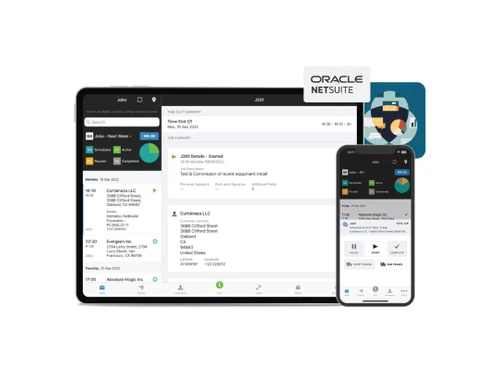
fieldaware work order customer
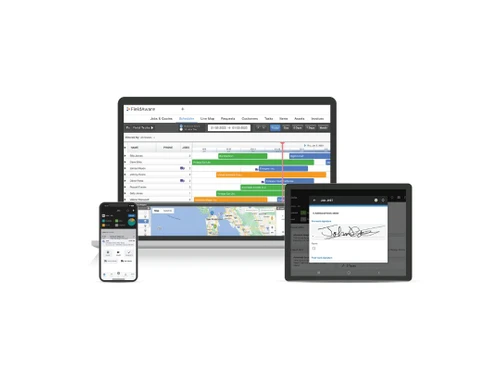
fieldaware work order reporting

FieldAware

Brand: FieldAware

  • 4.4

  • 5 Ratings

FieldAware is a Inspection Management Software that is designed to streamline operations, enhance efficiency, and improve customer satisfaction. It provides tools for scheduling, mobile workforce management, and asset tracking, all in one platform.

See More

Have you used FieldAware before?

Share your insights for better experience

Add a Review

Price Available on Request

Questions about pricing or customization? We’re here to help, just a click away.

100% Genuine
Products
Best Price
Guaranteed
Safe & Secure
Payment
  • Description

  • Pricing

  • Features

  • Specification

  • Review

  • Compare

  • Alternatives

  • FAQ

FieldAware Software Overview

What is FieldAware?

FieldAware is a cloud-based Inspection Management Software that empowers businesses to optimize their field operations. It offers a suite of integrated tools designed to manage work orders, schedule technicians, track assets, and communicate with customers effectively. At its core, FieldAware transforms messy, paper-based processes into streamlined digital workflows, reducing errors and accelerating service delivery.

Its functions encompass everything from initial service requests and dispatching technicians with optimized routes, to real-time updates on job status and accurate reporting. FieldAware prioritizes ease of use, ensuring technicians can quickly adopt the mobile app, focusing on serving customers rather than struggling with complicated software.

FieldAware is particularly beneficial for businesses operating in industries such as HVAC, plumbing, electrical, and equipment maintenance, where efficient field service is critical. Small to large-sized businesses can leverage its capabilities to improve productivity, reduce operational costs, and enhance customer service. FieldAware's customer portal enables self-service options, allowing customers to request services, view work history, and manage their accounts independently.

Why Choose FieldAware?

  • Smarter Scheduling & Dispatch: FieldAware provides unparalleled visibility into your field operations, allowing you to optimize schedules and dispatch technicians faster and more efficiently. This leads to reduced travel time, quicker response times, and improved customer satisfaction.
  • Empower Your Technicians with a User-Friendly Mobile App: The intuitive mobile app is designed to be easy to use, ensuring technicians spend more time helping customers and less time struggling with software. This results in increased productivity and improved data accuracy.
  • Transform Work Orders into Digital Powerhouses: Say goodbye to messy and illegible paper work orders. FieldAware's digital work orders streamline the entire process, reducing errors and accelerating completion times. This ensures accurate information capture and seamless communication between the field and the office.
  • Empower Customers with a Self-Service Portal: In today's fast-paced world, customers expect self-service options. FieldAware's customer portal allows customers to request service, view work order status, and access important information at their convenience, enhancing their overall experience.
  • Comprehensive Asset Management for Complete Visibility: FieldAware provides complete visibility into the status and history of assets, whether they are located on your premises or at a customer's site. This allows for proactive maintenance, reduced downtime, and improved asset utilization.

Benefits of FieldAware Inspection Management Software

  • Increased Efficiency: Streamlined workflows and optimized scheduling lead to significant improvements in field service efficiency. Technicians can complete more jobs in a day, reducing backlog and maximizing revenue.
  • Reduced Costs: By optimizing schedules, minimizing travel time, and improving first-time fix rates, FieldAware helps businesses reduce operational costs and improve profitability.
  • Improved Customer Satisfaction: Faster response times, improved communication, and self-service options contribute to higher customer satisfaction and increased customer loyalty.
  • Enhanced Data Accuracy: Digital work orders and barcode scanning eliminate errors associated with manual data entry, ensuring accurate and reliable information.
  • Better Asset Management: Proactive maintenance and improved asset tracking lead to reduced downtime, extended asset lifespan, and optimized asset utilization.
  • Data-Driven Insights: Comprehensive reporting provides valuable insights into key performance indicators (KPIs), allowing businesses to identify areas for improvement and make data-driven decisions.
  • Seamless Integration: FieldAware integrates seamlessly with other business systems, such as CRM and accounting software, streamlining workflows and improving data visibility across the organization.

Pricing of FieldAware

FieldAware pricing is available upon request. The pricing model is based on specific needs and configurations for your business size and requirements. For further queries related to the product, you can contact our product team and learn more about the pricing and offers.

Read more

FieldAware Company Details

Founded Year:  2009

FieldAware

Director/Founders Ray Cunningham
Company Size 101-500

FieldAware Pricing & Plans

Looking for The Right Pricing?

Share your requirements and get a plan built around your business.

  • Define your business needs
  • Get customised pricing
  • Choose features that fit your workflow

Price Available on Request

Get personalised FieldAware pricing that fits your needs. Our team will connect with you.

FieldAware Features

  • icon_check Scheduling
    Optimize schedules and dispatch technicians efficiently for improved visibility.
  • icon_check Mobile App
    User-friendly mobile app ensures technicians focus on customer service, not software navigation.
  • icon_check Work Orders
    Digital work orders replace paper-based systems, accelerating processes and minimizing errors.
  • icon_check Customer Portal
    Empower customers with self-service options for service requests and work order views.
  • icon_check Asset Management
    Track asset status and history, regardless of location (your premises or customer sites).
  • icon_check ReportS
    Gain valuable performance insights and timely, accurate data for informed decision-making.
  • icon_check Barcode Scanning
    Quickly access asset, order, or customer information by scanning barcodes/QR codes. This improves accuracy.
FieldAware Demo Video play icon

Get FieldAware Demo

Watch the demo video to explore key features, real workflows, and how the software fits your business needs.

Understand
Key Features
Personal
Demo Insights
Interactive
Demo Support

FieldAware Specifications

Supported Platforms
Windows Windows iOS iOS Android Android MacOS MacOS
Devices
Desktop Desktop Mobile Mobile Tablet Tablet iPad iPad
Deployment
Cloud-Based Cloud-Based
Suitable For
All Industries
Business Specific
All Businesses
Business Size
Small Business Startups Medium Business Enterprises SMBs SMEs MSMBs MSMEs
Customer Support
Phone Email Forums
Language
English
Training Resources
Documentation Videos

Explore the Best Alternative Solutions Similar to Your Business Size and Needs

FieldAware Review

4.4

Out of 5

img

Overall Rating

Based on
5 Verified Ratings

Rating Breakdown

  • Features 4.6
  • Value for Money 4.5
  • Ease of Use 4.4
  • Customer Support 4.4

90% Recommend this Product

Add Review

Be the First to Review

This product has no reviews yet. Be the first to leave your feedback.

Add Review

Compare FieldAware With other Inspection Management Software

Products
Ratings
Pricing
Device Supported
Deployment
Supported Platforms
  • img

    FieldAware

  • 4.4

  • Price On Request

  • Desktop

    Mobile

  • Web based

    On Premises

  • Windows

    Mac OS

  • img

    Inspection Manager

  • 4.4

  • Price On Request

  • Desktop

    Mobile

  • Web based

    On Premises

  • Windows

    Mac OS

  • img

    Inspector Toolbelt

  • 4.5

  • Price On Request

  • Desktop

    Mobile

  • Web based

    On Premises

  • Windows

    Mac OS

  • img

    Eneris

  • 4.2

  • Price On Request

  • Desktop

    Mobile

  • Web based

    On Premises

  • Windows

    Mac OS

  • img

    Home Inspector Pro

  • 4.2

  • Price On Request

  • Desktop

    Mobile

  • Web based

    On Premises

  • Windows

    Mac OS

  • img

    Property Inspect

  • 4.1

  • Price On Request

  • Desktop

    Mobile

  • Web based

    On Premises

  • Windows

    Mac OS

  • img

    HomeGauge

  • 4.2

  • Price On Request

  • Desktop

    Mobile

  • Web based

    On Premises

  • Windows

    Mac OS

  • img

    Spectora

  • 4.3

  • Price On Request

  • Desktop

    Mobile

  • Web based

    On Premises

  • Windows

    Mac OS

  • img

    Horizon

  • 4.2

  • Price On Request

  • Desktop

    Mobile

  • Web based

    On Premises

  • Windows

    Mac OS

  • img

    Xenia Team

  • 4.6

  • Price On Request

  • Desktop

    Mobile

  • Web based

    On Premises

  • Windows

    Mac OS

(0) Product(s) selected

FieldAware Alternatives

See All FieldAware Alternatives

Starting Price:

$57 /Month

Starting Price:

$89 /Month

Starting Price:

$99 /Month

Starting Price:

$79 /Month

Available

Price on Request

Available

Price on Request

Which operating system does FieldAware Inspection Management Software support?

FieldAware supports Windows, macOS, iOS, and Android operating systems, ensuring compatibility with a wide range of devices.

Is there any app for FieldAware?

Yes, FieldAware offers a mobile app for both Android and iOS platforms, allowing technicians to efficiently manage their tasks on-the-go.

How much does FieldAware Inspection Management Software cost?

The pricing for FieldAware Inspection Management Software is available upon request. For more detailed pricing options, please visit techjockey.com.

Who are the potential users of FieldAware Inspection Management Software?

FieldAware is ideal for small to medium-sized businesses across various industries looking to optimize their field service management and improve operational efficiency.

Does FieldAware offer a free trial or demo?

You can explore a demo of FieldAware at techjockey.com. Additionally, contacting our product experts will help you learn more about available trial options.

Is FieldAware suitable for small businesses?

Yes, FieldAware is well-suited for small businesses looking to enhance their scheduling, work order, and asset management processes without extensive training.

How secure is FieldAware Inspection Management Software?

FieldAware implements robust security features, including data encryption and secure access controls, to protect sensitive information and maintain user confidentiality.

How does FieldAware work?

FieldAware Inspection Management Software functions by digitizing work orders, optimizing schedules, and enabling real-time asset management, which increases operational accuracy and enhances customer service efficiency.

What features does FieldAware offer?

Key features of FieldAware include scheduling optimization, mobile access, work order management, a customer portal, asset management, reporting tools, and barcode scanning. For more details, please contact our product experts.

20,000+ Software Listed

Best Price Guranteed

Free Expert Consultation

2M+ Happy Customers

Terms and Condtions

close

Users with registered businesses can purchase goods from merchants on the platform to satisfy their business needs. Users are not permitted to utilize any products acquired through the platform for resale, advertising, business, or further distribution.

For each purchase made, users will receive a Tax Invoice (or 'GST invoice') that includes specific details such as:

  • the GSTIN of the user associated with their registered business, and

  • the specified Entity Name for their business.

It should be noted that not all products are eligible for GST Invoice. Only the products displayed by participating sellers with the 'GST-based Invoice Available' callout on the product description page would qualify.

Certain goods and services are not eligible to get a GST Invoice, including items with VAS, i.e., Value Added Services (e.g., Total Mobile Protection/Assured Buyback) and those involving an exchange offer at the time of purchase.

Users must ensure the accuracy of the GSTIN, and business entity name provided for the GST Invoice. Requests for corrections into GST Invoice would not be accommodated by Techjockey.com or any Seller, and any issues arising from user-provided information are the sole responsibility of users.

Techjockey.com is not liable for the GST Invoice or any associated input tax credit. To efficiently claim an input tax credit, users should select the registered place of business address as per the GST authority's data and follow the provisions of the GST Act and rules.

To claim an input tax credit, the delivery and billing addresses must match. Furthermore, input tax credits will not be granted if the delivery address and GSTIN on the invoice are from different states. In case of incorrect GST details provided during the order placement, the order will be canceled automatically.