linkedin
Fusion 360 Manage with Upchain logo
play Fusion 360 Manage With Upchain
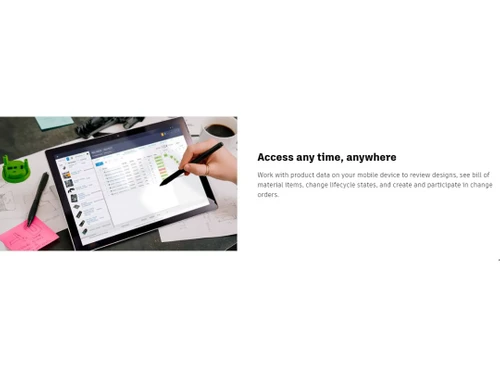
Fusion 360 Manage with Upchain Access any time
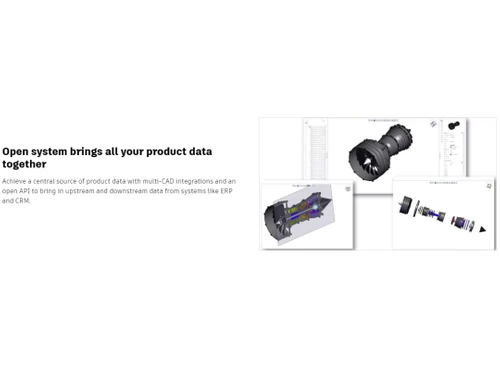
Fusion 360 Manage with Upchain Open systems

Fusion 360 Manage with Upchain

Brand: Autodesk

  • 4.4

  • 5 Ratings

Fusion 360 Manage with Upchain PDM Platform offers unify design and product data seamlessly, enhancing collaboration and streamlining product lifecycle management for a comprehensive and efficient engineering experience.

See More

Have you used Fusion 360 Manage with Upchain before?

Share your insights for better experience

Add a Review

Price Available on Request

Questions about pricing or customization? We’re here to help, just a click away.

100% Genuine
Products
Best Price
Guaranteed
Safe & Secure
Payment
  • Description

  • Pricing

  • Features

  • Specification

  • Review

  • Compare

  • Alternatives

  • FAQ

  • Questions

Fusion 360 Manage with Upchain Software Overview

What is Fusion 360 Manage with Upchain Software?

Experience a new era of Product Data Management (PDM) with Fusion 360 Manage with Upchain. This dynamic software duo offers a comprehensive suite of features that empower businesses to seamlessly manage their product data, streamline processes, and drive innovation across their organization. Say goodbye to scattered data and disjointed processes. Fusion 360 Manage with Upchain centralizes your data and workflows, ensuring that all team members have access to the most up-to-date information, promoting collaboration and reducing errors.

Seamlessly handle data from multiple CAD platforms, allowing your engineering and design teams to work with the tools they prefer without sacrificing data integrity or efficiency. Gain full control of your product portfolio with comprehensive tools to organize, track, and optimize product development, ensuring that your projects align with your strategic goals. Keep projects on track with robust change management features that allow you to track and assess the impact of design changes, reducing the risk of costly delays or errors.

Ensure the highest level of product quality with quality management tools that help you maintain rigorous quality standards and compliance throughout the product lifecycle. Collaborate effortlessly with suppliers, fostering stronger relationships and improving supply chain visibility, ultimately enhancing the quality and timeliness of your products. Enjoy flexibility with an open API that allows easy integration with other tools and systems. Plus, facilitate design collaboration and review processes to ensure that every aspect of your product meets your specifications and standards. Centralize your data, streamline workflows, and drive innovation with confidence.

Why Choose Fusion 360 Manage with Upchain System?

Engineering and design professionals should leverage Fusion 360 Manage with Upchain to streamline multi-CAD data management and design collaboration. It allows teams to work with various CAD platforms while maintaining data integrity, fostering seamless collaboration, and reducing design errors. Manufacturers and supply chain experts benefit from the robust Bill of Materials (BOM) management and supplier collaboration features. These tools ensure accurate BOM creation, enhance supply chain visibility, and improve overall product quality, resulting in efficient manufacturing and procurement processes.

Project managers and executives should consider adopting Fusion 360 Manage with Upchain for its comprehensive dashboards and KPIs. These features provide real-time insights into project performance, enabling data-driven decision-making and strategic alignment of projects with organizational goals.

Benefits of Fusion 360 Manage with Upchain Product Data Management Solution

  • Centralized data and processes promote efficient cross-team collaboration.
  • Multi-CAD data management ensures data integrity across various design platforms.
  • Product portfolio management enables data-driven strategic decisions.
  • Robust change management minimizes costly errors during product development.
  • Get access to real-time performance insights for informed decisions.
  • Quality management and supplier collaboration ensure product quality and supply chain efficiency.

Pricing of Fusion 360 Manage with Upchain Product Data Management Software

Fusion 360 Manage with Upchain Product Data Management pricing is available on request at techjockey.com.

The pricing model is based on different parameters, including extra features, deployment type, and total users. For further queries related to the product, you can contact our product team and learn more about the pricing and offers.

Read more

Autodesk Company Details

Founded Year:  1982

Autodesk makes software for people who make things. If you’ve ever driven a high-performance car, admired a towering skyscraper, used a smartphone, or watched a great film, chances are you’ve experienced what millions of Autodesk customers are doing with our software.

Director/Founders John Walker / Dan Drake
Company Size 1000+ Employees

Fusion 360 Manage with Upchain Pricing & Plans

Looking for The Right Pricing?

Share your requirements and get a plan built around your business.

  • Define your business needs
  • Get customised pricing
  • Choose features that fit your workflow

Price Available on Request

Get personalised Fusion 360 Manage with Upchain pricing that fits your needs. Our team will connect with you.

Fusion 360 Manage with Upchain Features

  • icon_check Multi-CAD Data Management
    Seamlessly handle data from multiple CAD platforms for efficient design collaboration.
  • icon_check Centralised data & processes
    Streamline operations by centralizing data and workflows, enhancing collaboration and reducing errors.
  • icon_check Product Portfolio Management
    Organize, track, and optimize your product development projects for strategic alignment.
  • icon_check Bill of Materials
    Create and manage detailed product BOMs for accurate manufacturing and procurement.
  • icon_check Change Management
    Track and assess design changes to keep projects on track and reduce costly errors.
  • icon_check Dashboards & KPIs
    Gain real-time insights into project performance with customizable dashboards and key performance indicators.
  • icon_check Quality Management
    Maintain rigorous quality standards and compliance throughout the product lifecycle.
  • icon_check Supplier Collaboration
    Collaborate seamlessly with suppliers to enhance supply chain visibility and product quality.
  • icon_check Open API
    Enjoy flexibility and integration possibilities with an open API for connecting with other tools and systems.
  • icon_check Design Collaboration & Review
    Facilitate efficient design collaboration and reviews to ensure product specifications and standards are met.
Fusion 360 Manage with Upchain Demo Video play icon

Get Fusion 360 Manage with Upchain Demo

Watch the demo video to explore key features, real workflows, and how the software fits your business needs.

Understand
Key Features
Personal
Demo Insights
Interactive
Demo Support

Fusion 360 Manage with Upchain Specifications

Supported Platforms
Ubuntu Ubuntu Windows Windows MacOS MacOS Linux Linux
Devices
Desktop Desktop Mobile Mobile Tablet Tablet iPad iPad
Deployment
Cloud-Based Cloud-Based
Suitable For
All Industries
Business Specific
All Businesses
Business Size
Small Business Startups Medium Business Enterprises
Customer Support
Phone Email Live Chat Communities
Language
English français Italiano 日本人 한국어 普通话 Polskie Português Español
Integration
API Integration
Training Resources
Webinars Videos

Explore the Best Alternative Solutions Similar to Your Business Size and Needs

Medium Business

Built for business growth and flexibility

Sibe

4.1

OpenBOM

4.7

Bild

4.5

See More

Fusion 360 Manage with Upchain Review

4.4

Out of 5

img

Overall Rating

Based on
5 Verified Ratings

Rating Breakdown

  • Features 4.5
  • Value for Money 4.2
  • Ease of Use 4.5
  • Customer Support 4.5

86% Recommend this Product

Add Review

Be the First to Review

This product has no reviews yet. Be the first to leave your feedback.

Add Review

Compare Fusion 360 Manage with Upchain With other Product Data Management (PDM) Software

Products
Ratings
Pricing
Device Supported
Deployment
Supported Platforms
  • img

    Fusion 360 Manage with Upchain

  • 4.4

  • Price On Request

  • Desktop

    Mobile

  • Web based

    On Premises

  • Windows

    Mac OS

  • img

    Autodesk Vault

  • 4.2

  • Price On Request

  • Desktop

    Mobile

  • Web based

    On Premises

  • Windows

    Mac OS

  • img

    OpenBOM

  • 4.7

  • Price On Request

  • Desktop

    Mobile

  • Web based

    On Premises

  • Windows

    Mac OS

  • img

    Solidworks PDM

  • 4.0

  • Price On Request

  • Desktop

    Mobile

  • Web based

    On Premises

  • Windows

    Mac OS

  • img

    Sibe

  • 4.1

  • Price On Request

  • Desktop

    Mobile

  • Web based

    On Premises

  • Windows

    Mac OS

  • img

    Bild

  • 4.5

  • Price On Request

  • Desktop

    Mobile

  • Web based

    On Premises

  • Windows

    Mac OS

  • img

    OnePLM Teamcenter

  • 4.1

  • Price On Request

  • Desktop

    Mobile

  • Web based

    On Premises

  • Windows

    Mac OS

  • img

    MechWorks PDM

  • 4.4

  • Price On Request

  • Desktop

    Mobile

  • Web based

    On Premises

  • Windows

    Mac OS

  • img

    PRO.FILE

  • 4.0

  • Price On Request

  • Desktop

    Mobile

  • Web based

    On Premises

  • Windows

    Mac OS

  • img

    HELiOS PDM

  • 4.3

  • Price On Request

  • Desktop

    Mobile

  • Web based

    On Premises

  • Windows

    Mac OS

  • img

    Wikifactory

  • 4.3

  • Price On Request

  • Desktop

    Mobile

  • Web based

    On Premises

  • Windows

    Mac OS

(2) Product(s) selected

Fusion 360 Manage with Upchain Alternatives

See All Fusion 360 Manage with Upchain Alternatives

Available

Price on Request

Available

Price on Request

Articles for Fusion 360 Manage with Upchain

See All Related Articles

Which operating system does Fusion 360 Manage with Upchain Software Support?

Fusion 360 Manage with Upchain Is compatible with Windows and Mac operating systems.

Is there any Fusion 360 Manage with Upchain Software?

Fusion 360 Manage with Upchain App is not available for Android and iOS devices.

What is the deployment type of Fusion 360 Manage with Upchain Software?

Fusion 360 Manage with Upchain Software Supports cloud-based deployment.

How much does the Fusion 360 Manage with Upchain Software cost?

Fusion 360 Manage with Upchain Product Data Management Software Pricing is available on request at techjockey.com. Its price in India may vary based on factors like customization, additional features required, the number of users, and the deployment type. Please request a call back for subscription-related details and to avail offers on premium packages.

Who are the potential users of Fusion 360 Manage with Upchain Software?

Fusion 360 Manage with Upchain Software can be used by small to large-scale businesses, manufacturing firms, agricultural firms and businesses that need product management software.

Is there any free trial or demo for Fusion 360 Manage with Upchain?

Fusion 360 Manage with Upchain Demo is available for free with techjockey.com.

Is the Fusion 360 Manage with Upchain software free?

Fusion 360 Manage with Upchain Software Does not offer a free trial.

How can you download the Fusion 360 Manage with Upchain Software?

Fusion 360 Manage with Upchain Software's installation is not required, as it is cloud-based. Just open the Setup Wizard to get started.

How does Fusion 360 Manage with Upchain work?

Fusion 360 Manage with Upchain by Autodesk is a product data management software that facilitates seamless collaboration and data sharing across various departments and locations within an organization. It streamlines the product development process, enabling faster time-to-market for products.

Fusion 360 Manage with Upchain Questions

A:

Changing a unidirectional relationship to a bidirectional relationship using an 'On Demand' script in Fusion 360 Manage would require scripting expertise. You'd need to develop a custom script that identifies the relationships and updates them accordingly based on your criteria.

Sheetal Vora • Oct 8, 2023
A:

To pull a report on a set of top-level assemblies and their full BOMs in Fusion 360 Manage, you would generally use the reporting and querying features available in the system. This can involve creating custom reports or using predefined report templates provided by the software.

Divya Jyothi • Oct 8, 2023
A:

To run a script on all items within a workspace in Fusion 360 Manage, you'll need to create a custom script that iterates through the items and applies your desired actions or changes. This typically requires scripting knowledge or development skills.

Nishikanta samal • Oct 8, 2023
A:

Fusion 360 Manage does support scripting capabilities, but running a script on all records in a workspace daily would require a custom script and may not be a built-in feature. You would need to develop or obtain a script that performs this task and schedule it to run externally if needed.

Aakash Bhakta • Oct 8, 2023
A:

The appearance of script tags like <p> <ul><li> in your workspace, including the print view, might be a formatting or data rendering issue. This could be related to how data is being entered or processed. Review your data input and workspace settings and reach out to Autodesk support for troubleshooting assistance.

Sidharam Koppad • Jul 23, 2024
See All Fusion 360 Manage with Upchain Questions

20,000+ Software Listed

Best Price Guranteed

Free Expert Consultation

2M+ Happy Customers

Terms and Condtions

close

Users with registered businesses can purchase goods from merchants on the platform to satisfy their business needs. Users are not permitted to utilize any products acquired through the platform for resale, advertising, business, or further distribution.

For each purchase made, users will receive a Tax Invoice (or 'GST invoice') that includes specific details such as:

  • the GSTIN of the user associated with their registered business, and

  • the specified Entity Name for their business.

It should be noted that not all products are eligible for GST Invoice. Only the products displayed by participating sellers with the 'GST-based Invoice Available' callout on the product description page would qualify.

Certain goods and services are not eligible to get a GST Invoice, including items with VAS, i.e., Value Added Services (e.g., Total Mobile Protection/Assured Buyback) and those involving an exchange offer at the time of purchase.

Users must ensure the accuracy of the GSTIN, and business entity name provided for the GST Invoice. Requests for corrections into GST Invoice would not be accommodated by Techjockey.com or any Seller, and any issues arising from user-provided information are the sole responsibility of users.

Techjockey.com is not liable for the GST Invoice or any associated input tax credit. To efficiently claim an input tax credit, users should select the registered place of business address as per the GST authority's data and follow the provisions of the GST Act and rules.

To claim an input tax credit, the delivery and billing addresses must match. Furthermore, input tax credits will not be granted if the delivery address and GSTIN on the invoice are from different states. In case of incorrect GST details provided during the order placement, the order will be canceled automatically.