linkedin
GameMaker logo
play How To Create Rooms (Levels) And Add Objects | GameMaker
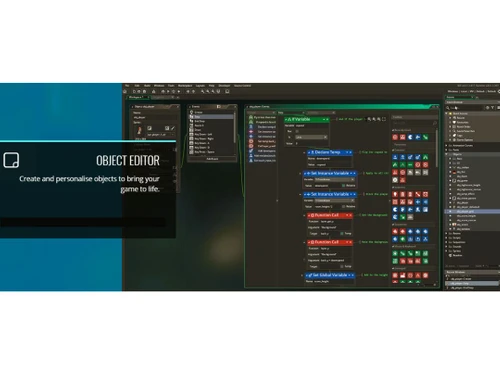
GameMaker Studio object editor
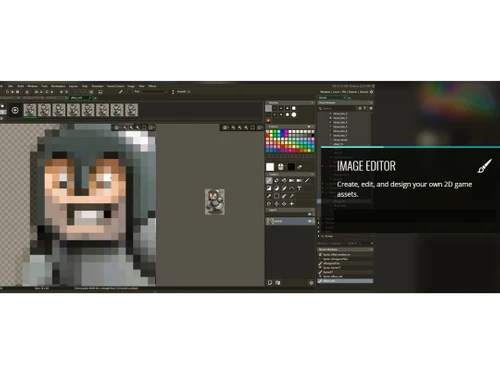
GameMaker Studio image editor

GameMaker

Brand: YoYO Games

  • 4.0

  • 6 Ratings

Allows users to create 2D games without extensive programming knowledge. It offers an intuitive drag-and-drop interface and scripting language.

See More

Have you used GameMaker before?

Share your insights for better experience

Add a Review
Starting Price
$80

View plans

100% Genuine
Products
Best Price
Guaranteed
Safe & Secure
Payment
  • Description

  • Pricing

  • Features

  • Specification

  • Review

  • Compare

  • Alternatives

  • FAQ

Starting at $80

GameMaker Software Overview

What is GameMaker?

GameMaker is a game development software designed for creating 2D games. It provides a user-friendly drag-and-drop interface, allowing developers to build games without the need for advanced programming skills. For more complex projects, GameMaker also supports a scripting language called GameMaker Language (GML), enabling greater customization and control.

The software is suitable for both beginners and experienced developers, offering a range of tools for designing graphics, animations, and sound. GameMaker supports export to multiple platforms, including Windows, MacOS, HTML5, iOS, Android, and more. It is popular for its versatility and ease of use in game development.

Why Choose GameMaker Software?

  • User-Friendly Interface: Its drag-and-drop feature allows beginners to create games without coding knowledge, while advanced users can leverage its scripting language, GameMaker Language (GML).
  • Cross-Platform Export: It supports exporting games to multiple platforms, such as Windows, macOS, HTML5, iOS, and Android, providing a wide reach for your games.
  • Versatility: It offers a variety of tools for designing 2D games, including graphics, animations, and sound, making it suitable for diverse game genres.
  • Rapid Prototyping: Its intuitive interface allows for quick prototyping and iteration, helping developers bring their ideas to life faster.
  • Large Community and Resources: It has an active community, offering tutorials, forums, and asset marketplaces to support development.
  • Affordable: Compared to other game development tools, GameMaker offers a more affordable entry point for indie developers and hobbyists.

Benefits of GameMaker Software

  • Efficient Workflow: Its streamlined workflow reduces development time, allowing developers to focus more on creative aspects rather than technical details.
  • Built-in Debugging Tools: The software includes debugging tools that help identify and fix errors quickly, ensuring smooth game development.
  • Extensive Asset Library: It provides access to a wide range of pre-built assets and templates, which can accelerate game creation.
  • Integrated Physics Engine: It comes with a built-in physics engine for realistic motion and interactions, eliminating the need for external tools.
  • Scalable Projects: It can handle both small and large-scale projects, offering scalability for different game types.
  • Easier Programming Language: The GameMaker Language (GML) is designed to be simpler than many other programming languages, making it easier for newcomers to grasp coding concepts.
  • Versatile Asset Management: Users can easily manage game assets with built-in asset bundles, streamlining the development process and enhancing organization.
  • Constant Updates: The software is regularly updated with new features and improvements, ensuring developers have access to the latest tools and capabilities.

Pricing of GameMaker

GameMaker price in India starts at $ 80 at techjockey.com.

The pricing model is based on different parameters, including extra features, deployment type, and the total number of users. For further queries related to the product, you can contact our product team and learn more about the pricing and offers.

Read more

YoYO Games Company Details

Founded Year:  2007

GameMaker allows you to create cross platform games and functional prototypes with managed workflow, quality, multi format export, performance and more.

Director/Founders Michel Cassius · Sandy Duncan · Spencer Hyman · James North-Hearn
Company Size 1-100 Employees

GameMaker Pricing & Plans

ENTERPRISE
Key Features
  • Commercial Licence
  • GX.games Export
  • Desktop Exports
  • Web Export
  • Mobile Exports
  • Console Exports
  • Source Code Access
Starting at $80
    • Licenses

      Licenses
      Licenses
    • Monthly

      Monthly
      Monthly

Key Features

  • Commercial Licence

  • GX.games Export

  • Desktop Exports

  • Web Export

  • Mobile Exports

  • Console Exports

  • Source Code Access

GameMaker Features

  • icon_check 2D Drawing
    It provides robust tools for creating and manipulating 2D art and sprites, essential for game design.
  • icon_check Animation
    The software allows easy animation creation for characters and objects, enhancing game visuals and interactions.
  • icon_check Collaboration Tools
    It supports team collaboration with features for sharing projects, making it easier for multiple developers to work together.
  • icon_check Custom Deployment
    Developers can export games to a variety of platforms, allowing for custom deployment across different devices.
  • icon_check Graphical User Interface
    The intuitive GUI makes it accessible for both beginners and advanced users to navigate and design games efficiently.
  • icon_check Virtual Reality
    It supports basic VR development, offering tools to create immersive 2D games with VR compatibility.
  • icon_check Image Editor
    It includes an integrated image editor for designing and modifying game assets directly within the software.
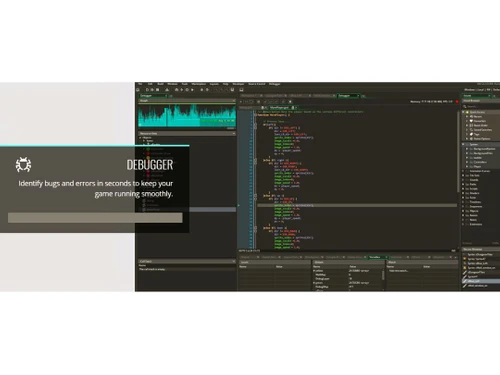
  • icon_check Inline Debugger
    The inline debugger lets developers fix code issues in real-time, streamlining the development process.
GameMaker Demo Video play icon

Get GameMaker Demo

Watch the demo video to explore key features, real workflows, and how the software fits your business needs.

Understand
Key Features
Personal
Demo Insights
Interactive
Demo Support

GameMaker Specifications

Supported Platforms
Windows Windows MacOS MacOS
Devices
Desktop Desktop
Deployment
Perpetual Perpetual
Suitable For
All Industries
Business Specific
All Businesses
Business Size
Small Business Startups Medium Business Enterprises
Customer Support
Live Chat
Language
English
Training Resources
Documentation

Explore the Best Alternative Solutions Similar to Your Business Size and Needs

GameMaker Review

4.0

Out of 5

img

Overall Rating

Based on
6 Verified Ratings

Rating Breakdown

  • Features 3.9
  • Value for Money 4.0
  • Ease of Use 4.3
  • Customer Support 3.9

86% Recommend this Product

Add Review

Be the First to Review

This product has no reviews yet. Be the first to leave your feedback.

Add Review

Compare GameMaker With other Game Development Software

Products
Ratings
Pricing
Device Supported
Deployment
Supported Platforms
  • img

    GameMaker

  • 4.0

  • Price On Request

  • Desktop

    Mobile

  • Web based

    On Premises

  • Windows

    Mac OS

  • img

    CONSTRUCT 3

  • 4.7

  • ₹ 526

  • Desktop

    Mobile

  • Web based

    On Premises

  • Windows

    Mac OS

  • img

    GDevelop

  • 4.7

  • Price On Request

  • Desktop

    Mobile

  • Web based

    On Premises

  • Windows

    Mac OS

  • img

    Unity

  • 4.6

  • Price On Request

  • Desktop

    Mobile

  • Web based

    On Premises

  • Windows

    Mac OS

  • img

    Buildbox

  • 4.3

  • Price On Request

  • Desktop

    Mobile

  • Web based

    On Premises

  • Windows

    Mac OS

  • img

    Rosebud AI

  • Price On Request

  • Desktop

    Mobile

  • Web based

    On Premises

  • Windows

    Mac OS

  • img

    Scenario - AI

  • 4.4

  • Price On Request

  • Desktop

    Mobile

  • Web based

    On Premises

  • Windows

    Mac OS

  • img

    Wwise

  • 4.4

  • Price On Request

  • Desktop

    Mobile

  • Web based

    On Premises

  • Windows

    Mac OS

  • img

    GameSalad

  • 4.5

  • Price On Request

  • Desktop

    Mobile

  • Web based

    On Premises

  • Windows

    Mac OS

  • img

    Godot Engine

  • Price On Request

  • Desktop

    Mobile

  • Web based

    On Premises

  • Windows

    Mac OS

  • img

    Flowlab

  • Price On Request

  • Desktop

    Mobile

  • Web based

    On Premises

  • Windows

    Mac OS

(0) Product(s) selected

GameMaker Alternatives

See All GameMaker Alternatives

Starting Price:

$9 /Month

Starting Price:

$99 /year

Available

Price on Request

Available

Price on Request

Articles for GameMaker

See All Related Articles

What is the cost of GameMaker Software?

GameMaker price in India starts at $ 80 at techjockey.com.

Is there a GameMaker Software app available?

GameMaker does not have a standalone app.

Which operating systems are supported by GameMaker Software?

GameMaker supports Windows and MacOS operating systems.

Does GameMaker Software offer a free trial?

Yes, GameMaker offers a free trial for new users to explore its features.

How does GameMaker Software function?

GameMaker allows users to create 2D games using drag-and-drop features or the GameMaker Language (GML) for scripting.

Who are the typical users of GameMaker Software?

GameMaker is used by indie game developers, hobbyists, and students learning game development.

Is there a free demo available for GameMaker Software?

Yes, a free version of GameMaker is available with limited features for basic game development.

Is GameMaker Software free to use?

GameMaker has a free version with basic features, but advanced features require a paid subscription.

Can I export my game to mobile devices with GameMaker?

Yes, GameMaker allows you to export games to mobile platforms such as iOS and Android.

What types of games can I create with GameMaker?

GameMaker is ideal for creating 2D platformers, puzzles, shooters, RPGs, and more.

Does GameMaker support multiplayer game development?

Yes, GameMaker offers networking features for creating multiplayer games.

20,000+ Software Listed

Best Price Guranteed

Free Expert Consultation

2M+ Happy Customers

Terms and Condtions

close

Users with registered businesses can purchase goods from merchants on the platform to satisfy their business needs. Users are not permitted to utilize any products acquired through the platform for resale, advertising, business, or further distribution.

For each purchase made, users will receive a Tax Invoice (or 'GST invoice') that includes specific details such as:

  • the GSTIN of the user associated with their registered business, and

  • the specified Entity Name for their business.

It should be noted that not all products are eligible for GST Invoice. Only the products displayed by participating sellers with the 'GST-based Invoice Available' callout on the product description page would qualify.

Certain goods and services are not eligible to get a GST Invoice, including items with VAS, i.e., Value Added Services (e.g., Total Mobile Protection/Assured Buyback) and those involving an exchange offer at the time of purchase.

Users must ensure the accuracy of the GSTIN, and business entity name provided for the GST Invoice. Requests for corrections into GST Invoice would not be accommodated by Techjockey.com or any Seller, and any issues arising from user-provided information are the sole responsibility of users.

Techjockey.com is not liable for the GST Invoice or any associated input tax credit. To efficiently claim an input tax credit, users should select the registered place of business address as per the GST authority's data and follow the provisions of the GST Act and rules.

To claim an input tax credit, the delivery and billing addresses must match. Furthermore, input tax credits will not be granted if the delivery address and GSTIN on the invoice are from different states. In case of incorrect GST details provided during the order placement, the order will be canceled automatically.