USA
USA UAE
UAESmall Business
Designed for startups and growing businesses


See More



Brand: Genie9
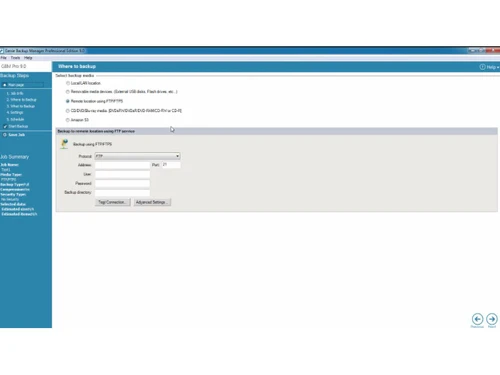
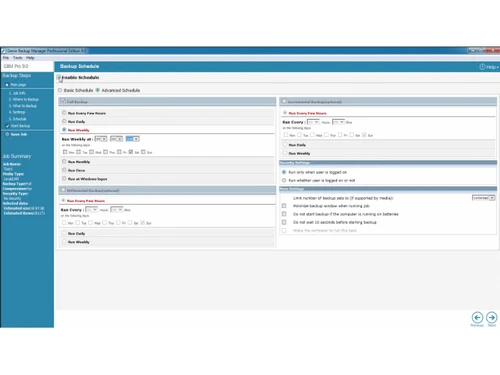
Genie Backup Master Pro 9.0 is an award winning backup and disaster recovery solution developed by Genie9. It is an extremely power software which gives the users options for a flexible backup. It comes packed with additional features such as Seamless System Recovery, Offsite Backups and on the go r...
See MoreHave you used Genie Backup Manager Pro before?
Share your insights for better experience
Brand: Genie9
Founded Year: 2010
Genie9
 Backup Encryption.. External Drive Backup Based on Server / Database Functionality Disaster Recovery Database Backup/Restore (Management) Security
  Windows
  Desktop
  Cloud-Based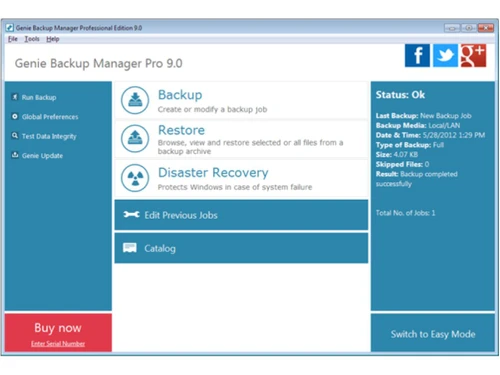
Small Business
Designed for startups and growing businesses
Medium Business
Built for business growth and flexibility
Enterprises
Designed for complex and large-scale business needs
4.5
Out of 5

Overall Rating
Based on
3 Verified Reviews
Rating Breakdown
83% Recommend this Product
Add ReviewCustomers express high satisfaction with Genie Backup Manager Pro, highlighting its ease of use and quick customer support. Many users appreciate the software's quality and versatility, suitable for both beginners and advanced users. The prompt delivery of keys and responsive assistance further enhance the positive experience. However, there are no notable complaints or limitations mentioned, indicating a strong overall sentiment towards the product.

May 8, 2018
Techjockey Verified
“Totally satisfied, will visit again”
Pros
I've recently bought a key with Techjockey and I've had no issues! Quick to reply to queries and will go above and beyond to help their customers. The key arrived via email within 24 hours and help is offered if there are any hiccups with software.
Cons
N/A
Sep 13, 2018
Techjockey Verified
“Best Software i have use till now.”
Pros
We would also like to congratulate you for the quality of your product. It exceeds the quality standards of many other software products in its category
Cons
NO CONS
Sep 3, 2018
Techjockey Verified
“In love with this software”
Pros
Genie Backup Manager certainly qualifies as a GEM. It is very easy to download and install. It is easy enough for a beginner to use, but major geeks will appreciate the more detailed and powerful features also available in the software.
Cons
NO CONS

Genie Backup Manager Pro
Price On Request
Desktop
Mobile
Web based
On Premises
Windows
Mac OS

Genie Timeline Professional
Price On Request
Desktop
Mobile
Web based
On Premises
Windows
Mac OS

Dr.Fone - Data Recovery
₹ 1899
Desktop
Mobile
Web based
On Premises
Windows
Mac OS

Ideas Plus
Price On Request
Desktop
Mobile
Web based
On Premises
Windows
Mac OS

Iperius Data Backup Software
₹ 3190
Desktop
Mobile
Web based
On Premises
Windows
Mac OS

Apna Backup
₹ 1562
Desktop
Mobile
Web based
On Premises
Windows
Mac OS

Allway Sync
Price On Request
Desktop
Mobile
Web based
On Premises
Windows
Mac OS

Staz
₹ 1000
Desktop
Mobile
Web based
On Premises
Windows
Mac OS

Veeam Data Cloud
Price On Request
Desktop
Mobile
Web based
On Premises
Windows
Mac OS

Retrospect Backup
Price On Request
Desktop
Mobile
Web based
On Premises
Windows
Mac OS

iTransor for iOS
₹ 3289
Desktop
Mobile
Web based
On Premises
Windows
Mac OS
(0) Product(s) selected
Starting Price:
$60 Lifetime
Starting Price:
₹1,562 /Month ₹2,003
Available
Price on Request
Starting Price:
$20
Starting Price:
₹3,289 /Quantity ₹4,936

Available
Price on Request

Available
Price on Request

Starting Price:
$149 /Year

Starting Price:
$579 Yearly/

Available
Price on Request

Starting Price:
$499
Genie Backup Manager Pro is compatible with Windows operating systems.
Genie Backup Manager Pro app is not available.
Genie Backup Manager Pro supports Web-Based.
Genie Backup Manager Pro pricing starts at $ 69.95 .
Genie Backup Manager Pro is typically used in All Industries.
Genie Backup Manager Pro demo is available for free at Techjockey.
Genie Backup Manager Pro Data Backup Software offers a free trial. However, the premium plan with advanced features available at Techjockey.
For Genie Backup Manager Pro installation, insert the given CD/USB flash storage in your system and open the Setup Wizard to get started.
Genie Backup Manager Pro helps with Functionality,Disaster Recovery,Database Backup/Restore (Management) and Security. It's a complete solution for Backup,Encryption..,External Drive Backup and Based on Server / Database.
20,000+ Software Listed
Best Price Guranteed
Free Expert Consultation
2M+ Happy Customers
Terms and Condtions

Users with registered businesses can purchase goods from merchants on the platform to satisfy their business needs. Users are not permitted to utilize any products acquired through the platform for resale, advertising, business, or further distribution.
For each purchase made, users will receive a Tax Invoice (or 'GST invoice') that includes specific details such as:
the GSTIN of the user associated with their registered business, and
the specified Entity Name for their business.
It should be noted that not all products are eligible for GST Invoice. Only the products displayed by participating sellers with the 'GST-based Invoice Available' callout on the product description page would qualify.
Certain goods and services are not eligible to get a GST Invoice, including items with VAS, i.e., Value Added Services (e.g., Total Mobile Protection/Assured Buyback) and those involving an exchange offer at the time of purchase.
Users must ensure the accuracy of the GSTIN, and business entity name provided for the GST Invoice. Requests for corrections into GST Invoice would not be accommodated by Techjockey.com or any Seller, and any issues arising from user-provided information are the sole responsibility of users.
Techjockey.com is not liable for the GST Invoice or any associated input tax credit. To efficiently claim an input tax credit, users should select the registered place of business address as per the GST authority's data and follow the provisions of the GST Act and rules.
To claim an input tax credit, the delivery and billing addresses must match. Furthermore, input tax credits will not be granted if the delivery address and GSTIN on the invoice are from different states. In case of incorrect GST details provided during the order placement, the order will be canceled automatically.