linkedin
Dr.Fone - Data Recovery logo
play Wondershare Data Recovery Software-Your Safe & Reliable Data Recovery Solution Demo
Dr.fone - Data recovery software
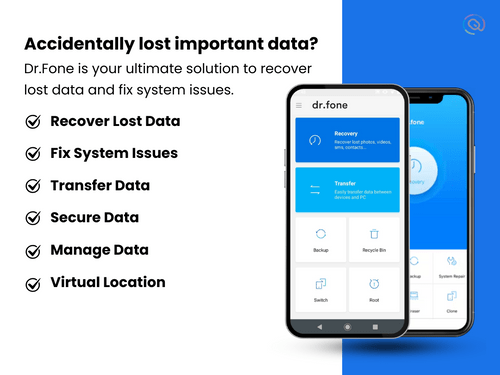
Dr.fone - Data recovery software pain point

Dr.Fone - Data Recovery

Brand: Wondershare

  • 4.1

  • 2 Ratings & 2 Reviews

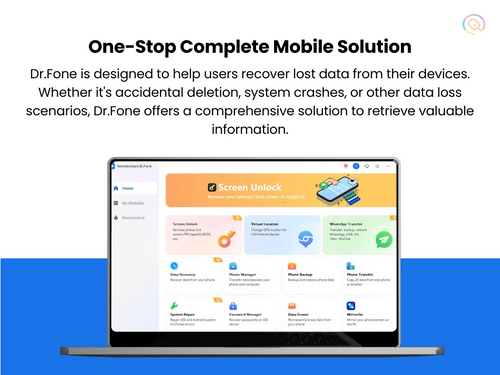
Designed to help users retrieve lost or deleted data, such as photos, videos, contacts, and messages, from both Android and iOS devices.

See More

Have you used Dr.Fone - Data Recovery before?

Share your insights for better experience

Add a Review
Starting Price 34% OFF
₹1,899 excl.GST  ₹2,899
₹ 2,241 incl. GST

View plans

offer Save upto 18%, Get GST Invoice on your business purchase T&C
offer Buy Now & Pay Later, Check offer on payment page.
Buy Now
100% Genuine
Products
Best Price
Guaranteed
Safe & Secure
Payment
  • Description

  • Pricing

  • Features

  • Specification

  • Review

  • Compare

  • Alternatives

  • FAQ

Starting at ₹1,899
Buy Now

Dr.Fone - Data Recovery Software Overview

What is Dr.Fone - Data Recovery?

Dr.Fone - Data Recovery is a software tool developed by Wondershare that helps users recover lost or deleted data from both Android and iOS devices. It supports a wide range of data types, including photos, videos, contacts, messages, and even WhatsApp chats. The software is designed to be user-friendly, allowing individuals to connect their devices to a computer and easily scan for lost files.

Dr.Fone can recover data from functioning devices as well as those that are broken or damaged, making it versatile for various situations. Users can preview the recoverable data before restoring it, ensuring they retrieve only what they need. Additionally, Dr.Fone offers features for backing up data and transferring files between devices.

Why Choose Dr.Fone - Data Recovery Software?

  • Versatile Recovery Options: It supports recovery from various sources, including directly from the device, iTunes backups, and iCloud, allowing users to retrieve lost data through multiple methods.
  • Selective Recovery: Users can recover only the specific files they need instead of restoring everything, which saves time and storage space.
  • Preview Feature: Before recovering files, users can preview the data to ensure they are retrieving the correct information, enhancing the recovery process.
  • Support for a Wide Range of Devices: It is compatible with over 6000 Android devices and all iOS devices, making it a versatile choice for users with different smartphones.
  • Data Recovery from Broken Devices: It can recover data from damaged or non-functional devices, which is particularly useful for users dealing with hardware issues.
  • Comprehensive File Type Support: The software can recover various file types, including photos, videos, messages, contacts, and app-specific data like WhatsApp chats, providing extensive coverage for data loss scenarios.
  • Regular Updates and Improvements: It is frequently updated to support the latest devices and operating systems, ensuring that users have access to the most current features and fixes.
  • Backup and Restore Capabilities: In addition to recovery, it offers backup solutions that allow users to securely save their important data and restore it whenever needed.

Benefits of Dr.Fone - Data Recovery Software

  • Three Recovery Modes: Dr.Fone offers three distinct modes for data recovery—directly from the device, from iTunes backups, or from iCloud backups—allowing users to choose the most suitable option for their situation.
  • APK Recovery: For Android users, Dr.Fone can recover APK files, which are essential for restoring applications that may have been lost during data recovery.
  • File Type Support: The software supports a wide range of file types beyond just photos and messages, including notes, voice memos, calendar entries, and even app-specific data from platforms like WhatsApp and Viber.
  • Direct Restore to Device: Users can restore recovered data directly back to their iPhone or iPad, providing a seamless way to regain access to important information without needing to manage files on a computer.
  • Export Options: In addition to restoring data to devices, users can export recovered files to their computers for backup or printing, enhancing data management flexibility.
  • Data Management Solutions: Beyond recovery, it provides additional tools for managing mobile data, including backup solutions and system repair features, offering a comprehensive mobile management suite.
  • In-Depth Scanning Capability: It performs an in-depth scan of devices to locate deleted files that may not be easily accessible through standard recovery methods.
  • Cost-Effective Data Recovery: While many similar tools charge high fees for full functionality, it offers a free trial that allows users to scan and preview recoverable files before committing to a purchase.

Pricing of Dr.Fone - Data Recovery

Dr.Fone - Data Recovery offers flexible pricing for both Android and iOS is available at INR 1,899 at techjockey.com.

The pricing model is based on different parameters, including extra features, deployment type, and the total number of users. For further queries related to the product, you can contact our product team and learn more about the pricing and offers.

Read more

Wondershare Company Details

Founded Year:  2003

Wondershare is a global tech company dedicated to providing creative solutions. As a leading tech startup, we offer a comprehensive portfolio of 60 different software products designed to simplify people's lives through innovative technology.

Director/Founders Mr. Tobee Wu
Company Size 1000+ Employees

Dr.Fone - Data Recovery Pricing & Plans

Data Recovery (iOS) Monthly Plan

Calculated Price

1899 ₹2899
SAVE UPTO 34%
Exclusive of all taxes
    • Pc (5 Device)

      Pc (5 Device)
      Pc (5 Device)
    • Monthly

      Monthly
      Monthly

Key Features

  • Available for 1-5 mobile devices with 2 PCs

  • Free software updates and technical support

  • 1-month access to Data Recovery (iOS)

Data Recovery (iOS) Annual Plan

Calculated Price

2499 ₹3799
SAVE UPTO 34%
Exclusive of all taxes
    • Pc (5 Device)

      Pc (5 Device)
      Pc (5 Device)
    • Yearly

      Yearly
      Yearly

Key Features

  • 1-year access to Data Recovery (iOS)

  • Available for 1-5 mobile devices with 1 PC

  • Free software updates and technical support

  • 7-day money-back guarantee

Data Recovery (iOS) Perpetual

Calculated Price

2999 ₹4499
SAVE UPTO 33%
Exclusive of all taxes
    • Pc (Device)

      Pc (Device)
      Pc (Device)
    • Licenses (Lifetime)

      Licenses (Lifetime)
      Licenses (Lifetime)

Key Features

  • Forever access to Data Recovery (iOS)

  • Available for 1-5 mobile devices with 2 PCs

  • Free software updates and technical support

Dr.Fone - Data Recovery Features

  • icon_check Data Recovery
    Recovers lost or deleted files like photos, messages, contacts, and more from Android and iOS devices.
  • icon_check Content Suite
    Offers tools for transferring, managing, and organizing device content easily.
  • icon_check Backup Sets
    Allows users to create and manage backups to protect data against future loss.
  • icon_check Preview
    Lets users preview files before recovering, ensuring accurate restoration of the needed data.
  • icon_check Apple iOS and macOS Management
    Provides support for managing data and performing recovery on Apple devices, including iPhones and macOS systems.
  • icon_check Recovers Lost or Deleted Data
    Retrieves data lost due to accidental deletion, system errors, or device damage.
  • icon_check File Recovery
    Supports the recovery of various file types, including documents, images, videos, and more.
  • icon_check Direct Device Scanning
    Scans your smartphone directly to retrieve deleted photos, messages, and contacts without needing a previous backup file.
  • icon_check iTunes Backup Extractor
    Enables users to preview and selectively recover specific files from encrypted or unencrypted iTunes backup files effortlessly.
  • icon_check iCloud Data Retrieval
    Securely logs into your iCloud account to download and export synced data like notes, calendars, and photos to your computer.
  • icon_check System Repair Module
    Fixes various iOS and Android issues such as being stuck on the Apple logo, recovery mode loop, or a black screen of death.
  • icon_check Google Drive Recovery
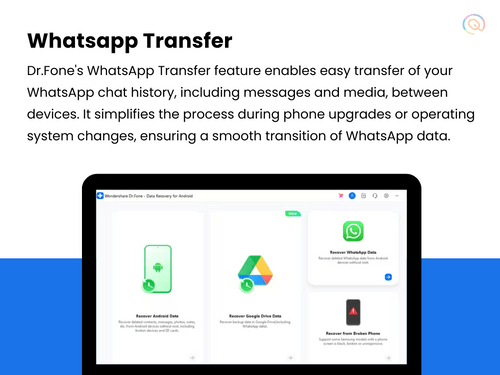
    Allows Android users to extract and restore data from Google Drive backups including call logs, messages, and WiFi passwords.
  • icon_check Contact Export Utility
    Saves recovered contacts in vCard, CSV, or HTML formats to ensure seamless importing into Outlook or other mobile devices.
  • icon_check Broken Phone Recovery
    Retrieves data from physically damaged Android devices with broken screens or touch issues that prevent normal user access.
  • icon_check Call History Recovery
    Retrieves a complete log of incoming, outgoing, and missed calls with phone numbers, dates, and call durations displayed.
  • icon_check Browser History Track
    Restores deleted Safari and Chrome browsing history to help users find important websites they visited in previous weeks.
  • icon_check App Media Extraction
    Accesses and recovers images stored within third-party apps like Instagram, Flickr, and iPhoto that were previously deleted.
  • icon_check Voice Memo Retrieval
    Scans the device storage to find and restore lost voice recordings and memos created using the built-in mobile recorder app.
Dr.Fone - Data Recovery Demo Video play icon

Get Dr.Fone - Data Recovery Demo

Watch the demo video to explore key features, real workflows, and how the software fits your business needs.

Understand
Key Features
Personal
Demo Insights
Interactive
Demo Support

Dr.Fone - Data Recovery Specification

Supported Platforms
Windows Windows MacOS MacOS
Devices
Desktop Desktop
Deployment
Perpetual Perpetual
Suitable For
All Industries
Business Specific
All Businesses
Business Size
Small Business Startups Medium Business Enterprises SMBs
Customer Support
Email Live Chat Forums
Language
English
Training Resources
Documentation Videos

Explore the Best Alternative Solutions Similar to Your Business Size and Needs

Dr.Fone - Data Recovery Reviews

4.1

Out of 5

img

Overall Rating

Based on
2 Verified Reviews

Rating Breakdown

  • Features 4.4
  • Value for Money 4.4
  • Ease of Use 4.7
  • Customer Support 4.2

85% Recommend this Product

Add Review

Dr.Fone - Data Recovery Video Review

youtubeVideoId

4.4

“Wondershare Dr. Fone Data Recovery Review: Can It Recover Data?”

Review by: Data Recovery Adviser

Mohammad Raza

User

4

Reviewed on: May 16, 2018

Techjockey Verified

“best at consultation & service providing”

Pros

Was a bit sceptical about buying from here. Had issue trying to register with the company of the product I purchased. Emailed them and within minutes they had responded and guided me through the process of registering directly with the company. Will definitely be checking out their other products. Great price and superb customer experience

Cons

N/A

Compare Dr.Fone - Data Recovery With other Data Backup Software

Products
Ratings
Pricing
Device Supported
Deployment
Supported Platforms
  • img

    Dr.Fone - Data Recovery

  • 4.1

  • ₹ 1899.00 excl. GST

  • Desktop

    Mobile

  • Web based

    On Premises

  • Windows

    Mac OS

  • img

    Ideas Plus

  • 4.5

  • Price On Request

  • Desktop

    Mobile

  • Web based

    On Premises

  • Windows

    Mac OS

  • img

    iTransor for iOS

  • 4.7

  • ₹ 3289

  • Desktop

    Mobile

  • Web based

    On Premises

  • Windows

    Mac OS

  • img

    Apna Backup

  • 4.3

  • ₹ 1562

  • Desktop

    Mobile

  • Web based

    On Premises

  • Windows

    Mac OS

  • img

    Allway Sync

  • 4.5

  • Price On Request

  • Desktop

    Mobile

  • Web based

    On Premises

  • Windows

    Mac OS

  • img

    Retrospect Backup

  • 4.5

  • Price On Request

  • Desktop

    Mobile

  • Web based

    On Premises

  • Windows

    Mac OS

  • img

    Veeam Data Cloud

  • 4.4

  • Price On Request

  • Desktop

    Mobile

  • Web based

    On Premises

  • Windows

    Mac OS

(2) Product(s) selected

Dr.Fone - Data Recovery Alternatives

See All Dr.Fone - Data Recovery Alternatives

Available

Price on Request

SAVE UPTO 33%

Starting Price:

₹1,562 /Month ₹2,003

SAVE UPTO 22%

Available

Price on Request

Available

Price on Request

Articles for Dr.Fone - Data Recovery

See All Related Articles

What type of data loss scenarios are covered by Dr.fone - Data Recovery?

The data backup and recovery software can be used to extract lost data against scenarios like accidental deletion, forgotten password, water damage, stolen device, ROM flashing jailbreak and more.

Which Android models are supported by Dr.fone - Recover?

The solution is compatible with 6000+ Android models including LG, Samsung, Motorola, Sony, ZTE, Huawei etc.

Is Dr.fone - Recover available for an online demo?

Yes, you can request an online demo of Dr.fone - Recover. Our technical executives will get connected to you soon.

What are the technical specifications for downloading Dr.fone - Recover data backup software?

Users need to have: RAM: 256MB or more Processor: Running at a speed of 1GHz Hard Disk: 200MB or more

What type of file types can be recovered using Dr.fone - Recover?

The data backup software can be used to recover messages, contacts, call history, attachments, calendars, notes, Safari bookmarks, Whatsapp messages, music and video

What is the cost of Dr.Fone - Data Recovery software?

Dr.Fone - Data Recovery provides flexible pricing options tailored for Android and iOS users. For Android, the monthly plan costs INR1499, the annual plan INR1699, and the perpetual license INR2099. For iOS, pricing is INR1899 per month, INR2499 annually, and INR2999 for a perpetual license, offering solutions for various user preferences.

Is there a mobile app available for Dr.Fone - Data Recovery?

No, Dr.Fone - Data Recovery does not have a mobile app available.

Which operating systems are compatible with Dr.Fone - Data Recovery software?

Dr.Fone - Data Recovery is compatible with Windows and MacOS.

Does Dr.Fone - Data Recovery offer a free trial option?

Yes, Dr.Fone - Data Recovery offers a free trial option that allows users to scan and preview lost data.

What is the working mechanism of Dr.Fone - Data Recovery software?

Dr.Fone works by connecting the device to a computer, scanning for lost files, and allowing users to recover data from the device or backups.

Who can benefit from using Dr.Fone - Data Recovery software?

Anyone who has lost data on their mobile devices, including casual users and professionals, can benefit from using Dr.Fone.

Is a free demo available for Dr.Fone - Data Recovery software?

There is no separate free demo; however, the trial version allows users to scan and preview recoverable files for free.

Is Dr.Fone - Data Recovery software available for free?

While Dr.Fone offers a free trial for scanning and previewing data, the full recovery features require a paid version after the trial period.

How much does Dr.Fone - Data Recovery cost?

Dr.Fone - Data Recovery offers flexible pricing for both Android and iOS is available at INR 1,899 at techjockey.com.

20,000+ Software Listed

Best Price Guranteed

Free Expert Consultation

2M+ Happy Customers

Terms and Condtions

close

Users with registered businesses can purchase goods from merchants on the platform to satisfy their business needs. Users are not permitted to utilize any products acquired through the platform for resale, advertising, business, or further distribution.

For each purchase made, users will receive a Tax Invoice (or 'GST invoice') that includes specific details such as:

  • the GSTIN of the user associated with their registered business, and

  • the specified Entity Name for their business.

It should be noted that not all products are eligible for GST Invoice. Only the products displayed by participating sellers with the 'GST-based Invoice Available' callout on the product description page would qualify.

Certain goods and services are not eligible to get a GST Invoice, including items with VAS, i.e., Value Added Services (e.g., Total Mobile Protection/Assured Buyback) and those involving an exchange offer at the time of purchase.

Users must ensure the accuracy of the GSTIN, and business entity name provided for the GST Invoice. Requests for corrections into GST Invoice would not be accommodated by Techjockey.com or any Seller, and any issues arising from user-provided information are the sole responsibility of users.

Techjockey.com is not liable for the GST Invoice or any associated input tax credit. To efficiently claim an input tax credit, users should select the registered place of business address as per the GST authority's data and follow the provisions of the GST Act and rules.

To claim an input tax credit, the delivery and billing addresses must match. Furthermore, input tax credits will not be granted if the delivery address and GSTIN on the invoice are from different states. In case of incorrect GST details provided during the order placement, the order will be canceled automatically.