linkedin
GeoGebra logo
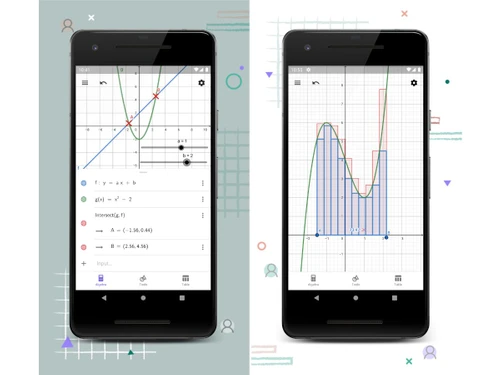
GeoGebra-overview
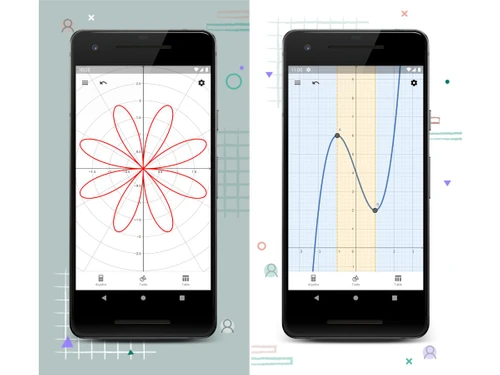
GeoGebra-graphs
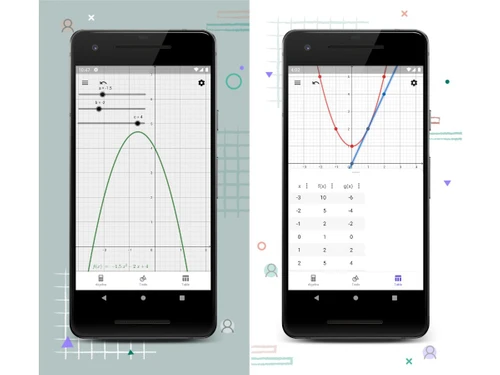
GeoGebra-calculator

GeoGebra

Brand: GeoGebra

  • No Ratings & Reviews

Geogebra is the world's favorite free math platform, empowering over 100 million students and teachers with interactive tools and resources for smarter learning.

See More

Have you used GeoGebra before?

Share your insights for better experience

Add a Review

Price Available on Request

Questions about pricing or customization? We’re here to help, just a click away.

100% Genuine
Products
Best Price
Guaranteed
Safe & Secure
Payment
  • Description

  • Pricing

  • Features

  • Specification

  • Review

  • Compare

  • Alternatives

  • FAQ

GeoGebra Software Overview

What is GeoGebra?

GeoGebra is a dynamic and interactive educational software platform designed specifically for teaching and learning mathematics from elementary school to the university level. It is recognized globally as a leading suite of free math tools, trusted by a community of over 100 million students and teachers. GeoGebra merges geometry, algebra, spreadsheets, graphing, statistics, and calculus into a single, easy-to-use package.

More than just a collection of applications, GeoGebra functions as a comprehensive platform that connects an enthusiastic global community of educators and learners. It provides a novel, hands-on approach to exploring mathematical concepts, allowing users to visualize and interact with mathematical objects and relationships. The platform's core mission is to empower teachers with the best tools to help students unlock their full potential, making mathematics more engaging, accessible, and understandable for everyone.

Why Choose GeoGebra?

  • Interactive and Engaging Learning: GeoGebra brings mathematics to life. Its dynamic environment encourages student-centered, discovery-based learning, allowing students to actively explore concepts, make conjectures, and see the immediate impact of changing variables.
  • Accessibility and Equity: As a completely free platform, GeoGebra removes financial barriers, providing access to high-quality educational tools for diverse student populations worldwide. It is available on all major platforms, ensuring students can learn anytime, anywhere.
  • Comprehensive Toolset: It integrates multiple mathematical representations, geometric, algebraic, and numeric, in one place. This interconnectedness helps students see the relationships between different areas of mathematics, from basic operations to 3D calculus.
  • Vast Resource Library: The platform offers a massive collection of meticulously crafted math resources, activities, and simulations for Grades 4 to 12, created by both the GeoGebra team and a global community of educators.
  • Strong Community and Support: Users benefit from the responsiveness of the GeoGebra staff and a large, active community of teachers who share materials, ideas, and support, creating a collaborative educational ecosystem.

Advanced Features of GeoGebra

  • Math Solver with Step-by-Step Solutions: A standout feature that allows users to simply take a photo of a math problem. The app then provides not only the answer but also detailed, step-by-step explanations and the option to practice similar problems, reinforcing the learning process.
  • Real-Time classroom Collaboration: The GeoGebra classroom platform enables teachers to conduct interactive lessons, assign activities, and monitor student progress in real-time. This allows for immediate, personalized feedback and helps encourage active participation and classroom discussion.
  • Seamless LMS Integration: GeoGebra is designed to work within existing educational workflows. It supports integration with various popular Learning Management Systems (LMSs), making it easy for teachers to incorporate GeoGebra materials into their online courses.
  • Powerful 3D Calculator: Beyond 2D graphing, GeoGebra includes a sophisticated 3D calculator. This tool allows students to plot and explore functions of two variables, surfaces, and other 3D geometric constructions, making complex spatial concepts more accessible.
  • Customization and Sharing: Users can create a free account to save their work, create custom interactive worksheets, and build their own library of resources. These materials can be easily shared with students or the wider GeoGebra community.

Key Capabilities of GeoGebra

  • Math Calculators & Apps: This is the core of GeoGebra, a suite of powerful, free calculators available on all devices. It includes a Graphing Calculator, 3D Calculator, Geometry tool, Scientific Calculator, and GeoGebra Notes, a collaborative whiteboard, providing a comprehensive environment for calculations, graphing, and geometric constructions for any level of mathematics.
  • Curated Math Resources: The platform hosts an extensive library of ready-to-use educational materials. These resources are expertly crafted for Grades 4 to 12 and cover a wide range of topics, including Number Sense, Algebra, Geometry, Measurement, Operations, and Probability and Statistics.
  • GeoGebra classroom: A dedicated platform for teachers to create an interactive and collaborative learning environment. Teachers can use GeoGebra resources to create lessons, share them with students via a simple code, and see every student's work live on their dashboard, facilitating guided instruction and group discussions.

How to Use GeoGebra?

  1. Create a Free Account: The first step is to sign up for a free account on the GeoGebra website. This allows you to save your projects, organize your favorite resources, and share your creations with others.
  2. Explore the Resources: Dive into the vast library of GeoGebra Math Resources. You can filter by grade level and topic to find interactive activities, simulations, and practice exercises that align with your curriculum.
  3. Select the Right Tool: Choose from the suite of Math Calculators & Apps based on your needs. Use the Graphing Calculator to visualize functions, the Geometry tool to construct figures, or the 3D Calculator to explore spatial relationships.
  4. Engage Your Students (For Teachers): Utilize GeoGebra classroom to create an interactive lesson. Simply select a GeoGebra resource, create a class, and share the access code with your students to begin monitoring their work and guiding their learning in real-time.
  5. Customize and Create: Don't hesitate to adapt existing resources or build your own from scratch. The intuitive authoring tools make it easy to create custom interactive worksheets and applets tailored to your specific teaching goals.

GeoGebra Pricing

GeoGebra pricing details are available on request on techjockey.com.

The pricing model is based on different parameters, including extra features, deployment type, and the total number of users. For further queries related to the product, you can contact our product team and learn more about the pricing and offers.

Read more

GeoGebra Company Details

Founded Year:  2002

GeoGebra is dynamic mathematics software.

Director/Founders Markus Hohenwarter
Company Size 1-100 Employees

GeoGebra Pricing & Plans

Looking for The Right Pricing?

Share your requirements and get a plan built around your business.

  • Define your business needs
  • Get customised pricing
  • Choose features that fit your workflow

Price Available on Request

Get personalised GeoGebra pricing that fits your needs. Our team will connect with you.

GeoGebra Features

  • icon_check Interactive Geometry
    Create and explore geometric constructions dynamically with points, lines, angles, and shapes in real time.
  • icon_check Graphing Calculator
    Plot functions, equations, inequalities, and data sets with interactive graphing and analysis tools.
  • icon_check Algebra View
    Display algebraic expressions and equations alongside graphical representations for better understanding.
  • icon_check 3D Visualization
    Build and manipulate three-dimensional graphs, surfaces, solids, and geometric objects interactively.
  • icon_check Calculus Tools
    Analyze derivatives, integrals, limits, tangents, and optimization problems through visual methods.
  • icon_check Statistics Analysis
    Perform statistical calculations, create charts, and analyze data distributions using built-in tools.
  • icon_check Dynamic Manipulation
    Use sliders and variables to dynamically change values and instantly observe graphical results.
  • icon_check Spreadsheet Integration
    Organize data in spreadsheets and connect it directly with graphs, charts, and calculations.
  • icon_check Collaborative learning
    Share worksheets and activities online to support student participation and teamwork.
  • icon_check Customizable Worksheets
    Build personalized interactive worksheets with text, graphics, questions, and mathematical objects.
  • icon_check Cross-Platform Access
    Access projects seamlessly through web browsers, desktops, tablets, and mobile devices.
  • icon_check Export and Sharing
    Export constructions, graphs, and activities for presentations, websites, and educational resources.
  • icon_check Data Visualizations
    Convert numerical data into visual graphs and charts for easier interpretation and analysis.
  • icon_check Resource Library
    Access a large collection of community-created lessons, worksheets, and teaching materials.
  • icon_check Real-Time Feedback
    Instantly visualize mathematical changes and outcomes to enhance concept comprehension.

GeoGebra Specifications

Supported Platforms
Windows Windows iOS iOS Android Android MacOS MacOS
Devices
Desktop Desktop Mobile Mobile Tablet Tablet iPad iPad
Deployment
Cloud-Based Cloud-Based
Suitable For
Education
Business Specific
School/Colleges/Coaching
Business Size
Individual Small Business Startups Medium Business Enterprises SMBs SMEs MSMBs MSMEs Freelancers
Customer Support
Email Communities Forums
Language
English
Integration
API Integration
Training Resources
Live Online Webinars Documentation Videos
Compliance Regulation
COPPA

Explore the Best Alternative Solutions Similar to Your Business Size and Needs

GeoGebra Review

Techjockey Trusted Reviews from Verified Users

No reviews are currently available for GeoGebra. Discover similar Educational Software reviews

  • Megam Education

    4.6

    Whats great - The user interface is simple and contemporary, and device checkout is simple and convenient. These are perhaps its best quali... read more

  • School Console

    4.6

    Whats great - The overall experience is great, and the team support is also excellent. read more

  • EDUPI

    4.7

    Whats great - I could contact with my kids' instructors and gather information about them, and it was simple to use. working well read more
Compare GeoGebra With other Educational Software

Products
Ratings
Pricing
Device Supported
Deployment
Supported Platforms
  • img

    GeoGebra

  • Price On Request

  • Desktop

    Mobile

  • Web based

    On Premises

  • Windows

    Mac OS

  • img

    iCloudEMS

  • 4.3

  • Price On Request

  • Desktop

    Mobile

  • Web based

    On Premises

  • Windows

    Mac OS

  • img

    Chegg

  • 4.4

  • Price On Request

  • Desktop

    Mobile

  • Web based

    On Premises

  • Windows

    Mac OS

  • img

    Kuta Software

  • 4.7

  • Price On Request

  • Desktop

    Mobile

  • Web based

    On Premises

  • Windows

    Mac OS

  • img

    Megam Education

  • 4.6

  • Price On Request

  • Desktop

    Mobile

  • Web based

    On Premises

  • Windows

    Mac OS

  • img

    Fliplearn

  • 4.5

  • Price On Request

  • Desktop

    Mobile

  • Web based

    On Premises

  • Windows

    Mac OS

  • img

    Copilot

  • 4.5

  • Price On Request

  • Desktop

    Mobile

  • Web based

    On Premises

  • Windows

    Mac OS

  • img

    Elicit

  • 4.7

  • Price On Request

  • Desktop

    Mobile

  • Web based

    On Premises

  • Windows

    Mac OS

  • img

    Classbot

  • 4.1

  • ₹ 5000

  • Desktop

    Mobile

  • Web based

    On Premises

  • Windows

    Mac OS

  • img

    Canvas Studio

  • 4.4

  • Price On Request

  • Desktop

    Mobile

  • Web based

    On Premises

  • Windows

    Mac OS

(0) Product(s) selected

GeoGebra Alternatives

See All GeoGebra Alternatives

Available

Price on Request

Starting Price:

$20 /month

Available

Price on Request

Starting Price:

$12 /Month

Starting Price:

$75

Starting Price:

$149 /Year

Available

Price on Request

Starting Price:

$5 /Month

Available

Price on Request

Articles for GeoGebra

See All Related Articles

What does GeoGebra do?

GeoGebra provides a suite of free math tools and a platform for teachers and students to explore, learn, and teach mathematics in an interactive and smarter way. It offers resources, calculators, and collaborative features to make math engaging for various grade levels.

How much does GeoGebra cost?

GeoGebra pricing details are available on request on techjockey.com.

What are the main features of GeoGebra?

GeoGebra's main features include curated Math Resources for Grades 4-12, interactive Math Calculators & Apps (including 3D), a classroom Collaboration platform with real-time student progress, and a Math Solver that provides step-by-step solutions from homework photos.

Is there a free trial for GeoGebra?

No, GeoGebra does not offer a free trial because the software and its extensive suite of math tools, resources, and calculators are entirely free for all users.

Who can use GeoGebra?

GeoGebra is designed for and used by over 100 million students and teachers worldwide, particularly those in Grades 4 to 12, to enhance their learning and teaching of mathematics.

What types of math resources does GeoGebra offer?

GeoGebra offers meticulously crafted math resources curated by experts for Grades 4 to 12, covering topics such as Number Sense, Operations, Algebra, Measurement, Geometry, Probability, and Statistics.

How does GeoGebra support classroom collaboration?

GeoGebra's classroom learning platform enables interactive math lessons, allows teachers to view student progress in real-time, provide individual feedback, and supports integration with various Learning Management Systems (LMSs).

Can GeoGebra help with math homework?

Yes, GeoGebra includes a Math Solver tool that allows users to take a photo of their math homework to receive step-by-step solutions with explanations and practice similar problems.

What kind of calculators are available in GeoGebra?

GeoGebra provides easy-to-use, free calculators and apps that support student-centered discovery-based learning, capable of performing calculations for any level of mathematics, including 3D.

20,000+ Software Listed

Best Price Guranteed

Free Expert Consultation

2M+ Happy Customers

Terms and Condtions

close

Users with registered businesses can purchase goods from merchants on the platform to satisfy their business needs. Users are not permitted to utilize any products acquired through the platform for resale, advertising, business, or further distribution.

For each purchase made, users will receive a Tax Invoice (or 'GST invoice') that includes specific details such as:

  • the GSTIN of the user associated with their registered business, and

  • the specified Entity Name for their business.

It should be noted that not all products are eligible for GST Invoice. Only the products displayed by participating sellers with the 'GST-based Invoice Available' callout on the product description page would qualify.

Certain goods and services are not eligible to get a GST Invoice, including items with VAS, i.e., Value Added Services (e.g., Total Mobile Protection/Assured Buyback) and those involving an exchange offer at the time of purchase.

Users must ensure the accuracy of the GSTIN, and business entity name provided for the GST Invoice. Requests for corrections into GST Invoice would not be accommodated by Techjockey.com or any Seller, and any issues arising from user-provided information are the sole responsibility of users.

Techjockey.com is not liable for the GST Invoice or any associated input tax credit. To efficiently claim an input tax credit, users should select the registered place of business address as per the GST authority's data and follow the provisions of the GST Act and rules.

To claim an input tax credit, the delivery and billing addresses must match. Furthermore, input tax credits will not be granted if the delivery address and GSTIN on the invoice are from different states. In case of incorrect GST details provided during the order placement, the order will be canceled automatically.