linkedin
Goodsync logo
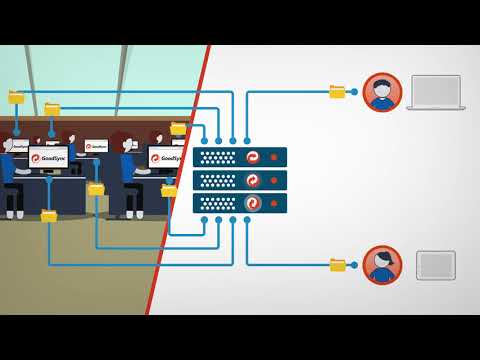
play GoodSync for Servers
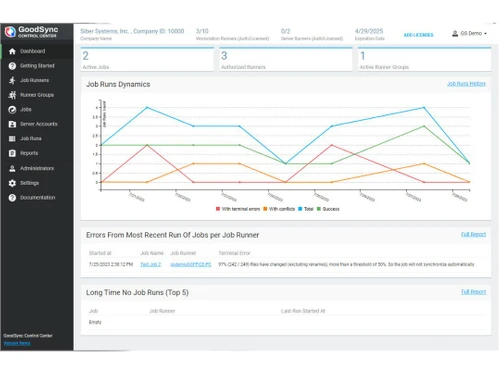
Goodsync Dashboard
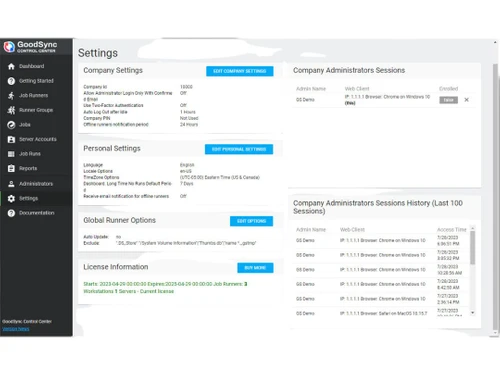
Goodsync Settings

Goodsync

Brand: Siber Systems

  • 4.3

  • 7 Ratings & 1 Review

A data backup software that runs quietly, sync happens in no time, and safety never fails, keeping your data forever alive and connected.

See More

Have you used Goodsync before?

Share your insights for better experience

Add a Review
Starting Price
$19

View plans

100% Genuine
Products
Best Price
Guaranteed
Safe & Secure
Payment
  • Description

  • Pricing

  • Features

  • Specification

  • Review

  • Compare

  • Alternatives

  • FAQ

Starting at $19

Goodsync Software Overview

What is Goodsync?

Goodsync data backup software is designed to keep your files safe, updated, and available at all times. It allows data transfer between computers, external drives, and cloud accounts.

Users can back up files in one direction or keep two locations identical. These functions help reduce risks of data loss or outdated files. Automation is central to how Goodsync works for its users.

Jobs can be scheduled to run at chosen intervals or in real time. This keeps data consistent without requiring daily effort or technical skills. Its ideal balance of speed, reliability, and control makes it a trusted solution far and wide.

Why Choose Goodsync Software?

  • Reliable File Synchronization: Consistent copies stay identical across devices via smart sync technology. Automatic detection of changes ensures updates propagate quickly and accurately.
  • Cross-Platform Compatibility: Support spans Windows, macOS, Linux, Android, and many cloud providers. A single configuration manages devices across platforms without extra tools.
  • Secure Data Transfers: End-to-end encryption protects files during transfer and at rest. Optional locked-file copying and secure protocols preserve integrity under load.
  • Efficient Bandwidth Use: Block-level transfers reduce data movement by syncing only changed file parts. Bandwidth throttling options enable predictable performance during peak business hours.
  • Versioned File History: Comprehensive version history keeps previous file states for reliable recovery. Point-in-time restores allow quick rollback to earlier versions when necessary.
  • User-Friendly Management: Intuitive setup and clear job templates simplify initial configuration tasks. Visual dashboards and alerts keep teams informed about sync status.

Benefits of Goodsync Software

  • Strong File Security: All files remain absolutely safe through automated backups that reduce the risk of permanent loss.
  • Comprehensive Cloud Support: The system works seamlessly with Google Drive, OneDrive, and other popular storage platforms.
  • Accurate File Movement: Every transfer is checked carefully to avoid broken or missing documents.
  • Effortless Customization: Settings allow adjustments that suit personal needs or demanding business requirements.
  • Fast Processing of Bulk Data: Handles large file sets effectively without exhausting system resources.
  • Non-Disruptive Operations: Jobs complete quietly, letting users continue with other essential tasks smoothly.
  • Consistent Multi-Device Updates: All devices stay aligned with the latest versions of important files.
  • Transparent Job Tracking: Comprehensive activity logs keep backup progress easy to follow.

Goodsync Pricing

Goodsync price in India starts at $49.95 per year at techjockey.com. The pricing model is based on different parameters, including extra features, deployment type, and the total number of users. For further queries related to the product, you can contact our product team and learn more about the pricing and offers.

Read more

Siber Systems Company Details

Founded Year:  2015

Siber Systems is a software development company.

Director/Founders Siber Systems
Company Size 1-100 Employees

Goodsync Pricing & Plans

GoodSync Personal
Starting at $19
    • Quantity

      Quantity
      Quantity
    • Yearly

      Yearly
      Yearly

Key Features

  • Backup service

  • Synchronization service

  • Real-time data transfer

Workstation
Starting at $50
    • Quantity

      Quantity
      Quantity
    • Yearly

      Yearly
      Yearly

Key Features

  • Backup service

  • Synchronization service

  • Real-time data transfer

  • Block-level data transfer

  • Multi-threading

  • Version control

  • Number of allowed connections- 6

Server
Starting at $500
    • Quantity

      Quantity
      Quantity
    • Yearly

      Yearly
      Yearly

Key Features

  • Backup service

  • Synchronization service

  • Real-time data transfer

  • Block-level data transfer

  • Multi-threading

  • Version control

  • Number of allowed connections- Unlimited

  • Unlimited users

Goodsync Features

  • icon_check Real Time Data Transfer
    Changes are updated instantly across devices, keeping files current everywhere.
  • icon_check Block Level Data Transfer
    Only modified parts of a file move, saving time and bandwidth.
  • icon_check Unattended Service
    Backups and sync run automatically in the background without manual effort.
  • icon_check End-to-End Encryption
    Data stays protected during transfer with secure end-to-end encryption.
  • icon_check Version History
    Previous file versions are stored, allowing quick recovery when needed.
  • icon_check Copy Locked Files
    Files in use are copied safely without interruption or failure.
  • icon_check File & Folder Move
    Entire folders and individual files shift smoothly to new locations.
  • icon_check Security Attribute
    File permissions and security details remain intact during every transfer.
  • icon_check Bandwith Throttling
    Transfer speed can be adjusted to avoid network congestion.
  • icon_check Reports
    Detailed logs show backup status and sync history in clear summaries.
Goodsync Demo Video play icon

Get Goodsync Demo

Watch the demo video to explore key features, real workflows, and how the software fits your business needs.

Understand
Key Features
Personal
Demo Insights
Interactive
Demo Support

Goodsync Specifications

Supported Platforms
Ubuntu Ubuntu Windows Windows iOS iOS Android Android MacOS MacOS Linux Linux
Devices
Desktop Desktop Mobile Mobile Tablet Tablet iPad iPad
Deployment
Cloud-Based Cloud-Based Perpetual Perpetual
Suitable For
All Industries
Business Specific
All Businesses
Business Size
Small Business Startups SMBs SMEs
Customer Support
Phone Email Forums
Language
English Deutsche Italiano Português
Training Resources
Videos

Explore the Best Alternative Solutions Similar to Your Business Size and Needs

Goodsync Review

4.3

Out of 5

img

Overall Rating

Based on
1 Verified Review

Rating Breakdown

  • Features 4.1
  • Value for Money 4.4
  • Ease of Use 4.4
  • Customer Support 4.5

87% Recommend this Product

Add Review

Goodsync Video Review

youtubeVideoId

4.6

“GoodSync Review: The BEST File Sync and Backup Software?”

Review by: WEB WISE

Compare Goodsync With other Data Backup Software

Products
Ratings
Pricing
Device Supported
Deployment
Supported Platforms
  • img

    Goodsync

  • 4.3

  • Price On Request

  • Desktop

    Mobile

  • Web based

    On Premises

  • Windows

    Mac OS

  • img

    Ideas Plus

  • 4.5

  • Price On Request

  • Desktop

    Mobile

  • Web based

    On Premises

  • Windows

    Mac OS

  • img

    Apna Backup

  • 4.3

  • ₹ 1562

  • Desktop

    Mobile

  • Web based

    On Premises

  • Windows

    Mac OS

  • img

    Allway Sync

  • 4.5

  • Price On Request

  • Desktop

    Mobile

  • Web based

    On Premises

  • Windows

    Mac OS

  • img

    Staz

  • 4.2

  • ₹ 1000

  • Desktop

    Mobile

  • Web based

    On Premises

  • Windows

    Mac OS

  • img

    Veeam Data Cloud

  • 4.4

  • Price On Request

  • Desktop

    Mobile

  • Web based

    On Premises

  • Windows

    Mac OS

  • img

    Retrospect Backup

  • 4.5

  • Price On Request

  • Desktop

    Mobile

  • Web based

    On Premises

  • Windows

    Mac OS

  • img

    iTransor for iOS

  • 4.7

  • ₹ 3289

  • Desktop

    Mobile

  • Web based

    On Premises

  • Windows

    Mac OS

  • img

    BDRCloud

  • 4.2

  • Price On Request

  • Desktop

    Mobile

  • Web based

    On Premises

  • Windows

    Mac OS

(0) Product(s) selected

Goodsync Alternatives

See All Goodsync Alternatives

Starting Price:

₹1,562 /Month ₹2,003

SAVE UPTO 22%
SAVE UPTO 33%

Available

Price on Request

Available

Price on Request

Articles for Goodsync

See All Related Articles

How much does Goodsync cost?

The price of Goodsync data backup software in India starts at $49.95 per year on techjockey.com. The final cost, however, depends on the chosen features, deployment type, and the number of users.

Who uses Goodsync Software?

Goodsync is used by individuals who need personal file backup and businesses that manage large data. The solution works equally well for both small setups and big enterprises.

Is there a mobile app available for Goodsync Software?

Yes, Goodsync has apps for Android and iOS devices. They allow file access, mobile backup, and smooth sync between phones and computers.

Which operating systems are compatible with Goodsync Software?

Goodsync works across multiple systems including Windows, MacOS, Linux, Ubuntu, Android, and iOS.

Does Goodsync Software offer a free trial?

Yes, Goodsync provides a free trial so users can test its features before purchase.

How does Goodsync Software function?

The software solution lets you set up jobs for backup or sync between two locations. It then runs automatically, keeps files updated, and ensures safe transfers.

20,000+ Software Listed

Best Price Guranteed

Free Expert Consultation

2M+ Happy Customers

Terms and Condtions

close

Users with registered businesses can purchase goods from merchants on the platform to satisfy their business needs. Users are not permitted to utilize any products acquired through the platform for resale, advertising, business, or further distribution.

For each purchase made, users will receive a Tax Invoice (or 'GST invoice') that includes specific details such as:

  • the GSTIN of the user associated with their registered business, and

  • the specified Entity Name for their business.

It should be noted that not all products are eligible for GST Invoice. Only the products displayed by participating sellers with the 'GST-based Invoice Available' callout on the product description page would qualify.

Certain goods and services are not eligible to get a GST Invoice, including items with VAS, i.e., Value Added Services (e.g., Total Mobile Protection/Assured Buyback) and those involving an exchange offer at the time of purchase.

Users must ensure the accuracy of the GSTIN, and business entity name provided for the GST Invoice. Requests for corrections into GST Invoice would not be accommodated by Techjockey.com or any Seller, and any issues arising from user-provided information are the sole responsibility of users.

Techjockey.com is not liable for the GST Invoice or any associated input tax credit. To efficiently claim an input tax credit, users should select the registered place of business address as per the GST authority's data and follow the provisions of the GST Act and rules.

To claim an input tax credit, the delivery and billing addresses must match. Furthermore, input tax credits will not be granted if the delivery address and GSTIN on the invoice are from different states. In case of incorrect GST details provided during the order placement, the order will be canceled automatically.