linkedin
Guidewire ClaimCenter logo
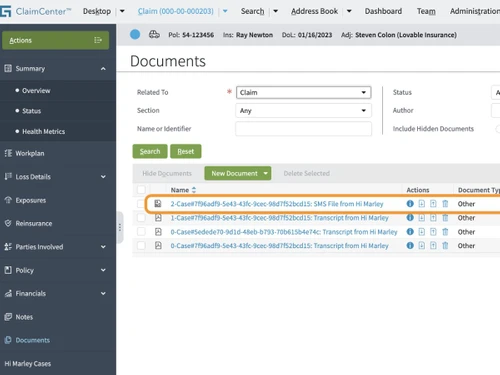
guidewire claimcenter-documents
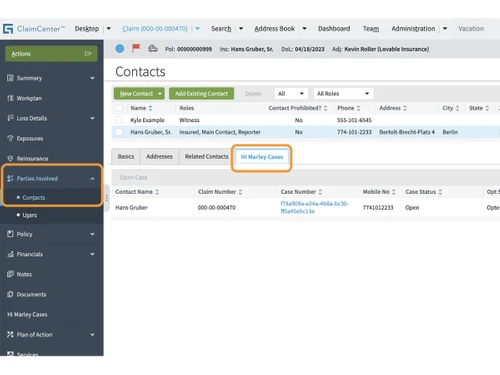
guidewire claimcenter-contacts
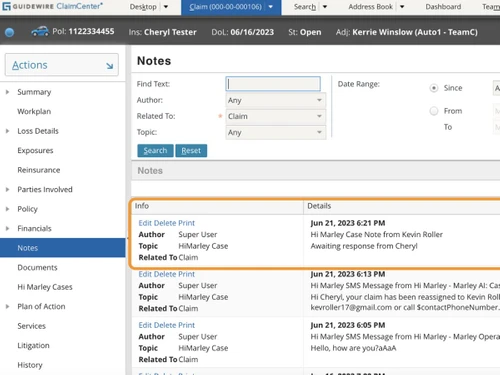
guidewire claimcenter-notes

Guidewire ClaimCenter

Brand: Guidewire

  • 4.3

  • 4 Ratings

Guidewire ClaimCenter is a flexible claims management software that helps insurance teams handle claims faster and more accurately.

See More

Have you used Guidewire ClaimCenter before?

Share your insights for better experience

Add a Review

Price Available on Request

Questions about pricing or customization? We’re here to help, just a click away.

100% Genuine
Products
Best Price
Guaranteed
Safe & Secure
Payment
  • Description

  • Pricing

  • Features

  • Specification

  • Review

  • Compare

  • Alternatives

  • FAQ

Guidewire ClaimCenter Software Overview

What is Guidewire ClaimCenter?

Guidewire ClaimCenter is a modern claims management software that helps insurance companies manage every step of a claim's lifecycle. From first notice of loss (FNOL) to final settlement, it brings automation, accuracy, and real-time tracking into the process. Insurance teams can easily access customer data, update claims, and process payments using a clean and user-friendly interface.

The software supports dynamic workflows and allows teams to customize claim journeys based on specific policies, geographies, and rules. It connects easily with other tools and systems, so you can streamline every part of your work. Whether you're managing auto, home, or health insurance claims, Guidewire ClaimCenter helps reduce time and errors with the help of strong built-in tools and automation.

Why Choose Guidewire ClaimCenter

  • Made for the Insurance Sector: The software is built especially for insurance workflows, helping insurers manage property, health, and vehicle claims smoothly and efficiently.
  • Custom Workflows Per Claim Type: Guidewire allows insurers to adjust workflows based on the type of claim. This makes processing quicker and more relevant to the case.
  • Real-Time Claim Updates: You can track claim progress and updates live. Customers and agents always stay informed without waiting for long responses.
  • Smart Automation: It automates common claim actions like data entry, status updates, and routing. This reduces workload and increases speed.
  • Seamless Integrations: The software connects easily with external systems such as policy tools, financial apps, or document platforms to avoid data duplication.

Benefits of Guidewire ClaimCenter

  • Faster Claim Settlement: With automated steps and real-time access to data, insurers can settle claims more quickly, improving customer satisfaction.
  • Lower Operating Costs: Automation reduces manual tasks, which saves time and cuts down on staffing and process costs.
  • Higher Claim Accuracy: Integrated tools help prevent duplicate entries, wrong data, or skipped steps, ensuring clean and accurate claim handling.
  • Better Fraud Detection: Smart fraud-detection features alert teams of suspicious activity, saving money and reducing risky payouts.
  • Greater Team Productivity: The software takes care of repetitive tasks, so staff can focus more on customer service and critical case decisions.

Guidewire ClaimCenter Pricing

Guidewire ClaimCenter pricing is available on request at Techjockey.com. The pricing model is based on different parameters, including extra features, deployment type, and the total number of users. For further queries related to the product, you can contact our product team and learn more about the pricing and offers.

Read more

Guidewire Company Details

Founded Year:  2001

Guidewire is the platform P&C insurers trust to engage, innovate, and grow efficiently.

Director/Founders Mike Rosenbaum
Company Size 1000+ Employees

Guidewire ClaimCenter Pricing & Plans

Looking for The Right Pricing?

Share your requirements and get a plan built around your business.

  • Define your business needs
  • Get customised pricing
  • Choose features that fit your workflow

Price Available on Request

Get personalised Guidewire ClaimCenter pricing that fits your needs. Our team will connect with you.

Guidewire ClaimCenter Features

  • icon_check Dynamic Interaction
    Gives users a flexible way to interact with claim data and guide processes with easy drag-and-drop tools.
  • icon_check Financial Management
    Manages claim-related payments, reserves, and approvals with full financial accuracy.
  • icon_check Litigation Management
    Tracks and handles legal actions related to claims in an organized and controlled manner.
  • icon_check Performance Monitoring
    Monitors claim KPIs and staff performance using dashboards and easy-to-read analytics.
  • icon_check Fraud Detection
    Identifies unusual claim patterns using smart alerts to prevent fraud losses.
  • icon_check Document Management
    Stores, shares, and organizes claim-related documents with easy access and full version control.
  • icon_check Workflow Automation
    Automates routine claim steps like email alerts, data updates, and task assignments.
  • icon_check Compliance Management
    Helps meet all industry rules and audit standards through built-in compliance checks and alerts.

Guidewire ClaimCenter Specifications

Supported Platforms
Ubuntu Ubuntu Windows Windows MacOS MacOS Linux Linux
Devices
Desktop Desktop
Deployment
Cloud-Based Cloud-Based
Suitable For
All Industries
Business Specific
All Businesses
Business Size
Small Business Startups Medium Business Enterprises SMBs SMEs MSMBs MSMEs
Customer Support
Email Communities
Language
English
Training Resources
Webinars Documentation

Guidewire ClaimCenter Review

4.3

Out of 5

img

Overall Rating

Based on
4 Verified Ratings

Rating Breakdown

  • Features 4.1
  • Value for Money 4.1
  • Ease of Use 4.8
  • Customer Support 4.2

80% Recommend this Product

Add Review

Be the First to Review

This product has no reviews yet. Be the first to leave your feedback.

Add Review

Compare Guidewire ClaimCenter With other Claims Management Software

Products
Ratings
Pricing
Device Supported
Deployment
Supported Platforms
  • img

    Guidewire ClaimCenter

  • 4.3

  • Price On Request

  • Desktop

    Mobile

  • Web based

    On Premises

  • Windows

    Mac OS

  • img

    YoroClaims

  • 4.3

  • Price On Request

  • Desktop

    Mobile

  • Web based

    On Premises

  • Windows

    Mac OS

  • img

    ClaimBook

  • 4.5

  • Price On Request

  • Desktop

    Mobile

  • Web based

    On Premises

  • Windows

    Mac OS

  • img

    Perfios Acclaim

  • 4.5

  • Price On Request

  • Desktop

    Mobile

  • Web based

    On Premises

  • Windows

    Mac OS

  • img

    Snapsheet

  • 4.3

  • Price On Request

  • Desktop

    Mobile

  • Web based

    On Premises

  • Windows

    Mac OS

  • img

    Reimbursify

  • 4.1

  • Price On Request

  • Desktop

    Mobile

  • Web based

    On Premises

  • Windows

    Mac OS

  • img

    ProClaimz

  • 4.2

  • Price On Request

  • Desktop

    Mobile

  • Web based

    On Premises

  • Windows

    Mac OS

(0) Product(s) selected

Guidewire ClaimCenter Alternatives

See All Guidewire ClaimCenter Alternatives

Available

Price on Request

Starting Price:

₹10,000 /Month

Available

Price on Request

Available

Price on Request

How much does Guidewire ClaimCenter cost?

Guidewire ClaimCenter pricing is available on request at Techjockey.com. It is considered premium insurance management software.

How does Guidewire ClaimCenter work?

It manages the complete claim journey from FNOL to final payment using automated tools, workflows, and real-time tracking.

Who uses Guidewire ClaimCenter?

It is used by insurance companies, third-party claim handlers, and adjusters to handle claim processes of all types.

Is Guidewire ClaimCenter cloud-based?

Yes, the software can be deployed on cloud or on-premise, depending on the business's needs and infrastructure.

Can it manage legal and complex claims?

Absolutely. It has built-in tools for handling litigation, disputes, and multi-party claims efficiently.

Does it support global compliance?

Yes, Guidewire adapts to multiple languages, regions, and legal frameworks to help you stay compliant.

Can you automate claim tasks with this tool?

Yes, most repetitive tasks like approvals, data entry, and document uploads can be automated.

How secure is customer data on Guidewire?

It follows strict data security practices and includes role-based access, encryption, and compliance with global standards.

Can I use it with my existing insurance software?

Yes, Guidewire supports integration with policy systems, CRMs, document tools, and third-party applications.

Is the software scalable for growing businesses?

Yes, it can handle increasing claim volumes and user teams as your insurance business grows.

20,000+ Software Listed

Best Price Guranteed

Free Expert Consultation

2M+ Happy Customers

Terms and Condtions

close

Users with registered businesses can purchase goods from merchants on the platform to satisfy their business needs. Users are not permitted to utilize any products acquired through the platform for resale, advertising, business, or further distribution.

For each purchase made, users will receive a Tax Invoice (or 'GST invoice') that includes specific details such as:

  • the GSTIN of the user associated with their registered business, and

  • the specified Entity Name for their business.

It should be noted that not all products are eligible for GST Invoice. Only the products displayed by participating sellers with the 'GST-based Invoice Available' callout on the product description page would qualify.

Certain goods and services are not eligible to get a GST Invoice, including items with VAS, i.e., Value Added Services (e.g., Total Mobile Protection/Assured Buyback) and those involving an exchange offer at the time of purchase.

Users must ensure the accuracy of the GSTIN, and business entity name provided for the GST Invoice. Requests for corrections into GST Invoice would not be accommodated by Techjockey.com or any Seller, and any issues arising from user-provided information are the sole responsibility of users.

Techjockey.com is not liable for the GST Invoice or any associated input tax credit. To efficiently claim an input tax credit, users should select the registered place of business address as per the GST authority's data and follow the provisions of the GST Act and rules.

To claim an input tax credit, the delivery and billing addresses must match. Furthermore, input tax credits will not be granted if the delivery address and GSTIN on the invoice are from different states. In case of incorrect GST details provided during the order placement, the order will be canceled automatically.