linkedin
HomeGauge logo
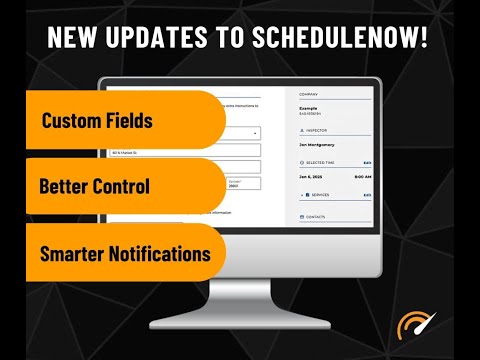
play ScheduleNow Customization Updates!
homegauge-dashboard
homegauge-inspections

HomeGauge

Brand: HomeGauge

  • 4.2

  • 5 Ratings

An inspection management software that enables inspectors to create, manage, and share detailed inspection reports efficiently.

See More

Have you used HomeGauge before?

Share your insights for better experience

Add a Review
Starting Price
$89

View plans

100% Genuine
Products
Best Price
Guaranteed
Safe & Secure
Payment
  • Description

  • Pricing

  • Features

  • Specification

  • Review

  • FAQ

Starting at $89

HomeGauge Software Overview

What is HomeGauge?

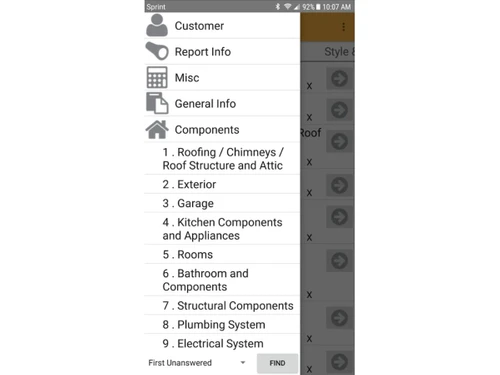
HomeGauge is an inspection management software made for home inspectors to create clear and professional inspection reports. It helps inspectors collect notes, photos, and details during property checks using a mobile app or computer.

The software then turns this information into easy-to-read reports for clients. HomeGauge also includes tools for scheduling inspections, managing clients, sending contracts, and taking payments online.

It saves time by reducing paperwork and keeping everything organized in one place. Inspectors can add images and comments to explain property conditions clearly. Overall, HomeGauge makes the home inspection process faster, more accurate, and more professional.

Why Choose HomeGauge Software?

  • Easy-to-Use Interface: HomeGauge offers a clean and intuitive interface, making it simple for inspectors to navigate and create reports. Even beginners can quickly adapt and work efficiently.
  • Customizable Reports: The software allows full customization of templates to match your inspection style. You can adjust layouts, sections, and formatting to meet client and agent expectations.
  • Mobile App Support: With its mobile app for Android and iOS, inspectors can complete inspections directly on-site. It helps save time by allowing immediate data entry.
  • Fast Report Delivery: HomeGauge enables instant sharing of reports with clients and agents through secure links. This speeds up communication and decision-making.
  • Cloud Storage: The platform provides secure cloud storage for all inspection data. You can access reports anytime, from anywhere, without worrying about device storage.
  • Photo & Video Integration: Inspectors can easily attach photos and videos to reports, making findings clearer. This improves understanding for clients and enhances report quality.
  • Digital Signatures: HomeGauge supports electronic signatures for agreements and contracts. This reduces paperwork and streamlines the inspection workflow.
  • Repair Request Builder: Agents and clients can generate repair lists directly from the inspection report. It simplifies negotiations and ensures nothing important is missed.
  • Scheduling Tools: The built-in scheduler helps inspectors manage appointments efficiently. It reduces manual tracking and avoids double bookings.
  • Client Communication Tools: The platform includes messaging and automated notifications. These tools keep clients informed and improve overall communication.

Benefits of HomeGauge Software

  • Professional-Grade Reports: HomeGauge produces clean, detailed, and visually appealing reports. These professional reports help build trust with clients and agents.
  • Time-Saving Automation: Automated features reduce repetitive tasks, helping inspectors work faster. It improves productivity and accuracy across inspections.
  • Reliable Customer Support: HomeGauge offers responsive support to resolve technical or operational issues. Inspectors receive help through email, calls, or online resources.
  • Regular Updates: The software is consistently updated with new features and improvements. This ensures inspectors always have access to the latest tools.
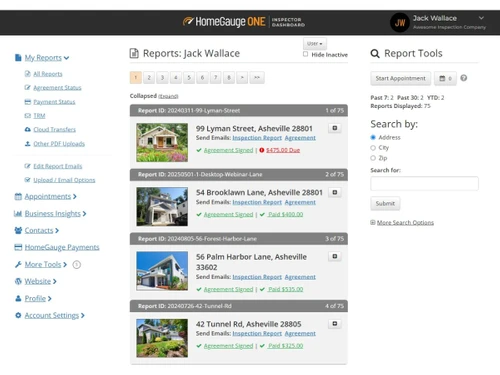
  • Inspector Dashboard: A centralized dashboard helps inspectors manage inspections, clients, and schedules in one place. It provides a clear view of daily and upcoming tasks.
  • Secure Data Protection: HomeGauge uses strong security measures to protect sensitive data. This ensures that all inspection documents and client information remain confidential.
  • Online Payments: Inspectors can accept payments directly through the platform. It simplifies the billing process and provides a smooth experience for clients.
  • Business Management Tools: The software includes tools to track jobs, payments, and client interactions. This helps inspectors manage their business operations efficiently.
  • Industry Trusted: HomeGauge is widely used by professional home inspectors across the industry. Its reliability has made it a trusted name for years.

HomeGauge Pricing

HomeGauge price starts at USD 89 at Techjockey.com. The pricing model is based on different parameters, including extra features, deployment type, and the total number of users. For further queries related to the product, you can contact our product team and learn more about the pricing and offers.

Read more

HomeGauge Company Details

Founded Year:  2001

HomeGauge makes it easy to create professional home inspection reports and print them onsite or deliver them online.

Director/Founders Russell Buchanan
Company Size 1-100 Employees

HomeGauge Pricing & Plans

HomeGauge Software
Key Features
  • Desktop Report Writer with Companion app
  • Online Agreements, Scheduling & Payments
  • Online Report Delivery & Storage
  • Live U.S.-based Support team
  • FREE Online Training, Webinars & more!
Starting at $89
    • Licenses

      Licenses
      Licenses
    • Monthly

      Monthly
      Monthly

Key Features

  • Desktop Report Writer with Companion app

  • Online Agreements, Scheduling & Payments

  • Online Report Delivery & Storage

  • Live U.S.-based Support team

  • FREE Online Training, Webinars & more!

HomeGauge Features

  • icon_check Report Generation
    Create detailed home inspection reports with customizable templates, photos, and comment libraries.
  • icon_check Work Order Management
    Add and manage repair or replacement work orders directly inside reports for better clarity.
  • icon_check Collaboration
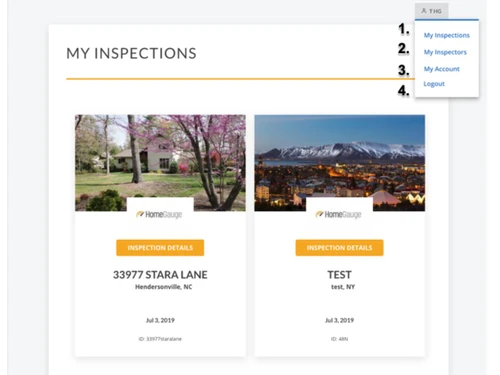
    Provide inspectors, buyers, and agents with dashboards for report access and request tracking.
  • icon_check Online Scheduling
    Enable clients to book inspection appointments directly through an inspector’s website.
  • icon_check Digital Agreements
    Send, review, and sign inspection agreements electronically with e-signature support.
  • icon_check Payment Processing
    Accept credit card payments online and lock inspection reports until invoices are cleared.
  • icon_check Templates
    Customize and reuse templates for faster reporting, including comment libraries and forms.
  • icon_check Mobile Access
    Capture notes, images, and comments using mobile devices with full offline functionality.
  • icon_check Multimedia Integration
    Embed high-quality videos and 360-degree images into reports to enhance visual clarity.
  • icon_check Website Builder
    Create inspector websites with SEO-optimized design and hosting to boost online presence.
  • icon_check Forms Management
    Access a library of regulatory forms like WDO, NPMA-33, and wind mitigation checklists.
  • icon_check Knowledge Management
    Learn with tutorials, articles, and videos, plus access to responsive customer support.
  • icon_check Multi-Device Support
    Use across Windows desktops, Android, and iOS devices meeting minimum system specs.
HomeGauge Demo Video play icon

Get HomeGauge Demo

Watch the demo video to explore key features, real workflows, and how the software fits your business needs.

Understand
Key Features
Personal
Demo Insights
Interactive
Demo Support

HomeGauge Specification

Supported Platforms
Windows Windows iOS iOS Android Android MacOS MacOS Linux Linux
Devices
Desktop Desktop Mobile Mobile Tablet Tablet iPad iPad
Deployment
Web-Based Web-Based
Suitable For
Property
Business Specific
Property
Business Size
Small Business Startups Medium Business Enterprises
Customer Support
Email Communities
Language
English
Training Resources
Videos

HomeGauge Review

4.2

Out of 5

img

Overall Rating

Based on
5 Verified Ratings

Rating Breakdown

  • Features 3.9
  • Value for Money 4.1
  • Ease of Use 4.7
  • Customer Support 4.5

80% Recommend this Product

Add Review

Be the First to Review

This product has no reviews yet. Be the first to leave your feedback.

Add Review

How much does HomeGauge cost?

HomeGauge pricing begins at USD 89 on Techjockey.com.

Is there a mobile app available for HomeGauge Software?

Yes, HomeGauge offers an Android and iOS mobile app for on-site inspections.

Which operating systems are compatible with HomeGauge Software?

HomeGauge works on Linux, Windows, macOS, Android, and iOS.

Does HomeGauge Software offer a free trial?

Yes, HomeGauge provides a free trial for new users.

How does HomeGauge Software function?

HomeGauge helps inspectors create, manage, and deliver detailed digital home inspection reports.

Who uses HomeGauge Software?

HomeGauge is used by home inspectors, real estate agents, and property professionals.

Is a free demo available for HomeGauge Software?

Yes, a free demo of HomeGauge is available upon request.

Is HomeGauge Software available for free?

No, HomeGauge is not free, but a free trial is offered.

20,000+ Software Listed

Best Price Guranteed

Free Expert Consultation

2M+ Happy Customers

Terms and Condtions

close

Users with registered businesses can purchase goods from merchants on the platform to satisfy their business needs. Users are not permitted to utilize any products acquired through the platform for resale, advertising, business, or further distribution.

For each purchase made, users will receive a Tax Invoice (or 'GST invoice') that includes specific details such as:

  • the GSTIN of the user associated with their registered business, and

  • the specified Entity Name for their business.

It should be noted that not all products are eligible for GST Invoice. Only the products displayed by participating sellers with the 'GST-based Invoice Available' callout on the product description page would qualify.

Certain goods and services are not eligible to get a GST Invoice, including items with VAS, i.e., Value Added Services (e.g., Total Mobile Protection/Assured Buyback) and those involving an exchange offer at the time of purchase.

Users must ensure the accuracy of the GSTIN, and business entity name provided for the GST Invoice. Requests for corrections into GST Invoice would not be accommodated by Techjockey.com or any Seller, and any issues arising from user-provided information are the sole responsibility of users.

Techjockey.com is not liable for the GST Invoice or any associated input tax credit. To efficiently claim an input tax credit, users should select the registered place of business address as per the GST authority's data and follow the provisions of the GST Act and rules.

To claim an input tax credit, the delivery and billing addresses must match. Furthermore, input tax credits will not be granted if the delivery address and GSTIN on the invoice are from different states. In case of incorrect GST details provided during the order placement, the order will be canceled automatically.