


linkedin
HomeLead logo
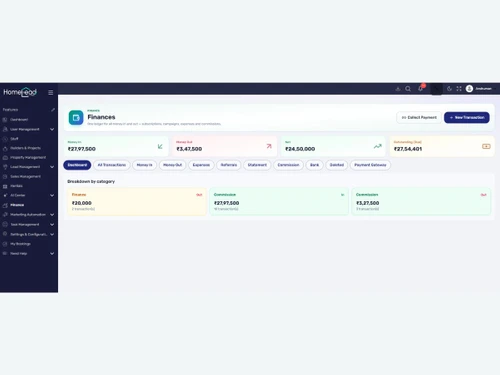
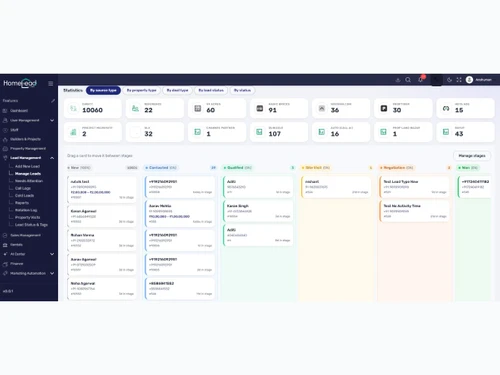
homelead dashboard
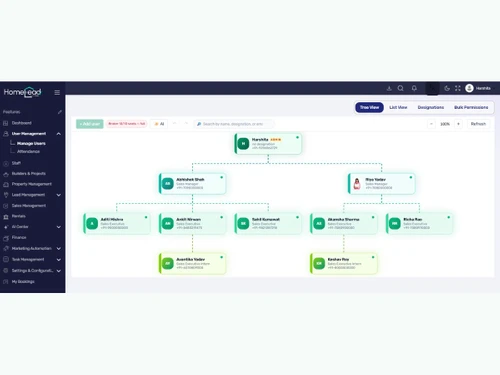
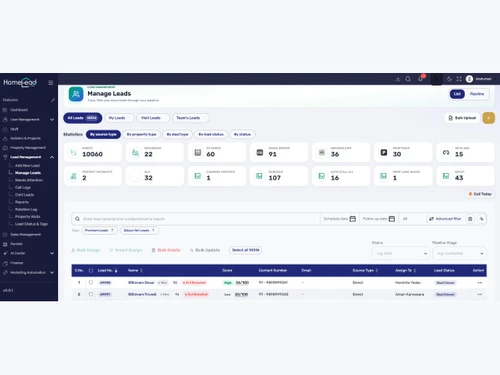
homelead Projects
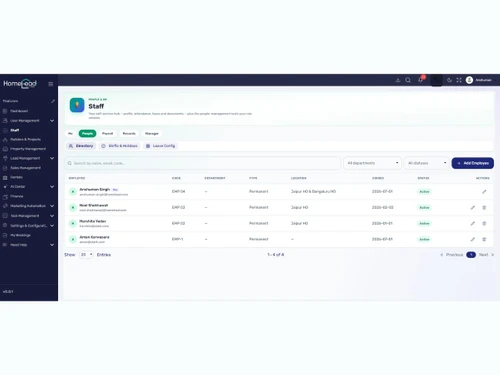
homelead property

HomeLead

Brand: Telepathy Infotech Private Limited

  • 4.9

  • 10 Ratings & 7 Reviews

HomeLead helps businesses manage leads, sales, projects, and customer interactions efficiently.

See More

Have you used HomeLead before?

Share your insights for better experience

Add a Review
Starting Price
₹1,000 excl.GST
₹ 1,000 incl. GST

View plans

offer Save upto 18%, Get GST Invoice on your business purchase T&C
offer Buy Now & Pay Later, Check offer on payment page.
Buy Now
100% Genuine
Products
Best Price
Guaranteed
Safe & Secure
Payment
  • Description

  • Pricing

  • Features

  • Specification

  • Review

  • FAQ

Starting at ₹1,000
Buy Now

HomeLeadSoftware Overview

What is HomeLead?

HomeLead is a cloud-based real estate CRM software designed for real estate businesses to manage leads and customers efficiently. It helps builders, brokers, and sales teams track inquiries and sales activities. The software automates lead management and follow-up tasks. Users can manage customer information in one place. HomeLead supports sales pipeline tracking and reporting. It helps improve communication with clients through calls, emails, and messages.

The platform provides real-time analytics and performance insights. It is easy to use and accessible from different devices. HomeLead also helps increase productivity and sales conversions. Teams can collaborate better using the software.

Why Choose HomeLead Software?

  • Lead Management: HomeLead helps organize and track leads efficiently.
  • Real Estate Focused: It is specially designed for the real estate industry.
  • Cloud-Based Platform: Users can access the software from anywhere.
  • Easy to Use: The interface is simple and user-friendly.
  • Customer Database: Stores all customer information in one place.
  • Automated Follow-Ups: Sends reminders and follow-up notifications automatically.
  • Sales Pipeline Tracking: Monitors every stage of the sales process.
  • Lead Assignment: Distributes leads among team members easily.
  • Call Management: Helps manage customer calls effectively.
  • Email Integration: Supports communication through email.
  • SMS Notifications: Enables quick messaging with customers.
  • WhatsApp Integration: Improves communication through WhatsApp.
  • Mobile Access: Works on smartphones and tablets.

Benefits of HomeLead Software

  • Team Collaboration: Helps teams work together efficiently.
  • Real-Time Updates: Provides instant information and notifications.
  • Performance Reports: Generates detailed business reports.
  • Analytics Dashboard: Offers insights into sales performance.
  • Task Management: Helps users organize daily tasks.
  • Document Management: Keeps important files and records secure.
  • Customer Engagement: Strengthens relationships with clients.
  • Higher Conversion Rates: Improves the chances of closing deals.
  • Centralized Data: Keeps all information in one system.
  • Time Saving: Reduces manual work and saves time.
  • Increased Productivity: Helps teams perform better.
  • Customizable Features: Can be adjusted according to business needs.
  • Scalable Solution: Suitable for small and large businesses.
  • Secure Data Storage: Protects customer and business information.
  • Free Trial Availability: Users can test the software before purchasing.
  • Free Demo Support: Provides demonstrations for better understanding.
  • Improved Business Growth: Helps real estate companies increase sales and efficiency.

HomeLead Pricing

HomeLead price starts at INR 9,999 at techjockey.com.

The pricing model is based on different parameters, including extra features, deployment type, and the total number of users. For further queries related to the product, you can contact our product team and learn more about the pricing and offers.

Read more

Telepathy Infotech Private Limited Company Details

Founded Year:  2011

Telepathy Solutions founded in 2011, now it is Telepathy Infotech Pvt Ltd. We are an innovative IT company, delivering cutting-edge solutions and services tailored to meet the ever-evolving technology needs of businesses and individuals, driving growth and success in the digital era.

Director/Founders Nishant Agarwal
Company Size 101-500 Employees

HomeLead Pricing & Plans

Growth

Calculated Price

1000 Exclusive of all taxes
    • Quantity

      Quantity
      Quantity
    • Monthly

      Monthly
      Monthly

Key Features

  • Includes 1 Licence

  • Dashboards

  • Lead Management

  • Lead Capture & Tracking

  • Automated Follow-Ups

  • Lead Source Integrations

Pro

Calculated Price

17999 Exclusive of all taxes
    • Quantity

      Quantity
      Quantity
    • Monthly

      Monthly
      Monthly

Key Features

  • Includes 20 Licence

  • Dashboards

  • Lead Management

  • Lead Capture & Tracking

  • Automated Follow-Ups

  • Lead Source Integrations

Scale

Calculated Price

39999 Exclusive of all taxes
    • Quantity

      Quantity
      Quantity
    • Monthly

      Monthly
      Monthly

Key Features

  • Includes 50 Licence

  • Dashboards

  • Lead Management

  • Lead Capture & Tracking

  • Automated Follow-Ups

  • Lead Source Integrations

HomeLead Features

Contact Management

  • icon_check Interaction Tracking
    Logs every call, WhatsApp message, and email in a centralized customer history timeline.
  • icon_check Client Management
    Controls the entire customer lifecycle from initial pre-sales inquiry to post-sales possession.
  • icon_check Customer History
    Preserves a 360-degree historical view of all buyer touchpoints, files, and agreements.
  • icon_check Centralized Database
    Unifies scattered lead records, project inventories, and contractor files into one repository.

Lead Management

  • icon_check Lead Scoring
    Uses AI to rank prospects based on engagement, budget, and location to prioritize high-intent buyers.
  • icon_check Lead Distribution
    Automatically assigns new inquiries to the right sales reps via Smart Lead Routing.
  • icon_check Lead Nurturing
    Automates drip campaigns and follow-ups based on the buyer's 6–12 month decision timeline.
  • icon_check Lead Qualification
    Uses conversational AI calling and smart chatbots to separate serious buyers from noise.
  • icon_check Lead Capture
    Automatically ingests inbound leads from Facebook, WhatsApp, websites, and external ads.
  • icon_check Lead Segmentation
    Automatically filters and groups incoming prospects by project, budget, location, or source.

Property Management

  • icon_check Commission Management
    Automates the tracking of broker payouts and settlement records across projects.
  • icon_check Property Listing Management
    Centralized inventory tracking for unit availability, pricing, and project status.
  • icon_check Payment Tracking
    Monitors rental collections, upcoming milestones, construction dues, and booking tokens.
  • icon_check Transaction Tracking
    Unifies tracking for all bookings, sales, customer refunds, and contractor expenses.
  • icon_check Property Matching
    Uses chatbot logic to instantly find and suggest available units matching client budgets.

Marketing Automation

  • icon_check Landing Page Builder
    Creates project-specific microsites to turn property listings into high-conversion digital experiences.
  • icon_check Campaign Management
    Monitors marketing campaign sources, allocations, and ROI directly inside the dashboard.
  • icon_check Email Campaigns
    Deploys targeted email marketing tracks synchronized directly with the central lead list.
  • icon_check SMS Campaigns
    Launches automated pre-sales and nurturing outreach blasts using short text services.

Task and Workflow Automation

  • icon_check Automated Follow-Ups
    Schedules reminders for site visits and sends automated WhatsApp/SMS sequences.
  • icon_check Task Scheduling
    Allocates and tracks contractor or agent tasks, timelines, budgets, and project completions.
  • icon_check Automated Workflows
    Sets off background data shifts and follow-up chains when a unit is blocked or updated.
  • icon_check Auto Lead Distribution
    Automatically routes new leads to specific reps using preset location or project rules.
  • icon_check Alerts & Notifications
    Receive real-time notifications for appointments, tasks, and lead activities.

Analytics and Reporting

  • icon_check Commission Tracking
    Calculates and monitors channel partner fees automatically to maintain payout transparency.
  • icon_check AI Insights
    Employs AI coaches and automated calling systems to generate summaries and smart follow-up drafts.
  • icon_check Real-Time Updates
    Delivers instant visibility into running campaign ROI, inventory availability, and sales data.
  • icon_check Performance Dashboards
    Provides visual real estate command center charts tracking sales metrics, field teams, and targets
  • icon_check Conversion Rate Tracking
    Delivers deep conversion analytics tracking lead responses versus completed site visits.
  • icon_check Comparative Market Analysis (CMA)
    Generate market reports to help agents price properties competitively.

Integrations

  • icon_check Payment Gateway Integration
    Integrates with financial tools to track customer bookings, dues, and collections.
  • icon_check Third Party Integrations
    Connect websites, ERPs, Meta Ads, and external tools seamlessly.
  • icon_check API Integration
    Offers open website and software APIs to seamlessly feed data from outer lead networks.
  • icon_check Calendar Integration
    Integrates smart reminders to schedule, manage, and confirm customer site visit allocations.
  • icon_check Multiple Listing Services (MLS) Integration
    Links directly with premium local listing hubs like 99acres, MagicBricks, Housing, and Square Yards.
  • icon_check IVR Integration
    Pairs with cloud telephony systems to automate routing and capture inbound or outbound call histories.
  • icon_check E-Signature Integration
    Facilitate digital document signing for faster, paperless transactions.

Collaboration and Communication

  • icon_check Document Management
    Securely stores RERA documents, agreements, and contracts with E-signature capabilities.
  • icon_check Call Tracking and Recording
    Includes IVR integration and AI-powered call coaching with live sentiment analysis.
  • icon_check Internal Communication
    Includes an integrated in-app chatting system to connect sales teams, builders, and brokers.
  • icon_check Bulk Email and SMS
    Distributes broad outreach notifications to prioritized contact batches simultaneously.

Security & Compliance

  • icon_check Audit Logs
    Maintains a transparent, chronological record of all system activities and user interactions.
  • icon_check Role-Based Access Control (RBAC)
    Control user permissions and access based on team roles.
  • icon_check API Access
    Provides secure programmatic developer entry points to link external real estate platforms.
  • icon_check Data Encryption
    Features a highly secured database architecture backed by certified VAPT and SOC governance.
  • icon_check Audit Trails
    Captures chronological database edit logs to ensure operational traceability and security.
  • icon_check IP Whitelisting
    Restrict access to the system by allowing only specific IP addresses for enhanced security.
  • icon_check Backup & Disaster Recovery
    Ensure data protection with automatic backups and disaster recovery features.
  • icon_check GDPR and CCPA Compliance
    Ensure full compliance with privacy regulations like GDPR and CCPA.

Others

  • icon_check Rent Management
    Handles lease agreements, tenant preferences, and automated rent collection reminders.
  • icon_check Sales Management
    Manage bookings, deal stages, and customer interactions efficiently.

HomeLead Specification

Supported Platforms
Ubuntu Ubuntu Windows Windows iOS iOS Android Android MacOS MacOS Linux Linux
Devices
Desktop Desktop Mobile Mobile Tablet Tablet iPad iPad
Deployment
Web-Based Web-Based
Suitable For
Real Estate
Business Specific
All Businesses
Business Size
Small Business Startups Medium Business Enterprises
Customer Support
Phone Email
Language
English
Integration
API Integration
Training Resources
Live Online
AI Features
AI Integrated

HomeLead Reviews

4.9

Out of 5

img

Overall Rating

Based on
7 Verified Reviews

Rating Breakdown

  • Features 4.9
  • Value for Money 4.8
  • Ease of Use 4.9
  • Customer Support 5

100% Recommend this Product

Add Review

Pros

  • "HomeLead offers real estate-focused features, responsive customer support, smooth onboarding, and centralized customer and sales management that boosts team productivity."

    Adshita RealtyJul 17, 2026

  • "HomeLead features an easy-to-use interface with a simple learning curve, along with efficient lead management and automated follow-up tracking that improve team productivity."

    SKJ RealtyJul 17, 2026

  • "Ai features, Data security, Pre sales and post sales, all the features which realestate requires"

    Ashish KhandelwalJul 16, 2026

Cons

  • "HomeLead could offer more advanced customization options and additional integrations to provide greater flexibility for growing real estate businesses."

    Abhishek SinghAug 10, 2026

  • "HomeLead could be improved with a more feature-rich mobile app, broader third-party integrations, and more customizable reporting and analytics dashboards."

    Adshita RealtyJul 17, 2026

  • "HomeLead could improve by simplifying the setup process and reducing the need for customization when using advanced features."

    SKJ RealtyJul 17, 2026

Kuldeep Holkar

Digital Marketer

Industry: Digital Marketing

5

Reviewed on: Aug 10, 2026

Techjockey Verified

“My Experience with HomeLead - A Journey of Learning, Growth & Innovation”

My experience with HomeLead has been positive and valuable, with good opportunities to learn and develop professional skills. The supportive team and real-world projects helped me gain practical experience in digital marketing and business activities. Overall, it has been a rewarding workplace for professional growth.

Pros

HomeLead provides a supportive learning environment with opportunities to work on real-world projects and gain practical industry experience. The team encourages creativity, skill development, and new ideas while offering exposure to digital marketing, technology, business processes, and customer-focused strategies.

Cons

Like any growing organization, workload and priorities can sometimes be challenging when multiple deadlines overlap. More structured communication, clearer task expectations, and consistent guidance could further improve the employee experience.
Switched from Real Estate CRM

gurjar

Founder

Industry: Real Estate

5

Reviewed on: Aug 10, 2026

Techjockey Verified

“A Helpful Tool for Managing Real Estate Leads”

HomeLead has been a useful platform for managing real estate leads and sales activities in one place. Its lead tracking, follow-ups, property management, site visits, bookings, and reporting features help keep the sales process organized. Overall, it is a practical CRM solution for real estate businesses looking to improve customer and sales management.

Pros

HomeLead offers comprehensive tools for lead tracking, follow-ups, customer management, property and inventory management, site visits, and bookings. Its communication, reporting, and team management features help real estate teams keep sales activities organized.

Cons

The wide range of features may require some time for new users to learn. Businesses with simpler requirements may not need all the available modules, and some features may require initial setup to match specific workflows.

Abhishek singh

Chief Operating Officer

Industry: Project Management

5

Reviewed on: Aug 10, 2026

Techjockey Verified

“Easy-to-Use CRM for Real Estate Lead Management”

HomeLead is a user-friendly CRM with useful features for managing real estate leads and daily sales activities. The platform is easy to navigate, and its overall feature set makes lead management more organized and efficient.

Pros

HomeLead’s microsite feature is useful for creating dedicated property pages and presenting project information in an organized way, helping real estate teams manage and showcase leads more effectively.

Cons

HomeLead could offer more advanced customization options and additional integrations to provide greater flexibility for growing real estate businesses.

Switched from Real Builder Real Estate

Reason to switch

Its features was not good , it is a generic CRM

See All HomeLead Reviews

Articles for HomeLead

See All Related Articles

How much does HomeLead CRM software cost?

HomeLead CRM software price starts at Rs 9,999 per month.

Is there a mobile app for HomeLead?

Yes, HomeLead offers mobile applications for both Android and iOS devices.

Which operating systems are compatible with HomeLead?

HomeLead software can be accessed through modern web browsers on Windows, macOS, Ubuntu and Linux.

Does HomeLead software offer a free trial?

No, HomeLead does not offer a free trial on its official website.

How does HomeLead CRM software function?

HomeLead CRM software for real estate centralizes real estate operations by capturing leads from multiple channels, automating follow-ups, managing inventory, sales, bookings, projects, and finance, while providing AI-powered insights and analytics from a unified dashboard.

Who uses HomeLead CRM software?

HomeLead software is used by real estate developers, builders, brokers, channel partners, sales teams, and property management businesses to streamline customer, sales, and project management.

Is a free demo available for HomeLead CRM software?

Yes, HomeLead software free demo is available on techjockey.

Is HomeLead software available for free?

No, HomeLead software free version is not available online.

How much does HomeLead Software cost?

HomeLead pricing starts at INR 9,999 and is available on techjockey.com.

Is there a mobile app available for HomeLead Software?

Yes, HomeLead offers an Android and iOS mobile app.

Which operating systems are compatible with HomeLead Software?

HomeLead is compatible with Ubuntu, Windows, iOS, Android, MacOS and Linux.

Does HomeLead Software offer a free trial?

Yes, HomeLead offers a free trial for users to explore its features.

How does HomeLead Software function?

HomeLead helps manage leads, customer data, follow-ups, and sales activities for real estate businesses.

Who uses HomeLead Software?

Real estate builders, brokers, agents, and sales teams use HomeLead.

Is a free demo available for HomeLead Software?

Yes, HomeLead provides a free demo for interested users.

Is HomeLead Software available for free?

No, HomeLead is a paid software, but it offers a free trial.

20,000+ Software Listed

Best Price Guranteed

Free Expert Consultation

2M+ Happy Customers

Terms and Condtions

close

Users with registered businesses can purchase goods from merchants on the platform to satisfy their business needs. Users are not permitted to utilize any products acquired through the platform for resale, advertising, business, or further distribution.

For each purchase made, users will receive a Tax Invoice (or 'GST invoice') that includes specific details such as:

  • the GSTIN of the user associated with their registered business, and

  • the specified Entity Name for their business.

It should be noted that not all products are eligible for GST Invoice. Only the products displayed by participating sellers with the 'GST-based Invoice Available' callout on the product description page would qualify.

Certain goods and services are not eligible to get a GST Invoice, including items with VAS, i.e., Value Added Services (e.g., Total Mobile Protection/Assured Buyback) and those involving an exchange offer at the time of purchase.

Users must ensure the accuracy of the GSTIN, and business entity name provided for the GST Invoice. Requests for corrections into GST Invoice would not be accommodated by Techjockey.com or any Seller, and any issues arising from user-provided information are the sole responsibility of users.

Techjockey.com is not liable for the GST Invoice or any associated input tax credit. To efficiently claim an input tax credit, users should select the registered place of business address as per the GST authority's data and follow the provisions of the GST Act and rules.

To claim an input tax credit, the delivery and billing addresses must match. Furthermore, input tax credits will not be granted if the delivery address and GSTIN on the invoice are from different states. In case of incorrect GST details provided during the order placement, the order will be canceled automatically.