linkedin
iKeyMonitor logo
play iKeyMonitor - Best Parental Control App for iPhone and Android - iKeyMonitor Demo
iKeymonitor 2
ikeymonitor devices

iKeyMonitor

Brand: iKeyMonitor

  • 4.1

  • 7 Ratings & 1 Review

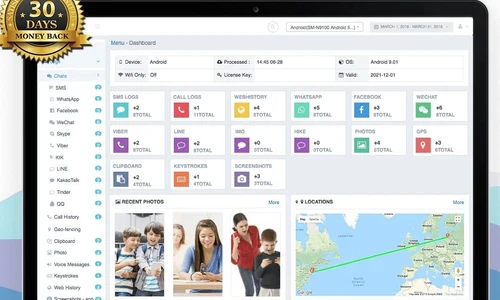
iKey Monitor is a user activity monitoring software for individual parents and business organisations, enabling them to keep track of calls, texts, social media apps, GPS location and visited web pages within the targeted device. Enterprises can record the conversations made by an individual employee in a discreet manner. They can even view the photos and videos stored within the monitored device...

See More

Have you used iKeyMonitor before?

Share your insights for better experience

Add a Review

Price Available on Request

Questions about pricing or customization? We’re here to help, just a click away.

100% Genuine
Products
Best Price
Guaranteed
Safe & Secure
Payment
  • Description

  • Pricing

  • Features

  • Specification

  • Review

  • Compare

  • Alternatives

  • FAQ

iKeyMonitor Software Overview

What is iKey Monitor?

iKey Monitor is a user activity monitoring software for individual parents and business organisations, enabling them to keep track of calls, texts, social media apps, GPS location and visited web pages within the targeted device. Enterprises can record the conversations made by an individual employee in a discreet manner. They can even view the photos and videos stored within the monitored device. Moreover, iKey Monitor features a multi-language interface by supporting a wide variety of lingo from all around the globe. The export logs feature offered by the app enables managers to download the desired logs from the target device and save them on their system for future reference.

How iKey Monitor facilitates tamper-proof monitoring?

You can secure iKey Monitor with passwords and configurable URL or access codes to prevent unauthorized access, thus enabling users to conduct tamper-proof and discrete monitoring. Moreover, they can set a rooted Android device as a system admin or convert the particular smartphone to a system app, preventing all chances of unauthorized uninstallation.

Pricing of iKey Monitor

The pricing of iKey Monitor is available on request. You can send us a callback request to get a detailed overview of the app and our in-house experts will get back to you on your mentioned time and date.

Compatible Platforms for iKey Monitor

iKey Monitor is compatible with Windows and Mac OS devices. It also has a dedicated mobile app for iOS and Android platforms.

Benefits of iKey Monitor

  1. Contacts Backup: The app saves a detailed backup of all contacts stored within the monitored device, including their names, numbers and email IDs, facilitating easy detection of suspicious contacts and illegal activities in real-time.
  2. Upload Logs to FTP: The feature is currently available for managers with iOS devices having iKey Monitor with jailbreak, installed in them. All the screenshots, text messages and other logs are uploaded to the FTP website facilitating easy monitoring from time to time.
  3. Multiple Admins and Users: Companies can create sub-accounts and assign separate admins to monitor individual departments.
  4. Schedules: Managers can set particular time schedules to limit screen timings on the monitored device and record the surroundings of the target device. The app saves detailed information within the cloud panel, facilitating flexible monitoring.
Read more

iKeyMonitor Pricing & Plans

Looking for The Right Pricing?

Share your requirements and get a plan built around your business.

  • Define your business needs
  • Get customised pricing
  • Choose features that fit your workflow

Price Available on Request

Get personalised iKeyMonitor pricing that fits your needs. Our team will connect with you.

iKeyMonitor Features

  • icon_check Social Apps
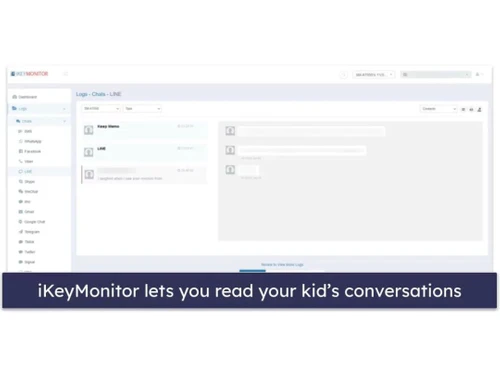
    With iKey Monitor, organisations can track the usage of multiple social media apps like Whatsapp, Viber, Hangouts, QQ, BBM,
  • icon_check Call History
    Individuals can monitor the entire call history of the target device, including saved contacts, incoming and outgoing calls,
  • icon_check Call Recording
     Organisations can record the entire conversation made over incoming and outgoing calls by an individual employee, in a
  • icon_check Text Messaging
    Users can monitor all the text messages received and sent from the targeted device, including the content of the message along
  • icon_check Keystroke Logging
    The app monitors all typed keystrokes on the target device including the pasted texts and hidden words in asterisks form.
  • icon_check Clipboard Monitoring
    Individuals can view the texts copied within the clipboard of the targeted device along with the accurate names of the websites
  • icon_check Screenshots
    The app takes screenshots of all the activities conducted within the monitored device in a periodic manner. It also captures
  • icon_check GPS Tracking
    With iKey Monitor, individuals can track accurate GPS location of the target device at preset intervals and monitor their
  • icon_check GEO - Fencing
    The app sends instant alerts via email once the monitored device crosses the virtually defined boundaries.
  • icon_check Photos
    iKey Monitor keeps track of all the saved photos within the gallery of the designated device and the newly captured ones as
  • icon_check Video Capturing
    You can monitor the video files stored within the target device in a remote manner.
  • icon_check Listen To Surroundings
    Individuals can listen to the surrounding voices of the target device by controlling the microphone of the particular device.
  • icon_check Spam Blocker
    iKey Monitor can be used to set specific time limits or block out certain apps, facilitating easy management.
  • icon_check Remote Control
    The advanced control panel of the app, facilitates remote monitoring. Managers can view the monitoring logs and can also turn on
  • icon_check Group Management
    The monitored device can be categorized as per departments or teams the employees belong to.
iKeyMonitor Demo Video play icon

Get iKeyMonitor Demo

Watch the demo video to explore key features, real workflows, and how the software fits your business needs.

Understand
Key Features
Personal
Demo Insights
Interactive
Demo Support

iKeyMonitor Specifications

Supported Platforms
Windows Windows iOS iOS Android Android MacOS MacOS
Devices
Desktop Desktop Mobile Mobile Tablet Tablet iPad iPad
Deployment
Cloud-Based Cloud-Based
Suitable For
All Industries
Business Specific
All Businesses
Language
English

Explore the Best Alternative Solutions Similar to Your Business Size and Needs

iKeyMonitor Review

4.1

Out of 5

img

Overall Rating

Based on
1 Verified Review

Rating Breakdown

  • Features 3.6
  • Value for Money 4.3
  • Ease of Use 4.0
  • Customer Support 4.3

84% Recommend this Product

Add Review

iKeyMonitor Video Review

youtubeVideoId

4.1

“iKeyMonitor Review For iPhone & Android: Features, Free Plan & Installation Guide”

Review by: SpyDrill

Compare iKeyMonitor With other User Activity Monitoring Software

Products
Ratings
Pricing
Device Supported
Deployment
Supported Platforms
  • img

    iKeyMonitor

  • 4.1

  • Price On Request

  • Desktop

    Mobile

  • Web based

    On Premises

  • Windows

    Mac OS

  • img

    iMyFone AnyTo

  • 4.7

  • ₹ 1234

  • Desktop

    Mobile

  • Web based

    On Premises

  • Windows

    Mac OS

  • img

    Spyzie

  • 4.6

  • Price On Request

  • Desktop

    Mobile

  • Web based

    On Premises

  • Windows

    Mac OS

  • img

    mSpy Family Kit

  • 4.7

  • Price On Request

  • Desktop

    Mobile

  • Web based

    On Premises

  • Windows

    Mac OS

  • img

    XNSPY

  • 4.4

  • ₹ 2398

  • Desktop

    Mobile

  • Web based

    On Premises

  • Windows

    Mac OS

  • img

    FlexiSPY

  • 4.5

  • Price On Request

  • Desktop

    Mobile

  • Web based

    On Premises

  • Windows

    Mac OS

  • img

    Mouseflow

  • 4.4

  • Price On Request

  • Desktop

    Mobile

  • Web based

    On Premises

  • Windows

    Mac OS

  • img

    Spyic

  • 4.1

  • Price On Request

  • Desktop

    Mobile

  • Web based

    On Premises

  • Windows

    Mac OS

(0) Product(s) selected

iKeyMonitor Alternatives

See All iKeyMonitor Alternatives
SAVE UPTO 40%

Starting Price:

$39 /Month

Articles for iKeyMonitor

See All Related Articles

1. Is it possible to view the calendar of the target device using iKey Monitor?

Yes, you can view all the activities scheduled within the calendar of the target device, along with their start time and end time.

2. Does iKey Monitor facilitate e-mail monitoring?

The app takes timely screenshots of the keystrokes, recipient and the exact date and time of the sent emails.

3. Can I get a demo of iKey Monitor?

Yes, you can request an online demo of iKey Monitor. Our executives will get back to you as per the mentioned time schedule.

4. Does iKey Monitor support LAN Access?

Yes, users can modify the in-app settings, view the call logs and can even alter the monitoring status within the target device in case both the system device and target device are connected with each other over LAN.

5. As a manager, can I click pictures remotely with the camera of the monitored device using iKey Monitor?

Yes, you can monitor the front and rear cameras of the target device remotely and view those snaps within the cloud panel.

20,000+ Software Listed

Best Price Guranteed

Free Expert Consultation

2M+ Happy Customers

Terms and Condtions

close

Users with registered businesses can purchase goods from merchants on the platform to satisfy their business needs. Users are not permitted to utilize any products acquired through the platform for resale, advertising, business, or further distribution.

For each purchase made, users will receive a Tax Invoice (or 'GST invoice') that includes specific details such as:

  • the GSTIN of the user associated with their registered business, and

  • the specified Entity Name for their business.

It should be noted that not all products are eligible for GST Invoice. Only the products displayed by participating sellers with the 'GST-based Invoice Available' callout on the product description page would qualify.

Certain goods and services are not eligible to get a GST Invoice, including items with VAS, i.e., Value Added Services (e.g., Total Mobile Protection/Assured Buyback) and those involving an exchange offer at the time of purchase.

Users must ensure the accuracy of the GSTIN, and business entity name provided for the GST Invoice. Requests for corrections into GST Invoice would not be accommodated by Techjockey.com or any Seller, and any issues arising from user-provided information are the sole responsibility of users.

Techjockey.com is not liable for the GST Invoice or any associated input tax credit. To efficiently claim an input tax credit, users should select the registered place of business address as per the GST authority's data and follow the provisions of the GST Act and rules.

To claim an input tax credit, the delivery and billing addresses must match. Furthermore, input tax credits will not be granted if the delivery address and GSTIN on the invoice are from different states. In case of incorrect GST details provided during the order placement, the order will be canceled automatically.