USA
USA UAE
UAESmall Business
Designed for startups and growing businesses
See More





Brand: Mouseflow
Mouseflow's User Activity Monitoring Software offers comprehensive tracking and analysis for enhanced user insights and website optimization.
See MoreHave you used Mouseflow before?
Share your insights for better experience
Brand: Mouseflow
Founded Year: 2010
From when website analytics was in its infancy to today – we begin each day on a mission to help businesses uncover user behavior insights that otherwise would go unseen. We are not just one tool with separate features. We are an ecosystem that works together to empower teams.
 Optimize campaigns & spend Get more done, faster Segments & visualizations Auto-tagged friction events Deliver indisputable context Confirm & collaborate Unbiased insights Grumpy users identified Added value for A/B tests Unlimited custom dashboards

Watch the demo video to explore key features, real workflows, and how the software fits your business needs.
 Ubuntu
  Windows
  MacOS
MacOS  Linux
Linux  Desktop
  Mobile
  Tablet
  iPad
iPad  Cloud-Based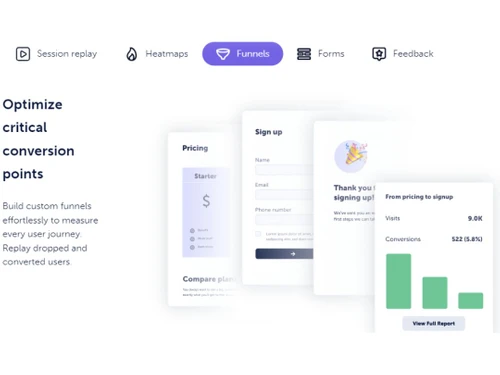
Small Business
Designed for startups and growing businesses
Medium Business
Built for business growth and flexibility
Enterprises
Designed for complex and large-scale business needs
4.4
Out of 5

Overall Rating
Based on
3 Verified Ratings
Rating Breakdown
83% Recommend this Product
Add ReviewTechjockey Trusted Reviews from Verified Users
No reviews are currently available for Mouseflow. Discover similar User Activity Monitoring Software reviews

Android Mobile Phone Software
Whats great - Managing contacts became a breeze with Android Mobile Phone Software. It offers a user-friendly interface for organizing and ... read more

mSpy Family Kit
Whats great - The fact of being able to trust GPS to know the live location of the children at each moment is an added advantage of this ap... read more

Spyzie
Whats great - I was so overwhelmed to see my son spending hours on his phone. He is only 14, and it haunts me to see him glued to his table... read more

Mouseflow
Price On Request
Desktop
Mobile
Web based
On Premises
Windows
Mac OS

mSpy Android Monitoring
₹ 2310
Desktop
Mobile
Web based
On Premises
Windows
Mac OS

iMyFone AnyTo
₹ 1234
Desktop
Mobile
Web based
On Premises
Windows
Mac OS
Spyzie
Price On Request
Desktop
Mobile
Web based
On Premises
Windows
Mac OS
mSpy Family Kit
Price On Request
Desktop
Mobile
Web based
On Premises
Windows
Mac OS

mSpy iPhone Monitoring
₹ 2310
Desktop
Mobile
Web based
On Premises
Windows
Mac OS

XNSPY
₹ 2398
Desktop
Mobile
Web based
On Premises
Windows
Mac OS

FlexiSPY
Price On Request
Desktop
Mobile
Web based
On Premises
Windows
Mac OS

iPhone Without Jailbreak
Price On Request
Desktop
Mobile
Web based
On Premises
Windows
Mac OS

Spyic
Price On Request
Desktop
Mobile
Web based
On Premises
Windows
Mac OS

Orbivue
₹ 999
Desktop
Mobile
Web based
On Premises
Windows
Mac OS
(0) Product(s) selected
Available
Price on Request

Available
Price on Request
Mouseflow software is compatible with Windows and macOS device systems.
The Mouseflow app is not available on Android and iOS devices.
The Mouseflow system supports web-based deployment.
Mouseflow User Activity Monitoring Software pricing starts from $31 at techjockey.com.
Potential users of Mouseflow include website owners, UX designers, digital marketers, and e-commerce businesses seeking to enhance their online user experience, understand customer behavior, and optimize their websites for better conversions and engagement.
The Mouseflow User Activity Monitoring platform demo is available for free with techjockey.com.
The Mouseflow User Activity Monitoring system does not offer a free trial.
Mouseflow User Activity Monitoring software installation is not required, as it is web-based. Just open the Setup Wizard to get started.
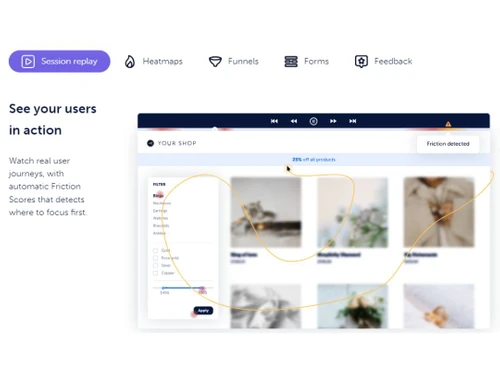
Mouseflow is a behavior analytics tool that enables website owners to gain valuable insights into user interactions. It records and visualizes real user sessions, helping identify areas of improvement and opportunities for enhancing the website's user experience (UX). This allows businesses to optimize their websites for better user engagement and satisfaction.
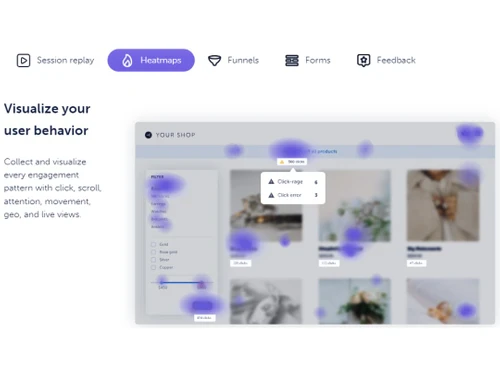
Mouseflow is used to track the number of clicks, mouse movement, scrolls, tabs switch, forms and the pages that you visit while browsing.
Mouseflow is ranked as number 1 in the field of marketing and analytics with the highest score of 9.35 among all the marketing analytics tools.
In Mouseflow click error is a friction event that happens when a user tries to interact with buttons or links on a website and gets a JavaScript error.
Mouseflow is able to track number of clips, mouse movements, tag and monitor specific website elements.
20,000+ Software Listed
Best Price Guranteed
Free Expert Consultation
2M+ Happy Customers
Terms and Condtions

Users with registered businesses can purchase goods from merchants on the platform to satisfy their business needs. Users are not permitted to utilize any products acquired through the platform for resale, advertising, business, or further distribution.
For each purchase made, users will receive a Tax Invoice (or 'GST invoice') that includes specific details such as:
the GSTIN of the user associated with their registered business, and
the specified Entity Name for their business.
It should be noted that not all products are eligible for GST Invoice. Only the products displayed by participating sellers with the 'GST-based Invoice Available' callout on the product description page would qualify.
Certain goods and services are not eligible to get a GST Invoice, including items with VAS, i.e., Value Added Services (e.g., Total Mobile Protection/Assured Buyback) and those involving an exchange offer at the time of purchase.
Users must ensure the accuracy of the GSTIN, and business entity name provided for the GST Invoice. Requests for corrections into GST Invoice would not be accommodated by Techjockey.com or any Seller, and any issues arising from user-provided information are the sole responsibility of users.
Techjockey.com is not liable for the GST Invoice or any associated input tax credit. To efficiently claim an input tax credit, users should select the registered place of business address as per the GST authority's data and follow the provisions of the GST Act and rules.
To claim an input tax credit, the delivery and billing addresses must match. Furthermore, input tax credits will not be granted if the delivery address and GSTIN on the invoice are from different states. In case of incorrect GST details provided during the order placement, the order will be canceled automatically.