 USA
USA UAE
UAESmall Business
Designed for startups and growing businesses


See More




Brand: INAXUS
A construction management software platform tailored for stakeholders in the built-environment industry (owners, contractors, consultants, subcontractors).
See MoreHave you used INAXUS before?
Share your insights for better experience
Brand: INAXUS
Founded Year: 2009
INAXUS is a Hybrid Software for Construction.
Looking for The Right Pricing?
Share your requirements and get a plan built around your business.
Price Available on Request
Get personalised INAXUS pricing that fits your needs. Our team will connect with you.
 Project Planning Resource Management Budget Tracking Document Management Task Scheduling Time Tracking Risk Management Quality Control Collaboration Tools Analytics & Reporting Mobile Access Workflow Automation Bid Management Subcontractor Management Change Order Management Cost Estimation Inventory Management Compliance Management Client Portal Third Party Integration

Watch the demo video to explore key features, real workflows, and how the software fits your business needs.
 Ubuntu
  Windows
  MacOS
MacOS  Linux
Linux  Desktop
  Mobile
  Tablet
  iPad
iPad  Cloud-Based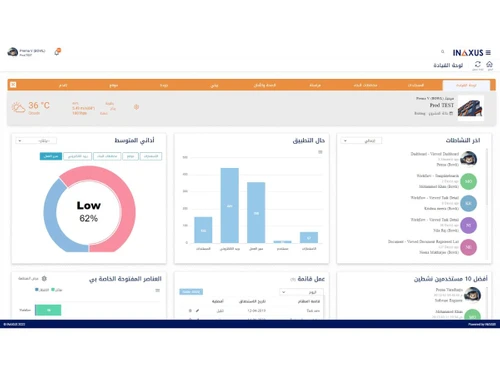
Small Business
Designed for startups and growing businesses
Medium Business
Built for business growth and flexibility
Enterprises
Designed for complex and large-scale business needs
4.2
Out of 5

Overall Rating
Based on
5 Verified Ratings
Rating Breakdown
80% Recommend this Product
Add ReviewTechjockey Trusted Reviews from Verified Users
No reviews are currently available for INAXUS. Discover similar Construction Project Management Software reviews

Oracle Aconex
Whats great - The best thing about the software is that it lets me organize and manage the meeting documents from a central location. This ... read more

Onsite
Whats great - What I liked most was how everything is connected in one system. BOQ, budgeting, labour, materials, and billing all flow toge... read more

Wrike
Whats great - ssions and manage user rights, ensuring that sensitive information is only available to the right people. Further, the two-fa... read more
INAXUS
Price On Request
Desktop
Mobile
Web based
On Premises
Windows
Mac OS
Oracle Aconex
Price On Request
Desktop
Mobile
Web based
On Premises
Windows
Mac OS

Houzz Pro
Price On Request
Desktop
Mobile
Web based
On Premises
Windows
Mac OS
Onsite
₹ 12000
Desktop
Mobile
Web based
On Premises
Windows
Mac OS
SIGNAX
Price On Request
Desktop
Mobile
Web based
On Premises
Windows
Mac OS

Autodesk Build
₹ 12980
Desktop
Mobile
Web based
On Premises
Windows
Mac OS

Fonn
Price On Request
Desktop
Mobile
Web based
On Premises
Windows
Mac OS
TaskTag
Price On Request
Desktop
Mobile
Web based
On Premises
Windows
Mac OS

Superwise
₹ 6399
Desktop
Mobile
Web based
On Premises
Windows
Mac OS

InEight
Price On Request
Desktop
Mobile
Web based
On Premises
Windows
Mac OS

Sage 100 Contractor
Price On Request
Desktop
Mobile
Web based
On Premises
Windows
Mac OS
(0) Product(s) selected
INAXUS pricing can be requested at Techjockey.com. Pricing is customised based on specific business needs.
INAXUS is cloud-based and works on all major operating systems, including Windows and macOS, via any modern web browser. Its mobile apps work on both Android and iOS devices.
INAXUS centralizes project documents, workflows, and site activities on a single cloud platform. It automates approvals, streamlines communication, and provides real-time tracking of construction progress.
Yes, INAXUS is scalable and can be used by small contractors or consultants who want to digitize workflows, improve coordination, and manage projects more efficiently.
INAXUS typically offers demos on request, allowing users to explore key features before purchasing. Trial availability may depend on region or plan.
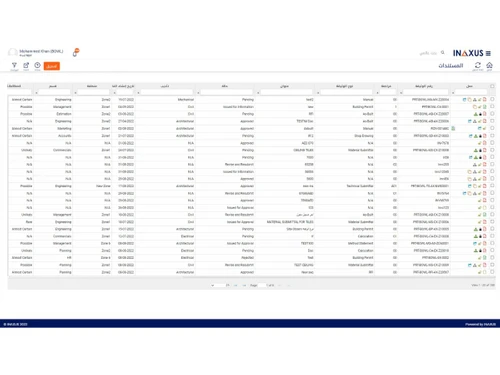
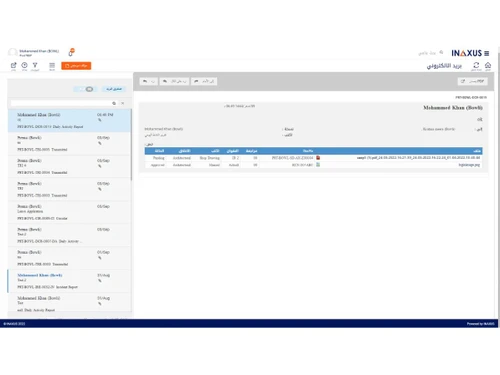
It offers document management, workflow automation, site inspections, snagging, daily logs, dashboards, cost tracking, tendering, correspondence management, and mobile field tools.
Yes, INAXUS provides mobile apps for Android and iOS, enabling site teams to capture photos, logs, inspections, and updates in real time.
Owners, contractors, subcontractors, consultants, project managers, site engineers, and construction teams are involved in project planning, coordination, and site execution.
INAXUS uses cloud-based data protection, role-based permissions, encryption, and audit trails to safeguard project information and control user access.
INAXUS is used for managing construction projects, automating workflows, controlling documents, monitoring site progress, improving collaboration, and ensuring project transparency.
20,000+ Software Listed
Best Price Guranteed
Free Expert Consultation
2M+ Happy Customers
Terms and Condtions

Users with registered businesses can purchase goods from merchants on the platform to satisfy their business needs. Users are not permitted to utilize any products acquired through the platform for resale, advertising, business, or further distribution.
For each purchase made, users will receive a Tax Invoice (or 'GST invoice') that includes specific details such as:
the GSTIN of the user associated with their registered business, and
the specified Entity Name for their business.
It should be noted that not all products are eligible for GST Invoice. Only the products displayed by participating sellers with the 'GST-based Invoice Available' callout on the product description page would qualify.
Certain goods and services are not eligible to get a GST Invoice, including items with VAS, i.e., Value Added Services (e.g., Total Mobile Protection/Assured Buyback) and those involving an exchange offer at the time of purchase.
Users must ensure the accuracy of the GSTIN, and business entity name provided for the GST Invoice. Requests for corrections into GST Invoice would not be accommodated by Techjockey.com or any Seller, and any issues arising from user-provided information are the sole responsibility of users.
Techjockey.com is not liable for the GST Invoice or any associated input tax credit. To efficiently claim an input tax credit, users should select the registered place of business address as per the GST authority's data and follow the provisions of the GST Act and rules.
To claim an input tax credit, the delivery and billing addresses must match. Furthermore, input tax credits will not be granted if the delivery address and GSTIN on the invoice are from different states. In case of incorrect GST details provided during the order placement, the order will be canceled automatically.


