linkedin
Sage 100 Contractor logo
play Product Introduction | Sage 100 Contractor | Sage
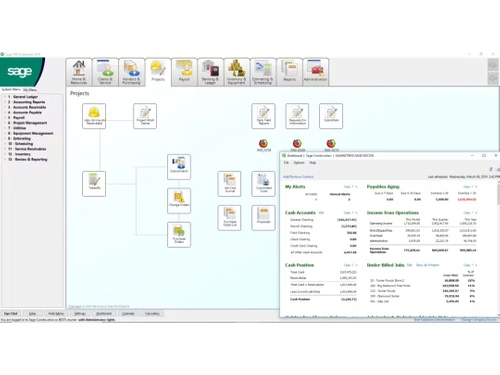
Sage 100 Contractor Dashboard
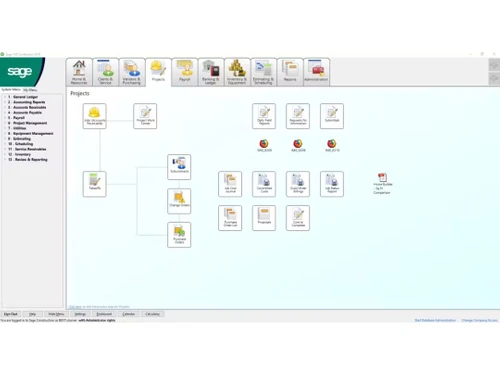
Sage 100 Contractor Desktop

Sage 100 Contractor

Brand: Sage Group plc

  • 4.3

  • 4 Ratings

Sage 100 Contractor is construction management software designed to help small—and mid-sized contractors manage various aspects of their projects, including accounting, project management, and estimating.

See More

Have you used Sage 100 Contractor before?

Share your insights for better experience

Add a Review

Price Available on Request

Questions about pricing or customization? We’re here to help, just a click away.

100% Genuine
Products
Best Price
Guaranteed
Safe & Secure
Payment
  • Description

  • Pricing

  • Features

  • Specification

  • Review

  • Compare

  • Alternatives

  • FAQ

Sage 100 Contractor Software Overview

What is Sage 100 Contractor?

Sage 100 Contractor is a comprehensive construction management software for small to mid-sized contractors. It integrates various accounting, project management, and estimating functions to streamline construction operations.

The software provides tools for job costing, scheduling, and document control, helping contractors manage projects efficiently from start to finish. With its user-friendly interface, Sage 100 Contractor improves accuracy and productivity by automating key processes. It also offers robust reporting and analytics to support informed decision-making. This software is ideal for contractors looking to enhance project oversight and financial management.

Why Choose Sage 100 Contractor Software?

  • Streamlines Accounting: Simplifies accounting tasks for better data-driven decisions and improved business operations.
  • Complete Construction Management: Offers full accounting and project tracking for contractors and home builders.
  • Manages Contract Phases: Handles cost estimating, scheduling, and job costing in one platform.
  • Customizable Dashboards: Provides dashboards, email alerts, and profitability status to manage projects efficiently.
  • Efficient Management Features: These include features to boost the productivity and profitability of construction companies.
  • Enhances Communication: Improves communication with contractors, subcontractors, and teams via to-do lists and reminders.
  • Software Integration: Integrates with other software, eliminating the need for multiple applications.
  • Time Management: Offers easy-to-use tools for task delegation and progress tracking.
  • Project Management: Includes a top-notch project management module for construction tasks.
  • Ideal for Small to Mid-Sized Contractors: Perfect for small to mid-sized contractors needing comprehensive business and project information.

Benefits of Sage 100 Contractor Platform

  • Efficient Resource Use: Optimizes resource allocation by tracking timelines, budgets, and availability for effective utilization.
  • Real-Time Collaboration: Facilitates communication and coordination among stakeholders for smoother project execution.
  • Cost Control: Enhances cost control with accurate expense tracking and vendor invoice management to avoid budget overruns.
  • Document Management: Centralizes project documents, reducing errors, version conflicts, and data loss.
  • Regulatory Compliance: Tracks and manages permits, licenses, and safety regulations to ensure legal compliance.
  • Risk Management: Identifies and mitigates potential risks to minimize project disruptions and liabilities.
  • Client Satisfaction: Improves client satisfaction by delivering projects on time, within budget, and to quality standards.
  • Remote Access: Allows users to manage projects and collaborate from anywhere, increasing flexibility and productivity.
  • Data Security: Protects sensitive information with robust encryption, user authentication, and regular backups.
  • Business Growth: Supports scalability with tools that adapt to changing project requirements and market conditions.

Pricing of Sage 100 Contractor

Sage 100 Contractor price details are available on request at techjockey.com.

The pricing model is based on different parameters, including extra features, deployment type, and the total number of users. If you have further queries related to the product, you can contact our product team to learn more about the pricing and offers.

Read more

Sage Group plc Company Details

Founded Year:  1981

Sage provide businesses with software and services that are simple and easy to use, as we work with you to give you that feeling of confidence. Customers trust our Payroll, HR, and Finance software to make business flow with ease.

Director/Founders Chad Ruff, Colin Cooper, David Goldman, Graham Wylie, P. Addo-Nyarko, Paul Milford Muller, Simonetta
Company Size 1000+ Employees

Sage 100 Contractor Pricing & Plans

Looking for The Right Pricing?

Share your requirements and get a plan built around your business.

  • Define your business needs
  • Get customised pricing
  • Choose features that fit your workflow

Price Available on Request

Get personalised Sage 100 Contractor pricing that fits your needs. Our team will connect with you.

Sage 100 Contractor Features

  • icon_check Project Management
    Oversee scheduling, task assignments, progress tracking, and resource allocation for construction projects.
  • icon_check Document Management
    Centralize project documents for easy access, version control, and stakeholder collaboration.
  • icon_check Contractors Management
    Efficiently handle contractors, subcontractors, and vendors, including contracts, performance tracking, and payments.
  • icon_check Budgeting & Forecasting
    Track project budgets, forecasts, and expenses to ensure projects stay on budget and schedule.
  • icon_check Billing & Invoicing
    Simplify billing and invoicing, creating accurate invoices based on project progress and contract terms.
  • icon_check Dashboard
    Access real-time project data and key metrics through a centralized dashboard for informed decision-making.
  • icon_check Quotes/Estimates
    Create detailed project quotes and estimates for labor, materials, and overhead costs to ensure accurate pricing and bidding.
Sage 100 Contractor Demo Video play icon

Get Sage 100 Contractor Demo

Watch the demo video to explore key features, real workflows, and how the software fits your business needs.

Understand
Key Features
Personal
Demo Insights
Interactive
Demo Support

Sage 100 Contractor Specifications

Supported Platforms
Ubuntu Ubuntu Windows Windows MacOS MacOS Linux Linux
Devices
Desktop Desktop
Deployment
Cloud-Based Cloud-Based
Suitable For
Construction
Business Specific
Construction
Business Size
Small Business Startups Medium Business Enterprises
Customer Support
Email Communities
Language
English
Training Resources
Videos

Explore the Best Alternative Solutions Similar to Your Business Size and Needs

Sage 100 Contractor Review

4.3

Out of 5

img

Overall Rating

Based on
4 Verified Ratings

Rating Breakdown

  • Features 5
  • Value for Money 4.1
  • Ease of Use 4.1
  • Customer Support 4

92% Recommend this Product

Add Review

Techjockey Trusted Reviews from Verified Users

No reviews are currently available for Sage 100 Contractor. Discover similar Construction Project Management Software reviews

  • Oracle Aconex

    4.3

    Whats great - The best thing about the software is that it lets me organize and manage the meeting documents from a central location. This ... read more

  • Onsite

    4.8

    Whats great - What I liked most was how everything is connected in one system. BOQ, budgeting, labour, materials, and billing all flow toge... read more

  • Wrike

    4.0

    Whats great - ssions and manage user rights, ensuring that sensitive information is only available to the right people. Further, the two-fa... read more

Compare Sage 100 Contractor With other Construction Project Management Software

Products
Ratings
Pricing
Device Supported
Deployment
Supported Platforms
  • img

    Sage 100 Contractor

  • 4.3

  • Price On Request

  • Desktop

    Mobile

  • Web based

    On Premises

  • Windows

    Mac OS

  • img

    Oracle Aconex

  • 4.2

  • Price On Request

  • Desktop

    Mobile

  • Web based

    On Premises

  • Windows

    Mac OS

  • img

    Houzz Pro

  • 4.6

  • Price On Request

  • Desktop

    Mobile

  • Web based

    On Premises

  • Windows

    Mac OS

  • img

    Onsite

  • 4.4

  • ₹ 12000

  • Desktop

    Mobile

  • Web based

    On Premises

  • Windows

    Mac OS

  • img

    INAXUS

  • 4.2

  • Price On Request

  • Desktop

    Mobile

  • Web based

    On Premises

  • Windows

    Mac OS

  • img

    SIGNAX

  • 4.2

  • Price On Request

  • Desktop

    Mobile

  • Web based

    On Premises

  • Windows

    Mac OS

  • img

    Autodesk Build

  • 4.3

  • ₹ 12980

  • Desktop

    Mobile

  • Web based

    On Premises

  • Windows

    Mac OS

  • img

    Fonn

  • 4.2

  • Price On Request

  • Desktop

    Mobile

  • Web based

    On Premises

  • Windows

    Mac OS

  • img

    TaskTag

  • 4.2

  • Price On Request

  • Desktop

    Mobile

  • Web based

    On Premises

  • Windows

    Mac OS

  • img

    Superwise

  • 4.2

  • ₹ 6399

  • Desktop

    Mobile

  • Web based

    On Premises

  • Windows

    Mac OS

  • img

    InEight

  • 4.3

  • Price On Request

  • Desktop

    Mobile

  • Web based

    On Premises

  • Windows

    Mac OS

(0) Product(s) selected

Sage 100 Contractor Alternatives

See All Sage 100 Contractor Alternatives

Starting Price:

₹12,000 /Month ₹15,600

SAVE UPTO 23%

Available

Price on Request

Fonn

4.2

Starting Price:

£5,500 /Year

Starting Price:

$12 /Month

Which operating system does Sage 100 Contractor Software support?

Sage 100 Contractor is compatible with Ubuntu, Windows, MacOS, and Linux operating systems.

How much does Sage 100 Contractor Software cost?

Sage 100 Contractor offers various pricing plans at techjockey.com upon request.

Is there any Sage 100 Contractor Software app?

No, Sage 100 Contractor does not have a dedicated mobile app.

Does this product offer a free trial?

Yes, Sage 100 Contractor offers a free trial for users to explore its features.

How does Sage 100 Contractor Software work?

Sage 100 Contractor helps contractors manage projects by integrating accounting, project management, and estimating functions.

Who are the users of Sage 100 Contractor Software?

Potential users include small to mid-sized contractors in the construction industry.

What is Sage 100 Contractor used for?

Sage 100 Contractor is used for managing accounting, estimating, project management, job costing, scheduling, and service management specifically tailored for small to midsize construction companies.

What is the difference between Sage 50 and Sage 100 Contractor?

Sage 50 is best for smaller businesses, while Sage 100 Contractor is more robustly suited for those with advanced inventory and manufacturing needs.

20,000+ Software Listed

Best Price Guranteed

Free Expert Consultation

2M+ Happy Customers

Terms and Condtions

close

Users with registered businesses can purchase goods from merchants on the platform to satisfy their business needs. Users are not permitted to utilize any products acquired through the platform for resale, advertising, business, or further distribution.

For each purchase made, users will receive a Tax Invoice (or 'GST invoice') that includes specific details such as:

  • the GSTIN of the user associated with their registered business, and

  • the specified Entity Name for their business.

It should be noted that not all products are eligible for GST Invoice. Only the products displayed by participating sellers with the 'GST-based Invoice Available' callout on the product description page would qualify.

Certain goods and services are not eligible to get a GST Invoice, including items with VAS, i.e., Value Added Services (e.g., Total Mobile Protection/Assured Buyback) and those involving an exchange offer at the time of purchase.

Users must ensure the accuracy of the GSTIN, and business entity name provided for the GST Invoice. Requests for corrections into GST Invoice would not be accommodated by Techjockey.com or any Seller, and any issues arising from user-provided information are the sole responsibility of users.

Techjockey.com is not liable for the GST Invoice or any associated input tax credit. To efficiently claim an input tax credit, users should select the registered place of business address as per the GST authority's data and follow the provisions of the GST Act and rules.

To claim an input tax credit, the delivery and billing addresses must match. Furthermore, input tax credits will not be granted if the delivery address and GSTIN on the invoice are from different states. In case of incorrect GST details provided during the order placement, the order will be canceled automatically.