 USA
USA UAE
UAESmall Business
Designed for startups and growing businesses


See More





Brand: Abeyaantrix Technology
A construction project management software that is designed for contractors, builders, developers, and design-build firms.
See MoreHave you used Onsite before?
Share your insights for better experience
Brand: Abeyaantrix Technology
Founded Year: 2021
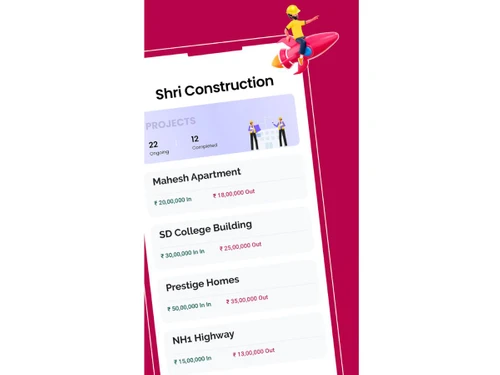
Onsite aims to be the world’s largest platform for construction site management. Onsite mobile app helps construction companies and contractors to manage project resources and project spends at the click of a button.
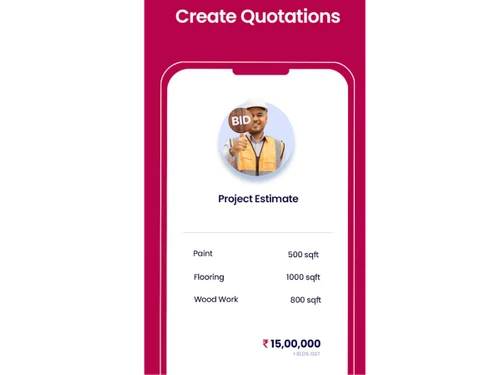
 Sub-Contractor Management Vendor Management Financial Reporting Resource Management Quotation Management Real-Time Collaboration Document Management Task Management Labour Management Material Management Budgeting and Cost Control Project Planning Inventory Management Mobile Access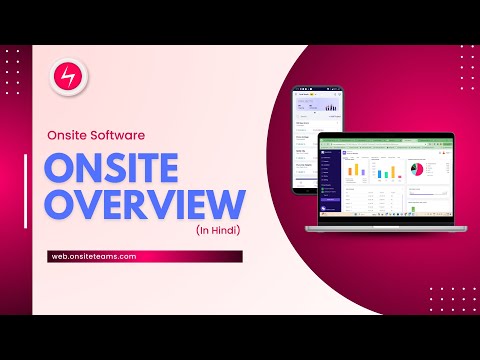

Watch the demo video to explore key features, real workflows, and how the software fits your business needs.
 Ubuntu
  Windows
  MacOS
MacOS  Linux
Linux  Desktop
  Cloud-Based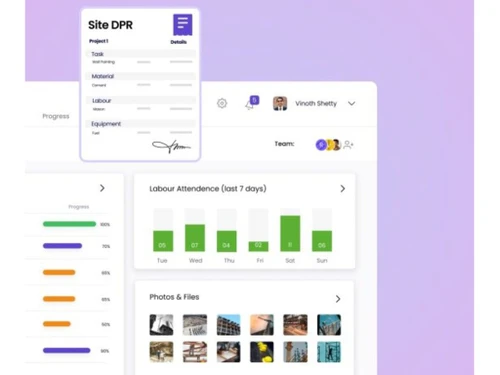
Small Business
Designed for startups and growing businesses
Medium Business
Built for business growth and flexibility
Enterprises
Designed for complex and large-scale business needs
4.4
Out of 5

Overall Rating
Based on
1 Verified Review
Rating Breakdown
83% Recommend this Product
Add Review
Feb 19, 2026
Techjockey Verified
“My experience with Onsite has been smooth and practical”
Using Onsite felt close to how construction actually runs on ground. It was not overwhelming with unnecessary layers, and it did not feel like a generic business tool adjusted for construction. The system follows a logical flow from BOQ to budgeting, execution, and billing, which made it easier to understand where the money was going at any given time. What made the biggest difference for us was the visibility during execution. Instead of reviewing costs after the fact, we could see movement in labour, materials, and expenses while work was still happening. That reduced last-minute surprises. Approvals and purchase decisions became more disciplined because everything was connected to the project budget. The mobile experience also helped. Site teams were able to update progress and attendance without resistance. Once the workflows were in place, the process felt structured but not rigid. It brought clarity without adding extra paperwork. Overall, the platform gave us a better sense of control. It made project tracking less stressful and helped us make decisions with more confidence during execution rather than after completion.
Pros
What I liked most was how everything is connected in one system. BOQ, budgeting, labour, materials, and billing all flow together, so you can see the financial impact of site work in real time. The approval controls and mobile usability also make it practical for both office and site teams.
Cons
In the beginning, setting up the structure properly required some effort, especially while defining BOQs and approval workflows. The system is detailed, so it works best when data is entered correctly from the start. There is a small learning phase for teams that are used to informal tracking methods, but once the process is understood, it becomes smoother.
Reason to switch
I moved from Zoho Projects to Onsite because Zoho helped with task management and timelines, but it did not give clear control over project costs at site level. We still had to manage BOQ, materials, labour, and billing separately. Onsite brought execution and financial tracking into one system, so daily site activity directly reflected in budget position and profitability. That made decision-making much clearer during the project, not just at the end.

Onsite
₹ 12000.00 excl. GST
Desktop
Mobile
Web based
On Premises
Windows
Mac OS

Oracle Aconex
Price On Request
Desktop
Mobile
Web based
On Premises
Windows
Mac OS

Houzz Pro
Price On Request
Desktop
Mobile
Web based
On Premises
Windows
Mac OS

INAXUS
Price On Request
Desktop
Mobile
Web based
On Premises
Windows
Mac OS

SIGNAX
Price On Request
Desktop
Mobile
Web based
On Premises
Windows
Mac OS

Autodesk Build
₹ 12980
Desktop
Mobile
Web based
On Premises
Windows
Mac OS

Fonn
Price On Request
Desktop
Mobile
Web based
On Premises
Windows
Mac OS
TaskTag
Price On Request
Desktop
Mobile
Web based
On Premises
Windows
Mac OS

Superwise
₹ 6399
Desktop
Mobile
Web based
On Premises
Windows
Mac OS

InEight
Price On Request
Desktop
Mobile
Web based
On Premises
Windows
Mac OS

Sage 100 Contractor
Price On Request
Desktop
Mobile
Web based
On Premises
Windows
Mac OS
(0) Product(s) selected
Onsite pricing starts at INR 36000 at Techjockey.com. Pricing is customised based on specific business needs.
Onsite is cloud-based and works on all major operating systems through any modern web browser, including Windows and macOS. It also provides mobile apps for Android and iOS.
Onsite connects field and office teams through a centralized construction management platform that tracks labour, materials, finances, progress, and daily site activities in real time.
Yes, Onsite is scalable and works well for small contractors and builders looking to digitize site operations, reduce wastage, and manage projects more efficiently.
Onsite typically provides demos on request to help users understand its features. Trial availability may depend on the vendor or subscription plan.
It offers labour tracking, material management, attendance, budgeting, billing, daily site logs, task management, subcontractor coordination, and real-time dashboards.
Yes, Onsite provides mobile apps for Android and iOS, enabling field teams to log attendance, track materials, upload photos, and report progress directly from the site.
Contractors, builders, developers, project managers, site engineers, supervisors, and construction companies managing small to large-scale projects.
Onsite ensures data security through cloud-based protection, controlled access, encrypted data storage, and role-based permissions.
Onsite is used for managing construction projects, controlling labour and material usage, tracking progress, managing finances, and improving site-office coordination.
20,000+ Software Listed
Best Price Guranteed
Free Expert Consultation
2M+ Happy Customers
Terms and Condtions

Users with registered businesses can purchase goods from merchants on the platform to satisfy their business needs. Users are not permitted to utilize any products acquired through the platform for resale, advertising, business, or further distribution.
For each purchase made, users will receive a Tax Invoice (or 'GST invoice') that includes specific details such as:
the GSTIN of the user associated with their registered business, and
the specified Entity Name for their business.
It should be noted that not all products are eligible for GST Invoice. Only the products displayed by participating sellers with the 'GST-based Invoice Available' callout on the product description page would qualify.
Certain goods and services are not eligible to get a GST Invoice, including items with VAS, i.e., Value Added Services (e.g., Total Mobile Protection/Assured Buyback) and those involving an exchange offer at the time of purchase.
Users must ensure the accuracy of the GSTIN, and business entity name provided for the GST Invoice. Requests for corrections into GST Invoice would not be accommodated by Techjockey.com or any Seller, and any issues arising from user-provided information are the sole responsibility of users.
Techjockey.com is not liable for the GST Invoice or any associated input tax credit. To efficiently claim an input tax credit, users should select the registered place of business address as per the GST authority's data and follow the provisions of the GST Act and rules.
To claim an input tax credit, the delivery and billing addresses must match. Furthermore, input tax credits will not be granted if the delivery address and GSTIN on the invoice are from different states. In case of incorrect GST details provided during the order placement, the order will be canceled automatically.


