linkedin
Infogram logo
play How to Create a Chart
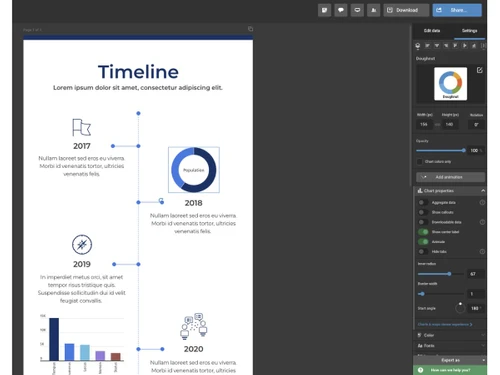
infogram-timeline
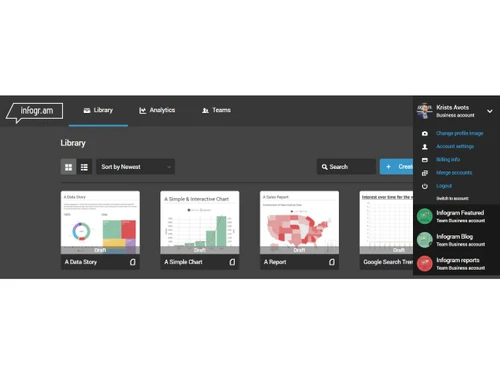
infogram-library

Infogram

Brand: Infogram

  • 4.1

  • 3 Ratings

An easy online data visualization tool to create interactive charts, infographics, maps, and reports from data.

See More

Have you used Infogram before?

Share your insights for better experience

Add a Review
Starting Price
$25

View plans

100% Genuine
Products
Best Price
Guaranteed
Safe & Secure
Payment
  • Description

  • Pricing

  • Features

  • Specification

  • Review

  • Compare

  • Alternatives

  • FAQ

Starting at $25

Infogram Software Overview

What is Infogram?

Infogram is a data visualization tool that helps you create visual charts, infographics, maps, and reports from your data. It works directly on the web, so there is no need to install any software.

With Infogram, you can turn numbers and information into attractive and interactive visuals that are easy to understand. Its drag-and-drop editor allows anyone to design without coding or special skills.

The platform offers many templates, charts, icons, images, and maps to help you get started quickly. You can share or embed your visuals on websites, blogs, or social media.

Infogram is useful for business reports, school projects, marketing, and educational purposes. It also allows teams to collaborate and edit in real time.

Why Choose Infogram Software?

  • Easy to Use: Intuitive drag-and-drop editor with no design or coding skills required.
  • Interactive Visuals: Create engaging charts, maps, dashboards, and infographics.
  • Professional Templates: Wide range of ready-made, customizable templates.
  • Real-Time Collaboration: Teams can work together and edit projects simultaneously.
  • Cloud-Based Platform: Access your projects anytime, anywhere.
  • Multiple Chart Types: Supports bar, line, pie, radar, bubble, and more.
  • Data Import Options: Import data from Excel, CSV, Google Sheets, and databases.
  • Live Data Integration: Connect and update visuals with real-time data.
  • Custom Branding: Apply brand colors, fonts, and logos easily.
  • Responsive Design: Visuals look great on desktop, tablet, and mobile devices.
  • Embed Anywhere: Easily embed charts and infographics on websites or blogs.

Benefits of Infogram Software

  • Secure Data Handling: Strong data security and privacy controls.
  • Presentation Ready: Create reports and presentations directly within the platform.
  • AI-Powered Features: Smart suggestions to improve visual storytelling.
  • Wide User Base: Trusted by marketers, educators, journalists, and enterprises.
  • Export Options: Download visuals in PNG, PDF, GIF, and other formats.
  • Custom Interactivity: Add tooltips, animations, and clickable elements.
  • Scalable Plans: Suitable for individuals, teams, and large organizations.
  • Analytics Tracking: Track engagement and performance of shared visuals.
  • Time-Saving Solution: Quickly transform complex data into clear insights.

Infogram Pricing

Infogram price starts at USD 25 at techjockey.com. The pricing model is based on different parameters, including extra features, deployment type, and the total number of users. For further queries related to the product, you can contact our product team and learn more about the pricing and offers.

Read more

Infogram Company Details

Founded Year:  2012

Infogram is a data visualization tool designed to turn complex data into stunning, interactive visuals. Launched in 2012, it has empowered over 10 million users and 30,000+ companies in more than 160 countries to communicate data with impact.

Director/Founders Alise Semjonova, Raimonds Kaže, Uldis Leiterts
Company Size 1-100 Employees

Infogram Pricing & Plans

Pro
Starting at $25
    • Licenses

      Licenses
      Licenses
    • Monthly

      Monthly
      Monthly

Key Features

  • Up to 100 projects

  • Up to 10 pages per project

  • 100+ premium templates

  • 800+ map types

  • 1 million images and icons available

  • Advanced image editing features

Business
Starting at $79
    • Licenses

      Licenses
      Licenses
    • Monthly

      Monthly
      Monthly

Key Features

  • Up to 1,000 projects

  • Unlimited pages per project

  • Your brand logo, color palette, fonts, and image a

  • Your own logo

  • Basic analytics

  • Version history

Team
Starting at $179
    • Licenses

      Licenses
      Licenses
    • Monthly

      Monthly
      Monthly

Key Features

  • 3-10 users

  • One team

  • Up to 3,000 projects

  • Commenting

  • Content engagement analytics

  • Tracking links

Infogram Features

  • icon_check Interactive Map Library
    Users can access over 800 professional maps to visualize geographic data with clickable legends, tooltips, and zoomable layers.
  • icon_check Dynamic Chart
    The library includes 35+ customizable chart types, such as bar, line, and pie charts, to represent various complex data
  • icon_check Data Integration
    Supports real-time data syncing from external sources like Google Sheets and JSON feeds to keep visualizations constantly updated.
  • icon_check API Connectivity
    Offers an off-the-shelf API for developers to programmatically create, update, and manage high volumes of interactive visual
  • icon_check Responsive Embedding
    Generates adaptive embed codes that automatically resize visual projects to fit various screen dimensions and different devices.
  • icon_check Brand Kit Integration
    Allows organizations to set fixed color palettes, logos, and typography to maintain visual identity across all team-made projects.
  • icon_check Team Collaboration
    Supports real-time co-editing and permission-based sharing so multiple users can work on the same infographic project
  • icon_check Data Import/Export
    Includes tools to upload and parse datasets from Excel, CSV, or PDF files, converting raw information into structured visual
  • icon_check Page Linking System
    Facilitates navigation within multi-page reports or dashboards by allowing users to create clickable links between internal pages.
  • icon_check Asset Library Access
    Provides a searchable database of royalty-free images, icons, and GIFs to enhance the visual storytelling of data-driven reports.
  • icon_check Engagement Analytics
    Tracks viewer interactions and traffic metrics to provide insights into how audiences are engaging with specific visual elements.
  • icon_check Image Masking Tool
    Allows users to crop and fit images into specific shapes or frames to create a more professional and integrated graphic aesthetic.
  • icon_check Version History
    Records and stores previous iterations of a project, enabling users to track changes and revert to earlier designs when necessary.
  • icon_check Multi Format Support
    Supports downloading finished projects in high-resolution formats including PNG, JPG, PDF, and interactive HTML or video files.
  • icon_check WCAG Accessibility
    Includes built-in tools to check color contrast and font readability, ensuring content meets international web accessibility
Infogram Demo Video play icon

Get Infogram Demo

Watch the demo video to explore key features, real workflows, and how the software fits your business needs.

Understand
Key Features
Personal
Demo Insights
Interactive
Demo Support

Infogram Specifications

Supported Platforms
Ubuntu Ubuntu Windows Windows MacOS MacOS Linux Linux
Devices
Desktop Desktop
Deployment
Cloud-Based Cloud-Based
Suitable For
All Industries
Business Specific
All Businesses
Business Size
Individual Small Business Startups Medium Business Enterprises SMBs SMEs MSMBs MSMEs
Customer Support
Email Communities
Language
English
Integration
API Integration
Training Resources
Webinars Videos
AI Features
AI Integrated

Explore the Best Alternative Solutions Similar to Your Business Size and Needs

Infogram Review

4.1

Out of 5

img

Overall Rating

Based on
3 Verified Ratings

Rating Breakdown

  • Features 4.3
  • Value for Money 4.3
  • Ease of Use 4.5
  • Customer Support 3.6

80% Recommend this Product

Add Review

Techjockey Trusted Reviews from Verified Users

No reviews are currently available for Infogram. Discover similar Data Visualization Tools reviews

  • Ortto

    4.0

    Whats great - Ortto offers a wide range of features that are very useful for my marketing campaigns. read more

  • Google Analytics

    4.5

    Whats great - I genuinely find Google Analytics indispensable for its versatile functionalities. It simplifies tasks like conversion tracki... read more

  • Hotjar

    4.4

    Whats great - Great platform to track heat maps on your websites. I like the analysis of the clicks and especially their entire session rec... read more

Compare Infogram With other Data Visualization Tools

Products
Ratings
Pricing
Device Supported
Deployment
Supported Platforms
  • img

    Infogram

  • 4.1

  • Price On Request

  • Desktop

    Mobile

  • Web based

    On Premises

  • Windows

    Mac OS

  • img

    Rose AI

  • 4.4

  • Price On Request

  • Desktop

    Mobile

  • Web based

    On Premises

  • Windows

    Mac OS

  • img

    Deckpilot

  • 4.1

  • Price On Request

  • Desktop

    Mobile

  • Web based

    On Premises

  • Windows

    Mac OS

  • img

    Redash

  • 4.1

  • Price On Request

  • Desktop

    Mobile

  • Web based

    On Premises

  • Windows

    Mac OS

  • img

    Maxqda

  • 4.2

  • Price On Request

  • Desktop

    Mobile

  • Web based

    On Premises

  • Windows

    Mac OS

  • img

    Flourish

  • 4.7

  • Price On Request

  • Desktop

    Mobile

  • Web based

    On Premises

  • Windows

    Mac OS

  • img

    Apache Superset

  • 4.2

  • Price On Request

  • Desktop

    Mobile

  • Web based

    On Premises

  • Windows

    Mac OS

  • img

    Zing Data

  • 4.2

  • Price On Request

  • Desktop

    Mobile

  • Web based

    On Premises

  • Windows

    Mac OS

  • img

    OAS Visualization

  • 4.6

  • Price On Request

  • Desktop

    Mobile

  • Web based

    On Premises

  • Windows

    Mac OS

  • img

    StockCharts

  • 4.1

  • Price On Request

  • Desktop

    Mobile

  • Web based

    On Premises

  • Windows

    Mac OS

  • img

    ReportDash

  • 4.4

  • Price On Request

  • Desktop

    Mobile

  • Web based

    On Premises

  • Windows

    Mac OS

(0) Product(s) selected

Infogram Alternatives

See All Infogram Alternatives

Starting Price:

$13 /Month

Available

Price on Request

Available

Price on Request

Starting Price:

$12 /Month

Available

Price on Request

Available

Price on Request

Available

Price on Request

Articles for Infogram

See All Related Articles

How much does Infogram cost?

Infogram pricing starts at USD 25, as listed on techjockey.com.

Is there a mobile app available for Infogram Software?

No, Infogram does not have a dedicated mobile app, but it works well on mobile browsers.

Which operating systems are compatible with Infogram Software?

Infogram is web-based and compatible with Ubuntu, Windows, macOS, and Linux.

Does Infogram Software offer a free trial?

Yes, Infogram provides a free plan that allows users to try basic features.

How does Infogram Software function?

Infogram works through a drag-and-drop editor to turn data into interactive visuals and reports.

Who uses Infogram Software?

Infogram is used by marketers, businesses, educators, journalists, and designers.

Is a free demo available for Infogram Software?

Yes, users can explore the platform through its free version without a demo request.

Is Infogram Software available for free?

Yes, Infogram has a free plan with limited features and branding.

20,000+ Software Listed

Best Price Guranteed

Free Expert Consultation

2M+ Happy Customers

Terms and Condtions

close

Users with registered businesses can purchase goods from merchants on the platform to satisfy their business needs. Users are not permitted to utilize any products acquired through the platform for resale, advertising, business, or further distribution.

For each purchase made, users will receive a Tax Invoice (or 'GST invoice') that includes specific details such as:

  • the GSTIN of the user associated with their registered business, and

  • the specified Entity Name for their business.

It should be noted that not all products are eligible for GST Invoice. Only the products displayed by participating sellers with the 'GST-based Invoice Available' callout on the product description page would qualify.

Certain goods and services are not eligible to get a GST Invoice, including items with VAS, i.e., Value Added Services (e.g., Total Mobile Protection/Assured Buyback) and those involving an exchange offer at the time of purchase.

Users must ensure the accuracy of the GSTIN, and business entity name provided for the GST Invoice. Requests for corrections into GST Invoice would not be accommodated by Techjockey.com or any Seller, and any issues arising from user-provided information are the sole responsibility of users.

Techjockey.com is not liable for the GST Invoice or any associated input tax credit. To efficiently claim an input tax credit, users should select the registered place of business address as per the GST authority's data and follow the provisions of the GST Act and rules.

To claim an input tax credit, the delivery and billing addresses must match. Furthermore, input tax credits will not be granted if the delivery address and GSTIN on the invoice are from different states. In case of incorrect GST details provided during the order placement, the order will be canceled automatically.