linkedin
Maxqda logo
play Getting started with MAXQDA 2022
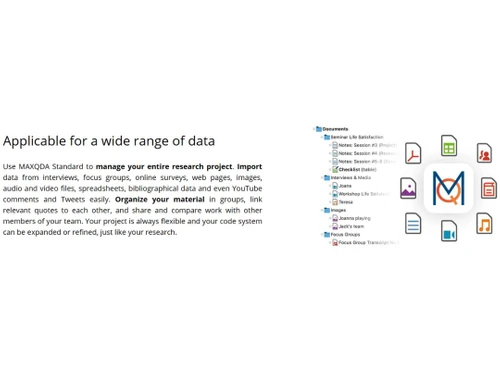
Maxqda Applicable for a wide range of data
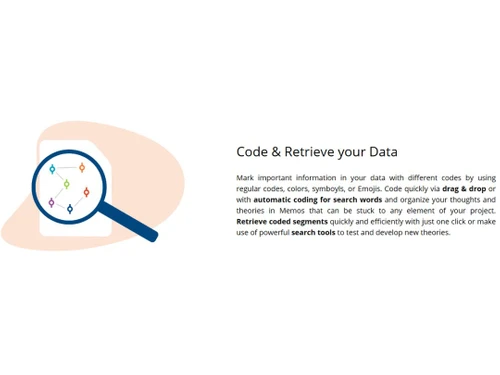
Maxqda coda and retrieve your data

Maxqda

Brand: Maxqda

  • 4.2

  • 6 Ratings

MAXQDA is a tool for qualitative and mixed methods research, enabling users to analyze diverse data types such as text, audio, video, and images.

See More

Have you used Maxqda before?

Share your insights for better experience

Add a Review

Price Available on Request

Questions about pricing or customization? We’re here to help, just a click away.

100% Genuine
Products
Best Price
Guaranteed
Safe & Secure
Payment
  • Description

  • Pricing

  • Features

  • Specification

  • Review

  • Compare

  • Alternatives

  • FAQ

Maxqda Software Overview

What is Maxqda?

MAXQDA is a data visualization tool designed for qualitative and mixed methods data analysis, developed by VERBI Software in Berlin, Germany.

It enables researchers to import, code, and analyze various data types, including text, audio, video, and images, facilitating comprehensive analysis of interviews, focus groups, surveys, and more.

The software offers features such as visualization tools, statistical analysis, and AI-assisted functionalities like MAXQDA Tailwind and AI Assist to enhance research efficiency.

MAXQDA is widely used across academic, scientific, and business institutions for its robust capabilities in handling complex data analysis tasks.

Why Choose Maxqda Data Visualization Software?

  • Developed by Researchers for Researchers: MAXQDA is designed by researchers to meet the specific needs of qualitative and mixed methods research, ensuring practical and effective tools for data analysis.
  • Intuitive and User-Friendly Interface: The software offers a self-explanatory interface with embedded manuals, video tutorials, and PDF guides, making it accessible for both beginners and experienced researchers.
  • AI Assist: Thoughtful AI Integration: MAXQDAs AI Assist acts as a virtual research assistant, helping to summarize texts, suggest subcodes, and interact with your data, all while ensuring data security.
  • Leading Mixed Methods Capabilities: It excels in mixed methods research by providing tools like frequency tables, charts, crosstabs, and the MAXQDA Stats module for comprehensive data analysis.
  • Built-in Transcription Tool: MAXQDA includes an integrated transcription feature that is accurate, affordable, and GDPR-compliant, streamlining the process of converting audio and video into text.
  • Questions-Themes-Theories (QTT) Workspace: The QTT workspace allows researchers to collect, organize, and manage findings related to specific research questions in one place, enhancing analytical clarity.

Benefits of Maxqda Software

  • Regular Updates and Innovation: MAXQDA is continuously improved with updates every 2-3 months, adding new tools and enhancing existing features to keep researchers ahead in their work.
  • Efficient Team Collaboration with TeamCloud: The TeamCloud feature simplifies file management and communication among team members, facilitating efficient collaborative research.
  • Extensive Data Format Support: MAXQDA supports a wide range of data formats, including text, audio, video, images, and spreadsheets, allowing for versatile data analysis within a single platform.
  • Customizable Reporting and Export Options: Researchers can tailor their reports and export data in formats like Excel and Word, facilitating professional presentation of findings.
  • Multilingual Support: MAXQDA supports multiple languages and Unicode, making it suitable for international and cross-cultural research projects.
  • Integration with Statistical Analysis: The MAXQDA Stats module allows for statistical comparisons, including descriptive and inferential statistics, enhancing mixed methods research.
  • Real-Time Collaboration Features: Features like TeamCloud enable real-time collaboration, ensuring that team members can work together efficiently regardless of location.

Maxqda Pricing

Maxqda price details are available on request at techjockey.com.

The pricing model is based on different parameters, including extra features, deployment type, and the total number of users. For further queries related to the product, you can contact our product team and learn more about the pricing and offers.

Read more

Maxqda Company Details

Founded Year:  1989

MAXQDA is a software package for qualitative and mixed methods research.

Director/Founders Udo Kuckartz
Company Size 1-100 Employees

Maxqda Pricing & Plans

Looking for The Right Pricing?

Share your requirements and get a plan built around your business.

  • Define your business needs
  • Get customised pricing
  • Choose features that fit your workflow

Price Available on Request

Get personalised Maxqda pricing that fits your needs. Our team will connect with you.

Maxqda Features

  • icon_check Annotations
    Add comments or notes to specific parts of your data for deeper insights and clarification.
  • icon_check Data Visualizations
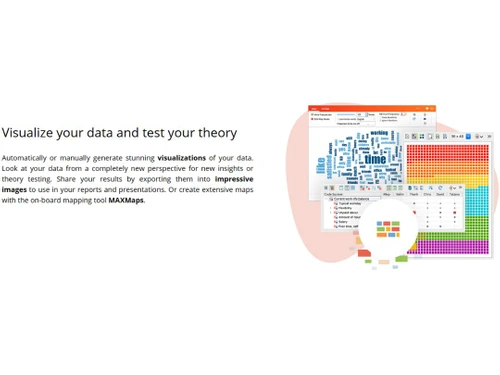
    Create graphs, charts, and maps to understand patterns and trends in your data.
  • icon_check Qualitative Analysis
    Analyze textual, audio, or video data to identify themes, patterns, and insights.
  • icon_check Quantitative Analysis
    Perform numeric analysis on coded segments and variables for measurable results.
  • icon_check Multi Language Support
    Analyze and work with data in various languages seamlessly.
  • icon_check Paraphrasing Score
    Evaluate the degree of rewording in text, useful for content comparison or originality checks.
  • icon_check Import/Export Management
    Easily bring in and send out data from/to multiple file formats and platforms.
  • icon_check Collaboration Tools
    Work with team members in shared projects with version tracking and syncing.
  • icon_check Statistical Research
    Conduct statistical tests and analyses within the software using coded data.
  • icon_check Media Management
    Organize and analyze images, audio, and video files effectively within the project.
Maxqda Demo Video play icon

Get Maxqda Demo

Watch the demo video to explore key features, real workflows, and how the software fits your business needs.

Understand
Key Features
Personal
Demo Insights
Interactive
Demo Support

Maxqda Specifications

Supported Platforms
Windows Windows Android Android MacOS MacOS
Devices
Desktop Desktop Mobile Mobile iPad iPad
Deployment
Perpetual Perpetual
Suitable For
All Industries
Business Specific
All Businesses
Business Size
Small Business Medium Business Enterprises
Customer Support
Live Chat
Language
English
Training Resources
In Person Live Online Webinars Documentation

Explore the Best Alternative Solutions Similar to Your Business Size and Needs

Maxqda Review

4.2

Out of 5

img

Overall Rating

Based on
6 Verified Ratings

Rating Breakdown

  • Features 4.3
  • Value for Money 4
  • Ease of Use 4
  • Customer Support 4.5

91% Recommend this Product

Add Review

Techjockey Trusted Reviews from Verified Users

No reviews are currently available for Maxqda. Discover similar Data Visualization Tools reviews

  • Ortto

    4.0

    Whats great - Ortto offers a wide range of features that are very useful for my marketing campaigns. read more

  • Google Analytics

    4.5

    Whats great - I genuinely find Google Analytics indispensable for its versatile functionalities. It simplifies tasks like conversion tracki... read more

  • Hotjar

    4.4

    Whats great - Great platform to track heat maps on your websites. I like the analysis of the clicks and especially their entire session rec... read more

Compare Maxqda With other Data Visualization Tools

Products
Ratings
Pricing
Device Supported
Deployment
Supported Platforms
  • img

    Maxqda

  • 4.2

  • Price On Request

  • Desktop

    Mobile

  • Web based

    On Premises

  • Windows

    Mac OS

  • img

    Rose AI

  • 4.4

  • Price On Request

  • Desktop

    Mobile

  • Web based

    On Premises

  • Windows

    Mac OS

  • img

    Deckpilot

  • 4.1

  • Price On Request

  • Desktop

    Mobile

  • Web based

    On Premises

  • Windows

    Mac OS

  • img

    Redash

  • 4.1

  • Price On Request

  • Desktop

    Mobile

  • Web based

    On Premises

  • Windows

    Mac OS

  • img

    Flourish

  • 4.7

  • Price On Request

  • Desktop

    Mobile

  • Web based

    On Premises

  • Windows

    Mac OS

  • img

    Apache Superset

  • 4.2

  • Price On Request

  • Desktop

    Mobile

  • Web based

    On Premises

  • Windows

    Mac OS

  • img

    Zing Data

  • 4.2

  • Price On Request

  • Desktop

    Mobile

  • Web based

    On Premises

  • Windows

    Mac OS

  • img

    OAS Visualization

  • 4.6

  • Price On Request

  • Desktop

    Mobile

  • Web based

    On Premises

  • Windows

    Mac OS

  • img

    StockCharts

  • 4.1

  • Price On Request

  • Desktop

    Mobile

  • Web based

    On Premises

  • Windows

    Mac OS

  • img

    ReportDash

  • 4.4

  • Price On Request

  • Desktop

    Mobile

  • Web based

    On Premises

  • Windows

    Mac OS

  • img

    Pietential

  • 4.5

  • ₹ 826

  • Desktop

    Mobile

  • Web based

    On Premises

  • Windows

    Mac OS

(0) Product(s) selected

Maxqda Alternatives

See All Maxqda Alternatives

Starting Price:

$13 /Month

Available

Price on Request

Starting Price:

$12 /Month

Available

Price on Request

Starting Price:

$25 /Month

Available

Price on Request

Available

Price on Request

Articles for Maxqda

See All Related Articles

How much does MAXQDA Software cost?

MAXQDA pricing details are available upon request on techjockey.com.

Is there a mobile app available for MAXQDA Data Visualization Software?

Yes, MAXQDA offers a mobile app called MAXApp for data collection on Android.

Which operating systems are compatible with MAXQDA Software?

MAXQDA is compatible with both Android, Windows and macOS operating systems.

Does MAXQDA Software offer a free trial?

Yes, MAXQDA Data Visualization Tool offers a 14-day free trial of its full version.

How does MAXQDA Software function?

MAXQDA helps users collect, code, analyze, and visualize qualitative and mixed methods data.

Who uses MAXQDA Data Visualization Software?

MAXQDA is used by researchers, academics, students, market analysts, and social scientists.

Is a free demo available for MAXQDA Software?

Yes, you can request a free demo from the MAXQDA website.

Is MAXQDA Data Visualization Tool available for free?

No, MAXQDA is paid software.

What type of data can I analyze with MAXQDA?

You can analyze text, audio, video, images, survey data, PDFs, and web content with MAXQDA.

Does MAXQDA support mixed methods research?

Yes, MAXQDA Data Visualization Tool is fully equipped for mixed methods research, combining qualitative and quantitative analysis.

20,000+ Software Listed

Best Price Guranteed

Free Expert Consultation

2M+ Happy Customers

Terms and Condtions

close

Users with registered businesses can purchase goods from merchants on the platform to satisfy their business needs. Users are not permitted to utilize any products acquired through the platform for resale, advertising, business, or further distribution.

For each purchase made, users will receive a Tax Invoice (or 'GST invoice') that includes specific details such as:

  • the GSTIN of the user associated with their registered business, and

  • the specified Entity Name for their business.

It should be noted that not all products are eligible for GST Invoice. Only the products displayed by participating sellers with the 'GST-based Invoice Available' callout on the product description page would qualify.

Certain goods and services are not eligible to get a GST Invoice, including items with VAS, i.e., Value Added Services (e.g., Total Mobile Protection/Assured Buyback) and those involving an exchange offer at the time of purchase.

Users must ensure the accuracy of the GSTIN, and business entity name provided for the GST Invoice. Requests for corrections into GST Invoice would not be accommodated by Techjockey.com or any Seller, and any issues arising from user-provided information are the sole responsibility of users.

Techjockey.com is not liable for the GST Invoice or any associated input tax credit. To efficiently claim an input tax credit, users should select the registered place of business address as per the GST authority's data and follow the provisions of the GST Act and rules.

To claim an input tax credit, the delivery and billing addresses must match. Furthermore, input tax credits will not be granted if the delivery address and GSTIN on the invoice are from different states. In case of incorrect GST details provided during the order placement, the order will be canceled automatically.