USA
USA UAE
UAESmall Business
Designed for startups and growing businesses


See More





Brand: Google
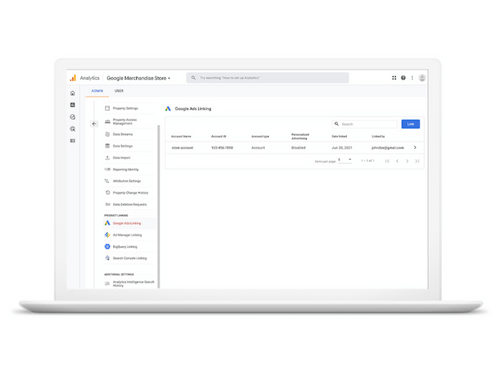
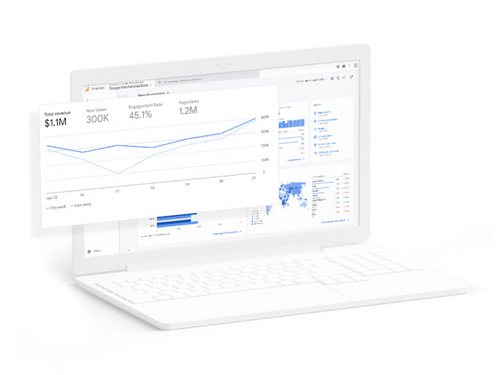
Google Analytics Data Visualization Software offers powerful visualization capabilities, enabling users to gain actionable insights from their website and app data.
See MoreHave you used Google Analytics before?
Share your insights for better experience
Brand: Google
Founded Year: 1998
Google is a multinational corporation that specializes in Internet-related services and products.
Looking for The Right Pricing?
Share your requirements and get a plan built around your business.
Price Available on Request
Get personalised Google Analytics pricing that fits your needs. Our team will connect with you.
 Built-in Automation Proactive Insights Predictive Capabilities Real-Time Reporting Engagement Reports Advertising Snapshot Data-Driven Attribution Free-Form Exploration Segment Overlap Unsampled Explorations

Watch the demo video to explore key features, real workflows, and how the software fits your business needs.
 Ubuntu
  Windows
  Android
  MacOS
MacOS  Linux
Linux  Desktop
  Mobile
  Tablet
  iPad
iPad  Cloud-Based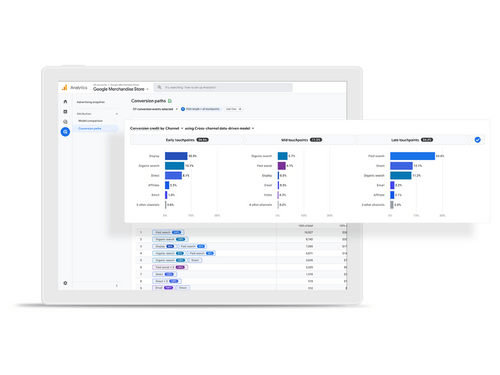
Small Business
Designed for startups and growing businesses
Medium Business
Built for business growth and flexibility
Enterprises
Designed for complex and large-scale business needs
4.5
Out of 5

Overall Rating
Based on
4 Verified Reviews
Rating Breakdown
87% Recommend this Product
Add ReviewCustomers generally appreciate Google Analytics for its robust data analysis capabilities and seamless integration with third-party software, which enhances their ability to track website performance and user behavior. Users find the platform particularly useful for refining marketing strategies and gaining insights into visitor interactions. However, some common complaints include limited historic data storage, challenges in locating specific data like GTIN numbers, and occasional slow performance when accessing detailed reports. Frequent updates and interface changes have also been noted as potential sources of frustration.
Pros
"Integration with third-party software enables comprehensive data analysis and visualization across various domains."
Cons
"Limited historic data storage capacity hampers long-term project analysis."
"One issue we've faced is locating GTIN numbers. Even our suppliers are struggling with this new requirement. This is something that needs attention."

Apr 14, 2024
Techjockey Verified
“Google Analytics Reigns Supreme in Data Analysis and Segmentation”
Pros
I genuinely find Google Analytics indispensable for its versatile functionalities. It simplifies tasks like conversion tracking, creating remarketing lists, real-time traffic monitoring, and funnel visualization. Additionally, its ability to track user behavior and journeys is invaluable. Integration with Google Tag Manager further expands its usefulness.
Cons
While Google has made significant improvements to Analytics over the years, frequent updates and interface changes can sometimes be frustrating for users. Despite this, the overall functionality remains reliable and effective.
Reason to switch
For any digital advertiser, Google Analytics is a must-have tool. I've relied on it since I began working in this industry. Its features, including conversion tracking, user behavior analysis, segmentation, funnel visualization, remarketing, and real-time traffic monitoring, are essential for running successful ad campaigns and driving revenue.
Apr 13, 2024
Techjockey Verified
“Google Analytics: Your Ultimate Digital Ally”
Pros
Setting up Google Analytics on my website was easy. I just had to put a small piece of code on my site, and I started getting data in minutes. It's great because it tells me where my visitors are coming from and how they're interacting with my content. For example, I learned that most of my visitors are coming from social media, which helps me know where to focus my marketing efforts.
Cons
Sometimes, Google Analytics can be a bit slow when I'm trying to look at detailed reports. And there's a ton of information available, which can be overwhelming. I've found myself getting lost in all the data more than once.
Reason to switch
Google Analytics has been really useful for me. It's helped me figure out how to make my website better for users, tweak my marketing strategies, and understand how effective my campaigns are. Overall, it's a valuable tool for improving my online presence.
Apr 14, 2024
Techjockey Verified
“Understanding Our Website Visitors with Google Analytics”
Pros
One great thing about Google Analytics is its clear analysis features. It helps us see exactly how our site is doing and allows us to fine-tune our online presence. With each update, it gets more powerful, giving us even more insights.
Cons
One issue we've faced is locating GTIN numbers. Even our suppliers are struggling with this new requirement. This is something that needs attention.
Reason to switch
Google Analytics has been essential in boosting our online visibility. We believe it's a must-have tool for any business operating online. It's helped us immensely and we couldn't imagine running our business without it.

Google Analytics
Price On Request
Desktop
Mobile
Web based
On Premises
Windows
Mac OS

Zoho Analytics
₹ 1200
Desktop
Mobile
Web based
On Premises
Windows
Mac OS

Meltwater
Price On Request
Desktop
Mobile
Web based
On Premises
Windows
Mac OS

Insigna
₹ 100000
Desktop
Mobile
Web based
On Premises
Windows
Mac OS

Hex
Price On Request
Desktop
Mobile
Web based
On Premises
Windows
Mac OS

Dimensions AI
Price On Request
Desktop
Mobile
Web based
On Premises
Windows
Mac OS

Digantara Stars
Price On Request
Desktop
Mobile
Web based
On Premises
Windows
Mac OS

Dynatron Software
Price On Request
Desktop
Mobile
Web based
On Premises
Windows
Mac OS

Querri
Price On Request
Desktop
Mobile
Web based
On Premises
Windows
Mac OS
Echo Data Analytics
Price On Request
Desktop
Mobile
Web based
On Premises
Windows
Mac OS

WisdomAI
Price On Request
Desktop
Mobile
Web based
On Premises
Windows
Mac OS
(0) Product(s) selected
Starting Price:
$36 /Month
Available
Price on Request
Available
Price on Request
Available
Price on Request
Starting Price:
$20 /Month
Available
Price on Request
Available
Price on Request

Available
Price on Request

Available
Price on Request

Starting Price:
$7 /Month

Starting Price:
₹1,690 /Month
Google Analytics software is compatible with Windows and macOS operating systems.
The Google Analytics app is unavailable on Android and iOS devices.
Google Analytics system supports web-based deployment.
Google Analytics data visualization software pricing is available on request at techjockey.com.
Google Analytics can be used by researchers, students, online stores, web owners, data analysts, and individuals needing robust data visualization software.
The Google Analytics demo is free with techjockey.com.
Google Analytics offers a free trial.
Google Analytics Is a web-based software. So, you need not download any software to use it.
Google Analytics is a powerful tool that helps businesses understand and improve their online performance. It enables tracking and analyzing advertising effectiveness, website traffic, user behaviour, and engagement across various platforms like Flash, video, and social media.
No, creating a new Google Analytics 4 (GA4) property is not necessary when moving your blog from blog.mysite.com to mysite.com/blog. In GA4, the same property can be used for tracking across different parts of your website, including different subdirectories or subdomains.
However, to ensure correct data collection, you should change the current GA4 property settings and tagging setups
0 0
To build your own audience, you should use the Audience Builder in Analytics. Here are the steps:
20 4
The difference can be seen in the structure of the data and how the dimensions and metrics are calculated.
0 2
0 2
To filter out domain traffic data from GA4 go to Property column. Then click on Data Settings and go to Data Filters. Now click Create Filter and choose Internal Traffic. Lastly, enter a name for the data filter.
0 3
20,000+ Software Listed
Best Price Guranteed
Free Expert Consultation
2M+ Happy Customers
Terms and Condtions

Users with registered businesses can purchase goods from merchants on the platform to satisfy their business needs. Users are not permitted to utilize any products acquired through the platform for resale, advertising, business, or further distribution.
For each purchase made, users will receive a Tax Invoice (or 'GST invoice') that includes specific details such as:
the GSTIN of the user associated with their registered business, and
the specified Entity Name for their business.
It should be noted that not all products are eligible for GST Invoice. Only the products displayed by participating sellers with the 'GST-based Invoice Available' callout on the product description page would qualify.
Certain goods and services are not eligible to get a GST Invoice, including items with VAS, i.e., Value Added Services (e.g., Total Mobile Protection/Assured Buyback) and those involving an exchange offer at the time of purchase.
Users must ensure the accuracy of the GSTIN, and business entity name provided for the GST Invoice. Requests for corrections into GST Invoice would not be accommodated by Techjockey.com or any Seller, and any issues arising from user-provided information are the sole responsibility of users.
Techjockey.com is not liable for the GST Invoice or any associated input tax credit. To efficiently claim an input tax credit, users should select the registered place of business address as per the GST authority's data and follow the provisions of the GST Act and rules.
To claim an input tax credit, the delivery and billing addresses must match. Furthermore, input tax credits will not be granted if the delivery address and GSTIN on the invoice are from different states. In case of incorrect GST details provided during the order placement, the order will be canceled automatically.