linkedin
Hex logo
play Intro to Hex
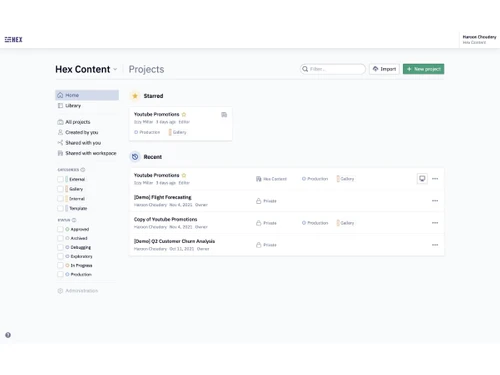
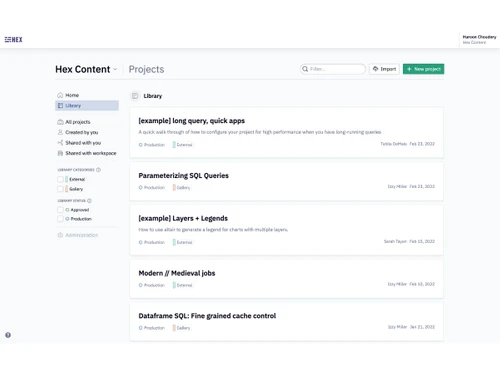
Hex-homepage
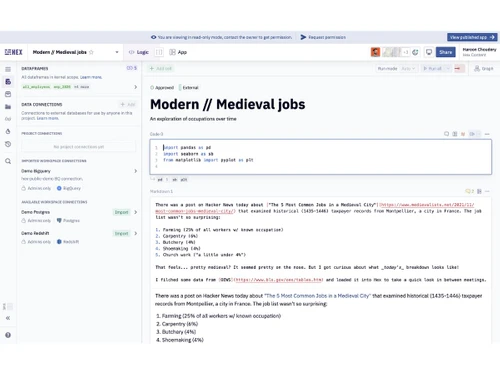
Hex-project page

Hex

Brand: Hex Technologies Inc

  • 4.4

  • 5 Ratings

An AI-powered collaborative data analytics software for exploring, analyzing, and visualizing data.

See More

Have you used Hex before?

Share your insights for better experience

Add a Review
Starting Price
$36

View plans

100% Genuine
Products
Best Price
Guaranteed
Safe & Secure
Payment
  • Description

  • Pricing

  • Features

  • Specification

  • Review

  • FAQ

Starting at $36

Hex Software Overview

What is Hex?

Hex is a modern data analytics software that helps people work with data easily in one place. It allows users to analyze data using SQL, Python, or simple no-code tools, making it useful for both beginners and experts.

Hex provides interactive notebooks where users can write code, explore data, and create charts. It also includes AI features that help generate queries, insights, and visualizations faster. Users can turn their analysis into dashboards and simple data apps.

Hex connects securely with popular data sources like cloud databases. Teams can collaborate in real time and share results easily.

Why Choose Hex Software?

  • AI-Powered Analytics: Uses AI to speed up data analysis and insight generation.
  • All-in-One Platform: Combines notebooks, dashboards, and data apps in one workspace.
  • Supports SQL & Python: Ideal for data analysts, engineers, and scientists.
  • No-Code Options: Enables non-technical users to analyze data easily.
  • Collaborative Workspace: Teams can work together in real time.
  • Interactive Dashboards: Create dynamic, shareable data visualizations.
  • Fast Insights: Reduces time from data to decision.
  • Scalable for Teams: Works well for startups as well as large enterprises.
  • Version Control: Track changes and manage workflows efficiently.
  • Reusable Data Logic: Build once and reuse across analyses and dashboards.
  • Secure Data Access: Enterprise-grade security and permissions.

Benefits of Hex Software

  • Cloud-Based Platform: No local setup or heavy infrastructure required.
  • Easy Sharing: Share insights with stakeholders using links or apps.
  • Automated Workflows: Schedule queries and refresh data automatically.
  • Flexible Data Connections: Connect to warehouses, databases, and APIs.
  • Custom Data Apps: Turn analyses into interactive internal tools.
  • User-Friendly Interface: Clean UI that improves productivity.
  • Modern Analytics Stack: Built for today's data teams and tools.
  • Improves Data Literacy: Makes data accessible across the organization.
  • Faster Business Decisions: Empowers teams with real-time, reliable insights.

Hex Pricing

Hex price starts at USD 36 at techjockey.com. The pricing model is based on different parameters, including extra features, deployment type, and the total number of users. For further queries related to the product, you can contact our product team and learn more about the pricing and offers.

Read more

Hex Technologies Inc Company Details

Founded Year:  2019

Hex Technologies is a unified, AI-powered workspace that integrates SQL, Python, R, and no-code tools for data science and analytics.

Director/Founders Barry McCardel, Caitlin Colgrove, Glen Takahashi
Company Size 1-100 Employees

Hex Pricing & Plans

Professional
Starting at $36
    • Users

      Users
      Users
    • Monthly

      Monthly
      Monthly

Key Features

  • Notebook agent

  • Standard agent credits

  • Unlimited notebooks

  • Up to 5 published apps

  • Medium compute

Team
Starting at $75
    • Users

      Users
      Users
    • Monthly

      Monthly
      Monthly

Key Features

  • Threads agent

  • Semantic model agent

  • Extended agent credits

  • Visual exploration and drill down

  • Scheduled runs and alerts

Hex Features

  • icon_check SQL Editor
    Write, run, and optimize SQL queries directly on cloud data warehouses with instant results and previews.
  • icon_check Python Notebook
    Analyze data using Python with pandas and libraries in interactive notebook cells built for analytics workflows.
  • icon_check No-Code Data Exploration
    Explore datasets using point-and-click controls, filters, and visual tools without writing code.
  • icon_check Dashboards
    Create dynamic dashboards with charts, filters, and drill-downs for real-time business insights.
  • icon_check Data Applications
    Build shareable, interactive data apps that let users input values and explore live analytics results.
  • icon_check AI Query Assistant
    Ask questions in natural language and get auto-generated SQL, Python code, and insights from data.
  • icon_check Real-Time Collaboration
    Work together in shared notebooks with live edits, comments, and multiplayer collaboration support.
  • icon_check Version History
    Track changes, compare versions, and safely roll back notebooks and dashboards when needed.
  • icon_check Data Warehouse Connectivity
    Connect securely to Snowflake, BigQuery, Redshift, Postgres, and other modern data platforms.
  • icon_check Role-Based Access Control (RBAC)
    Manage user permissions with granular access rules to protect sensitive data and analytics assets.
  • icon_check Embedded Analytics and Algorithms
    Embed dashboards and data apps into internal tools or customer-facing applications securely.
  • icon_check Visualization Library
    Choose from charts, tables, and custom visuals to present data clearly and support decision-making.
  • icon_check Git & dbt Integration
    Integrate with Git workflows and dbt models to align analytics with data engineering practices.
  • icon_check Enterprise Security & Compliance
    Supports SOC 2 Type II controls, secure authentication, and governance for enterprise teams.
Hex Demo Video play icon

Get Hex Demo

Watch the demo video to explore key features, real workflows, and how the software fits your business needs.

Understand
Key Features
Personal
Demo Insights
Interactive
Demo Support

Hex Specifications

Supported Platforms
Windows Windows MacOS MacOS
Devices
Desktop Desktop
Deployment
Cloud-Based Cloud-Based
Suitable For
All Industries
Business Specific
All Businesses
Business Size
Individual Small Business Medium Business Enterprises
Customer Support
Email
Language
English
Training Resources
Videos
AI Features
AI Integrated

Hex Review

4.4

Out of 5

img

Overall Rating

Based on
5 Verified Ratings

Rating Breakdown

  • Features 4.7
  • Value for Money 4.5
  • Ease of Use 4.5
  • Customer Support 4.3

80% Recommend this Product

Add Review

Techjockey Trusted Reviews from Verified Users

No reviews are currently available for Hex. Discover similar Data Analytics Software reviews

  • Google Analytics

    4.5

    Whats great - I genuinely find Google Analytics indispensable for its versatile functionalities. It simplifies tasks like conversion tracki... read more

  • Zoho Analytics

    2.8

    Whats great - This is why anonymity is important. It's also why basically every piece of software on their site has stellar feedback. So no... read more

  • Helium 10

    4.5

    Whats great - Powerful suite if you use its full power; many sellers report they got significant business growth after using Helium 10. read more

How much does Hex cost?

Hex pricing starts at USD 36, as listed on techjockey.com.

Is there a mobile app available for Hex Software?

No, Hex does not currently offer a dedicated mobile app.

Which operating systems are compatible with Hex Software?

Hex is cloud-based and works on Windows and MacOS operating systems via a web browser.

Does Hex Software offer a free trial?

Yes, Hex offers a free trial with limited features for getting started.

How does Hex Software function?

Hex enables users to analyze data using SQL, Python, no-code tools, and AI in one collaborative platform.

Who uses Hex Software?

Hex is used by data analysts, data scientists, product teams, and business users.

Is a free demo available for Hex Software?

Yes, users can explore Hex through its free version or by requesting a demo.

Is Hex Software available for free?

Yes, Hex offers a free tier with basic features for individual users.

20,000+ Software Listed

Best Price Guranteed

Free Expert Consultation

2M+ Happy Customers

Terms and Condtions

close

Users with registered businesses can purchase goods from merchants on the platform to satisfy their business needs. Users are not permitted to utilize any products acquired through the platform for resale, advertising, business, or further distribution.

For each purchase made, users will receive a Tax Invoice (or 'GST invoice') that includes specific details such as:

  • the GSTIN of the user associated with their registered business, and

  • the specified Entity Name for their business.

It should be noted that not all products are eligible for GST Invoice. Only the products displayed by participating sellers with the 'GST-based Invoice Available' callout on the product description page would qualify.

Certain goods and services are not eligible to get a GST Invoice, including items with VAS, i.e., Value Added Services (e.g., Total Mobile Protection/Assured Buyback) and those involving an exchange offer at the time of purchase.

Users must ensure the accuracy of the GSTIN, and business entity name provided for the GST Invoice. Requests for corrections into GST Invoice would not be accommodated by Techjockey.com or any Seller, and any issues arising from user-provided information are the sole responsibility of users.

Techjockey.com is not liable for the GST Invoice or any associated input tax credit. To efficiently claim an input tax credit, users should select the registered place of business address as per the GST authority's data and follow the provisions of the GST Act and rules.

To claim an input tax credit, the delivery and billing addresses must match. Furthermore, input tax credits will not be granted if the delivery address and GSTIN on the invoice are from different states. In case of incorrect GST details provided during the order placement, the order will be canceled automatically.