linkedin
Jordensky logo
jordensky-analytics
jordensky-interface
jordensky-expenses

Jordensky

Brand: Jordensky

  • No Ratings & Reviews

A finance management software that provides accounting, tax, and virtual CFO solutions to startups and growing businesses.

See More

Have you used Jordensky before?

Share your insights for better experience

Add a Review
Starting Price
₹10,000 excl.GST
₹ 11,800 incl. GST

View plans

100% Genuine
Products
Best Price
Guaranteed
Safe & Secure
Payment
  • Description

  • Pricing

  • Features

  • Specification

  • Review

  • FAQ

Starting at ₹10,000

Jordensky Software Overview

What is Jordensky?

Jordensky is a modern finance management software designed to help businesses manage their financial tasks in a simple and efficient way. It is especially useful for startups and small businesses that need support with bookkeeping, tax filing, and financial planning.

The platform uses automation to handle tasks like tracking expenses, generating invoices, and creating financial reports, which saves time and reduces manual work.

Jordensky also provides access to finance experts, offering services like virtual CFO support, compliance management, and tax guidance. It helps businesses stay compliant with regulations such as GST and TDS while keeping records accurate and organized.

Being cloud-based, users can access their financial data anytime and from anywhere. With real-time insights, businesses can make better decisions quickly.

Why Choose Jordensky Software?

  • All-in-One Finance Solution: Combines accounting, tax, and CFO services in one platform.
  • Startup-Friendly Platform: Designed especially for startups and small businesses.
  • Automation Features: Reduces manual work with smart automation tools.
  • Accurate Reporting: Provides reliable and error-free financial reports.
  • Real-Time Insights: Helps you track finances and make quick decisions.
  • GST & TDS Compliance: Ensures your business follows Indian tax rules.
  • Penalty Prevention: Helps avoid late fees and tax penalties.
  • Affordable Pricing: Offers cost-effective plans for businesses.
  • Cost Saving: Cheaper than hiring a full-time accountant.
  • Expert Support: Access to professional accountants and CAs.
  • Virtual CFO Services: Get expert financial guidance for growth.
  • Better Cash Flow Management: Helps manage income and expenses efficiently.
  • Organized Records: Keeps all financial data clean and structured.

Benefits of Jordensky Software

  • Cloud-Based Access: Access your data anytime, anywhere.
  • Tool Integration: Works with software like Tally and Zoho Books.
  • Time Saving: Speeds up bookkeeping and finance tasks.
  • Monthly Reports: Provides regular financial statements.
  • Audit Ready: Keeps your business prepared for audits.
  • Dedicated Support: Offers personalized bookkeeping assistance.
  • Scalable Solution: Grows with your business needs.
  • Financial Planning: Helps in budgeting and forecasting.
  • Secure Data Storage: Ensures safety of financial information.
  • Expense Tracking: Monitors income and expenses easily.
  • Investor-Ready Reports: Prepares reports useful for investors.
  • Error Reduction: Minimizes mistakes from manual entries.
  • Wide User Base: Suitable for startups, MSMEs, and enterprises.
  • Business Advisory: Offers strategic financial advice.
  • Easy Compliance: Simplifies legal and tax requirements.
  • Improved Efficiency: Streamlines financial workflows.
  • Focus on Growth: Frees up time to grow your business.

Jordensky Pricing

Jordensky price starts at INR 10,000 at techjockey.com. The pricing model is based on different parameters, including extra features, deployment type, and the total number of users. For further queries related to the product, you can contact our product team and learn more about the pricing and offers.

Read more

Jordensky Company Details

Founded Year:  2018

Jordensky gives you a dedicated CFO and team — for a fraction of what a full-time hire would cost.

Director/Founders Akash Bagrecha, Urvi Gandhi
Company Size 1-100 Employees

Jordensky Pricing & Plans

Basic
Key Features
  • Financial Accounting
  • Banking Integration
  • Invoice Management
  • Expense Tracking
  • Compliance Management
  • Compliance Management

Calculated Price

10000 Exclusive of all taxes
    • Licenses

      Licenses
      Licenses
    • Monthly

      Monthly
      Monthly

Key Features

  • Financial Accounting

  • Banking Integration

  • Invoice Management

  • Expense Tracking

  • Compliance Management

  • Compliance Management

Jordensky Features

  • icon_check Financial Accounting
    Performs monthly bookkeeping with reconciliations and categorized entries to produce accurate financial records and statements.
  • icon_check Banking Integration
    Connects bank accounts to import and track financial transactions, ensuring synchronized and up-to-date financial data.
  • icon_check Invoice Management
    Enables creation, sending and tracking of invoices to manage receivables and streamline billing and collection processes.
  • icon_check Expense Tracking
    Records expenses and supports reimbursement workflows, maintaining accurate expense logs and financial accountability.
  • icon_check Multi-Currency Support
    Handles financial transactions in multiple currencies, supporting businesses operating across international markets.
  • icon_check Compliance Management
    Manages GST, TDS and corporate tax filings while ensuring adherence to regulatory deadlines and compliance requirements.
  • icon_check Financial Statement Generation
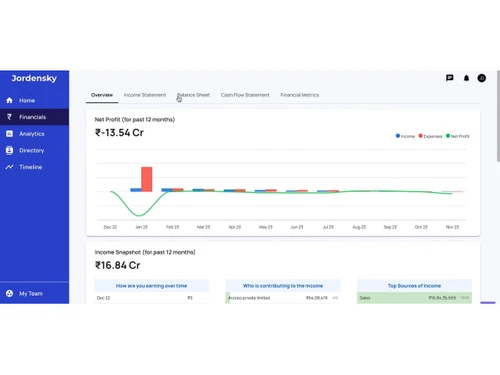
    Generates key financial reports including profit and loss, balance sheet and cash flow statements for analysis.
  • icon_check Real-time Insights
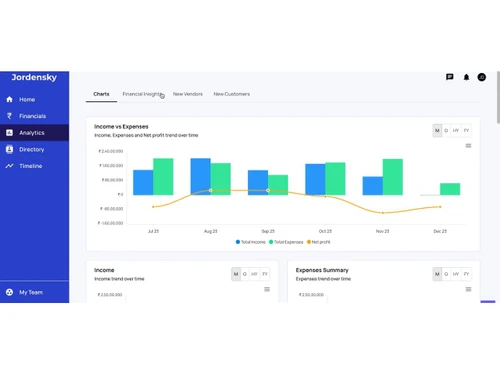
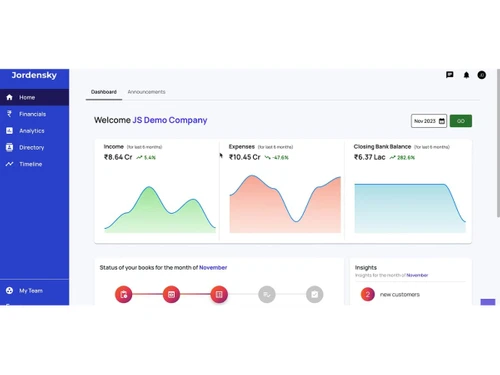
    Provides continuously updated financial data and dashboards for monitoring inflows, outflows and business performance.
  • icon_check MIS Reports
    Delivers MIS reports with structured financial data and insights for stakeholders and internal decision-making processes.
  • icon_check Budgeting And Forecasting
    Supports financial planning through forecasting models, budget tracking and variance analysis for business control.
  • icon_check KPI Monitoring & Analysis
    Tracks financial KPIs and performance indicators to evaluate operational efficiency and support strategic decisions.
  • icon_check Data Migration
    Allows import of financial data from existing systems to ensure seamless transition and continuity of accounting records.
  • icon_check Collaboration
    Supports collaboration between business owners, accountants and advisors within a shared financial management environment.
  • icon_check Financial Planning
    Supports investor readiness with financial forecasts, reports and analysis required for fundraising and capital planning.

Jordensky Specifications

Supported Platforms
Ubuntu Ubuntu Windows Windows MacOS MacOS Linux Linux
Devices
Desktop Desktop
Deployment
Cloud-Based Cloud-Based
Suitable For
All Industries
Business Specific
All Businesses
Business Size
Small Business Startups Medium Business SMBs MSMEs
Customer Support
Email Communities
Language
English
Training Resources
Webinars Videos

Jordensky Review

Techjockey Trusted Reviews from Verified Users

No reviews are currently available for Jordensky. Discover similar Financial Management Software reviews

  • ZestMoney

    4.5

    Whats great - Approval was fast, and it enabled shopping across 75k+ stores. read more

  • Sheshi FR

    4.8

    Whats great - Sheshi FR is a versatile financial reporting tool that can help businesses efficiently prepare critical financial documents e... read more

  • Two Wheeler Finance's Management Software

    4.8

    Whats great - programming window-bike fund the executives programming window-online-diary the executives, marking with one of the recommend... read more

Articles for Jordensky

See All Related Articles

How much does Jordensky cost?

Jordensky pricing starts from INR 10,000, as listed on techjockey.com.

Is there a mobile app available for Jordensky Software?

No, Jordensky mobile app is not available.

Which operating systems are compatible with Jordensky Software?

Jordensky is cloud-based and works on any operating system with a web browser such as Ubuntu, Windows, macOS, and Linux.

Does Jordensky Software offer a free trial?

No, Jordensky does not offer a free trial.

How does Jordensky Software function?

Jordensky combines automation with expert support to manage accounting, taxation, and CFO services efficiently.

Who uses Jordensky Software?

Startups, SMEs, and growing businesses use Jordensky for managing their financial operations.

Is a free demo available for Jordensky Software?

Yes, a free demo is available on request from the provider.

Is Jordensky Software available for free?

No, Jordensky is a paid service, though pricing depends on the selected services.

20,000+ Software Listed

Best Price Guranteed

Free Expert Consultation

2M+ Happy Customers

Terms and Condtions

close

Users with registered businesses can purchase goods from merchants on the platform to satisfy their business needs. Users are not permitted to utilize any products acquired through the platform for resale, advertising, business, or further distribution.

For each purchase made, users will receive a Tax Invoice (or 'GST invoice') that includes specific details such as:

  • the GSTIN of the user associated with their registered business, and

  • the specified Entity Name for their business.

It should be noted that not all products are eligible for GST Invoice. Only the products displayed by participating sellers with the 'GST-based Invoice Available' callout on the product description page would qualify.

Certain goods and services are not eligible to get a GST Invoice, including items with VAS, i.e., Value Added Services (e.g., Total Mobile Protection/Assured Buyback) and those involving an exchange offer at the time of purchase.

Users must ensure the accuracy of the GSTIN, and business entity name provided for the GST Invoice. Requests for corrections into GST Invoice would not be accommodated by Techjockey.com or any Seller, and any issues arising from user-provided information are the sole responsibility of users.

Techjockey.com is not liable for the GST Invoice or any associated input tax credit. To efficiently claim an input tax credit, users should select the registered place of business address as per the GST authority's data and follow the provisions of the GST Act and rules.

To claim an input tax credit, the delivery and billing addresses must match. Furthermore, input tax credits will not be granted if the delivery address and GSTIN on the invoice are from different states. In case of incorrect GST details provided during the order placement, the order will be canceled automatically.