USA
USA UAE
UAESmall Business
Designed for startups and growing businesses


See More




Brand: KDETools Software
The KDETools Zimbra Converter tool is an efficient and advance application that 100% allows you to convert multiple users from Zimbra TGZ to PST in Microsoft Outlook 2021, 2019, 2016, 2013, 2010. Batch Zimbra Migration tool giving you multi-conversion tools capable to migrate Zimbra to Office 365 ac...
See MoreHave you used KDETools Zimbra Converter before?
Share your insights for better experience
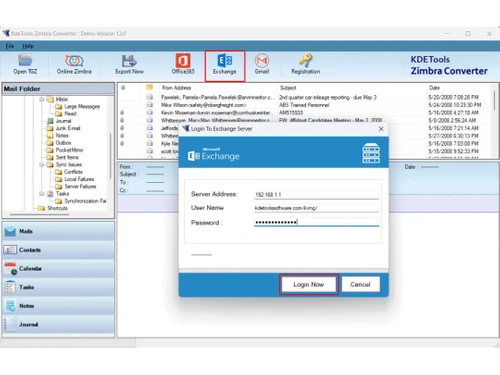
 Batch Zimbra Converter Converts Zimbra TGZ to different Mail Server Migrate Zimbra to Office 365 Convert Zimbra to Exchange Server Migrate Zimbra to Gmail Migrate Zimbra to MBOX Retrieves & Converts Inaccessible Zimbra Files

Watch the demo video to explore key features, real workflows, and how the software fits your business needs.
 Windows
  MacOS
MacOS  Desktop
  Cloud-Based
  Perpetual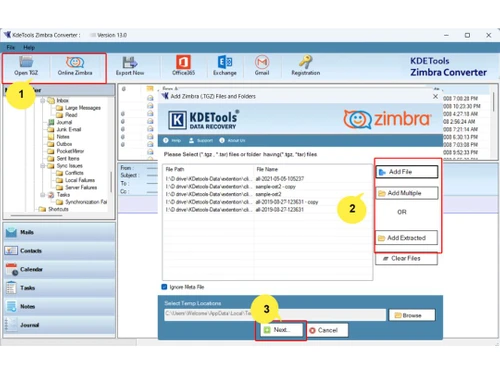
Small Business
Designed for startups and growing businesses
Medium Business
Built for business growth and flexibility
Enterprises
Designed for complex and large-scale business needs
4.2
Out of 5

Overall Rating
Based on
6 Verified Ratings
Rating Breakdown
90% Recommend this Product
Add ReviewTechjockey Trusted Reviews from Verified Users
No reviews are currently available for KDETools Zimbra Converter. Discover similar Data Backup Software reviews

Veeam Data Cloud
Whats great - Veeam's customer service and support are excellent. read more

Elcomsoft EFS Data Recovery
Whats great - elcomsoft-information recuperation Locking your vehicle to shield the road punks from taking it is brilliant. In any case, wh... read more
Lsoft Active Undelete
Whats great - It generally happens that we incidentally erased records on the PC. We use arrange in our office, so it happens ordinarily th... read more

KDETools Zimbra Converter
Price On Request
Desktop
Mobile
Web based
On Premises
Windows
Mac OS

Dr.Fone - Data Recovery
₹ 1899
Desktop
Mobile
Web based
On Premises
Windows
Mac OS

Ideas Plus
Price On Request
Desktop
Mobile
Web based
On Premises
Windows
Mac OS

Iperius Data Backup Software
₹ 3190
Desktop
Mobile
Web based
On Premises
Windows
Mac OS

Apna Backup
₹ 1562
Desktop
Mobile
Web based
On Premises
Windows
Mac OS

Allway Sync
Price On Request
Desktop
Mobile
Web based
On Premises
Windows
Mac OS

Staz
₹ 1000
Desktop
Mobile
Web based
On Premises
Windows
Mac OS

Retrospect Backup
Price On Request
Desktop
Mobile
Web based
On Premises
Windows
Mac OS
Veeam Data Cloud
Price On Request
Desktop
Mobile
Web based
On Premises
Windows
Mac OS

iTransor for iOS
₹ 3289
Desktop
Mobile
Web based
On Premises
Windows
Mac OS
Quest NetVault Backup
Price On Request
Desktop
Mobile
Web based
On Premises
Windows
Mac OS
(0) Product(s) selected
Starting Price:
₹1,562 /Month ₹2,003
Available
Price on Request
Starting Price:
$20
Starting Price:
₹3,289 /Quantity ₹4,936
Available
Price on Request

Available
Price on Request
Starting Price:
$149 /Year

Starting Price:
$579 Yearly/

Available
Price on Request

Starting Price:
$499

Available
Price on Request
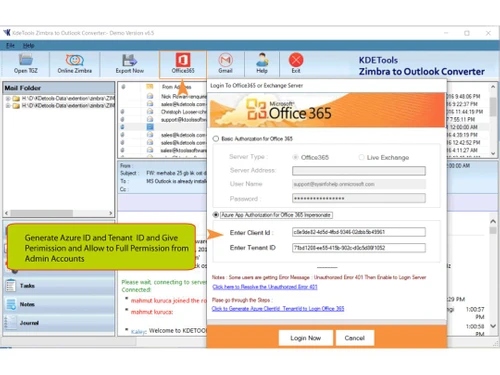
Yes, KDETools Zimbra Zimbra Converter allow to directly Convert Zimbra Mailboxes into Office 365 account by access global admin account with mapping option.
Yes, KDETools Zimbra Converter Converts Zimbra TGZ to PST format now also supports Microsoft Outlook 2021, 2019, 2016, 2013, 2010, 2007, and former editions.
20,000+ Software Listed
Best Price Guranteed
Free Expert Consultation
2M+ Happy Customers
Terms and Condtions

Users with registered businesses can purchase goods from merchants on the platform to satisfy their business needs. Users are not permitted to utilize any products acquired through the platform for resale, advertising, business, or further distribution.
For each purchase made, users will receive a Tax Invoice (or 'GST invoice') that includes specific details such as:
the GSTIN of the user associated with their registered business, and
the specified Entity Name for their business.
It should be noted that not all products are eligible for GST Invoice. Only the products displayed by participating sellers with the 'GST-based Invoice Available' callout on the product description page would qualify.
Certain goods and services are not eligible to get a GST Invoice, including items with VAS, i.e., Value Added Services (e.g., Total Mobile Protection/Assured Buyback) and those involving an exchange offer at the time of purchase.
Users must ensure the accuracy of the GSTIN, and business entity name provided for the GST Invoice. Requests for corrections into GST Invoice would not be accommodated by Techjockey.com or any Seller, and any issues arising from user-provided information are the sole responsibility of users.
Techjockey.com is not liable for the GST Invoice or any associated input tax credit. To efficiently claim an input tax credit, users should select the registered place of business address as per the GST authority's data and follow the provisions of the GST Act and rules.
To claim an input tax credit, the delivery and billing addresses must match. Furthermore, input tax credits will not be granted if the delivery address and GSTIN on the invoice are from different states. In case of incorrect GST details provided during the order placement, the order will be canceled automatically.