linkedin
KidLogger logo
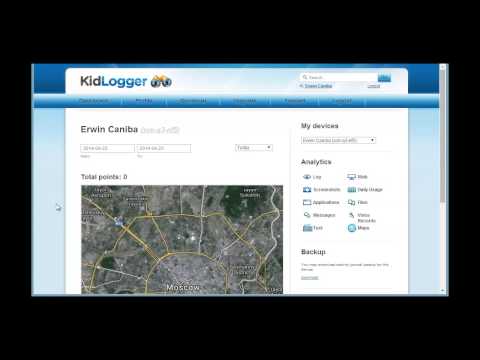
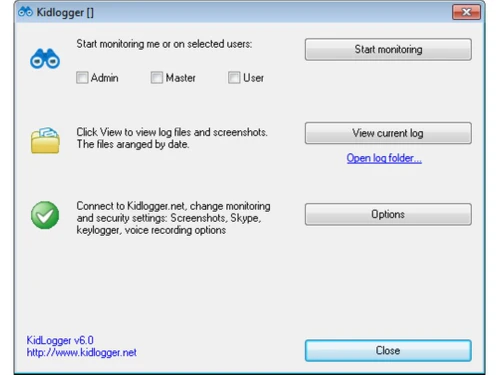
kidlogger usercontrol
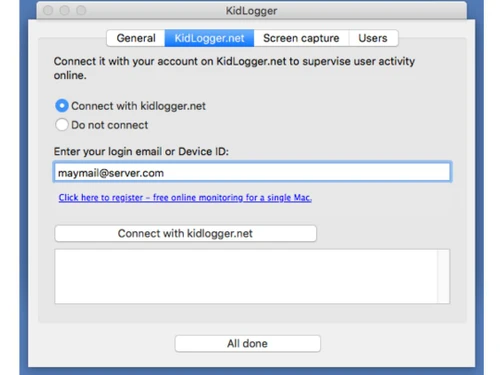
kidlogger connect
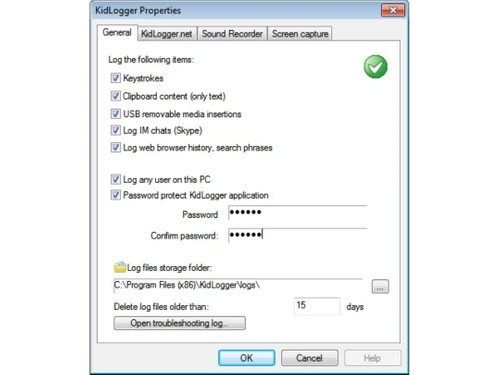
kidlogger properties

KidLogger

Brand: SafeJKA

  • 4.2

  • 6 Ratings & 1 Review

KidLogger is designed to monitor and track children's online activities, including website visits, application usage, and keystrokes, providing parents with insights into their children's digital behavior.

See More

Have you used KidLogger before?

Share your insights for better experience

Add a Review
Starting Price
$9

View plans

100% Genuine
Products
Best Price
Guaranteed
Safe & Secure
Payment
  • Description

  • Pricing

  • Features

  • Specification

  • Review

  • Compare

  • Alternatives

  • FAQ

Starting at $9

KidLogger Software Overview

What is KidLogger?

KidLogger is a parental control software that allows parents to monitor and track their children's online activities across various devices. With features such as website tracking, application monitoring, and keystroke logging, KidLogger provides detailed insights into children's digital behavior. It enables parents to set usage limits, block inappropriate content, and receive real-time alerts about concerning activities.

It operates discreetly in the background, ensuring that children remain unaware of the monitoring. The software supports multiple platforms, including Windows, macOS, Android, and iOS, allowing parents to effectively manage their children's digital safety. KidLogger is a valuable tool for parents seeking to ensure their children's responsible and safe internet usage.

Why Choose KidLogger Software?

  • Monitoring: It comprehensively monitors children's online activities, including website visits, application usage, and keystrokes, providing parents with a complete view of their digital behavior.
  • Real-time Alerts: It provides real-time alerts to parents about concerning activities, such as accessing inappropriate websites or interacting with strangers online, allowing for immediate intervention and guidance.
  • Usage Limits and Controls: It enables parents to set usage limits and controls, such as screen time restrictions and application blocking, promoting healthy digital habits and balance.
  • Cross-Platform Compatibility: With support for multiple platforms, including Windows, macOS, Android, and iOS, parents can monitor their children's activities across various devices, offering flexibility and convenience.
  • User-friendly Interface: It features a user-friendly interface that is easy for parents to navigate, configure, and understand, simplifying the monitoring process.
  • Data Privacy and Security: It prioritizes data privacy and security, ensuring that sensitive information about children's activities is protected and only accessible to authorized users.
  • Peace of Mind: By providing insights into children's digital behavior and facilitating proactive parental intervention, It offers parents peace of mind knowing that they can help guide their children's online experiences responsibly and safely.

Benefits of KidLogger Platform

  • Remote Monitoring: It allows parents to remotely monitor their children's online activities from anywhere with internet access, providing flexibility and convenience.
  • Customizable Reports: It offers customizable reports that parents can tailor to their preferences, allowing them to focus on specific aspects of their children's digital behavior.
  • Parental Insights: It provides valuable insights into children's online habits and trends, empowering parents to have informed conversations and make educated decisions about their digital upbringing.
  • Preventative Measures: Its real-time alerts and monitoring capabilities enable parents to implement preventative measures to protect their children from online dangers before they escalate.
  • Educational Opportunities: By understanding their children's digital behavior, parents can identify areas for improvement and opportunities for educational intervention, promoting responsible and safe internet usage.

Pricing of KidLogger Parental Control Software

KidLogger price in India starts at $29 at techjockey.com.

The pricing model is based on different parameters, including extra features, deployment type, and the total number of users. For further queries related to the product, you can contact our product team and learn more about the pricing and offers.

Read more

KidLogger Pricing & Plans

Standard
Starting at $9
    • Licenses

      Licenses
      Licenses
    • Monthly

      Monthly
      Monthly

Key Features

  • Monitor 5 devices

  • Keeps log history during 60 days

  • Disk space 400 MB

  • Access to analytics: Apps, Chats/SMS, Calls, Locat

  • Scheduled e-mail reports(1 per day/device);

  • Backup download;

  • Dedicated technical support

  • Screenshots

  • Multiple users monitoring support;

  • Blocked applications;

Professional
Starting at $29
    • Licenses

      Licenses
      Licenses
    • Monthly

      Monthly
      Monthly

Key Features

  • All standard features plus

  • Scheduled e-mail reports(5 per day/device);

  • Listening to phone calls, VoIP calls;

  • Screenshots;

  • View photos taken by camera;

  • "Call-back" by SMS-request;

  • Blocking websites

  • Typed text (use the agent for PRO account)

  • Surround sound recording (use the agent for PRO ac

  • Cam shots.

KidLogger Features

  • icon_check Web History Monitoring
    Tracks and logs children's website visits, providing insight into their online browsing.
  • icon_check Time Tracking
    Monitors children's activity duration to help manage screen time effectively.
  • icon_check USB drives, CD\DVD usage
    Records external file transfers and device connections for parental monitoring.
  • icon_check Record Keystrokes
    Captures and logs children's typed keystrokes to review their digital communication.
  • icon_check Captures Computer Screen
    Takes screenshots periodically to visually document children's online activities.
  • icon_check Used Files & Folders
    Monitors accessed files and folders, offering visibility into digital file management.
  • icon_check Monitor Messengers
    Tracks messaging app usage and logs conversations for parental awareness.
  • icon_check E-mail reports
    Sends summarized email reports to parents detailing children's online activity.
  • icon_check Blocked Application
    Allows parents to restrict access to specific apps or programs on the computer.
  • icon_check Multiple Users Monitoring
    Supports monitoring multiple users on a single device, facilitating oversight of all household children.

KidLogger Specifications

Supported Platforms
Windows Windows Android Android MacOS MacOS Linux Linux
Devices
Desktop Desktop Mobile Mobile Tablet Tablet
Deployment
Cloud-Based Cloud-Based Perpetual Perpetual
Suitable For
All Industries
Business Specific
All Businesses
Business Size
Small Business Startups Medium Business Enterprises
Customer Support
Phone Email Communities
Language
беларускі English français Español

Explore the Best Alternative Solutions Similar to Your Business Size and Needs

KidLogger Review

4.2

Out of 5

img

Overall Rating

Based on
1 Verified Review

Rating Breakdown

  • Features 4.1
  • Value for Money 4.1
  • Ease of Use 4.1
  • Customer Support 4.4

81% Recommend this Product

Add Review

KidLogger Video Review

youtubeVideoId

4.3

“KidLogger Review: What's Inside?”

Review by: Place Pop

Compare KidLogger With other Parental Control Software

Products
Ratings
Pricing
Device Supported
Deployment
Supported Platforms
  • img

    KidLogger

  • 4.2

  • Price On Request

  • Desktop

    Mobile

  • Web based

    On Premises

  • Windows

    Mac OS

  • img

    Qustodio

  • 4.1

  • Price On Request

  • Desktop

    Mobile

  • Web based

    On Premises

  • Windows

    Mac OS

  • img

    Norton Family

  • 4.3

  • ₹ 1749

  • Desktop

    Mobile

  • Web based

    On Premises

  • Windows

    Mac OS

  • img

    FlashGet Kids

  • 3.9

  • Price On Request

  • Desktop

    Mobile

  • Web based

    On Premises

  • Windows

    Mac OS

  • img

    Family Link

  • 4.5

  • Price On Request

  • Desktop

    Mobile

  • Web based

    On Premises

  • Windows

    Mac OS

  • img

    FamiSafe

  • 4.2

  • Price On Request

  • Desktop

    Mobile

  • Web based

    On Premises

  • Windows

    Mac OS

  • img

    FamilyTime

  • 4.3

  • Price On Request

  • Desktop

    Mobile

  • Web based

    On Premises

  • Windows

    Mac OS

  • img

    Net Nanny

  • 4.1

  • Price On Request

  • Desktop

    Mobile

  • Web based

    On Premises

  • Windows

    Mac OS

  • img

    Refog

  • 4.2

  • Price On Request

  • Desktop

    Mobile

  • Web based

    On Premises

  • Windows

    Mac OS

(0) Product(s) selected

KidLogger Alternatives

See All KidLogger Alternatives

Starting Price:

$40 /Year

Starting Price:

$30 /Month

Which operating system does KidLogger Software Support?

KidLogger Software is compatible with Ubuntu, Windows, Linux, and MacOS.

Is there any KidLogger Software App?

KidLogger Software app is available for Android users.

What is the deployment type of KidLogger Software?

KidLogger Software supports web-based deployment.

How much does KidLogger Software Cost?

KidLogger price in India starts at $29 at techjockey.com.

Who are the potential users of KidLogger Software?

KidLogger Software is typically used by all industries to monitor and track their children's online activities across various devices.

Is there any free demo for KidLogger Software?

Yes, a demo of KidLogger is available at techjockey.com.

Is KidLogger Software Free?

KidLogger Software is not available for free. You can contact our product experts to learn more about pricing plans.

Does KidLogger offer a free trial?

Yes, KidLogger Software offers a free trial.

How can you download KidLogger Software?

KidLogger Software installation is not required, as it is web-based. Just open the Setup Wizard to get started.

How does KidLogger Software Work?

KidLogger Software monitors children's online activities, capturing web history, keystrokes, screenshots, and other data to give parents insights into their digital behavior.

20,000+ Software Listed

Best Price Guranteed

Free Expert Consultation

2M+ Happy Customers

Terms and Condtions

close

Users with registered businesses can purchase goods from merchants on the platform to satisfy their business needs. Users are not permitted to utilize any products acquired through the platform for resale, advertising, business, or further distribution.

For each purchase made, users will receive a Tax Invoice (or 'GST invoice') that includes specific details such as:

  • the GSTIN of the user associated with their registered business, and

  • the specified Entity Name for their business.

It should be noted that not all products are eligible for GST Invoice. Only the products displayed by participating sellers with the 'GST-based Invoice Available' callout on the product description page would qualify.

Certain goods and services are not eligible to get a GST Invoice, including items with VAS, i.e., Value Added Services (e.g., Total Mobile Protection/Assured Buyback) and those involving an exchange offer at the time of purchase.

Users must ensure the accuracy of the GSTIN, and business entity name provided for the GST Invoice. Requests for corrections into GST Invoice would not be accommodated by Techjockey.com or any Seller, and any issues arising from user-provided information are the sole responsibility of users.

Techjockey.com is not liable for the GST Invoice or any associated input tax credit. To efficiently claim an input tax credit, users should select the registered place of business address as per the GST authority's data and follow the provisions of the GST Act and rules.

To claim an input tax credit, the delivery and billing addresses must match. Furthermore, input tax credits will not be granted if the delivery address and GSTIN on the invoice are from different states. In case of incorrect GST details provided during the order placement, the order will be canceled automatically.